
1. Pengenalan
Terima kasih kerana membeliasing the Soundsation MIOMIX 404FXM 6-Channel Mixer. This versatile mixer is designed for a wide range of audio applications, including home recording, live performances, and podcasting. It combines professional audio quality with portability, featuring low-noise preamplifiers, digital effects, a USB media player/recorder, and Bluetooth connectivity. This manual provides essential information for safe operation, setup, and optimal use of your MIOMIX 404FXM mixer.
2. Arahan Keselamatan
AMARAN: Untuk mengurangkan risiko kebakaran atau kejutan elektrik, jangan dedahkan peralatan ini kepada hujan atau lembapan.
- Baca arahan ini dengan teliti sebelum mengendalikan unit.
- Simpan manual ini untuk rujukan masa hadapan.
- Patuhi semua amaran dan ikut semua arahan.
- Jangan gunakan alat ini berhampiran air.
- Bersihkan hanya dengan kain kering.
- Jangan sekat sebarang bukaan pengudaraan. Pasang mengikut arahan pengilang.
- Jangan pasang berhampiran mana-mana sumber haba seperti radiator, daftar haba, dapur, atau radas lain (termasuk amppenghidup) yang menghasilkan haba.
- Jangan kalahkan tujuan keselamatan plag terkutub atau jenis pembumian. Palam terkutub mempunyai dua bilah dengan satu lebih lebar daripada yang lain. Palam jenis pembumian mempunyai dua bilah dan serampang pembumian ketiga. Bilah lebar atau serampang ketiga disediakan untuk keselamatan anda. Jika palam yang disediakan tidak sesuai dengan alur keluar anda, rujuk juruelektrik untuk menggantikan alur keluar usang.
- Lindungi kord kuasa daripada berjalan atau tersepit, terutamanya pada palam, bekas kemudahan dan tempat keluar dari radas.
- Hanya gunakan lampiran/aksesori yang ditentukan oleh pengilang.
- Cabut plag radas ini semasa ribut petir atau apabila tidak digunakan untuk jangka masa yang lama.
- Rujuk semua servis kepada kakitangan perkhidmatan yang berkelayakan. Servis diperlukan apabila radas telah rosak dalam apa jua cara, seperti kord bekalan kuasa atau palam rosak, cecair telah tertumpah atau objek jatuh ke dalam radas, radas telah terdedah kepada hujan atau lembapan, tidak beroperasi seperti biasa. , atau telah digugurkan.
3. Kandungan Pakej
Sila pastikan semua item yang disenaraikan di bawah disertakan dalam pakej:
- Soundsation MIOMIX 404FXM Mixer
- Penyesuai Kuasa
- Manual Pengguna
4. Ciri-ciri Produk
- 6-channel mixer with digital multi-effect processor.
- Integrated USB player/recorder supporting WAV, MP3, WMA, and FLAC formats.
- Wireless Bluetooth audio streaming.
- 4 Mic/Line channels with low-noise preamps and Combo connectors.
- Selectable Hi-Z inputs for guitars and other high-impedance instruments.
- Kuasa Hantu +48V untuk mikrofon kondenser.
- Peak indicators on input channels.
- 1 stereo line channel with 6.3mm jacks and +4/-10 dB pad adapter.
- 2-band EQ on channels 1-4.
- 24-bit/48 kHz digital effects processor with 16 presets (Reverb, Delay, Echo, Chorus, etc.) and TAP-Tempo function.
- USB player level control.
- Output fon kepala dengan kawalan tahap.
- XLR main outputs with volume control.
- Stereo VU Meter with 2 x 6 LED bars.
5. Kawalan dan Fungsi
5.1 Panel Hadapan Atasview

Image: Front panel of the Soundsation MIOMIX 404FXM mixer, showing all input channels, EQ controls, effect section, USB/Bluetooth media player, and main output controls.
Input Channels (MIC/INST 1-4)
- MIC/INST Input (Combo Jack): Connect XLR microphones or 1/4" instrument/line cables.
- +48V Kuasa Hantu: Activates phantom power for condenser microphones. Use with caution.
- Hi-Z Switch: Engages high impedance input for direct connection of guitars or basses.
- Tombol GAIN: Laraskan sensitiviti input untuk mikrofon atau instrumen yang disambungkan.
- Tombol TINGGI: Adjusts the high-frequency equalization (treble).
- Tombol RENDAH: Adjusts the low-frequency equalization (bass).
- Tombol FX: Controls the amount of signal sent to the internal digital effects processor.
- Tombol PAN: Melaraskan kedudukan stereo (kiri/kanan) saluran.
- Tombol VOL: Adjusts the output volume of the individual channel.
- PK (Peak) LED: Bercahaya apabila isyarat input terlalu tinggi, menunjukkan kemungkinan pemotongan.
Stereo Line Input (CH 5-6)
- L/Mono, R Inputs (1/4" Jacks): Connect stereo line-level devices (keyboards, CD players, DJ consoles, etc.). The L/Mono input can be used alone for a mono signal.
- +4/-10dB Switch: Adjusts input sensitivity for different line-level devices.
- Tombol PAN: Melaraskan kedudukan stereo saluran.
- Tombol VOL: Adjusts the output volume of the stereo channel.
- PK (Peak) LED: Illuminates when the input signal is too high.
USB & Bluetooth Media Player
- Port USB: Connect a USB drive for playing audio files or recording.
- Skrin Paparan: Menunjukkan mod semasa, maklumat trek dan tetapan.
- Up/Rewind Button: Navigates up in menus or rewinds current track.
- Down/Forward Button: Navigates down in menus or fast-forwards current track.
- Play/Pause/Enter Button: Plays/pauses audio or confirms menu selections.
- Butang MENU: Accesses media player menu options (BT streaming, music player, audio recorder, selection).
- MP3 PLAYER LVL Knob: Controls the output level of the USB/Bluetooth media player.
Digital Effects Processor (24-bit/48 kHz)
- Paparan Kesan: Shows the selected effect number and parameter values.
- Tombol PROGRAM: Rotates to select one of the 16 built-in digital effects. Press to confirm selection.
- TAP TEMPO Butang: Tap multiple times to set the tempo for time-based effects (e.g., Delay).
- Tombol TAHAP: Adjusts the overall wet/dry mix of the effects.
Output & Monitoring Section
- PHONES Jack (1/4"): Sambungkan fon kepala untuk pemantauan.
- PHONES LVL Knob: Melaraskan kelantangan output fon kepala.
- MAIN OUT L/R (XLR): Balanced XLR outputs for connecting to powered speakers, amppenghidup, atau peranti rakaman.
- Tombol KELUAR UTAMA: Mengawal jumlah output keseluruhan campuran utama.
- VU Meter (LED): Displays the stereo output level of the main mix.
5.2 Panel Belakangview
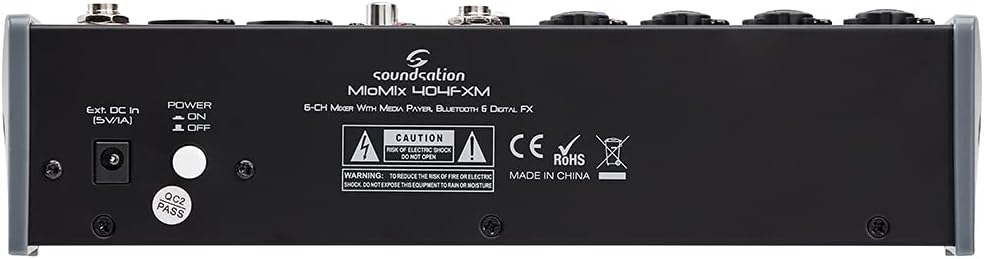
Image: Rear panel of the Soundsation MIOMIX 404FXM mixer, showing the power input, power switch, and main output connections.
- Ext. DC In (5V/1A): Power input for connecting the provided external power adapter.
- Suis HIDUP/MATI KUASA: Turns the mixer's power on or off.
- REC OUT L/R (RCA): Unbalanced RCA outputs for connecting to recording devices.
6. Persediaan
- Buka Pembungkusan Pengadun: Carefully remove the MIOMIX 404FXM from its packaging.
- penempatan: Place the mixer on a stable, flat surface, ensuring adequate ventilation around the unit.
- Sambungan Kuasa: Ensure the mixer's POWER switch is in the OFF position. Connect the provided power adapter to the "Ext. DC In (5V/1A)" port on the rear panel, then plug the adapter into a suitable power outlet.
- Kuasa Awal Hidup: Flip the POWER switch to the ON position. The mixer's indicators should light up, and the display should activate.
- Sambungkan Output: Connect the MAIN OUT XLR outputs to your powered speakers, amplifier, or audio interface. Connect headphones to the PHONES jack for monitoring.
- Sambungkan Input: Connect your microphones, instruments, and line-level devices to the appropriate input channels.
7. Arahan Operasi
7.1 Menyambungkan Sumber Audio
- Mikrofon: Connect dynamic microphones via XLR cables to the MIC/INST Combo jacks. For condenser microphones, connect via XLR and activate the +48V Phantom Power switch for the respective channel.
- Instruments (Guitars/Basses): Connect directly using a 1/4" TS cable to the MIC/INST Combo jack and engage the Hi-Z switch for that channel.
- Line-Level Devices (Keyboards, CD Players): Connect using 1/4" TS cables to the MIC/INST Combo jacks (for mono) or to the CH 5-6 L/Mono and R inputs (for stereo). Adjust the +4/-10dB switch on CH 5-6 as needed.
7.2 Adjusting Channel Levels and EQ
- Set all GAIN, VOL, and MAIN OUT knobs to their minimum positions before starting.
- Speak into the microphone or play your instrument. Slowly increase the GAIN knob for the respective channel until the PK LED flashes only occasionally during the loudest parts.
- Adjust the HIGH and LOW EQ knobs to shape the tone of your sound.
- Use the PAN knob to position the sound in the stereo field.
- Slowly increase the channel's VOL knob to blend it into the overall mix.
7.3 Using the USB Media Player/Recorder
- Main balik: Insert a USB drive containing WAV, MP3, WMA, or FLAC files into the USB port. The display will show the file list. Use the Up/Down buttons to navigate and Play/Pause/Enter to select and play. Adjust the MP3 PLAYER LVL knob to control its volume in the mix.
- Rakaman: In the media player menu (accessed via MENU button), select the 'Audio Recorder' function. Ensure your USB drive has enough free space. Press Play/Pause/Enter to start and stop recording. The mixer records the main stereo mix.
7.4 Kesambungan Bluetooth
- Press the MENU button on the media player and select 'BT Streaming'. The display will show 'Bluetooth' and indicate it's searching.
- On your smartphone or Bluetooth device, search for available devices and select 'MIOMIX 404FXM'.
- Once paired, you can stream audio from your device to the mixer. Control the volume using your device and the MP3 PLAYER LVL knob on the mixer.
7.5 Applying Digital Effects
- Turn the FX knob on the desired input channel to send signal to the effects processor.
- Rotate the PROGRAM knob to browse through the 16 available effects. Press the PROGRAM knob to select an effect.
- Adjust the LEVEL knob in the FX section to control the overall amount of effect applied to the mix.
- For time-based effects, use the TAP TEMPO button to synchronize the effect to your music.
7.6 Monitoring and Main Output
- Fon kepala: Connect headphones to the PHONES jack and adjust the PHONES LVL knob for comfortable monitoring.
- Keluaran Utama: Slowly increase the MAIN OUT knob to send the mixed audio to your connected speakers or amplifier. Monitor the VU Meter to ensure levels are not clipping (avoiding red LEDs).
8. Penyelenggaraan
- Pembersihan: Gunakan kain lembut dan kering untuk membersihkan permukaan pengadun. Jangan gunakan pembersih cecair atau pelarut.
- Storan: Apabila tidak digunakan untuk tempoh yang lama, simpan pengadun di tempat yang sejuk dan kering, jauh daripada cahaya matahari langsung dan suhu yang melampau.
- Pengudaraan: Pastikan bukaan pengudaraan tidak disekat untuk mengelakkan terlalu panas.
9. Penyelesaian masalah
- Tiada Keluaran Bunyi:
- Periksa semua sambungan kuasa dan pastikan pengadun dihidupkan.
- Verify that all channel VOL knobs, MAIN OUT knob, and PHONES LVL knob are turned up.
- Ensure your speakers/amplifier are powered on and connected correctly.
- Check input source connections and ensure GAIN knobs are set appropriately.
- Bunyi Herot:
- Kecilkan tombol GAIN untuk saluran input.
- Check if the PK LED is constantly lit; if so, reduce the input level.
- Lower the MAIN OUT volume if the VU Meter is consistently in the red.
- Kuasa Hantu Tidak Berfungsi:
- Ensure the +48V switch is engaged for the specific channel.
- Verify that you are using an XLR cable, as phantom power is only supplied via XLR.
- Bluetooth Tidak Bersambung:
- Ensure the mixer's media player is in 'BT Streaming' mode.
- Make sure your device's Bluetooth is enabled and it's searching for devices.
- Cuba nyahgandingkan dan pasangkan semula peranti.
- Isu Main Semula/Rakaman USB:
- Ensure the USB drive is formatted correctly (FAT32 is generally recommended).
- Periksa audio files are in a supported format (WAV, MP3, WMA, FLAC).
- For recording, ensure the USB drive has sufficient free space.
10. Spesifikasi
| Ciri | Spesifikasi |
|---|---|
| Pengeluar | Bunyi |
| Nombor Model | E923E |
| Bilangan Saluran | 6 |
| Berat Barang | 1900 Gram |
| Teknologi Ketersambungan | USB, Bluetooth |
| Sumber Kuasa | Kabel Elektrik |
| Jenis Penyambung Output | XLR |
| Input Audio | XLR, 1/4" Jack |
| Voltage | 48 Volt (Kuasa Hantu) |
| Kesan Digital | 16 Presets, 24-bit/48 kHz |
| Supported USB Audio Formats | WAV, MP3, WMA, FLAC |
11. Waranti dan Sokongan
Soundsation products are designed and manufactured to the highest quality standards. For information regarding warranty coverage, service, or technical support, please refer to the warranty card included with your product or visit the official Soundsation webtapak. Simpan resit pembelian anda sebagai bukti pembelian untuk sebarang tuntutan waranti.