
1. Pengenalan
This manual provides detailed instructions for the installation, operation, and maintenance of your Alptop AT-200DW Outdoor PTZ WiFi IP Security Camera. This 1080P HD camera offers pan/tilt functionality, two-way audio, motion detection, and color night vision, designed to enhance your home surveillance.

Figure 1: Alptop AT-200DW Outdoor PTZ WiFi IP Security Camera.
Ciri-ciri Utama:
- Full 1080P HD Video Resolution (1920x1080P)
- Pan/Tilt Functionality: 320° horizontal, 90° vertical rotation
- Intelligent Full-color Night Vision (up to 100FT) and IR Night Vision (up to 150FT)
- Motion Detection Alerts with push notifications, email, or FTP upload
- Clear Two-Way Audio with built-in microphone and speaker
- Reliable 2.4G WiFi Connection (5Ghz not supported)
- Reka Bentuk Kalis Cuaca IP66
- Supports max 128GB Micro SD Card for local storage
- Pelbagai platform viewing via CamHi/CamHiPro App (iOS/Android) and PC Software (Windows/Mac)
2. Panduan Persediaan
2.1 Kandungan Pakej
Sebelum pemasangan, sila pastikan semua komponen ada:
- Alptop AT-200DW Camera Unit
- Penyesuai Kuasa (12V 2A)
- Skru Pemasangan dan Palam Dinding
- Manual Pengguna (dokumen ini)
2.2 Pemasangan Fizikal
The camera supports multiple installation options including vertical, wall, and ceiling mount. Choose a location that provides optimal viewing coverage and stable Wi-Fi signal.
- Tandakan titik penggerudian menggunakan pendakap pelekap sebagai templat.
- Drill holes and insert wall plugs if mounting on masonry.
- Secure the mounting bracket to the desired surface using the provided screws.
- Attach the camera unit to the mounted bracket.
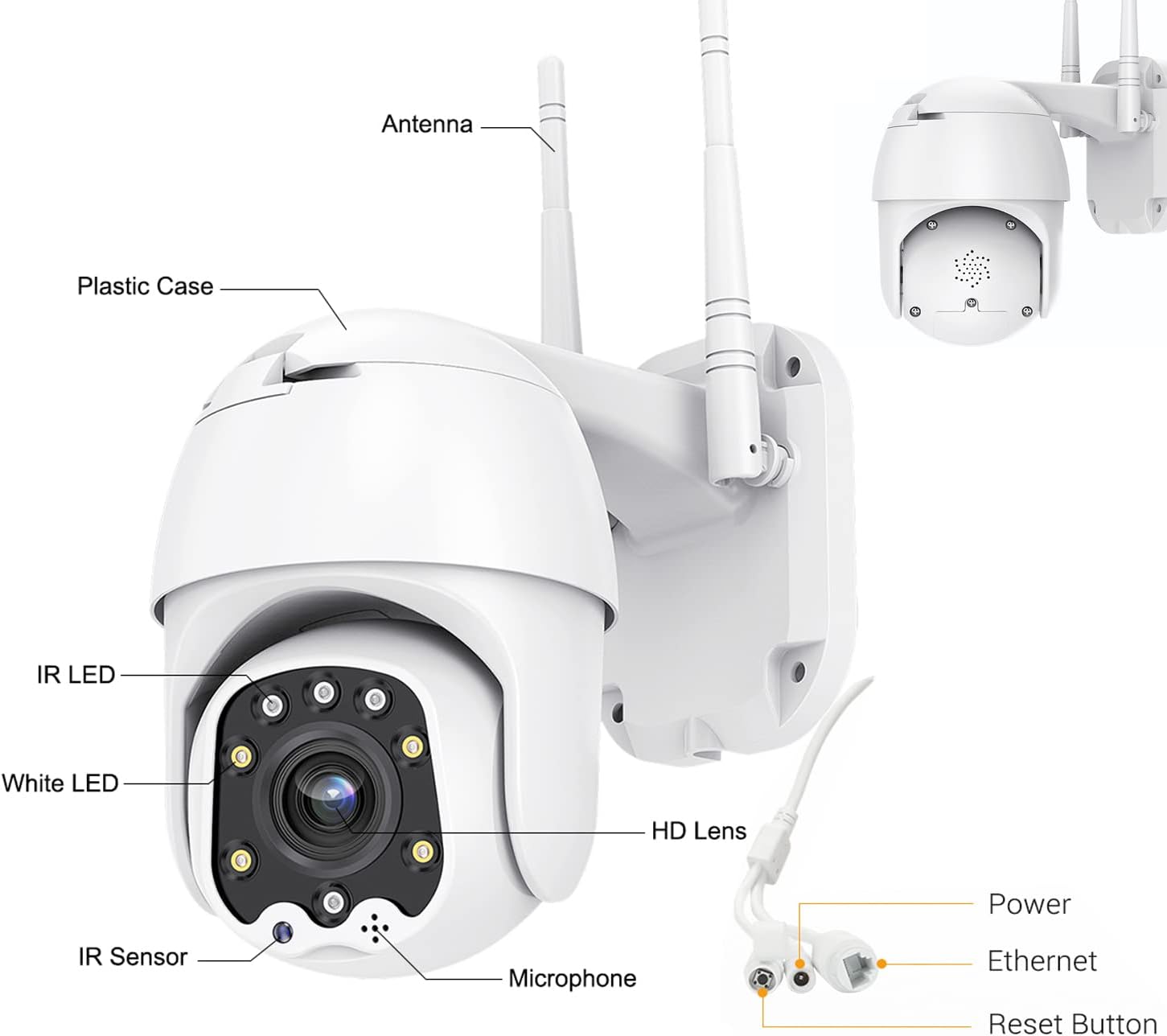
Figure 2: Camera Components and Connections.
2.3 Pemasangan Kad SD (Pilihan)
The camera supports a Micro SD card up to 128GB for local video storage (card not included).
- Open the cover on the camera body.
- Masukkan kad Micro SD dengan berhati-hati ke dalam slot sehingga ia berbunyi klik pada tempatnya.
- Tutup penutup dengan selamat.
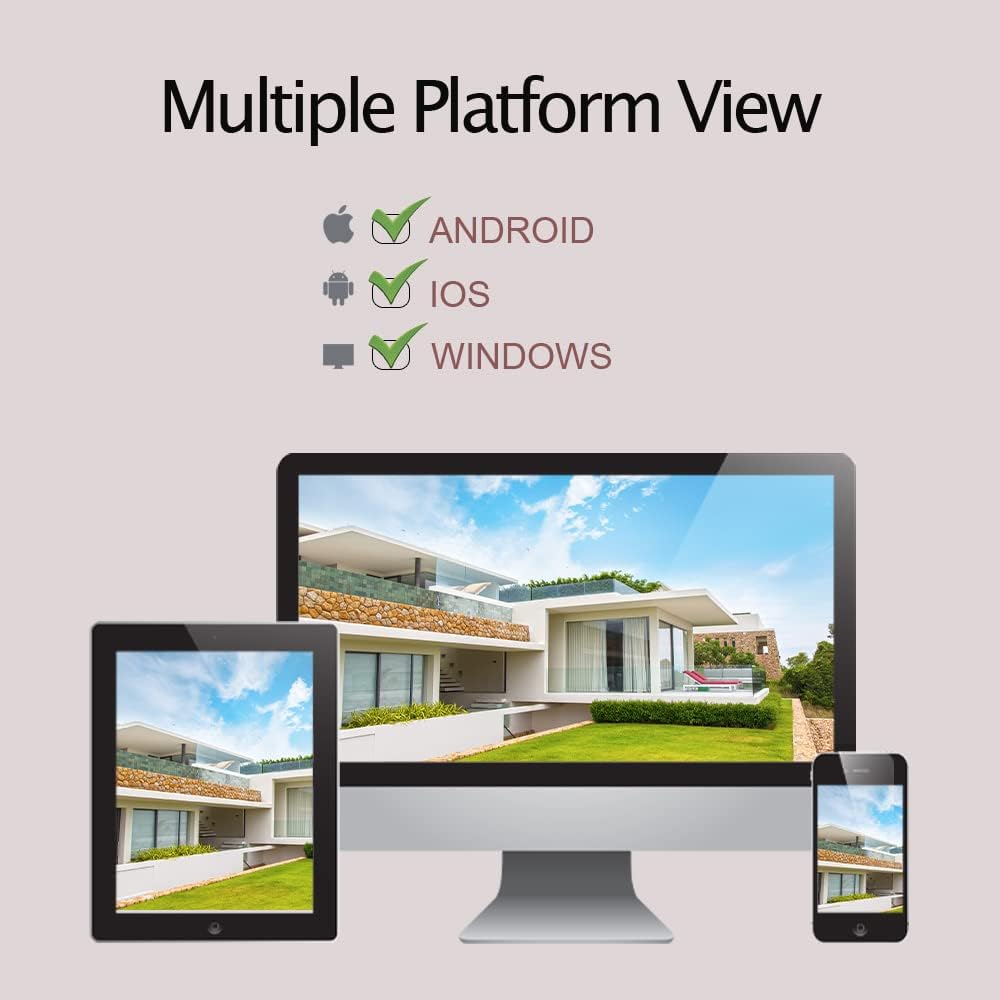
Figure 3: SD Card Installation Steps.
2.4 Network Connection and App Setup
The camera connects via 2.4GHz Wi-Fi. Ensure your Wi-Fi password does not contain special symbols.
- Download the "CamHiPro" app from the App Store (iOS) or Google Play Store (Android).
- Daftar akaun dan log masuk.
- Hidupkan kamera.
- In the app, follow the on-screen instructions to add a new device. Select "Add Camera" and choose the Wi-Fi setup method.
- Enter your 2.4GHz Wi-Fi network details when prompted.
- The camera will connect to your Wi-Fi network. Once connected, you can view aliran langsung.
3. Mengendalikan Kamera
3.1 Langsung View dan Kawalan PTZ
Once connected, you can access the live video feed through the CamHiPro app or PC software.
- Kuali/Condongkan: Use the directional controls within the app to rotate the camera horizontally (320°) and vertically (90°) to adjust the viewsudut ing.
- Zum Digital: Cubit untuk zum pada siaran langsung view to digitally magnify the image.
3.2 Audio Dua Hala
Kamera ini dilengkapi mikrofon dan pembesar suara terbina dalam untuk komunikasi dua hala.
- Ketik ikon mikrofon dalam aplikasi untuk bercakap melalui pembesar suara kamera.
- Mikrofon kamera akan menangkap audio dari persekitarannya.

Figure 4: Two-Way Audio Functionality.
3.3 Pengesanan Gerakan dan Makluman
The camera can detect motion and send alerts to your device.
- Configure motion detection sensitivity and detection areas within the app settings.
- When motion is detected, the camera can send push notifications to your phone, send an email with a photo, or upload photos/videos to an FTP server.
- The camera also supports recording alarm video to the local Micro SD card.

Figure 5: Motion Detection Alerts.
3.4 Mod Penglihatan Malam
The AT-200DW offers intelligent full-color night vision and infrared night vision.
- Penglihatan Malam Pintar: The camera automatically switches between IR and full-color mode based on light conditions and detected motion.
- Penglihatan Malam Inframerah: Provides black and white video in low light using IR LEDs.
- Penglihatan Malam berwarna penuh: Utilizes white LEDs to provide color video even in very low light conditions. This can also act as a deterrent.

Figure 6: Full-Color Night Vision for Deterrence.
3.5 Multi-Platform Viewing
Access your camera feed from various devices.
- Apl Mudah Alih: CamHi/CamHiPro for iOS and Android smartphones.
- Perisian PC: Available for Windows and Mac operating systems.
- Web pelayar: Supports IE, Firefox, Safari, Chrome.
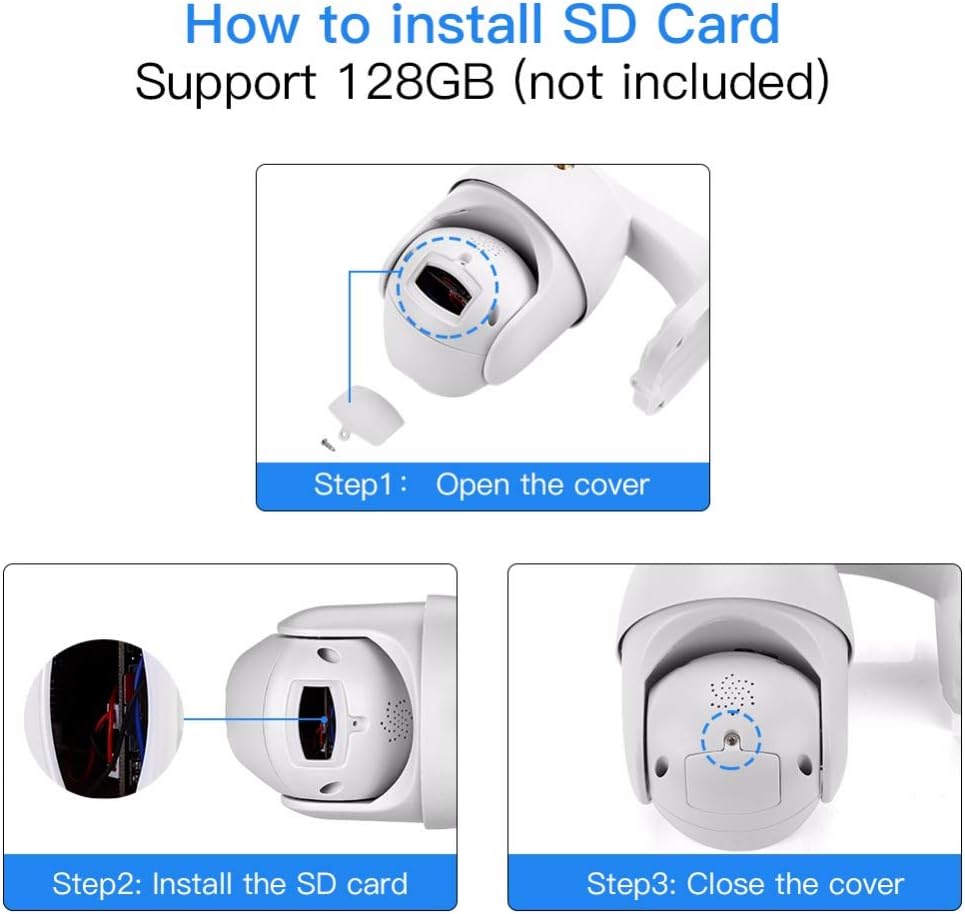
Figure 7: Multiple Platform Viewing Options.
4. Penyelenggaraan
Penyelenggaraan tetap memastikan prestasi optimum dan jangka hayat kamera anda.
- Pembersihan: Lap kanta kamera dan badan secara berkala dengan lembut, damp kain untuk menghilangkan habuk dan kotoran. Jangan gunakan bahan kimia yang keras atau pembersih yang kasar.
- Kemas kini Firmware: Check the CamHiPro app or Alptop's official weblaman web untuk sebarang kemas kini perisian tegar yang tersedia. Mengemas kini perisian tegar boleh meningkatkan prestasi dan menambah ciri baharu.
- Pengurusan Kad SD: If using an SD card for continuous recording, consider formatting it periodically (e.g., monthly) through the app to maintain performance and prevent data corruption.
- Semakan Sambungan: Occasionally verify the camera's Wi-Fi connection stability, especially after power outages or network changes.

Figure 8: IP66 Weatherproof Design.
5. Penyelesaian masalah
Jika anda menghadapi masalah dengan kamera anda, rujuk masalah dan penyelesaian biasa berikut:
| Masalah | Kemungkinan Punca | Penyelesaian |
|---|---|---|
| Kamera gagal menyambung ke Wi-Fi. | Incorrect Wi-Fi band (5GHz), wrong password, special characters in password, weak signal. | Ensure you are connecting to a 2.4GHz Wi-Fi network. Verify Wi-Fi password (no special symbols). Move camera closer to router or use a Wi-Fi extender. |
| No video feed or intermittent connection. | Network congestion, poor Wi-Fi signal, router channel interference. | Check network stability. Try changing your router's 2.4GHz Wi-Fi channel to a less congested one (e.g., 1, 6, or 11). Ensure your smartphone is not on the 2.4GHz band if possible. |
| Pengesanan gerakan tidak berfungsi atau terlalu sensitif. | Tetapan yang salah, faktor persekitaran. | Adjust motion detection sensitivity and detection areas in the app. Ensure there are no moving objects (trees, flags) in the detection zone causing false alarms. |
| Two-way audio is unclear or has echo. | Environmental noise, microphone/speaker obstruction. | Ensure no obstructions near microphone or speaker. Reduce background noise if possible. |
| Kad SD tidak dirakam atau dikenali. | Card not inserted correctly, incompatible card, card full/corrupted. | Re-insert the SD card. Ensure it is a Class 10 or higher, up to 128GB. Format the SD card via the app. |
6. Spesifikasi
| Ciri | Perincian |
|---|---|
| Nombor Model | AT-200DW |
| Resolusi Video | 1080P HD (1920x1080) |
| Julat Pan/Sendeng | Mendatar 320°, Menegak 90° |
| Julat Penglihatan Malam | IR: 150FT, Full-color: 100FT |
| Ketersambungan | 2.4GHz Wi-Fi (IEEE802.11b/g/n), Ethernet |
| Penyimpanan | Supports max 128GB Micro SD card |
| Audio | Two-way audio (built-in 38dB microphone & speaker) |
| Bekalan Kuasa | 12V 2A (AC/DC) |
| Suhu Operasi | Not specified, but designed for outdoor use (IP66) |
| Penarafan IP | IP66 (kalis cuaca) |
| Dimensi | 8.19 x 8.15 x 5.43 inci |
| Berat badan | 1.76 paun |
7. Waranti dan Sokongan
For warranty information and technical support, please refer to the documentation included with your product or contact Alptop customer service directly. You can also visit the official Alptop website for the latest support resources, FAQs, and contact details.
The primary application for managing your camera is the CamHiPro app, available for iOS and Android devices. PC software is also available for Windows and Mac users.