
pengenalan
Thank you for choosing the Renkforce RF-SBS-500 2D Wired Barcode Scanner. This device is designed for efficient and reliable scanning of both 1D and 2D barcodes from various surfaces, including paper and smartphone screens. Its omnidirectional scanning capability and hands-free operation make it suitable for a wide range of applications. This manual provides essential information for the proper setup, operation, and maintenance of your scanner.
Arahan Keselamatan
- Jangan dedahkan pengimbas kepada suhu, kelembapan atau cahaya matahari langsung yang melampau.
- Elakkan daripada menjatuhkan pengimbas atau mendedahkannya kepada hentaman yang kuat.
- Jangan cuba membuka atau mengubah suai pengimbas. Ini akan membatalkan jaminan.
- Keep the scanning window clean to ensure optimal performance. Use a soft, dry cloth.
- Ensure the USB cable is connected securely to prevent accidental disconnection.
Kandungan Pakej
- Renkforce RF-SBS-500 2D Wired Barcode Scanner
- Integrated USB-A Cable
- Manual Pengguna (dokumen ini)
Persediaan
Follow these steps to set up your Renkforce RF-SBS-500 barcode scanner:
- Buka Pengimbas: Keluarkan pengimbas dari pembungkusannya dengan berhati-hati.
- Sambung ke Komputer: Plug the integrated USB-A cable from the scanner into an available USB port on your desktop or laptop computer.
- Pemasangan Pemandu: The scanner is typically plug-and-play. Your operating system (Windows, macOS, Linux) should automatically detect and install the necessary drivers. Wait for the installation to complete.
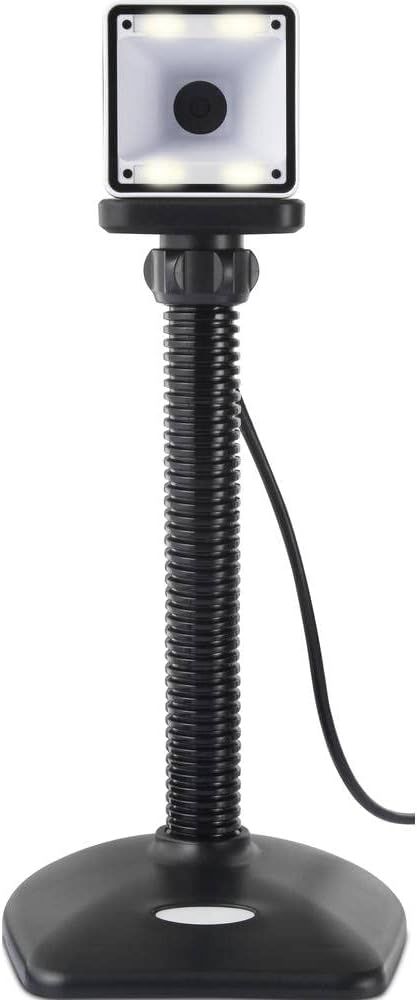
- penempatan: Place the scanner on a stable, flat surface. The flexible neck allows for adjustment of the scanning head angle for optimal positioning.

Mengendalikan Pengimbas
The Renkforce RF-SBS-500 is designed for ease of use with its omnidirectional and hands-free capabilities.
- Hidupkan kuasa: Once connected via USB, the scanner will power on automatically. The LED indicators on the scanner head may illuminate briefly.
- Mengimbas Kod Bar: Position the barcode within the scanning area of the scanner head. The scanner will automatically detect and read the barcode.
- Maklum Balas Visual dan Boleh Didengar: Upon successful scanning, the integrated buzzer will emit a short beep, and the LED display on the scanner will flash or change color, indicating a successful read.
- Omnidirectional Reading: The scanner can read barcodes regardless of their orientation, eliminating the need to align the barcode precisely.
- Hands-Free Mode (Presentation Mode): The scanner operates continuously in a presentation mode, allowing you to simply pass items with barcodes in front of the scanning window without pressing any buttons. This saves time and improves workflow efficiency.
- Kod Bar yang Disokong: The scanner supports both 1D (e.g., EAN, UPC, Code 39) and 2D (e.g., QR Code, Data Matrix, PDF417) barcode types.
Penyelenggaraan
Penyelenggaraan yang betul memastikan jangka hayat dan prestasi pengimbas anda yang optimum.
- Membersihkan Tetingkap Pengimbasan: Regularly clean the scanning window with a soft, lint-free cloth. For stubborn dirt, slightly dampen the cloth with water or a mild, non-abrasive cleaner. Do not spray cleaner directly onto the scanner.
- Pembersihan Am: Lap bahagian luar pengimbas dengan kain kering atau sedikitamp kain. Elakkan menggunakan bahan kimia yang keras atau bahan yang melelas.
- Storan: Apabila tidak digunakan, simpan pengimbas di persekitaran yang bersih dan kering, jauh daripada cahaya matahari langsung dan suhu yang melampau.
Menyelesaikan masalah
Jika anda menghadapi masalah dengan pengimbas anda, rujuk masalah dan penyelesaian biasa berikut:
| Masalah | Kemungkinan Punca | Penyelesaian |
|---|---|---|
| Pengimbas tidak dihidupkan. | USB cable not connected properly or faulty USB port. | Ensure the USB cable is firmly connected to both the scanner and the computer. Try a different USB port. |
| Pengimbas tidak membaca kod bar. | Barcode damaged, scanning window dirty, or incorrect barcode type. | Check the barcode for damage. Clean the scanning window. Ensure the barcode type is supported (1D/2D). Adjust the distance and angle of the barcode to the scanner. |
| No beep or LED feedback after scanning. | Barcode not read successfully. | Refer to the "Scanner does not read barcodes" solution. If the issue persists, contact support. |
| Data yang diimbas dipaparkan dengan salah. | Keyboard layout mismatch or software issue. | Ensure your computer's keyboard layout matches the expected output. Test with a simple text editor. |
If the problem persists after trying these solutions, please contact Renkforce customer support.
Spesifikasi
| Ciri | Spesifikasi |
|---|---|
| Nombor Model | RF-4679568 |
| Keupayaan Mengimbas | 1D and 2D Barcodes |
| Teknologi Ketersambungan | USB-A (Berwayar) |
| Kadar Imbasan | 60 imej sesaat |
| Mod Pengimbasan | Omnidirectional, Hands-free (Presentation Mode) |
| Maklum balas | Integrated Buzzer, LED Display |
| Peranti Serasi | Desktop Computer, Laptop, Smartphone (via appropriate adapter if needed) |
| Dimensi (L x W x H) | 150 x 5.2 x 5.2 cm |
| Berat Barang | 102 Gram |
| Sumber Kuasa | USB Powered |
| Negara Asal | Jerman |
Waranti dan Sokongan
Renkforce products are manufactured to high-quality standards and come with a standard warranty. Please refer to your purchase documentation or the Renkforce official webtapak untuk terma dan syarat waranti khusus yang terpakai untuk wilayah anda.
For technical support, troubleshooting assistance, or warranty claims, please contact Renkforce customer service. Contact details can typically be found on the Renkforce webtapak atau pada pembungkusan produk anda.