
1. Pengenalan
Thank you for choosing the Moultrie MCG-14001 A-900 Game and Trail Camera. This manual provides essential information for setting up, operating, and maintaining your camera to ensure optimal performance. The A-900 camera is designed for outdoor surveillance, featuring a 30 MP resolution, a rapid 0.4-second trigger speed, and 1280x720 HD video recording capabilities. Its Illumi-Night Sensor enhances nighttime image clarity, and the 70-foot flash range ensures clear captures at a distance. Please read this manual thoroughly before use.
2. Persediaan
2.1 Menyahkotak dan Komponen
Sebelum memulakan, pastikan semua komponen hadir:
- Moultrie A-900 Game Camera
- Heavy-duty Camera Strap
- Kad SD 16GB
- 8 Bateri AA

Image 2.1: The Moultrie A-900 Game Camera shown with the included 16GB SD card and 8 AA batteries.
2.2 Pemasangan Bateri
- Buka selak perumahan kamera.
- Cari petak bateri.
- Masukkan 8 bateri AA, pastikan kekutuban (+/-) betul.
- Tutup petak bateri dengan selamat.
2.3 Penyisipan Kad SD
- Dengan perumah kamera terbuka, cari slot kad SD.
- Masukkan kad SD 16GB ke dalam slot sehingga ia berbunyi klik pada tempatnya. Pastikan kad diorientasikan dengan betul.
- To remove, press the card gently to release it.
2.4 Memasang Kamera
The camera can be mounted using the provided heavy-duty strap.
- Masukkan tali melalui slot pelekap di bahagian belakang kamera.
- Secure the camera to a tree or post at the desired height and angle.
- Pastikan kamera stabil dan menghala ke arah kawasan yang ingin anda pantau.
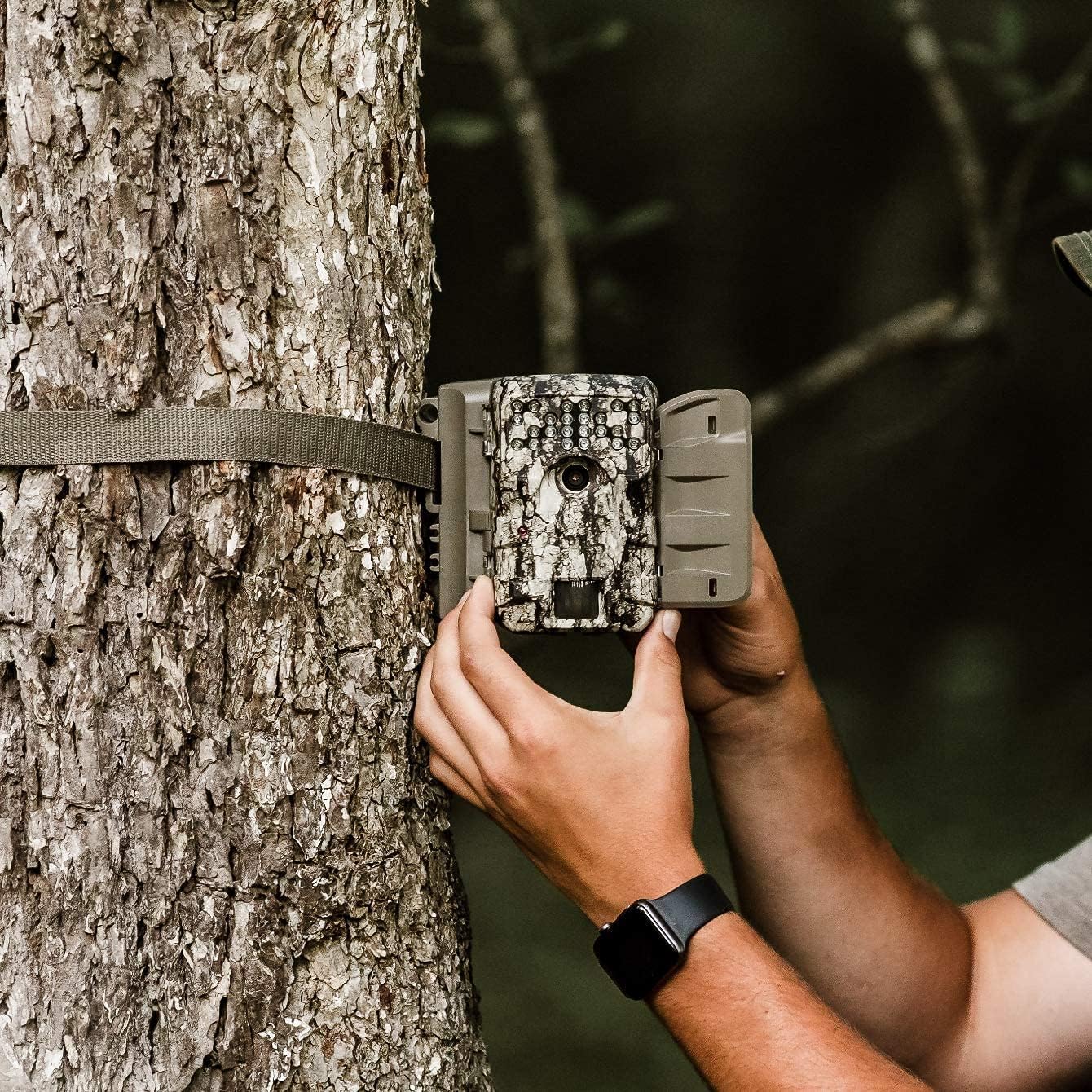
Image 2.2: A user demonstrating the process of securing the camera to a tree.

Image 2.3: The Moultrie A-900 Game Camera shown securely mounted to a tree, ready for operation.
2.5 Hidupkan Kuasa Awal
After installing batteries and the SD card, close the camera housing. Power on the camera using the designated power switch. The camera will perform a self-check and enter standby mode.
3. Arahan Operasi
3.1 Mod Operasi Asas
The A-900 camera offers several capture options:
- Mod Foto: Menangkap imej pegun.
- Mod Video: Records 1280x720 HD video clips.
- Mod Foto + Video: Menangkap imej pegun diikuti dengan klip video.
Refer to the camera's internal menu for selecting and configuring these modes.
3.2 Capture Options
Within Photo Mode, you can configure the number of photos taken per trigger event:
- 1 Photo: Takes a single image per trigger.
- Gambar 3: Takes three consecutive images per trigger.
Image resolution can also be set to either low or high resolution for both single and multiple photo captures.
3.3 Illumi-Night Sensor and Night Vision
The camera is equipped with an Illumi-Night Sensor to produce bright and clear images during nighttime operation. This feature automatically activates in low-light conditions, utilizing the 70-foot flash range to illuminate subjects.
3.4 Fungsi Sensor Gerakan
The integrated motion sensor detects movement within its range, triggering the camera to capture images or videos. The 0.4-second trigger speed ensures that fast-moving subjects are captured effectively. Adjust the sensor sensitivity in the camera settings if needed.
4. Penyelenggaraan
4.1 Penggantian Bateri
When the battery indicator shows low power, replace all 8 AA batteries with new ones. Always use high-quality alkaline or lithium batteries for best performance and longevity.
4.2 Pengurusan Kad SD
Regularly check the SD card capacity. It is recommended to format the SD card periodically using the camera's menu function to ensure optimal performance and prevent data corruption. Always back up important files sebelum memformat.
4.3 Membersihkan Kamera
To maintain image quality, periodically clean the camera lens and the motion sensor window with a soft, lint-free cloth. For the camera housing, use a damp cloth to wipe away dirt and debris. Do not use abrasive cleaners or solvents.
5. Penyelesaian masalah
| Masalah | Kemungkinan Punca | Penyelesaian |
|---|---|---|
| Kamera tidak dihidupkan | Bateri mati atau tidak dipasang dengan betul | Gantikan bateri, periksa polariti |
| Kualiti imej yang lemah | Kanta kotor, cahaya malap, tetapan tidak betul | Clean lens, check Illumi-Night settings, adjust resolution |
| Penderia gerakan tidak mencetuskan | Obstruction, incorrect sensitivity, out of range | Clear sensor path, adjust sensitivity, reposition camera |
| Kesalahan kad SD | Card full, corrupted, or incompatible | Format SD card (backup data first), replace with compatible card |
For issues not covered here, please refer to the Warranty & Support section for contact information.
6. Spesifikasi
- Resolusi: 30 Megapiksel
- Kelajuan Pencetus: 0.4 saat
- Resolusi Video: 1280x720 HD
- Julat Denyar: 70 kaki
- Penderia: Illumi-Night Motion Sensor
- Storan: Menyokong sehingga 16GB kad SD
- Kuasa: 8 AA Batteries (not included in all bundles)
- penggunaan: Luar
- Ciri Khas: Sensor Gerakan, Penglihatan Malam
7. Waranti & Sokongan
Moultrie products are manufactured to high-quality standards. For specific warranty details, please refer to the warranty card included with your product or visit the official Moultrie website. If you encounter any issues or require technical assistance, please contact Moultrie customer support through their official channels. Keep your purchase receipt as proof of purchase for warranty claims.