
1. Pengenalan
Terima kasih kerana membeliasing the Samsung SWA-9100S/ZA Wireless Rear Speaker Kit. This kit is designed to enhance your audio experience by adding wireless surround sound capabilities to compatible Samsung soundbars. Please read this manual carefully before using the product to ensure proper setup, operation, and maintenance. Keep this manual for future reference.
2. Maklumat Keselamatan
Untuk mengurangkan risiko kejutan elektrik, kebakaran atau kecederaan, sentiasa ikuti langkah berjaga-jaga keselamatan asas ini:
- Jangan dedahkan radas ini kepada hujan atau lembapan.
- Do not open the cabinet. There are no user-serviceable parts inside. Refer all servicing to qualified service personnel.
- Pastikan pengudaraan yang betul. Jangan sekat sebarang bukaan pengudaraan.
- Letakkan unit pada permukaan yang stabil dan rata.
- Lindungi kord kuasa daripada berjalan atau tersepit, terutamanya pada palam, bekas kemudahan dan tempat keluar dari radas.
- Cabut plag radas ini semasa ribut petir atau apabila tidak digunakan untuk jangka masa yang lama.
- Hanya gunakan lampiran/aksesori yang ditentukan oleh pengilang.
3. Kandungan Pakej
Sahkan bahawa semua komponen terdapat dalam pakej anda:
- Samsung SWA-9100S Wireless Receiver Module
- 2x Rear Speakers
- Power Cable for Wireless Receiver Module
- 2x Kabel Pembesar Suara
- Manual Arahan (dokumen ini)

Imej: Belakang view of the wireless receiver module and two rear speakers, illustrating the connection points for the speaker cables.
4. Persediaan
Follow these steps to set up your wireless rear speaker kit:
- Connect the Rear Speakers to the Wireless Receiver Module:
Connect the speaker cables to the corresponding color-coded terminals on the back of the wireless receiver module and the rear speakers. Ensure positive (+) and negative (-) terminals are matched correctly. - Connect Power to the Wireless Receiver Module:
Plug the power cable into the wireless receiver module and then into a wall outlet. The STANDBY indicator on the module will blink blue. - Connect to your Samsung Soundbar:
With your Samsung soundbar powered off, press and hold the 'ID SET' button on the back of the wireless receiver module for at least 5 seconds until the STANDBY indicator blinks blue and red alternately. Then, power on your Samsung soundbar. The soundbar will automatically search for the wireless receiver module. Once connected, the LINK indicator on the wireless receiver module will turn solid blue. - penempatan:
Position the rear speakers behind your listening area, ideally at ear level. The speakers are keyhole wall-mountable for flexible placement.

Imej: Depan view of one of the rear speakers.
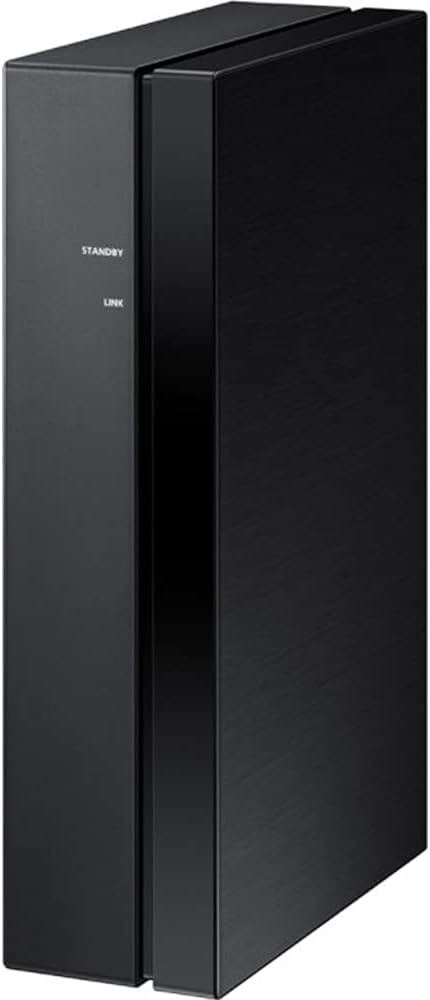
Imej: Sisi view of the wireless receiver module, showing the STANDBY and LINK indicators.
5. Beroperasi
Once successfully paired, the wireless rear speakers will automatically connect to your soundbar when both devices are powered on. The LINK indicator on the wireless receiver module will illuminate solid blue, indicating an active connection.
- Hidupkan/Mati Kuasa: The wireless receiver module powers on and off automatically with your connected Samsung soundbar.
- Petunjuk Status:
- STANDBY (Blinking Blue): Module is powered on and ready to connect.
- LINK (Solid Blue): Module is successfully connected to the soundbar.
- STANDBY (Blinking Blue/Red): Module is in ID SET mode, searching for a soundbar.
- STANDBY (Solid Red): Connection failed or module is in error state.
6. Penyelenggaraan
Proper care ensures the longevity and performance of your speaker kit.
- Pembersihan: Use a soft, dry cloth to clean the surfaces of the speakers and wireless receiver module. Do not use liquid cleaners, aerosols, or solvents, as they may damage the finish.
- Pengudaraan: Ensure the wireless receiver module has adequate ventilation. Do not cover its vents.
- Storan: If storing the kit for an extended period, disconnect it from power and store it in a cool, dry place away from direct sunlight and extreme temperatures.
7. Penyelesaian masalah
If you encounter issues, refer to the table below for common problems and solutions:
| Masalah | Kemungkinan Punca | Penyelesaian |
|---|---|---|
| No sound from rear speakers. | Wireless connection lost or not established. Speaker cables incorrectly connected. | Check the LINK indicator on the wireless receiver module (should be solid blue). Re-establish connection if necessary (refer to Setup section). Verify speaker cable connections. |
| LINK indicator is solid red. | Connection failed or error. | Unplug the power cord from the wireless receiver module and plug it back in. Repeat the ID SET process. Ensure the soundbar is compatible. |
| Bunyi herot atau terputus-putus. | Interference from other wireless devices. Wireless receiver module too far from soundbar. | Move the wireless receiver module closer to the soundbar. Ensure no large metal objects are between them. Minimize interference from other 2.4 GHz wireless devices. |
| Wireless receiver module does not power on. | Kabel kuasa tidak disambungkan atau isu salur keluar kuasa. | Check if the power cable is securely connected to the module and the wall outlet. Test the outlet with another device. |
8. Spesifikasi
| Ciri | Spesifikasi |
|---|---|
| Nombor Model | CRTSAMSWA9100S |
| Jenama | Samsung |
| Mod Keluaran Audio | Keliling |
| Jenis Pemasangan | Wall Mount (Keyhole) |
| Jenis Pembesar Suara | Rear Surround Sound |
| Ciri-ciri Tambahan | Two-Channel Wireless Amplifier; Compact Design |
| Bilangan Saluran Audio | 2.0 |
| Impedans | 3 ohm |
| Berat Barang | 6.5 Pound (lebih kurang) |
| Sumber Kuasa | AC |
| Teknologi Ketersambungan Subwufer | Wireless (for connection to soundbar) |
9. Waranti dan Sokongan
This Certified Refurbished product includes a 90-day warranty. For warranty claims or technical support, please refer to the documentation provided with your purchase or visit the official Samsung support website for your region. Ensure you have your product model number (CRTSAMSWA9100S) and proof of purchase available when contacting support.