
pengenalan
This manual provides detailed instructions for the operation and maintenance of your Casio W736H Series Digital Watch, model W-736H-5AV. Please read this manual thoroughly to ensure proper use and to fully utilize all features of your watch. Keep this manual for future reference.
Produk Selesaiview
The Casio W736H Series Digital Watch is designed for durability and functionality, featuring a 1/100 second stopwatch, countdown timer, daily alarm with vibration, dual time, and a Super Illuminator LED light. It also boasts 100-meter water resistance and a 10-year battery life.
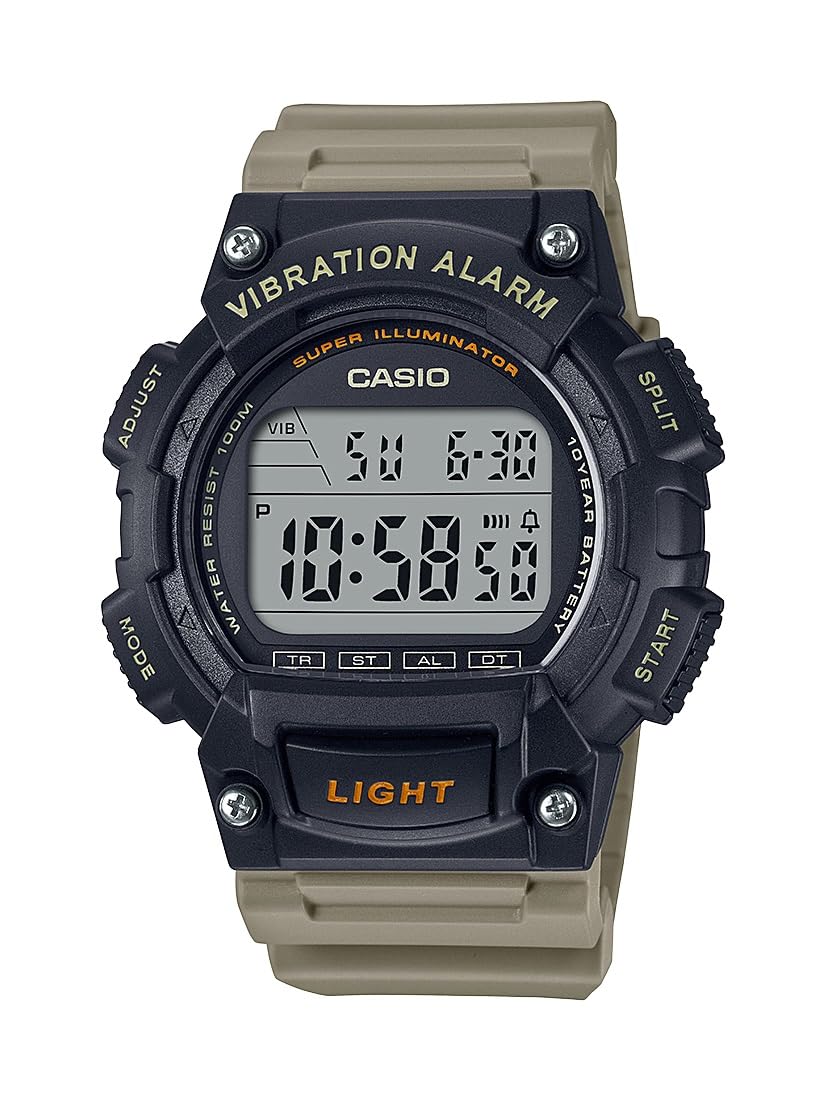
Image: Casio W736H Series Digital Watch, model W-736H-5AV. The watch features a digital display, four side buttons labeled 'ADJUST', 'MODE', 'SPLIT', 'START', and a front button labeled 'LIGHT'.
Fungsi Butang
- LARAS (Kiri Atas): Digunakan untuk masuk dan keluar dari mod tetapan, dan untuk mengesahkan tetapan.
- MOD (Kiri Bawah): Cycles through different watch modes (Timekeeping, Stopwatch, Countdown Timer, Alarm, Dual Time).
- SPLIT / START (Top Right): In Stopwatch mode, used for split/lap timing. In other modes, may function as a start button or for value adjustment.
- START / RESET (Bottom Right): Used to start/stop functions or to reset values. Also used for value adjustment in setting modes.
- LAMPU (Bahagian Depan Bawah): Activates the Super Illuminator LED backlight.
Persediaan
Menetapkan Masa dan Tarikh
- Dalam Mod Penjagaan Masa, tekan dan tahan SESUAIKAN butang sehingga saat mula berkelip, menunjukkan skrin tetapan.
- Tekan ke MODE button to cycle through the settings in the following order: Seconds → DST (Daylight Saving Time) → Hour → Minute → Year → Month → Day.
- Gunakan START / RESET (Bottom Right) and SPLIT / START (Top Right) buttons to adjust the flashing value.
- START / RESET: Meningkatkan nilai.
- SPLIT / START: Decreases the value (or cycles through options).
- Setelah semua tetapan dikonfigurasikan, tekan butang SESUAIKAN button to exit the setting screen and return to Timekeeping Mode.
Format 12/24-Jam
Dalam Mod Penjagaan Masa, tekan butang START / RESET butang untuk bertukar antara format masa 12 jam dan 24 jam.
Mod Pengendalian
Tekan ke MODE button to cycle through the watch's various modes:
- Mod Penjagaan Masa
- Mod Jam randik (ST)
- Countdown Timer Mode (TR)
- Mod Penggera (AL)
- Dual Time Mode (DT)
Mod Jam Randik
Jam randik mengukur masa berlalu, masa perpecahan, dan dua penamat.
- Daripada Mod Penjagaan Masa, tekan MODE until 'ST' appears on the display.
- Tekan START / RESET (Bottom Right) to start the stopwatch.
- Tekan START / RESET sekali lagi untuk menghentikan jam randik.
- Untuk menetapkan semula jam randik kepada sifar, tekan SPLIT / START (Top Right) while it is stopped.
- For split times, press SPLIT / START semasa jam randik berjalan. Paparan akan menunjukkan masa pembahagian. Tekan SPLIT / START again to return to elapsed time measurement.
Mod Pemasa Kiraan Balik
The countdown timer can be set for a period from 1 minute to 24 hours.
- Daripada Mod Penjagaan Masa, tekan MODE until 'TR' appears on the display.
- Tekan dan tahan SESUAIKAN sehingga tetapan jam berkelip.
- guna START / RESET (Bottom Right) and SPLIT / START (Top Right) to set the desired countdown start time (hours and minutes).
- Tekan SESUAIKAN untuk keluar dari skrin tetapan.
- Tekan START / RESET untuk memulakan kira detik.
- Tekan START / RESET again to pause the countdown. Press it once more to resume.
- To stop and reset the timer, press SPLIT / START while the timer is paused.
- When the countdown reaches zero, the watch will emit a vibration alarm.
Mod Penggera
The watch features a daily alarm with a vibration alert.
- Daripada Mod Penjagaan Masa, tekan MODE sehingga 'AL' muncul pada paparan.
- Tekan dan tahan SESUAIKAN sehingga tetapan jam berkelip.
- guna START / RESET (Bottom Right) and SPLIT / START (Top Right) to set the alarm hour and minute.
- Tekan SESUAIKAN untuk keluar dari skrin tetapan.
- Dalam Mod Penggera, tekan START / RESET to toggle the alarm ON/OFF. An alarm indicator will appear when the alarm is active.
- To stop the alarm once it sounds/vibrates, press any button.
Mod Masa Ganda
This mode allows you to keep track of a second time zone.
- Daripada Mod Penjagaan Masa, tekan MODE until 'DT' appears on the display.
- Tekan dan tahan SESUAIKAN sehingga tetapan jam berkelip.
- guna START / RESET (Bottom Right) and SPLIT / START (Top Right) to set the desired hour and minute for the second time zone.
- Tekan SESUAIKAN untuk keluar dari skrin tetapan.
Super Illuminator LED Light
The Super Illuminator LED light provides illumination for the display in low-light conditions.
- Tekan ke CAHAYA button (front bottom) to illuminate the display.
- The illumination duration is preset and cannot be adjusted.
Penyelenggaraan
Maklumat Bateri

Image: A gold and black emblem indicating '10 Year Battery Life'.
This watch is equipped with a long-life battery, designed to last approximately 10 years under normal use. When the display becomes dim or the light function weakens, it indicates that the battery power is low. Battery replacement should be performed by a qualified watch technician to ensure water resistance is maintained.
Tahan Air
The watch is rated for 100-meter water resistance. This means it is suitable for swimming, showering, and snorkeling. However, it is not suitable for scuba diving. Do not operate buttons while the watch is wet or submerged in water, as this can compromise the water resistance.
Pembersihan
Wipe the watch case and band with a soft, dry cloth to remove dirt and moisture. For resin bands, a mild soap solution and water can be used, followed by thorough rinsing and drying. Avoid using harsh chemicals or abrasive cleaners.
Menyelesaikan masalah
- Paparan kosong atau malap: Bateri mungkin lemah. Pertimbangkan untuk menggantikan bateri secara profesional.
- Masa tidak tepat: Re-adjust the time and date settings as described in the 'Setup' section. Ensure DST (Daylight Saving Time) is correctly set if applicable.
- Alarm not working: Check if the alarm is activated in Alarm Mode. Ensure the volume/vibration setting is enabled.
- Butang tidak bertindak balas: Ensure the watch is not wet. If the issue persists, a reset may be required (consult a service center), or there might be an internal malfunction.
If problems persist after attempting these solutions, please contact a Casio service center for assistance.
Spesifikasi
- Nombor Model: W-736H-5AV
- modul: (Not specified in provided data, typically a 4-digit number)
- Tahan Air: 100 meter (10 BAR)
- Hayat Bateri: Approximately 10 years (CR2032 Lithium Metal battery)
- Ketepatan: ±30 seconds per month (average)
- Penjagaan masa: Hour, minute, second, p.m., month, date, day
- Sistem Kalendar: Kalendar automatik penuh (hingga tahun 2099)
- Jam randik: 1/100-second; measuring capacity: 23:59'59.99''; measuring modes: elapsed time, split time, 1st-2nd place times
- Pemasa undur: Measuring unit: 1 second; countdown range: 24 hours; countdown start time setting range: 1 minute to 24 hours (1-minute increments and 1-hour increments)
- penggera: Daily alarm with vibration alert
- Masa Ganda: ya
- Pencahayaan: Super Illuminator LED backlight
- Dimensi: 6 x 6 x 4 inches (Product Dimensions as packaged)
- Berat: 3.84 ounces (Product Weight as packaged)
Waranti dan Sokongan
For warranty information, service, or additional support, please refer to the official Casio website or contact your local authorized Casio dealer. Keep your proof of purchase for warranty claims.
Casio Rasmi Webtapak: www.casio.com