
Maklumat Keselamatan Penting
Please read all instructions carefully before using your Smart-Tech 40-inch FHD Smart TV. Keep this manual for future reference. Failure to follow these safety guidelines may result in fire, electric shock, or other injuries.
- Jangan sekat bukaan pengudaraan. Pastikan ruang yang mencukupi di sekeliling TV untuk aliran udara yang betul.
- Jangan letakkan TV berhampiran sumber haba seperti radiator, daftar haba, dapur atau peralatan lain yang menghasilkan haba.
- Lindungi kord kuasa daripada berjalan atau tersepit, terutamanya pada palam, bekas kemudahan dan tempat keluar dari radas.
- Hanya gunakan lampiran/aksesori yang ditentukan oleh pengilang.
- Cabut plag radas ini semasa ribut petir atau apabila tidak digunakan untuk jangka masa yang lama.
- Rujuk semua perkhidmatan kepada pegawai perkhidmatan yang berkelayakan. Servis diperlukan apabila alat telah rosak dengan cara apa pun.
Kandungan Pakej
Sahkan bahawa semua item yang disenaraikan di bawah disertakan dalam pakej anda:
- Smart-Tech 40-inch FHD Smart TV
- Alat Kawalan Jauh
- Stand TV (2 keping)
- Skru untuk Lampiran Pendirian
- Kabel Kuasa
- Manual Pengguna (dokumen ini)
Persediaan
1. Memasang Pendirian
Untuk melampirkan dirian pada TV anda:
- Letakkan TV menghadap ke bawah dengan berhati-hati pada permukaan yang lembut dan bersih untuk mengelakkan kerosakan skrin.
- Jajarkan setiap bahagian dirian dengan slot yang sepadan di bahagian bawah TV.
- Kencangkan setiap bahagian dirian menggunakan skru yang disediakan. Pastikan ia diketatkan dengan kuat.

Image: Smart-Tech 40-inch FHD Smart TV with stand, illustrating its placement.
2. Pemasangan Dinding (Pilihan)
If you choose to wall mount your TV, you will need a VESA-compatible wall mount kit (not included). The TV supports a VESA mount pattern of 200mm x 100mm.
- Remove the stand if it has been attached.
- Follow the instructions provided with your wall mount kit for proper installation.
- Ensure the wall mount is securely fastened to a sturdy wall capable of supporting the TV's weight.

Image: Rear panel of the TV showing VESA mounting holes (200mm x 100mm) and port locations.
3. Menyambung Peranti
The TV features a variety of ports for connecting external devices. Refer to the image above for port locations.
- USB 1 / USB 2: Sambungkan peranti storan USB untuk main balik media atau kemas kini perisian.
- TELINGA AWAL: Sambungkan fon kepala untuk mendengar secara peribadi.
- CI+: Insert a Common Interface Plus module and smart card for encrypted digital channels.
- DVB_T/T2: Connect an aerial for terrestrial digital TV signals.
- DVB_S/S2: Connect a satellite dish for satellite digital TV signals.
- AV DI: Sambungkan peranti lama menggunakan video komposit dan kabel audio stereo.
- HDMI 1 / HDMI 2 / HDMI 3: Connect high-definition devices such as Blu-ray players, game consoles, or set-top boxes. HDMI 3 supports Audio Return Channel (ARC).
- RJ45: Sambungkan kabel Ethernet untuk sambungan internet berwayar.
- OPTIKAL: Connect to a digital audio receiver or soundbar for high-quality audio output.
Arahan Operasi
1. Kuasa Awal Hidup dan Wizard Persediaan
After connecting the TV to power and an antenna/satellite dish, press the power button on the remote control. The TV will guide you through an initial setup wizard to select language, country, network settings, and channel scanning.
2. Fungsi Alat Kawalan Jauh
Alat kawalan jauh membolehkan anda menavigasi ciri-ciri TV. Biasakan diri anda dengan butang utama:

Image: Remote control for the Smart-Tech TV.
- Butang Kuasa: Menghidupkan atau mematikan TV.
- Butang Nombor: Pilih saluran secara langsung.
- Kelantangan Naik/Turun: Laraskan tahap bunyi.
- Saluran Atas/Bawah: Change channels sequentially.
- Butang Navigasi (Atas/Bawah/Kiri/Kanan) dan OK: Navigasi menu dan sahkan pilihan.
- Belakang/Keluar: Return to the previous menu or exit current function.
- Sumber: Select input source (HDMI, AV, TV, etc.).
- Butang Aplikasi Pintar: Dedicated buttons for quick access to Netflix, YouTube, and Prime Video.
3. Ciri TV Pintar
Your Smart-Tech TV comes with integrated smart features, including access to popular streaming services and HbbTV.
- Sambungan Internet: Connect your TV to the internet via Wi-Fi or Ethernet (RJ45 port) to access smart features.
- Apl Penstriman: Use the dedicated buttons or navigate to the Smart TV menu to launch applications like Netflix, YouTube, and Prime Video. An active subscription may be required for some services.
- HbbTV 1.5: Hybrid Broadcast Broadband TV allows access to interactive services from broadcasters, such as catch-up TV, video-on-demand, and electronic program guides (EPG).
4. Channel Tuning
The TV supports DVB-T/T2 (terrestrial), DVB-S/S2 (satellite), and DVB-C (cable) digital tuners.
- Go to the TV's main menu.
- Select 'Channel' or 'Installation'.
- Choose your desired tuning method (e.g., 'Auto Scan' for DVB-T/T2 or 'Satellite Setup' for DVB-S/S2).
- Follow the on-screen prompts to complete the channel scan.
5. Main Semula Media (USB)
You can play various media files daripada peranti storan USB.
- Insert your USB device into one of the USB ports on the TV.
- The TV may automatically detect the device and prompt you to open the media browser. If not, select the USB source from the input menu.
- Navigasi melalui anda files dan pilih media yang diingini untuk dimainkan.
- Disokong file systems: FAT16, FAT32, NTFS.
- Supported media formats include: Music (MP3, WAV, AAC), Photo (JPG, JPEG, BMP, PNG), Video (AVI, MP4, MOV, MPG, MKV, DAT, VOB, TS, TRP, TP).
Penyelenggaraan
Membersihkan TV
Untuk memastikan jangka hayat dan prestasi optimum TV anda, ikuti garis panduan pembersihan ini:
- Sentiasa cabut plag TV dari salur keluar kuasa sebelum membersihkan.
- Gunakan kain lembut, kering dan bebas serabut untuk mengelap skrin dan kabinet dengan perlahan.
- Untuk tanda degil, ringankan dampen the cloth with water or a mild, non-abrasive screen cleaner. Never spray liquid directly onto the TV.
- Elakkan menggunakan pembersih, lilin atau pelarut yang kasar kerana ia boleh merosakkan kemasan TV.
Penyimpanan
If you need to store the TV for an extended period, ensure it is kept in a cool, dry place, away from direct sunlight and extreme temperatures. Use the original packaging if available to protect it from dust and physical damage.
Menyelesaikan masalah
If you encounter issues with your TV, consult the table below for common problems and solutions. If the problem persists, contact customer support.
| Masalah | Kemungkinan Punca | Penyelesaian |
|---|---|---|
| Tiada kuasa | Power cord not connected; No power from outlet | Pastikan kord kuasa dipasang dengan selamat; Periksa salur keluar kuasa dengan peranti lain. |
| Tiada gambar, tetapi bunyi hadir | Incorrect input source selected; Loose cable connection | Press the 'Source' button on the remote to select the correct input; Check all cable connections. |
| Tiada bunyi, tetapi ada gambar | Volume is muted or too low; External audio system issue | Tingkatkan kelantangan atau nyahbisukan; Periksa sambungan ke peranti audio luaran. |
| Alat kawalan jauh tidak berfungsi | Bateri mati atau dipasang dengan salah; Halangan antara alat kawalan jauh dan TV | Replace batteries; Ensure correct polarity; Remove any obstructions. |
| Tidak dapat menyambung ke Wi-Fi | Kata laluan salah; Isu penghala; TV terlalu jauh dari penghala | Verify Wi-Fi password; Restart router; Move TV closer to router or use wired connection. |
Spesifikasi
Detailed technical specifications for the Smart-Tech 40-inch FHD Smart TV (SMT40N30FV1U1B1).
| Ciri | Spesifikasi |
|---|---|
| Nombor Model | SMT40N30FV1U1B1 |
| Saiz Skrin | 40 inci (100 cm) |
| Resolusi | 1920 x 1080 (HD Penuh) |
| Teknologi Paparan | LED (D-LED Backlight) |
| Kadar Segar Semula | 60 Hz |
| Output Audio | 2 x 8 W |
| Teknologi Audio | Dolby Digital, AC-3 Decoder |
| Penala | DVB-T, DVB-T2, DVB-S, DVB-S2, DVB-C |
| Ciri Pintar | HbbTV 1.5, Netflix, YouTube, Prime Video |
| Port HDMI | 3 (HDMI-ARC, HDMI-CEC supported) |
| Port USB | 2 |
| Ketersambungan Lain | RF Antenna In, SAT In, Headphone Jack, CI+, CVBS + Audio In, Digital Optical Out, RJ45 (Ethernet), Wi-Fi |
| USB File Sistem | FAT16 / FAT32 / NTFS |
| USB Video System | HEVC / H.265, MPEG4 / H.264, VP9 |
| Penggunaan Kuasa (Operasi) | 70 W |
| Penggunaan Kuasa (Bersedia) | <0.50 W |
| Energy Class (New Label) | F |
| Dimensions with Stand (L x H x P) | 903.5 x 561.4 x 222 mm |
| Dimensions without Stand (L x H x P) | 903.5 x 517.5 x 78.1 mm |
| Berat Bersih | 5.66 kg |
| VESA Mount Pattern | 200mm x 100mm |
Maklumat Label Tenaga
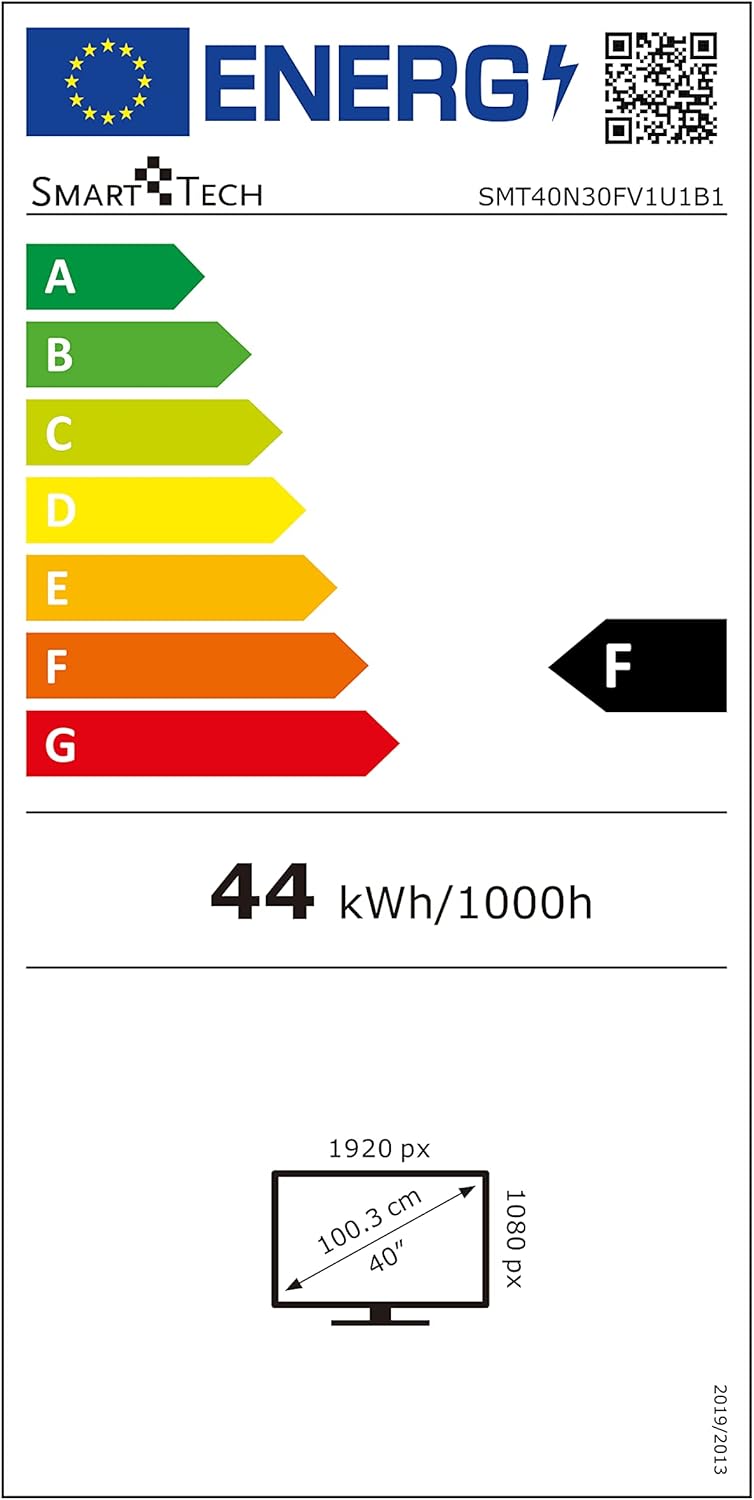
Image: EU Energy Label for Model SMT40N30FV1U1B1.
This television is rated Energy Class F under the new EU energy labeling system, with an energy consumption of 44 kWh per 1000 hours. For more detailed information, you can visit the official EPREL database: https://eprel.ec.europa.eu/qr/366834
Waranti dan Sokongan
Your Smart-Tech TV is covered by a manufacturer's warranty. Please refer to the warranty card included with your product for specific terms and conditions, including the warranty period and coverage details. For technical support, service inquiries, or to report any issues not covered in this manual, please contact Smart-Tech customer service through the contact information provided on your warranty card or the official Smart-Tech webtapak.
Please note that availability of spare parts and software updates may vary. Information regarding spare parts availability and guaranteed software updates is not available at this time.