
1. Pengenalan
This manual provides essential information for the safe and efficient operation, maintenance, and troubleshooting of your APOLLO Counterbalanced Electric Stacker Forklift, Model CPD15W-177. Please read this manual thoroughly before operating the equipment to ensure proper usage and to prevent injury or damage.

Figure 1: APOLLO Counterbalanced Electric Stacker Forklift.
2. Arahan Keselamatan
Always prioritize safety when operating the electric stacker. Failure to follow these instructions can result in serious injury or death.
- Latihan Operator: Only trained and authorized personnel should operate this equipment.
- Semakan Pra-Operasi: Before each use, inspect the stacker for any damage, loose parts, or malfunctions. Ensure all controls are functioning correctly.
- Kapasiti Muatan: Never exceed the rated load capacity of 3300 lbs. Refer to the load capacity charts for safe lifting limits at various heights and load centers.
- Stable Loads: Ensure loads are stable and properly centered on the forks before lifting or moving.
- Pembersihan: Maintain adequate clearance from walls, obstacles, and personnel during operation.
- Hentian kecemasan: Familiarize yourself with the emergency stop button and its location.
- Keselamatan Bateri: Follow all battery charging and maintenance procedures outlined in this manual. Wear appropriate personal protective equipment (PPE) when handling batteries.
- Kawasan Kerja: Operate the stacker on level, firm surfaces. Avoid uneven terrain or slopes.

Figure 2: Warning labels on the mast, indicating safety precautions for operation.
3. Persediaan dan Pemasangan
The APOLLO Counterbalanced Electric Stacker is typically delivered largely pre-assembled. However, some initial setup and checks are required before first use.
3.1 Pemeriksaan Awal
Upon receipt, carefully inspect the packaging and the stacker for any signs of shipping damage. Report any damage immediately to the carrier and supplier.
3.2 Sambungan Bateri dan Pengecasan Awal
Ensure the battery is properly connected and fully charged before the first operation. Refer to the charging section for detailed instructions.

Figure 3: The battery compartment, showing the lead-acid batteries. Ensure connections are secure.
3.3 Fork Adjustment
The forks are adjustable to accommodate various pallet sizes. Adjust the fork width by loosening the locking pins, sliding the forks to the desired position, and re-securing the pins.

Figure 4: Fork dimensions and adjustability. Forks are 42 inches long, 1.4 inches thick, and adjustable from 8.7 to 26.8 inches in width.
4. Arahan Operasi
4.1 Kawalan Ke Atasview
The stacker features a long handle structure for flexible steering and a control panel for key functions.
- Suis Kekunci: Turns the stacker on/off.
- Butang Berhenti Kecemasan: Immediately cuts power to all functions.
- Lift/Lower Controls: Levers or buttons on the handle to raise and lower the forks.
- Kawalan Arah: Twist grip or buttons on the handle for forward and reverse movement.
- Penunjuk Bateri: Displays current battery charge level.

Figure 5: The control panel, featuring the key switch, emergency stop button, and battery charge indicator.
4.2 Starting the Stacker
- Insert the key into the key switch and turn it to the 'ON' position.
- Periksa penunjuk bateri untuk memastikan cas mencukupi.
- Ensure the emergency stop button is disengaged (pulled out).
4.3 Lifting and Lowering Loads
- Position the stacker squarely in front of the load.
- Carefully insert the forks completely under the pallet or load.
- Use the lift control to raise the load slightly off the ground.
- Before moving, ensure the load is stable and within the stacker's capacity.
- To lower, use the lower control. Lower loads slowly and smoothly.
4.4 Moving the Stacker
- With the load slightly raised, use the directional controls on the handle to move forward or backward.
- Steer using the long handle. The vertical driving wheel provides efficient and flexible movement.
- Always travel with the load in the lowest possible position for stability, especially when turning.
4.5 Load Capacity Charts
Adhere strictly to the load capacity guidelines to prevent tipping or damage.

Figure 6: Load Capacity Chart. For example, load capacity is 1980 lbs when lifting height is between 157-177 inches, and 3300 lbs when lifting height is within 118 inches.

Figure 7: Load center chart, illustrating how load capacity decreases as the load center distance increases.
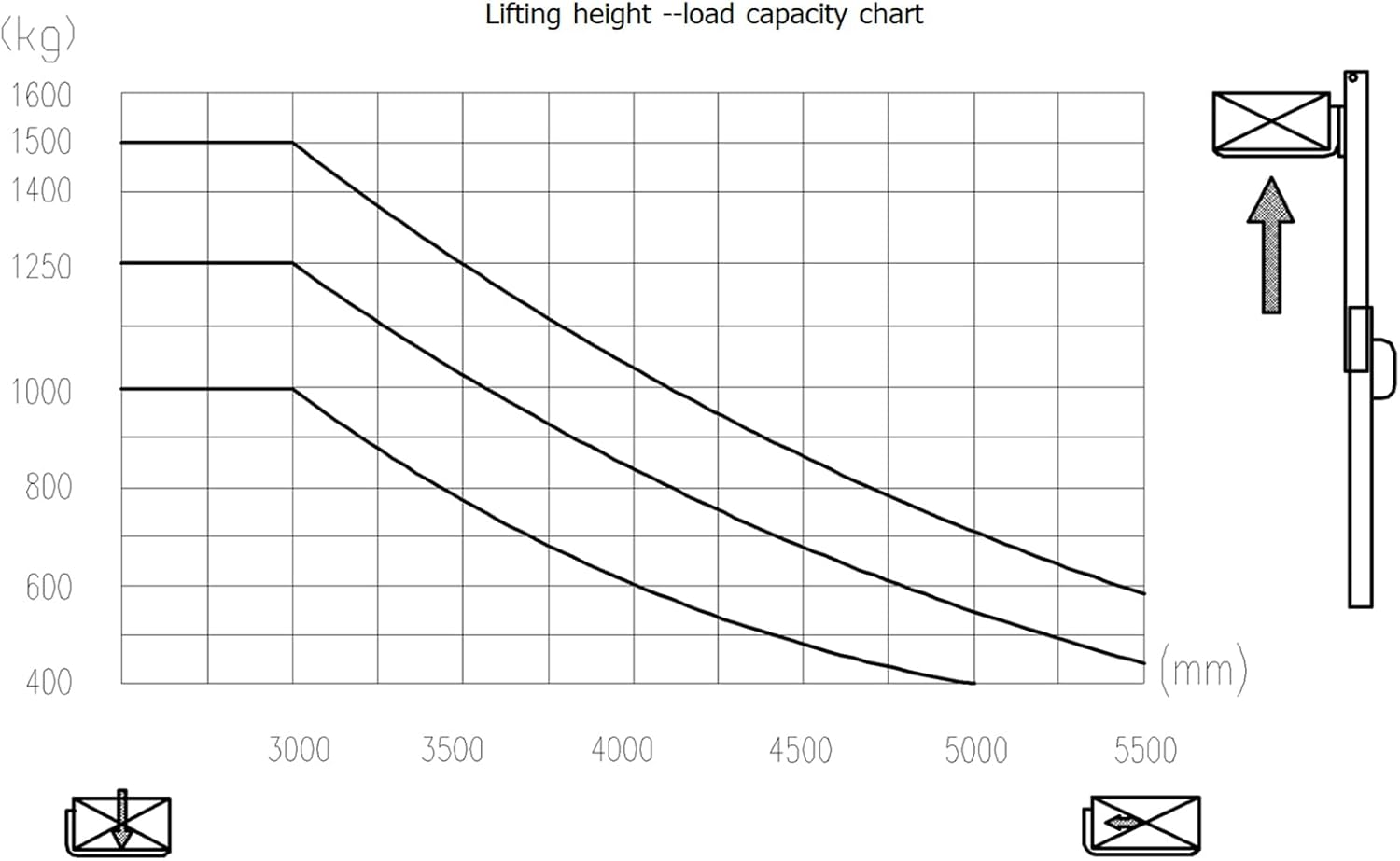
Figure 8: Lifting height versus load capacity chart, showing maximum weight at different lift heights.
5. Penyelenggaraan
Regular maintenance is crucial for the longevity and safe operation of your electric stacker.
5.1 Pemeriksaan Harian
- Periksa tahap pengecasan bateri.
- Inspect forks for damage or wear.
- Sahkan fungsi brek.
- Check for hydraulic fluid leaks.
- Ensure all warning labels are legible.
5.2 Pengecasan Bateri
Charge the lead-acid battery using the designated charger. Connect the charger to the charging port on the stacker. Ensure proper ventilation during charging.

Figure 9: The charger port, clearly marked for battery charging.
5.3 Sistem Hidraulik
Periodically check the hydraulic fluid level and replenish if necessary. Use only recommended hydraulic fluid. Inspect hydraulic hoses and fittings for wear or damage.
5.4 Wheel and Caster Inspection
Inspect wheels and casters for wear, damage, or debris. Replace worn wheels to maintain smooth operation and stability.
6. Penyelesaian masalah
This section addresses common issues you might encounter with your electric stacker.
| Masalah | Kemungkinan Punca | Penyelesaian |
|---|---|---|
| Stacker does not power on | Emergency stop engaged; Battery discharged; Key switch off; Loose battery connection | Disengage emergency stop; Charge battery; Turn key switch on; Check battery terminals |
| Forks do not lift | Overload; Low hydraulic fluid; Hydraulic system fault; Lift motor issue | Reduce load; Check/refill hydraulic fluid; Contact service technician |
| Stacker moves slowly or not at all | Low battery charge; Drive motor fault; Obstruction in wheels | Charge battery; Inspect drive wheel; Clear obstructions |
| Bunyi luar biasa semasa operasi | Loose components; Worn bearings; Motor issue | Inspect for loose parts; Contact service technician |
7. Spesifikasi
Detailed technical specifications for the APOLLO Counterbalanced Electric Stacker Forklift, Model CPD15W-177.

Figure 10: Key dimensions of the stacker, including mast height lowered (82.1 inches), mast height raised (216.5 inches), overall length (109.4 inches), and maximum lift height (177 inches).
| Ciri | Spesifikasi |
|---|---|
| Nombor Model | CPD15W-177 |
| Kapasiti Muatan | 3300 paun |
| Maks. Mengangkat Ketinggian | 177 inci |
| Height, Mast Lowered | 82 inci |
| Height, Mast Extended | 216.5 inci |
| Fork Dimensions (L x W x T) | 42 x 3.9 x 1.3 inci |
| Adjustable Fork Width | 8.7 - 26.8 inci |
| Lifting Speed (Laden/Unladen) | 0-4.7 / 0-6.3 inch/s |
| Kelajuan Perjalanan (Sarat/Tidak Muat) | 63.4 / 65.6 inch/s |
| Gradeability (Laden/Unladen) | 6% / 10% |
| Jejari Pusing | 61.8 inci |
| Jenis Bateri | Asid Plumbum |
| Dinilai Voltage / Kapasiti | 24V / 280Ah |
| Berat Perkhidmatan | 4585 paun |
| bahan | Keluli Aloi |
Nota: Spesifikasi tertakluk kepada perubahan tanpa notis untuk penambahbaikan produk.
8. Waranti dan Sokongan
APOLLO products are engineered for durability and performance. For warranty information, service requests, or technical support, please refer to the contact details provided at the time of purchase or visit the official APOLLO webtapak.
Sokongan Pelanggan: For assistance, please contact APOLLOLIFT customer support. Details can be found on your purchase documentation or the APOLLO brand store.
Pulangan: This product is eligible for 30-day easy returns. Please refer to the seller's return policy for specific conditions.