
1. Pengenalan
Thank you for choosing the Caliber HPG318DAB Portable DAB+/FM Radio. This device offers high-quality digital and analog radio reception, a compact design for portability, and convenient alarm functions. This manual provides essential information for the safe and efficient use of your radio.
2. Maklumat Keselamatan
- Baca semua arahan dengan teliti sebelum digunakan dan simpan untuk rujukan pada masa hadapan.
- Jangan dedahkan peranti kepada hujan, lembapan atau suhu yang melampau.
- Elakkan meletakkan peranti berhampiran sumber haba atau di bawah cahaya matahari langsung.
- Jangan buka atau cuba membaiki peranti ini sendiri. Rujuk semua servis kepada kakitangan yang berkelayakan.
- Gunakan hanya kabel pengecasan dan penyesuai yang disediakan.
- Jauhkan daripada kanak-kanak.
3. Kandungan Pakej
Pastikan semua item ada dalam pakej:
- Caliber HPG318DAB Portable DAB+/FM Radio Unit
- Manual Pengguna
- Kabel Pengecas USB
- Penyesuai Kuasa
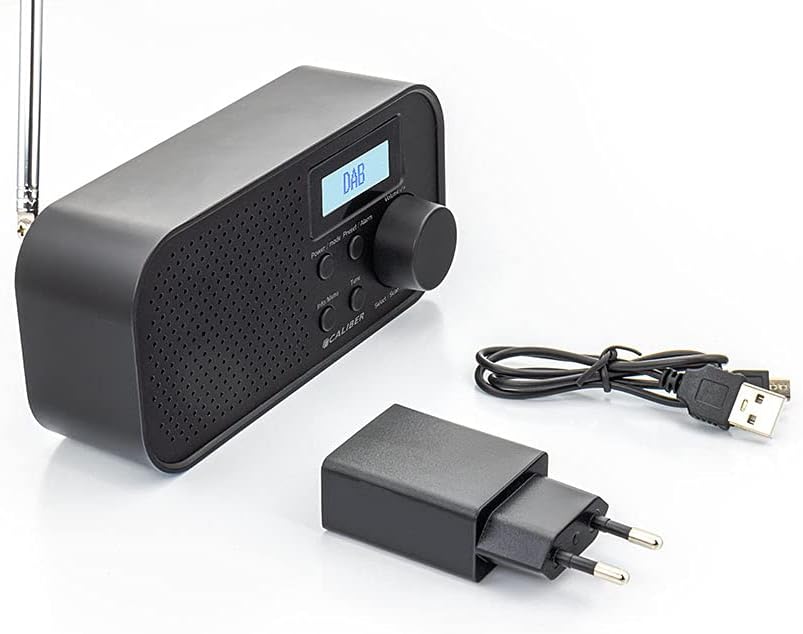
Image: Caliber HPG318DAB radio unit, USB charging cable, and power adapter.
4. Produk Lebihview
4.1 Kawalan Panel Hadapan
Imej: Depan view of the Caliber HPG318DAB radio, highlighting the LCD screen, speaker grille, and control buttons.
- Skrin LCD: Displays station information, time, and menu options.
- Butang Kuasa / Mod: Turns the radio on/off and switches between DAB+ and FM modes.
- Butang Menu/Maklumat: Accesses menu settings and displays additional information.
- Preset/Alarm Button: Saves/recalls preset stations and sets alarm functions.
- Select/Scan Button: Confirms selections and initiates station scans.
- Butang Tunda: Membisukan penggera buat sementara waktu.
- Tombol Kelantangan: Melaraskan kelantangan audio.
- Gril Pembesar Suara: Output audio.
4.2 Sambungan Panel Belakang

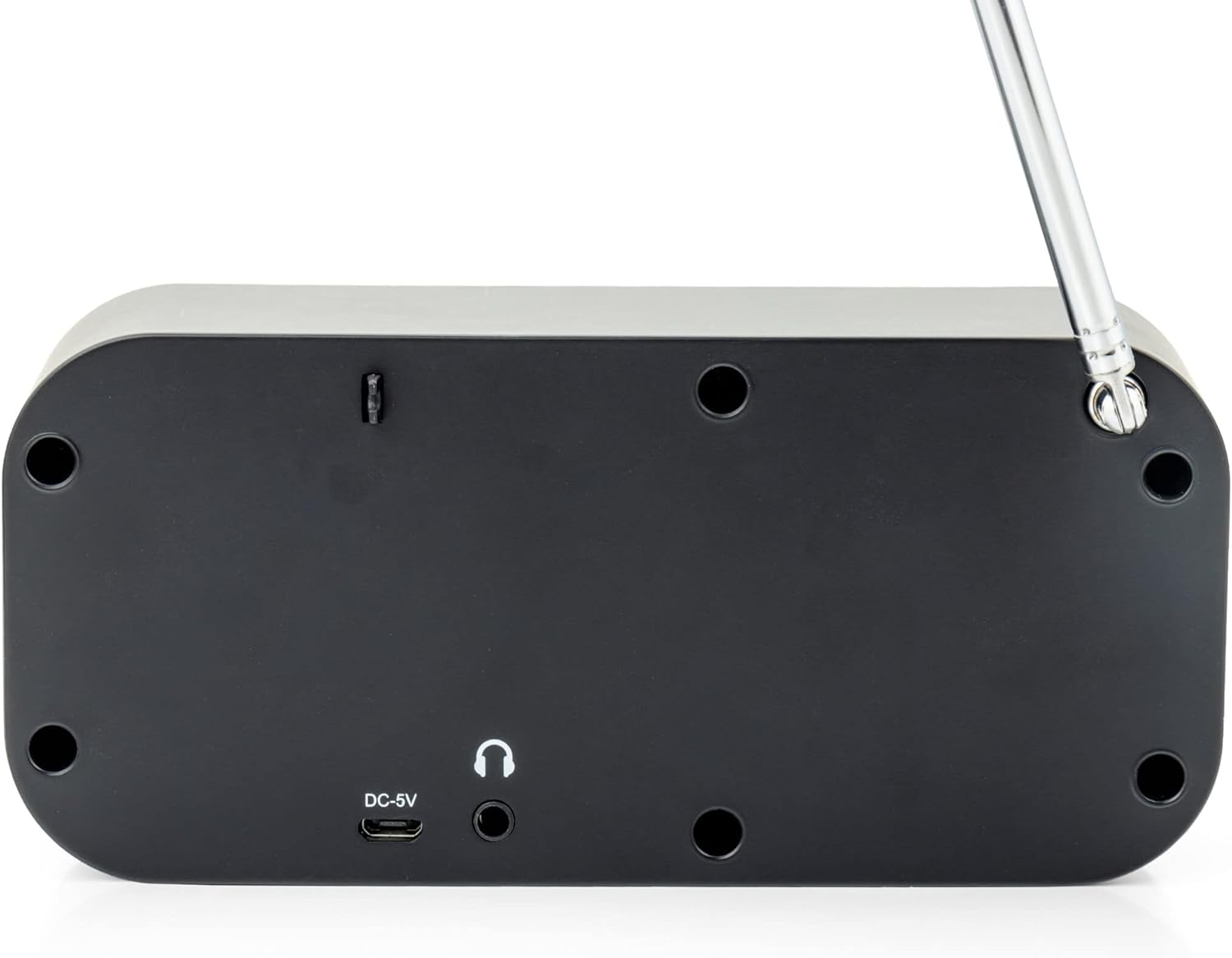
Imej: Belakang view of the Caliber HPG318DAB radio, showing the DC-5V charging port, 3.5mm headphone jack, and telescopic antenna.
- Input DC-5V: Connect the USB charging cable here.
- Bicu Fon Kepala 3.5mm: Untuk menyambungkan fon kepala atau fon telinga.
- Antena Teleskopik: Lanjutkan untuk penerimaan radio yang optimum.
5. Persediaan
5.1 Mengecas Bateri
The Caliber HPG318DAB features a built-in rechargeable battery, providing up to 8 hours of playback on a full charge.
- Connect the small end of the provided USB charging cable to the Input DC-5V port di bahagian belakang radio.
- Connect the larger end of the USB cable to the provided power adapter.
- Palamkan penyesuai kuasa ke salur keluar dinding standard.
- The charging indicator on the LCD screen will show the charging status. Once fully charged, the indicator will change.
Note: It is recommended to fully charge the battery before first use.
5.2 Pelarasan Antena
For optimal radio reception, fully extend the telescopic antenna located on the rear of the device. Adjust its position to improve signal strength if reception is poor.
6. Arahan Operasi
6.1 Kuasa Hidup/Mati dan Pemilihan Mod
- Untuk menghidupkan radio ON, tekan dan tahan butang Kuasa/Mod butang.
- Untuk menghidupkan radio DIMATIKAN, tekan dan tahan butang Kuasa/Mod butang lagi.
- Untuk bertukar antara DAB+ dan FM modes, short press the Kuasa/Mod button while the radio is on. The current mode will be displayed on the LCD screen.
6.2 Operasi Radio DAB+
- Tukar kepada mod DAB+ menggunakan Kuasa/Mod butang.
- The radio will automatically perform a full scan for available DAB+ stations upon first use or if no stations are found. To initiate a manual scan, press the Menu/Maklumat button, navigate to 'Full Scan', and press Select/Scan.
- Gunakan Tombol Kelantangan to scroll through the list of available stations. Press Select/Scan untuk memilih stesen.
- To save a station as a preset (up to 10 presets): While listening to a station, press and hold the Preset/Alarm butang. Gunakan Tombol Kelantangan untuk memilih nombor pratetap (1-10), kemudian tekan Select/Scan untuk mengesahkan.
- Untuk memanggil semula stesen pratetap: Tekan pendek Preset/Alarm butang, gunakan Tombol Kelantangan untuk memilih nombor pratetap yang diingini, kemudian tekan Select/Scan.
- Tekan ke Menu/Maklumat butang ke view additional information (e.g., program type, signal strength, time) provided by Radio Data System (RDS).
6.3 Operasi Radio FM
- Tukar kepada mod FM menggunakan Kuasa/Mod butang.
- To automatically scan for stations: Press and hold the Select/Scan button. The radio will scan and stop at the next strong station.
- To manually tune: Rotate the Tombol Kelantangan to adjust the frequency in small increments.
- To save a station as a preset (up to 10 presets): While listening to a station, press and hold the Preset/Alarm butang. Gunakan Tombol Kelantangan untuk memilih nombor pratetap (1-10), kemudian tekan Select/Scan untuk mengesahkan.
- Untuk memanggil semula stesen pratetap: Tekan pendek Preset/Alarm butang, gunakan Tombol Kelantangan untuk memilih nombor pratetap yang diingini, kemudian tekan Select/Scan.
- Tekan ke Menu/Maklumat butang ke view additional information (e.g., station name, program type) provided by Radio Data System (RDS).
6.4 Kawalan Kelantangan
Putarkan yang besar Tombol Kelantangan mengikut arah jam untuk meningkatkan kelantangan dan lawan arah jam untuk mengurangkannya.
6.5 Penggunaan Fon Kepala
Connect any standard 3.5mm headphones or earphones to the Bicu Fon Kepala 3.5mm on the rear of the radio for private listening. The internal speaker will automatically mute when headphones are connected.
6.6 Fungsi Penggera
The radio includes alarm clock and sleep timer functions.
Menetapkan Jam Penggera:
- Tekan dan tahan butang Preset/Alarm button until the alarm setup menu appears.
- Gunakan Tombol Kelantangan to navigate through options like Alarm 1, Alarm 2, Time, Source (Buzzer/DAB/FM), and Volume. Press Select/Scan untuk mengesahkan setiap tetapan.
- Set the desired alarm time, choose your preferred alarm source (buzzer, DAB+ station, or FM station), and set the alarm volume.
- Ensure the alarm is set to 'On' in the menu.
Menggunakan Fungsi Tunda:
Apabila penggera berbunyi, tekan Tunda button to temporarily pause the alarm for a short period (e.g., 9 minutes). The alarm will sound again after the snooze period.
Menetapkan Pemasa Tidur:
- Tekan ke Menu/Maklumat butang.
- Navigate to the 'Sleep' option using the Tombol Kelantangan dan tekan Select/Scan.
- Select the desired sleep timer duration (e.g., 15, 30, 45, 60, 90 minutes, or Off). The radio will automatically turn off after the selected time.
7. Penyelenggaraan
7.1 Pembersihan
To clean the radio, use a soft, dry cloth. Do not use abrasive cleaners, waxes, or solvents as they may damage the finish.
7.2 Penyimpanan
When not in use for extended periods, store the radio in a cool, dry place away from direct sunlight and extreme temperatures. Ensure the battery is partially charged before storage to maintain its lifespan.
7.3 Penjagaan Bateri
To prolong the life of the built-in Lithium-ion battery, avoid fully discharging it frequently. Charge the radio regularly, even if not in constant use.
8. Penyelesaian masalah
| Masalah | Kemungkinan Punca | Penyelesaian |
|---|---|---|
| Radio tidak dihidupkan. | Bateri habis. | Connect the radio to power using the USB cable and adapter to charge the battery. |
| Penerimaan radio yang lemah (DAB+/FM). | Antena tidak dilanjutkan atau kawasan isyarat lemah. | Fully extend the telescopic antenna and adjust its position. Try moving the radio to a different location. |
| Tiada bunyi. | Kelantangan terlalu rendah atau fon kepala disambungkan. | Tingkatkan kelantangan menggunakan Tombol Kelantangan. Disconnect headphones if you want sound from the speaker. |
| Penggera tidak berbunyi. | Penggera tidak ditetapkan dengan betul atau dimatikan. | Check alarm settings (time, source, volume, 'On' status) in the menu. |
9. Spesifikasi
| Ciri | Spesifikasi |
|---|---|
| Nombor Model | HPG318DAB |
| Dimensi (L x W x H) | 15 x 4 x 6.5 cm |
| Berat badan | 255 g |
| Sumber Kuasa | Battery-Powered (1 Lithium-ion battery required) |
| Hayat Bateri | Sehingga 8 jam |
| Kumpulan Radio yang Disokong | DAB+, FM |
| Teknologi Ketersambungan | AUX (for headphones), USB (for charging) |
| Output Pembesar Suara Maksimum | 25 Watt |
| bahan | plastik |
| warna | Hitam |
| Ciri Khas | Portable, Alarm Function, RDS, LCD Screen |
10. Waranti dan Sokongan
For warranty information and customer support, please refer to the documentation provided with your purchase or visit the official Caliber webtapak. Simpan bukti pembelian anda untuk sebarang tuntutan waranti.