
1. Pengenalan
The Avidsen HomeCam Battery is a 100% wireless outdoor surveillance camera designed for easy installation and robust home protection. Featuring 1080P Full HD resolution, a solar panel for continuous power, night vision, and two-way audio, this camera allows you to monitor your property remotely via a smartphone application without any subscription fees. This manual provides detailed instructions for setting up, operating, and maintaining your camera.
2. Apa yang ada di dalam Kotak
Sila pastikan semua komponen ada di dalam pakej:
- 1 x Avidsen HomeCam Battery IP WiFi Camera
- 1 x Solar Panel (PV module)
- 2 x 18650 Bateri
- 1 x Camera Sealing Gasket
- Skru Pemasangan dan Palam Dinding

Image: The Avidsen HomeCam Battery camera and its accompanying solar panel, unmounted, showing the main components included in the box.
3. Panduan Persediaan
3.1. Pemasangan Bateri
- Cari petak bateri pada kamera.
- Insert the two 18650 batteries, ensuring correct polarity (+/-).
- Tutup petak bateri dengan selamat.
3.2. Memasang Kamera dan Panel Suria
The camera and solar panel are designed for outdoor use and can be mounted separately or together. Choose a location that provides optimal sunlight exposure for the solar panel and a clear view untuk kamera.
- Pemasangan Kamera: The camera features an innovative magnetic mount for precise orientation. Secure the base of the mount to a wall using the provided screws and wall plugs. Attach the camera to the magnetic base and adjust its angle.
- Pemasangan Panel Suria: Mount the solar panel in a location that receives direct sunlight for several hours a day. Connect the solar panel cable to the camera's charging port.
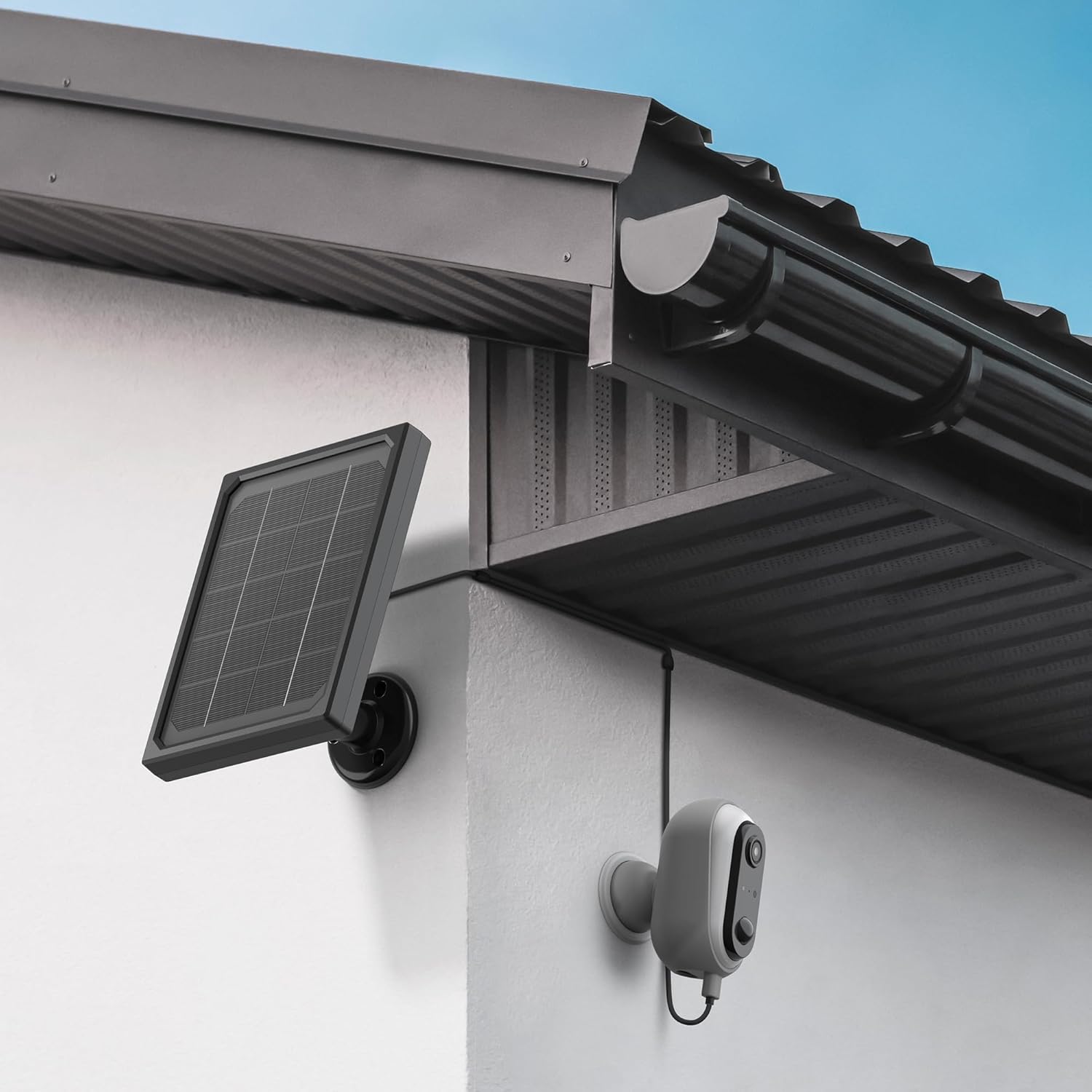
Image: The Avidsen HomeCam Battery camera and its solar panel are shown securely mounted on an exterior wall, positioned to capture sunlight and monitor the area.

Imej: Dari dekat view of the Avidsen HomeCam Battery camera, highlighting its adjustable magnetic mount which allows for flexible positioning and angle adjustments.
3.3. App Download and Initial Pairing
- Download the "Avidsen Home" application from your smartphone's app store (available on Google Play and Apple App Store).
- Buka apl dan buat akaun atau log masuk jika anda sudah memilikinya.
- Follow the in-app instructions to add a new device. This typically involves scanning a QR code on the camera or manually selecting the device type.
- Ensure your smartphone is connected to a 2.4GHz Wi-Fi network during the pairing process.
3.4. Sambungan Wi-Fi
During the app pairing process, you will be prompted to connect the camera to your home Wi-Fi network.
- Enter your Wi-Fi network name (SSID) and password when requested by the app.
- The camera supports 2.4GHz Wi-Fi networks only. Ensure your router is configured accordingly.
- Sebaik sahaja disambungkan, lampu penunjuk kamera akan berubah dan aplikasi akan mengesahkan pasangan yang berjaya.
4. Mengendalikan Kamera
4.1. Hidup View dan Kawalan
Once connected, open the Avidsen Home app to access the live feed from your camera.
- Video Langsung: Tap on the camera in the app to view the real-time video stream.
- Audio Dua hala: Use the microphone icon in the app to speak through the camera's speaker and the speaker icon to listen to audio from the camera's microphone.
- Rakaman: Manually record video or capture screenshots directly from the live view antara muka.
- Main balik: Akses foo yang dirakamtage stored on the MicroSD card (not included) via the app's playback feature.

Image: A smartphone screen showing the Avidsen Home app, with options for live view, screenshot, two-way talk, recording, playback, and photo album.
4.2. Pengesanan Gerakan dan Pemberitahuan
The camera features motion detection to alert you to activity.
- Dayakan/Lumpuhkan: In the app settings for your camera, you can enable or disable motion detection.
- Sensitiviti: Laraskan kepekaan pengesanan gerakan untuk meminimumkan penggera palsu.
- Pemberitahuan: When motion is detected, you will receive a notification on your smartphone.
- Rakaman: Motion-triggered events are automatically recorded to the MicroSD card (if installed).
4.3. Penglihatan Malam
The integrated infrared LEDs provide clear visibility up to 8 meters in total darkness.
- Penglihatan malam diaktifkan secara automatik dalam keadaan cahaya malap.
- The camera provides a clear black and white image in night vision mode.
4.4. Local Storage (MicroSD Card)
The camera supports local storage via a MicroSD card (up to 128GB, not included).
- Masukkan kad MicroSD ke dalam slot yang ditetapkan pada kamera.
- Ensure the card is formatted correctly (FAT32 recommended).
- All recordings, including motion-triggered events, will be saved to this card.
4.5. Integrasi Rumah Pintar
The Avidsen HomeCam Battery is compatible with Amazon Alexa and Google Assistant.
- Link your Avidsen Home account with your Alexa or Google Assistant app.
- Gunakan arahan suara untuk view suapan kamera anda pada paparan pintar yang serasi.
5. Penyelenggaraan
5.1. Pembersihan
- Regularly clean the camera lens and the surface of the solar panel with a soft, damp kain untuk memastikan prestasi optimum.
- Elakkan penggunaan bahan kimia yang keras atau bahan kasar yang boleh merosakkan permukaan.
5.2. Penjagaan Bateri
- The solar panel is designed to keep the batteries charged. Ensure the panel is free from obstructions and receives adequate sunlight.
- If the camera's battery level drops significantly, consider repositioning the solar panel or manually charging the batteries if possible (refer to specific battery charging instructions if applicable).
5.3. Connection Check
- Periodically check the physical connection between the solar panel and the camera to ensure it is secure and free from corrosion.
- Verify the camera's Wi-Fi connection status in the Avidsen Home app.
6. Penyelesaian masalah
6.1. No Power / Camera Not Turning On
- Ensure the 18650 batteries are correctly inserted with the right polarity.
- Check if the batteries are charged. If not, ensure the solar panel is connected and receiving sunlight, or try charging the batteries externally if possible.
- Verify the power button (if any) is pressed.
6.2. Tidak Dapat Menyambung ke Wi-Fi
- Confirm your Wi-Fi network is 2.4GHz. The camera does not support 5GHz networks.
- Pastikan kata laluan Wi-Fi yang dimasukkan dalam aplikasi adalah betul.
- Gerakkan kamera lebih dekat dengan penghala Wi-Fi anda untuk meningkatkan kekuatan isyarat.
- Mulakan semula penghala anda dan kamera.
- If issues persist, try resetting the camera to factory settings (refer to the reset procedure in the app or device manual) and re-pairing.
6.3. Kualiti Imej Lemah
- Bersihkan lensa kamera untuk menghilangkan sebarang kotoran atau kesan.
- Pastikan tiada halangan di hadapan kanta.
- Check your Wi-Fi signal strength; a weak signal can affect video streaming quality.
6.4. Pengesanan Gerakan Tidak Berfungsi atau Terlalu Banyak Penggera Palsu
- Verify motion detection is enabled in the Avidsen Home app.
- Adjust the motion detection sensitivity settings in the app. Lower sensitivity for fewer false alarms, higher for more sensitive detection.
- Pastikan medan kamera view is clear and not obstructed by moving objects like tree branches.
7. Spesifikasi
| Nama Model | HOME CAM BATTERY (127070) |
| Resolusi | 1080p HD Penuh |
| Ketersambungan | Tanpa Wayar (Wi-Fi 2.4GHz) |
| Sumber Kuasa | Solar Panel (5V 3W), 2x 18650 Batteries |
| Julat Penglihatan Malam | Sehingga 8 meter |
| Bidang View | 130° |
| Penarafan IP | IP65 (Outdoor use) |
| Penyimpanan | Kad MikroSD (sehingga 128GB, tidak termasuk) |
| Ciri Khas | Motion Detection, Two-Way Audio, Smart Home Compatibility (Alexa, Google Assistant) |
| Dimensi | 31.5 x 21 x 8.5 cm |
| Berat badan | 1100 Gram |
8. Waranti & Sokongan
8.1. Waranti Pengeluar
Produk Avidsen ini dilindungi oleh Waranti pengilang selama 2 tahun dari tarikh pembelian. Sila simpan bukti pembelian anda untuk tuntutan waranti. Waranti melindungi kecacatan pada bahan dan mutu kerja di bawah penggunaan biasa.
8.2. Sokongan Teknikal
For technical assistance, troubleshooting, or further inquiries, please visit the official Avidsen website or contact their customer support. You can find contact information and FAQs on their webtapak: