
pengenalan
This manual provides instructions for the setup, operation, and maintenance of your Sharper Image Foldable Gaming Chair with Onboard Speakers. Please read this guide thoroughly before use and retain it for future reference to ensure safe and optimal performance.
Maklumat Keselamatan
- Kapasiti Berat Maksimum: This chair supports a maximum weight of 300 pounds (136 kg). Do not exceed this limit to prevent damage or injury.
- Rocking Feature: Use caution when utilizing the rocking feature. Avoid excessive or aggressive rocking to prevent tipping or injury.
- Folding Mechanisms: Exercise care when folding and unfolding the chair. Keep hands and fingers clear of moving parts to avoid pinching.
- penempatan: Ensure the chair is placed on a stable, flat, and level surface, such as a hard floor, during use.
- Kanak-kanak: Adult supervision is recommended for children using the chair.
Kandungan Pakej
Sahkan bahawa semua item terdapat dalam pakej:
- Sharper Image Foldable Gaming Chair with Onboard Speakers
- RCA to 3.5 mm mini adapter
- 3.5 mm mini cable
- Note: 6 AA 1.5V batteries are required for speaker operation (not included).
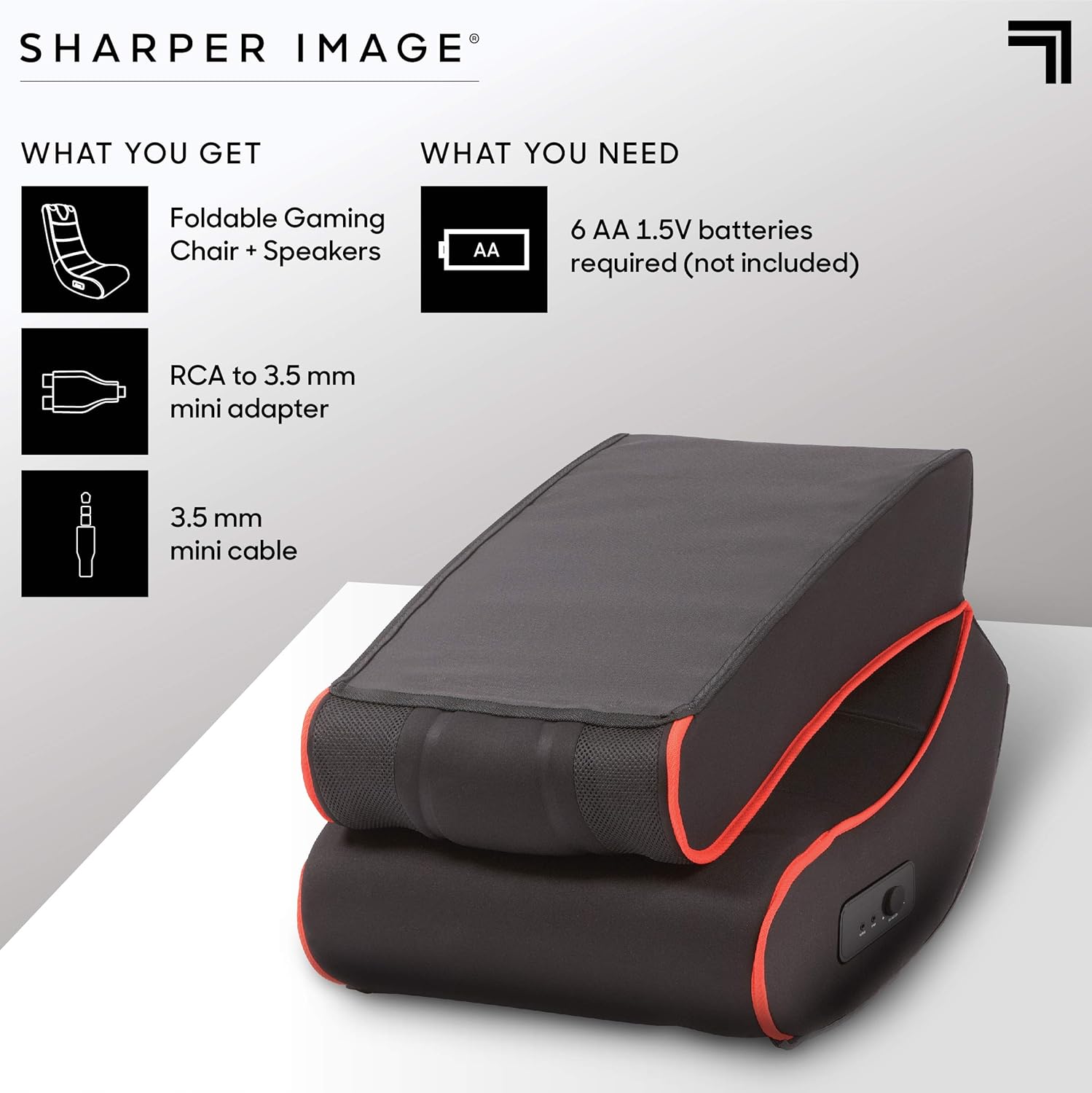
This image illustrates the items included in the package: the foldable gaming chair with speakers, an RCA to 3.5mm mini adapter, and a 3.5mm mini cable. It also indicates that 6 AA 1.5V batteries are required but not included.
Persediaan
Membentangkan Kerusi
- Tanggalkan kerusi dari pembungkusannya dengan berhati-hati.
- Letakkan kerusi di atas permukaan yang rata dan stabil.
- Unfold the chair by gently extending the backrest until it locks into an upright position. Ensure the folding mechanism is securely engaged before use.
Menghubungkan Penceramah
- Locate the battery compartment, typically on the side or bottom of the chair. Insert 6 AA 1.5V batteries (not included), ensuring correct polarity.
- Identify the audio input and output ports on the side control panel of the chair.
- Connect the 3.5 mm mini cable from your audio source (e.g., gaming console, TV, smartphone) to the "INPUT" port on the chair.
- If your audio source uses RCA outputs, use the provided RCA to 3.5 mm mini adapter to connect to the chair's "INPUT" port.
- (Optional) To connect external headphones or another audio device, use the "OUTPUT" port.

This image highlights the dual speakers located at the top of the chair and a close-up of the side control panel, which includes a volume/power knob, an audio input port, and an audio output port.
Arahan Operasi
Menghidupkan dan Melaraskan Kelantangan
- Once connected to an audio source and batteries are installed, turn the "VOLUME-ON" knob on the side control panel clockwise to power on the speakers and increase the volume.
- Laraskan kelantangan ke tahap yang anda inginkan.
- To power off the speakers, turn the "VOLUME-ON" knob counter-clockwise until it clicks off.
Using the Rocking Feature
The chair is designed to rock gently. Lean back or forward to engage the rocking motion. Ensure you maintain balance and do not rock excessively to prevent tipping.

This image shows a person comfortably seated in the gaming chair, engaged in playing a video game, illustrating the chair's intended use.
Penyelenggaraan
Pembersihan
To clean the chair, wipe it with a clean, damp cloth. Do not use harsh chemicals or abrasive cleaners, as these may damage the microfiber material. For stubborn stains, a mild soap solution can be used, followed by wiping with a clean, damp cloth. Always allow the chair to air dry completely.
Penyimpanan
When not in use, the chair can be folded for compact storage. To fold, gently push the backrest forward until the locking mechanism disengages, then fold the backrest down onto the seat. Store in a dry place away from direct sunlight and extreme temperatures.

This image displays the gaming chair in its folded position, demonstrating its compact design for easy storage.
Menyelesaikan masalah
| Masalah | Kemungkinan Punca | Penyelesaian |
|---|---|---|
| Tiada suara dari pembesar suara | Bateri mati atau tidak dimasukkan dengan betul. Volume knob is off or too low. Audio cable is not connected properly. Audio source volume is too low or muted. | Gantikan bateri atau pastikan polariti yang betul. Turn the "VOLUME-ON" knob clockwise. Periksa semua sambungan kabel audio. Tingkatkan kelantangan pada sumber audio anda. |
| Bunyi herot atau berderak | Bateri lemah. Sambungan audio longgar. Volume too high on chair or audio source. | Gantikan bateri. Re-seat audio cables. Reduce volume on chair or audio source. |
| Chair does not rock smoothly | Permukaan tidak rata. Halangan di bawah kerusi. | Move chair to a flat, even surface. Check for and remove any objects beneath the chair. |
Spesifikasi
| Ciri | Perincian |
|---|---|
| Nama Model | Charles |
| Jenama | Imej Lebih Tajam |
| warna | Hitam |
| bahan | Microfiber (Seat), Metal (Frame), Polyester (Fill) |
| Dimensi Produk (D x W x H) | 28"D x 16.5"W x 30"H (71.1 cm D x 41.9 cm W x 76.2 cm H) |
| Cadangan Berat Maksimum | 300 paun (136 kg) |
| Perhimpunan Diperlukan | Tidak |
| Ciri Audio | Dual Onboard Speakers, Side Controls (Volume-On, Input, Output) |
| Power Source for Speakers | 6 bateri AA 1.5V (tidak termasuk) |
| Faktor Bentuk | Boleh dilipat |
| Pergerakan | Bergoyang |

This image provides a visual representation of the chair's dimensions: 30 inches in height, 28 inches in depth, and 16.5 inches in width.
Waranti dan Sokongan
For warranty information and customer support, please refer to the documentation included with your purchase or visit the official Sharper Image website. Keep your proof of purchase for any warranty claims or service inquiries.