1. Pengenalan
Thank you for choosing the CATCHFACE Smart Lock. This advanced 5-in-1 keyless entry door lock provides multiple convenient and secure access methods, including fingerprint recognition, anti-peep virtual password, smartphone app control, IC card, and traditional physical keys. This manual will guide you through the installation, operation, and maintenance of your new smart lock to ensure optimal performance and security.
2. Kandungan Pakej
Sila sahkan bahawa semua komponen hadir sebelum memulakan pemasangan:
- 1 x Smart Lock Assembly
- 1 x 60/70mm Adjustable Backset Latch
- 1 x Installation Screws Bag
- 1 x Latch Box and Strike Plate
- 2 x Kekunci Mekanikal
- 5 x CATCHFACE IC Cards

Imej: Selesaiview of the CATCHFACE Smart Lock and its included components, such as the handle, latch, keys, and IC cards.
3. Spesifikasi
| Jenama | CATCHFACE |
| Nama Model | FBA-G01 |
| Jenis Kunci | Biometric door lock with fingerprint, Keypad smart door lock |
| bahan | Zink |
| Dimensi (L x W x H) | 5.8 x 2.8 x 2.5 inci |
| Berat Barang | 16 auns (1 paun) |
| Ciri Khas | Alarm, Anti-Peeping Password, Back-Lit Keypad, One-Touch Lock, Passcode Unlock |
| Protokol Ketersambungan | Bluetooth, Wi-Fi (dengan Gateway pilihan) |
| Jenis Pengawal | Amazon Alexa, Android, Google Assistant, iOS |
| Keserasian Ketebalan Pintu | 1.38" to 1.97" (35-50mm) |
| Selak Boleh Laras | 2.36" to 2.76" (60-70mm) |
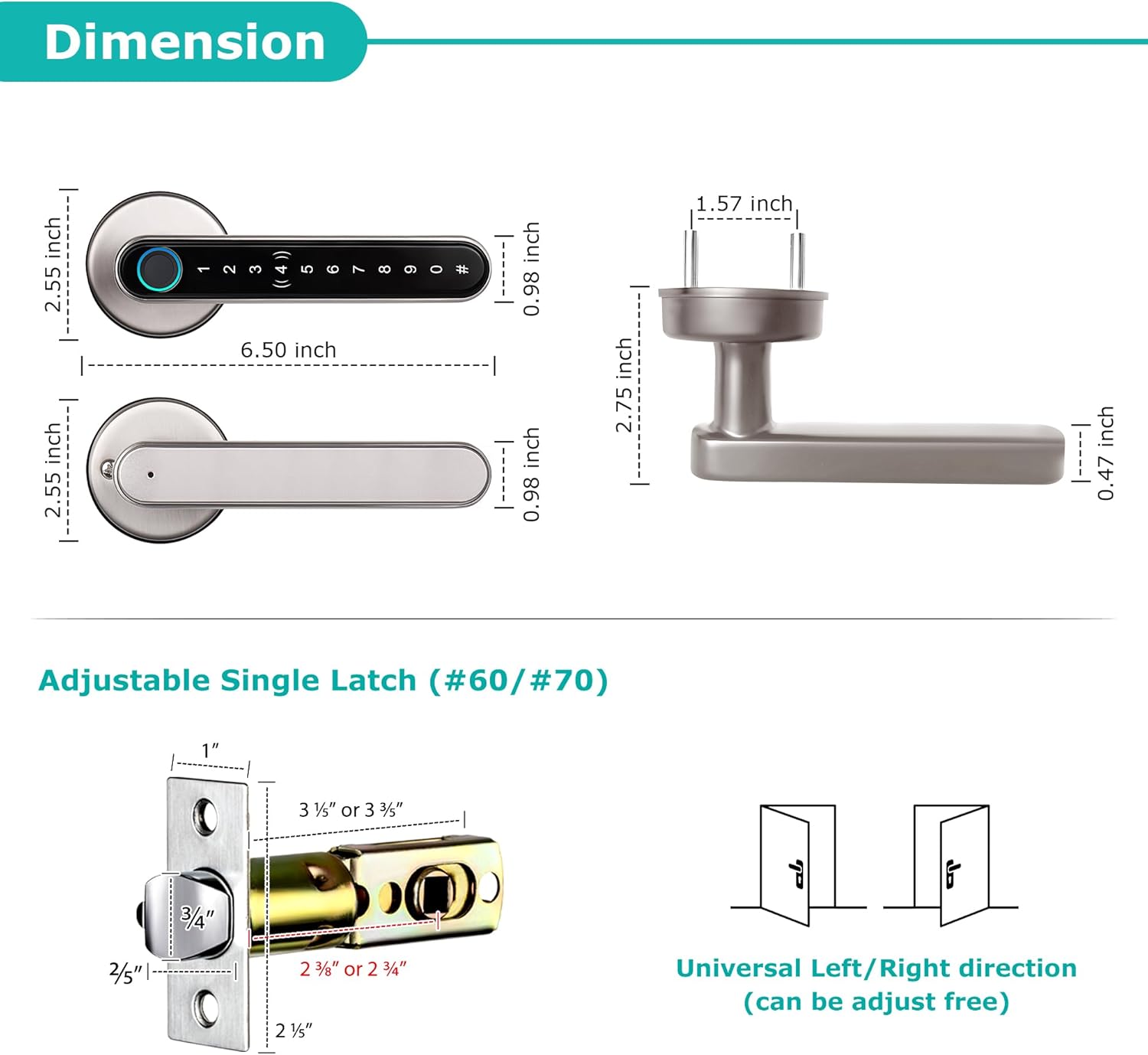
Image: Detailed dimensions of the smart lock and its adjustable latch mechanism.
4. Pemasangan
The CATCHFACE Smart Lock is designed for easy installation, typically taking minutes. It replaces standard single-cylinder U.S. door locks and supports both left and right-handed doors.
4.1 Semakan Pra-Pemasangan
- Ensure your door thickness is between 1.38" and 1.97" (35-50mm).
- Verify the adjustable latch can be set to 2.36" or 2.76" (60-70mm) backset.
- Confirm all package contents are present.
4.2 Langkah Pemasangan
Follow the step-by-step instructions provided in the included installation guide. While a video guide is typically provided by the manufacturer for visual assistance, it is not available in this manual. Key steps include:
- Prepare the door: Ensure the existing lock is removed and the door is ready for the new smart lock.
- Install the latch: Adjust the latch to the correct backset and insert it into the door edge.
- Install the exterior assembly: Feed the cable through the door and align the exterior handle.
- Install the interior mounting plate: Secure the mounting plate to the exterior assembly.
- Connect the cable and install the interior assembly: Connect the cable and attach the interior handle, ensuring proper alignment.
- Insert batteries: Install 4 AAA alkaline batteries into the battery compartment.
- Test the lock: Manually test the lock and handle for smooth operation.

Image: Components laid out for installation, illustrating the process.
5. Arahan Operasi
The CATCHFACE Smart Lock offers multiple ways to unlock and manage access.
5.1 Kaedah Membuka Kunci
- Buka kunci cap jari: Place your registered finger on the fingerprint sensor. The lock will recognize your fingerprint instantly (0.3s recognition speed) for seamless entry. The lock supports up to 100 fingerprints.

Image: Close-up of the fingerprint sensor on the smart lock, highlighting its quick recognition.
- Code Unlock (Anti-Peep Password): Enter your passcode on the backlit keypad. To prevent others from peeking, you can input any random numbers before or after your correct password. Press '#' to confirm and unlock.

Image: Illustration of the anti-peeping password feature, allowing extra digits to be entered before or after the actual code.
- Buka Kunci Kad IC: Tap the included IC card on the designated sensor area of the lock. The lock will verify the card and unlock. This method is ideal for users who prefer not to use a smartphone or fingerprint.

Image: A hand holding an IC card near the smart lock for unlocking.
- Buka Kunci Fizikal: In case of emergency or battery depletion, use one of the two provided mechanical keys to unlock the door manually.
- Kawalan Apl Telefon Pintar: Use the TT Lock app on your smartphone to unlock the door via Bluetooth when within range. For remote control, a CATCHFACE WiFi Gateway (sold separately, ASIN: B085HFFF9T) is required.
5.2 Mengunci Pintu
To lock the door, simply lift the handle upwards or long-press the '#' button on the keypad. The lock will engage automatically.

Image: Demonstrates how to lock the smart handle lock by long-pressing the '#' button.
5.3 TT Lock App Features
The TT Lock app provides comprehensive management of your smart lock:
- Monitor Lock Status: View remaining power, alerts, and real-time status.
- Hantar eKey: Share virtual keys with other TT Lock users.
- Generate Passcodes: Create permanent, timed, one-time, or recurring passcodes for various users (e.g., family, friends, maintenance, Airbnb guests).
- Kawalan Jauh: Lock/unlock remotely and manage codes from anywhere with the optional CATCHFACE WiFi Gateway.
- Manage Access Information: Generate or delete passwords, fingerprints, cards, or eKeys, and authorize administrators.
- Check Operation Logs: View unlock records and alarm records for enhanced security monitoring.
- Employee Attendance: Support office attendance management.

Image: The TT Lock Smart APP interface, illustrating its various features for lock management.

Image: Demonstrates the comprehensive management capabilities through both the mobile app and a web portal.
5.4 Remote Control with Gateway
To enable remote lock/unlock, code management, and real-time access logs from anywhere, you must pair your smart lock with the optional CATCHFACE WiFi Gateway (sold separately, ASIN: B085HFFF9T). This also allows seamless integration with Amazon Alexa and Google Home for voice control.

Image: Illustrates remote control functionality via smartphone and voice commands with a smart speaker, requiring the CATCHFACE Gateway.
6. Penyelenggaraan
6.1 Pengurusan Bateri
The smart lock is powered by 4 AAA alkaline batteries. The TT Lock app will provide low battery alarms. When battery levels are critically low (below 20%), the smart lock will emit a 'di-di' sound as a warning.
In case of complete battery depletion, a micro USB power bank can be used as a temporary power supply by connecting it to the micro USB charging port on the lock. Always keep the physical keys as a fail-safe option.

Image: Shows the micro USB port for emergency power supply and the battery compartment.
6.2 Pembersihan
To maintain the lock's appearance and functionality, wipe the surface with a soft, dry cloth. Avoid using abrasive cleaners or solvents that could damage the finish or electronic components.
7. Penyelesaian masalah
If you encounter issues with your CATCHFACE Smart Lock, please refer to the following common problems and solutions:
- Kunci tidak bertindak balas: Check battery levels in the TT Lock app. If low, replace batteries or use a micro USB power bank for temporary power. Ensure the lock is properly installed and all connections are secure.
- Cap jari tidak dikenali: Ensure your finger is clean and dry. Try re-registering your fingerprint in the app. Clean the fingerprint sensor with a soft cloth.
- Papan kekunci tidak bertindak balas: Ensure the keypad is clean. If the keypad is not lighting up, check battery levels.
- Remote unlock not working: Verify that the CATCHFACE WiFi Gateway is properly set up and connected to your home Wi-Fi network. Ensure the gateway is within Bluetooth range of the smart lock. Check your internet connection.
- Kunci mengeluarkan bunyi yang luar biasa: This might indicate low battery. If the sound persists after battery replacement, contact customer support.
- Difficulty with app connection: Ensure Bluetooth is enabled on your smartphone. Try restarting the app or your phone. If issues persist, try re-pairing the lock with the app.
For more detailed troubleshooting or persistent issues, please consult the TT Lock app's help section or contact CATCHFACE customer support.
8. Waranti dan Sokongan
CATCHFACE is committed to providing high-quality smart lock solutions. While specific warranty details are not provided in this manual, most CATCHFACE products come with a standard manufacturer's warranty covering defects in materials and workmanship.
For warranty claims, technical support, or any inquiries regarding your CATCHFACE Smart Lock, please contact CATCHFACE customer service through their official website or the contact information provided with your purchase. You can also visit the CATCHFACE Store on Amazon untuk mendapatkan maklumat lanjut dan sumber sokongan.