
Cetis 2510D NOMW
Cetis Standard Desk Phone 2510D NOMW User Manual
Model: 2510D NOMW
pengenalan
Welcome to the user manual for your Cetis Standard Desk Phone, model 2510D NOMW. This guide provides essential information for setting up, operating, and maintaining your new telephone. Please read these instructions carefully to ensure proper use and longevity of your device.
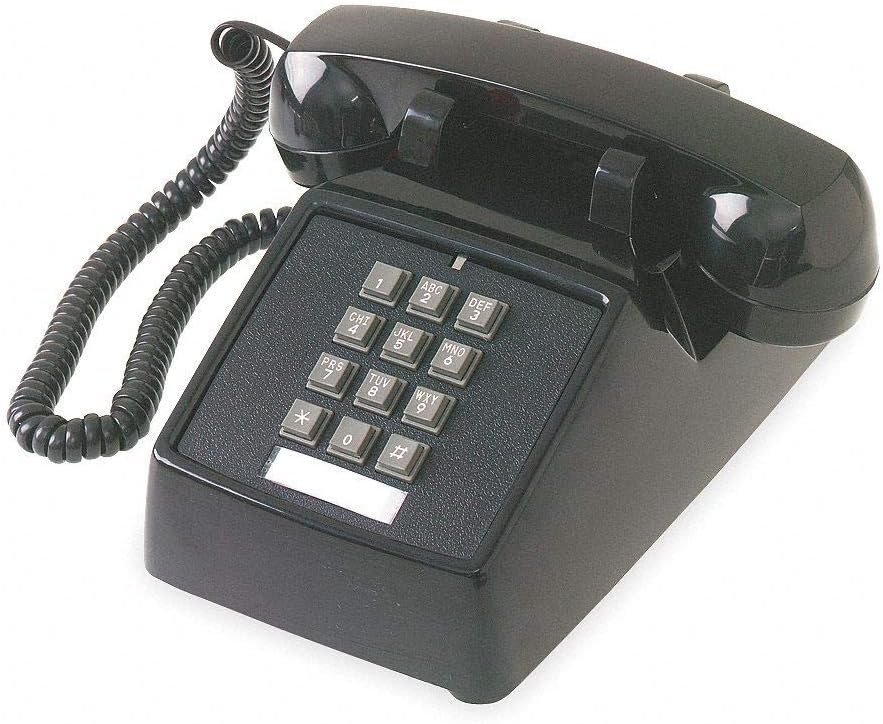
Figure 1: Cetis Standard Desk Phone 2510D NOMW. This image shows the black corded desk phone with its coiled handset cord, numeric keypad, and a blank label area below the keypad.
Arahan Keselamatan Penting
- jangan gunakan produk ini berhampiran air, contohnyaampiaitu, berhampiran tab mandi, mangkuk basuh, sinki dapur atau tab dobi, di ruang bawah tanah yang basah atau berhampiran kolam renang.
- elakkan using the telephone during an electrical storm. There may be a remote risk of electric shock from lightning.
- jangan use the telephone to report a gas leak in the vicinity of the leak.
- Sahaja use the power cord and accessories provided by the manufacturer.
- Lindungi the power cord from being walked on or pinched, particularly at plugs, convenience receptacles, and the point where they exit from the appliance.
Kandungan Pakej
Sahkan bahawa pakej anda mengandungi item berikut:
- Cetis Standard Desk Phone (Base Unit)
- Telefon bimbit
- Kord Handset Bergelung
- Line Cord (RJ11)
- Manual Pengguna (dokumen ini)
Arahan Persediaan
- Sambungkan Handset: Plug one end of the coiled handset cord into the handset and the other end into the jack on the side of the phone base unit, typically marked with a handset icon.
- Sambungkan Kord Talian: Plug one end of the line cord into the wall telephone jack (RJ11) and the other end into the LINE jack on the back or side of the phone base unit.
- penempatan: Place the phone on a stable, flat surface. Ensure it is not near heat sources or in direct sunlight.
- Ujian Permulaan: Angkat telefon bimbit. Anda sepatutnya mendengar nada dail. Jika tidak, periksa semula semua sambungan.
Arahan Operasi
Membuat Panggilan
- Angkat telefon bimbit.
- Dengarkan nada dail.
- Dail nombor telefon yang dikehendaki menggunakan papan kekunci.
- Tunggu panggilan disambungkan.
- When finished, place the handset back on the cradle.
Menjawab Panggilan
- Apabila telefon berdering, angkat gagang telefon.
- Begin your conversation.
- When finished, place the handset back on the cradle.
Adjusting Ringer Volume
The Cetis 2510D NOMW features a double gong ringer. The ringer volume is typically fixed or adjusted via a mechanical switch on the base unit (if present). Refer to the physical phone for any visible switches.
Adjusting Handset Volume
This model includes ADA compliant volume control for the handset. The volume control is usually a slider or button located on the side of the handset or base unit. Adjust it to a comfortable listening level during a call.
Penyelenggaraan
- Pembersihan: Lap telefon dengan kain lembut,amp kain. Jangan gunakan bahan kimia yang keras atau pembersih yang kasar.
- Penjagaan Kord: Avoid tangling or stretching the coiled handset cord excessively. Ensure the line cord is not pinched or damaged.
- Storan: If storing the phone for an extended period, disconnect it from the wall jack and store it in a cool, dry place.
Menyelesaikan masalah
| Masalah | Kemungkinan Punca | Penyelesaian |
|---|---|---|
| Tiada nada dail | Line cord disconnected or faulty. | Ensure the line cord is securely plugged into both the wall jack and the phone. Test with another phone if available. |
| Tidak dapat mendengar pemanggil / Pemanggil tidak dapat mendengar saya | Handset cord loose or faulty; Handset volume too low. | Check handset cord connections. Adjust handset volume control. |
| Telefon tidak berbunyi | Ringer turned off or faulty line. | Check for a ringer on/off switch on the phone base. Verify the phone line is active. |
| Butang tidak bertindak balas | Stuck buttons or internal fault. | Gently press buttons to ensure they are not stuck. If the issue persists, contact support. |
Spesifikasi
- model: Cetis 2510D NOMW
- Jenis: Standard Desk Phone
- warna: Hitam
- Number of Lines: 1
- Dering: Double Gong Ringer
- Telefon pembesar suara: Tidak
- Jenis Gunung: Meja
- Kawalan Kelantangan: ADA Compliant Handset Volume Control
- Sumber Kuasa: Line Powered (No Batteries Required)
- Termasuk: Port Data
Maklumat Waranti
For warranty details and service, please refer to the warranty card included with your product or visit the official Cetis webtapak. Simpan resit pembelian anda sebagai bukti pembelian.
Sokongan Pelanggan
If you require further assistance or encounter issues not covered in this manual, please contact Cetis customer support. Contact information can typically be found on the manufacturer's webtapak atau pada pembungkusan produk.
Untuk maklumat lanjut, lawati Cetis Official Webtapak.


