
1. Arahan Keselamatan Penting
Before using this product, please read this user manual carefully and save it for future reference. Failure to follow these instructions may result in electric shock, fire, or serious injury.
- Perkakas ini tidak dimaksudkan untuk digunakan oleh orang (termasuk kanak-kanak) yang kurang keupayaan fizikal, deria atau mental, atau kurang pengalaman dan pengetahuan, melainkan mereka telah diberi pengawasan atau arahan mengenai penggunaan perkakas oleh orang yang bertanggungjawab untuk keselamatan mereka.
- Jangan gunakan pembersih vakum di luar atau di permukaan basah.
- Do not allow children to play with the appliance. Close supervision is necessary when used by or near children.
- Jangan ambil bahan mudah terbakar atau mudah terbakar, seperti petrol, atau gunakan di kawasan yang mungkin terdapat bahan tersebut.
- Jangan ambil apa-apa yang terbakar atau berasap, seperti rokok, mancis, atau abu panas.
- Jangan gunakan tanpa beg habuk dan/atau penapis di tempatnya.
- Matikan perkakas sebelum membuat sebarang pelarasan, menukar aksesori atau menyimpan pembersih vakum.
- Gunakan hanya seperti yang diterangkan dalam manual ini. Gunakan hanya lampiran yang disyorkan pengilang.
- Jangan pegang pengecas atau perkakas dengan tangan yang basah.
2. Produk Lebihview
The Roborock H7 is a cordless stick vacuum cleaner designed for versatile and efficient cleaning. It features a lightweight design, powerful suction, and a long-lasting battery.
2.1 Komponen yang Disertakan
The following components are typically included with your Roborock H7 vacuum cleaner:
- H7 Stick Vacuum
- Berus Berbilang Permukaan
- Pemegang Beg Habuk
- Beg Habuk (x2)
- Baton (Extension Wand)
- Stesen dok
- Berus Debu
- Berus Mini Bermotor
- Bekalan Kuasa
- Tiub Flex
- Alat Celah
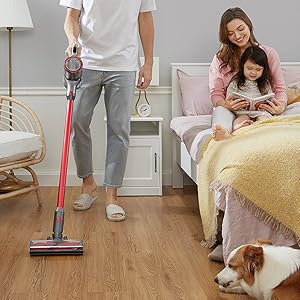
Image: All components included in the Roborock H7 package.
3. Persediaan dan Pemasangan
3.1 Memasang Vakum
- Attach the extension wand (baton) to the main vacuum body until it clicks into place.
- Connect the desired cleaning head (e.g., Multi-Surface Brush) to the other end of the extension wand.
- For handheld use, attach accessories directly to the main vacuum body.
3.2 Memasang Stesen Docking
The wall-mountable docking station provides convenient storage and charging. Ensure it is installed on a stable wall surface.

Image: Roborock H7 mounted on its wall docking station.
The MagBase system allows accessories to be magnetically attached to the docking station or other magnetic surfaces for easy access.

Image: Flexible MagBase accessories storage.
4. Mengecas dan Bateri
The Roborock H7 is powered by a Lithium-Ion battery, offering extended cleaning time.
4.1 Charging the Vacuum
- Connect the power supply to the docking station and plug it into a wall outlet.
- Place the vacuum cleaner onto the docking station. The OLED screen will indicate charging status.
- A full charge from empty takes approximately 2.5 hours.
4.2 Masa Jalan Bateri
The vacuum offers varying runtimes depending on the selected cleaning mode:
- Mod Eko: Sehingga 90 minit
- Mod Standard: Sehingga 45 minit
- Mod Maks: Sehingga 8 minit
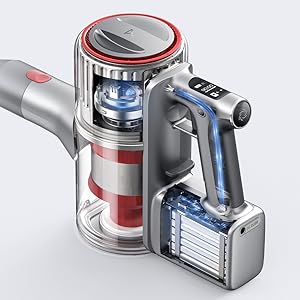
Image: Battery runtime and recharge time details.
5. Arahan Operasi
5.1 Menghidupkan/Mematikan dan Mod Sedutan
The vacuum cleaner features 160 AW constant suction power for effective cleaning across various surfaces.
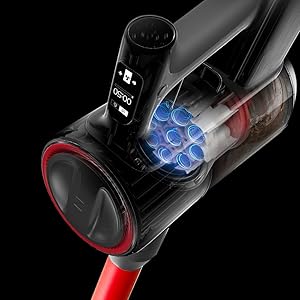
Image: Roborock H7 demonstrating its suction power.
- Tekan butang kuasa untuk menghidupkan atau mematikan vakum.
- Use the mode selection button to cycle through the three cleaning modes: Eco, Standard, and Max.
- The OLED screen displays the current mode and remaining battery life.
5.2 OLED Screen Information
The integrated OLED screen provides real-time updates on the vacuum's status, including:
- Baki peratusan bateritage and estimated runtime.
- Current cleaning mode.
- Maintenance alerts (e.g., filter cleaning reminder).
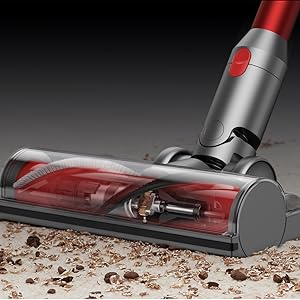
Image: OLED screen displaying operational information.
5.3 Using Various Attachments
The Roborock H7 comes with several attachments for different cleaning needs:
- Berus Berbilang Permukaan: Ideal for carpets and hard floors.
- Berus Mini Bermotor: Effective for pet hair and upholstery.
- Alat Celah: Untuk ruang dan sudut yang sempit.
- Berus Debu: Untuk permukaan halus dan pembersihan habuk.
- Flex Tube: Provides extended reach and flexibility for awkward areas.
Image: Roborock H7 in various cleaning scenarios with different attachments.
6. Penyelenggaraan
Regular maintenance ensures optimal performance and extends the lifespan of your Roborock H7 vacuum cleaner.
6.1 Mengosongkan Tong Sampah
Empty the dustbin after each use or when the MAX line is reached. The H7 supports both bagless operation and disposable dust bags for convenience.
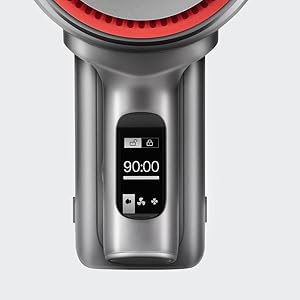
Image: Emptying the 560ml dust bag.
- Pastikan vakum dimatikan.
- Tekan butang pelepas tong sampah dan keluarkan tong sampah.
- Open the dustbin lid and empty contents into a trash receptacle.
- If using a dust bag, remove the full bag and replace it with a new one.
- Reattach the dustbin to the vacuum until it clicks securely.
6.2 Membersihkan Penapis
Lima-stage HEPA air filtration system helps maintain clean air. Filters should be cleaned regularly.

Image: Five-stage HEPA air filtration system.
- Remove the dustbin and then carefully remove the filters.
- Ketuk penapis perlahan-lahan untuk menghilangkan habuk yang longgar.
- Rinse the filters under running water. Ensure they are completely dry before reinserting (allow 24 hours).
- Replace filters if they are damaged or heavily soiled.
6.3 Membersihkan Kepala Berus
Periodically check the brush head for tangled hair or debris and clean as needed.
- Turn off the vacuum and detach the cleaning head.
- Use scissors or a cleaning tool to cut and remove any tangled hair or fibers from the brush roll.
- Ensure the brush roll spins freely before reattaching.
7. Penyelesaian masalah
Rujuk bahagian ini untuk isu biasa dan penyelesaiannya.
| Masalah | Kemungkinan Punca | Penyelesaian |
|---|---|---|
| Vakum tidak dihidupkan. | Bateri habis. | Cas vakum sepenuhnya. |
| Kuasa sedutan rendah. | Dustbin is full; Filters are clogged; Brush head is obstructed. | Empty dustbin; Clean or replace filters; Clear brush head of debris. |
| Brush head stops rotating. | Obstruction in the brush roll. | Matikan vakum dan keluarkan sebarang rambut atau serpihan yang kusut dari gulungan berus. |
| OLED screen displays an error code. | Isu dalaman khusus. | Rujuk kod ralat khusus dalam manual penuh atau hubungi sokongan pelanggan. |
8. Spesifikasi
| Ciri | Perincian |
|---|---|
| Jenama | roborock |
| Model | H7 |
| Ciri Khas | Cordless, HEPA Filtration, Lightweight |
| Jenis Penapis | Penapis HEPA |
| Wattage | 160 watt |
| Masa Mengecas | 2.5 Jam |
| Penggunaan yang Disyorkan | Deep Clean Carpets, Indoor Use |
| Faktor Bentuk | tongkat |
| Dimensi Produk | 11.2"L x 4.4"W x 9.1"H |
| Jenis Bateri | Litium-Ion |
| Tahap Kebisingan | 74 Desibel |
| Hayat Bateri (Maks) | 90 minutes (Eco Mode) |
| Berat Barang | 3.1 paun |
| Bilangan Kelajuan/Tahap Kuasa | 3 |
9. Video Produk Rasmi
Watch these official videos for visual guidance on using and maintaining your Roborock H7.
Video: Detailed overview and demonstration of the Roborock H7's features and operation (4:18 duration).
Video: In-depth guide to the Roborock H7, including assembly and usage tips (6:15 duration).
Video: Comprehensive demonstration of the Roborock H7's capabilities and maintenance (7:57 duration).
Video: User guide for the Roborock H7, covering various aspects of its use (5:01 duration).
10. Waranti dan Sokongan
The Roborock H7 Cordless Stick Vacuum Cleaner comes with a manufacturer's warranty. Please refer to the warranty card included in your product packaging for specific terms and conditions.
For technical support, troubleshooting assistance, or to inquire about replacement parts, please contact Roborock customer service through their official webtapak atau maklumat hubungan yang diberikan dalam dokumentasi produk anda.