
pengenalan
Thank you for choosing the Opal Selfie Stick OP-Sel-BT-01. This manual provides essential information for the safe and effective use of your device. Please read it thoroughly before operation and retain it for future reference.
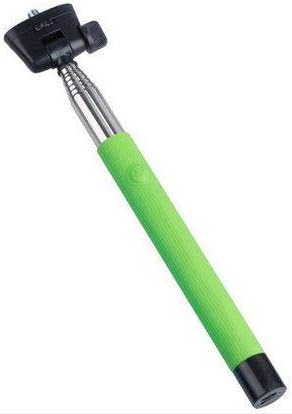
Rajah 1: The Opal Selfie Stick OP-Sel-BT-01 in green, showing its extendable arm, phone holder, and comfortable grip.
Ciri-ciri Produk
- warna: hijau
- Bahan Utama: Keluli
- Kapasiti Muatan Maks: 500 g
- Ketersambungan: Wayarles (Bluetooth)
- Sistem yang serasi: Android 3.0 dan ke atas, iOS 4.0 dan ke atas
Persediaan
- Unfold the Selfie Stick: Gently pull the phone holder section upwards to extend the stick.
- Adjust Phone Holder: Buka telefon clamp and securely place your smartphone within it. Ensure the phone is centered and stable. The clamp is designed to hold various phone sizes.
- Hidupkan kuasa: Locate the power button (if applicable, usually on the handle) and press it to turn on the selfie stick. An indicator light may illuminate.
Arahan Operasi
Berpasangan Bluetooth
- Ensure the selfie stick is powered on and in pairing mode (indicator light may flash rapidly).
- Pada telefon pintar anda, pergi ke tetapan > Bluetooth.
- Hidupkan Bluetooth dan cari peranti yang tersedia.
- Select "Opal OP-Sel-BT-01" or a similar name from the list of devices.
- Once paired, the indicator light on the selfie stick may turn solid or turn off, indicating a successful connection.
Mengambil Foto/Video
- Buka aplikasi kamera telefon pintar anda.
- Panjangkan batang selfie ke panjang yang anda inginkan.
- Position your phone for the desired shot.
- Press the shutter button on the selfie stick handle to capture a photo or start/stop video recording.
Penyelenggaraan
- Pembersihan: Wipe the selfie stick with a soft, dry cloth. Do not use abrasive cleaners or solvents.
- Storan: Store the device in a cool, dry place away from direct sunlight and extreme temperatures. Retract the stick fully before storage.
- Penjagaan Bateri: If the selfie stick has a rechargeable battery, ensure it is charged periodically even when not in use to maintain battery health.
Menyelesaikan masalah
| Masalah | Kemungkinan Punca | Penyelesaian |
|---|---|---|
| Tidak boleh berpasangan dengan telefon | Selfie stick not in pairing mode; Bluetooth off on phone; battery low. | Ensure stick is on and in pairing mode. Turn phone's Bluetooth off/on. Charge the selfie stick. |
| Shutter button not working | Not paired; camera app settings. | Verify successful Bluetooth pairing. Check camera app settings for volume button shutter control. |
| Phone not stable in clamp | Phone not centered; clamp not fully secured. | Re-position phone to be centered. Ensure clamp is firmly gripping the phone. |
Spesifikasi
- model: OP-Sel-BT-01
- Jenama: Opal
- warna: hijau
- Bahan Utama: Keluli
- Kapasiti Muatan Maks: 500 g
- Ketersambungan: Wayarles (Bluetooth)
- Sistem Operasi yang Disokong: Android 3.0+, iOS 4.0+
- ASIN: B091DBB122
- Tarikh Pertama Tersedia: 30 Mac 2021
Waranti dan Sokongan
For information regarding warranty coverage or technical support, please refer to the documentation included with your purchase or visit the official Opal webtapak. Syarat jaminan tertentu mungkin berbeza mengikut wilayah dan peruncit.
Maklumat Keselamatan
- Jangan dedahkan peranti kepada suhu yang melampau, lembapan atau cahaya matahari langsung untuk tempoh yang lama.
- Jauhkan daripada kanak-kanak.
- Jangan cuba membuka atau mengubah suai peranti. Ini boleh membatalkan jaminan dan menyebabkan kerosakan.
- Ensure your phone is securely fastened in the clamp before extending the stick.