
pengenalan
Welcome to your new BONECO U250 Humidifier. This manual provides essential information for the safe and efficient operation, maintenance, and troubleshooting of your device. The BONECO U250 is designed to take the guesswork out of home humidity, featuring an AUTO mode for optimal humidity levels.
Arahan Keselamatan Penting
- Baca semua arahan sebelum menggunakan perkakas.
- Jangan kendalikan sebarang perkakas dengan kord atau palam yang rosak.
- Jauhkan kord kuasa daripada permukaan yang dipanaskan.
- Jangan gunakan di luar rumah.
- Always unplug the humidifier when not in use or before cleaning.
- Jangan sekat bukaan udara.
- Gunakan hanya seperti yang diterangkan dalam manual ini.
- Perkakas ini mempunyai palam terkutub (satu bilah lebih lebar daripada yang lain).
Produk Selesaiview
The BONECO U250 is a compact and efficient ultrasonic humidifier.
Komponen
- Tangki Air
- Unit Asas dengan Panel Kawalan
- Water Filter (2-in-1)
- Berus Pembersih
- Kord Kuasa

Depan view of the BONECO U250 Humidifier, showcasing its sleek white design and central water level indicator.
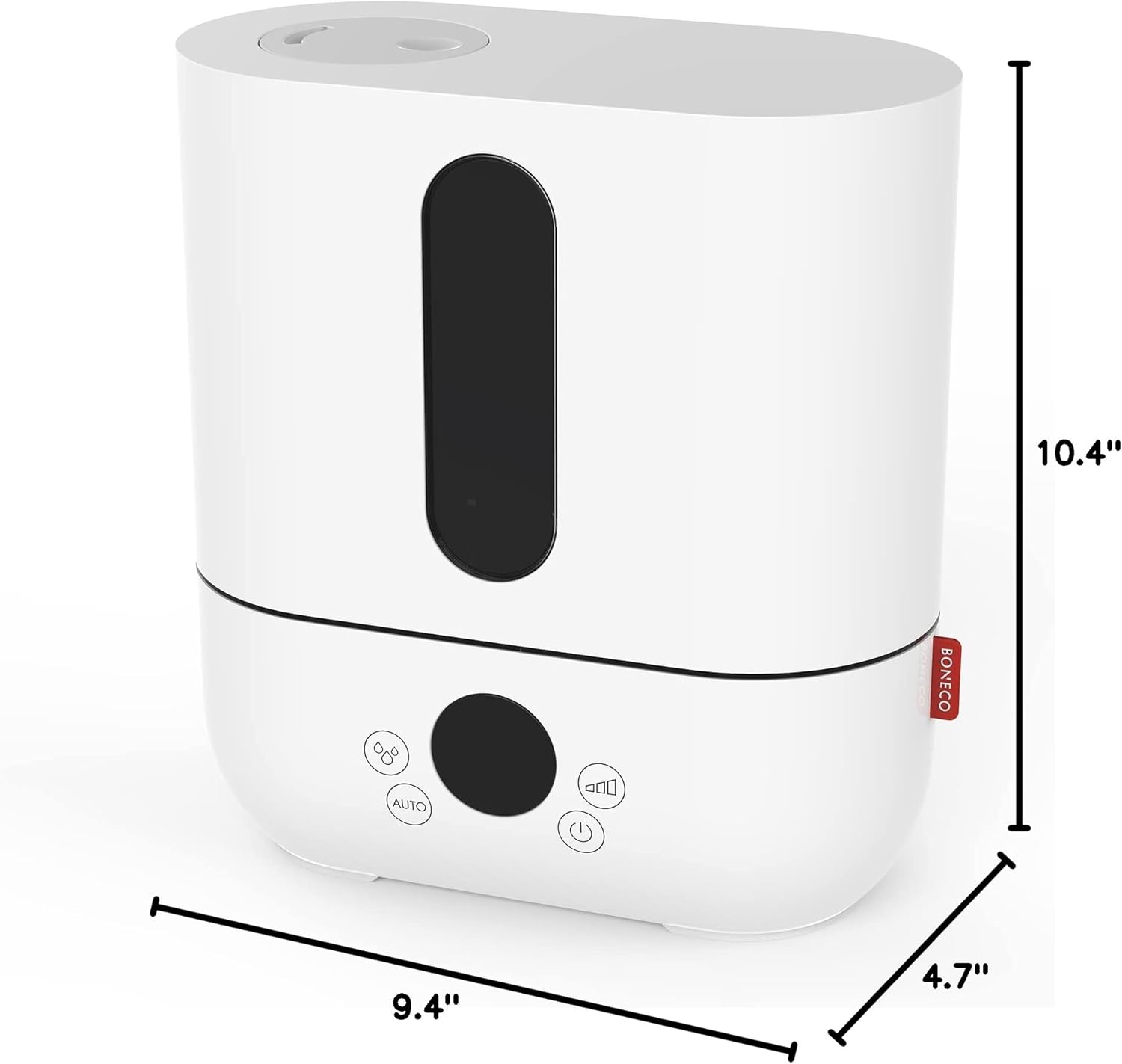
Diagram illustrating the dimensions of the BONECO U250 Humidifier: 10.4 inches high, 9.4 inches wide, and 4.7 inches deep.

Meletup view of the BONECO U250 Humidifier, showing the water tank, base, water filter, and cleaning brush as separate components.
Persediaan
- Membongkar: Keluarkan semua komponen dari pembungkusan dengan berhati-hati.
- penempatan: Place the humidifier on a firm, level, water-resistant surface. Ensure it is not placed directly on carpet or near heat sources.
- Isi Tangki Air:
- Keluarkan tangki air dari dasar.
- Tanggalkan penutup di bahagian bawah tangki.
- Fill the tank with clean, cool tap water. Distilled or demineralized water is recommended to prevent mineral buildup.
- Gantikan penutup dengan selamat.
- Masukkan Tangki Air: Place the filled water tank back onto the base unit.
- Sambungkan Kuasa: Palamkan kord kuasa ke salur keluar elektrik yang sesuai.

The BONECO U250 Humidifier with its top section removed, revealing the internal water reservoir and components.

Atas view of the BONECO U250 Humidifier's water tank, showing the integrated handle for easy carrying and refilling.
Arahan Operasi
Hidupkan/Mati Kuasa
Press the power button on the control panel to turn the humidifier on or off.
Kawalan Output Kabus
Rotate the knob on the front panel to adjust the mist output level from minimum to maximum.
Mod AUTO
The BONECO U250 features an AUTO mode that automatically adjusts the mist output to maintain an optimal humidity level in your room.
Penunjuk Air Rendah
The indicator light will illuminate when the water level in the tank is low, signaling that a refill is needed. The unit will automatically shut off when the water tank is empty.

Close-up of the BONECO U250 Humidifier's control panel, showing the mist output dial, auto mode button, and power button.
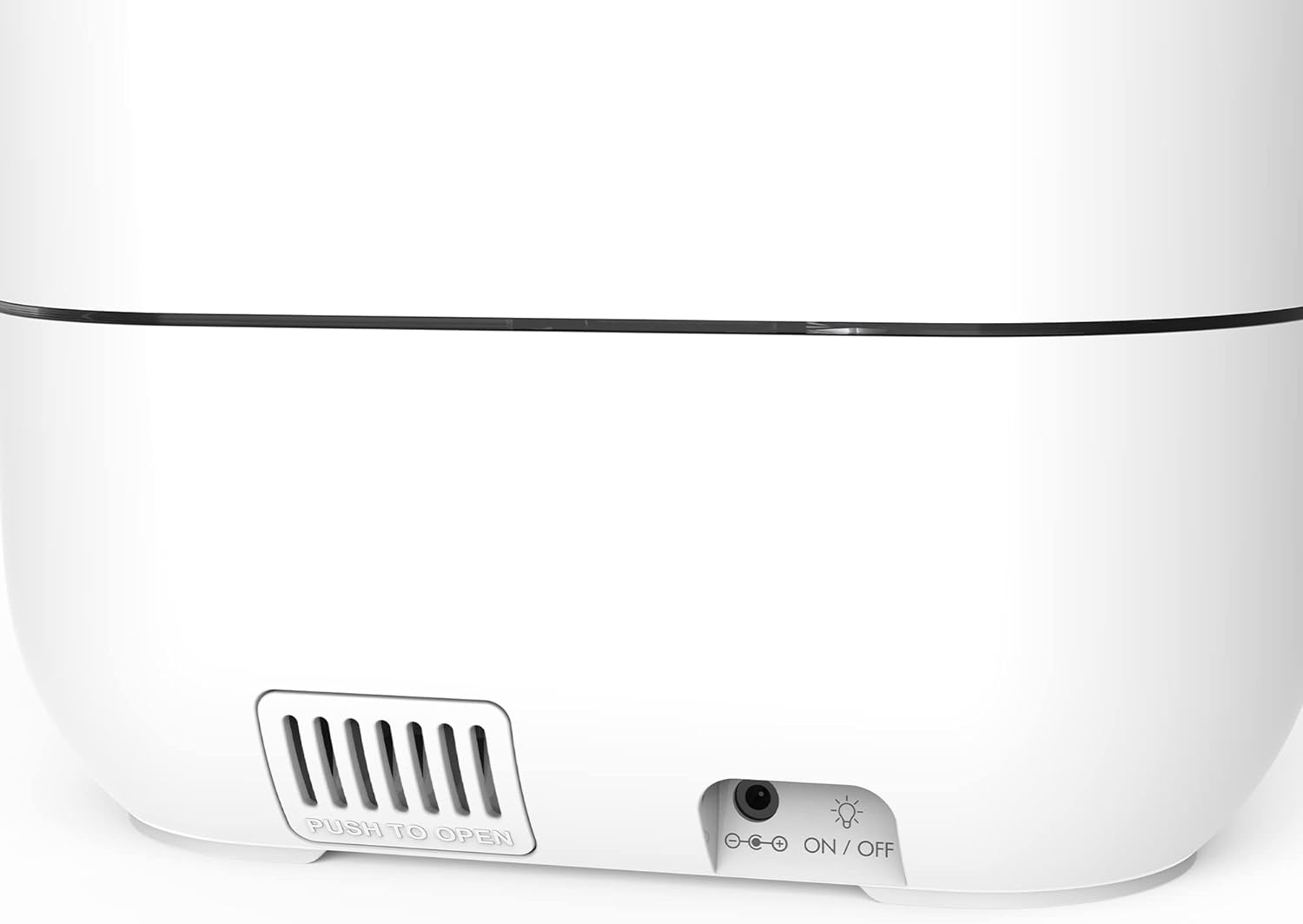
belakang view of the BONECO U250 Humidifier, highlighting the access panel for the water filter and the power input.
Penyelenggaraan
Regular cleaning and maintenance are crucial for optimal performance and longevity of your BONECO U250 Humidifier.
Penyelenggaraan Harian
- Kosongkan dan bilas tangki air dan tapaknya setiap hari.
- Isi semula dengan air tawar.
Pembersihan Mingguan
- Cabut plag unit dan kosongkan semua air.
- Tanggalkan penapis air.
- Clean the water tank and base with a soft brush and mild detergent.
- Bilas dengan teliti untuk mengeluarkan sebarang sisa.
- Use the provided cleaning brush to clean hard-to-reach areas.
Penggantian Penapis Air
The 2-in-1 water filter should be replaced regularly, depending on water hardness and usage. Refer to the filter packaging for specific replacement intervals.

belakang view of the BONECO U250 Humidifier with the filter access panel open, showing the removable water filter cartridge.

Dalaman view of the BONECO U250 Humidifier's base, showing the ultrasonic membrane and water channels, with the cleaning brush stored underneath.
Menyelesaikan masalah
| Masalah | Kemungkinan Punca | Penyelesaian |
|---|---|---|
| Tiada Keluaran Kabus | Paras air rendah | Isi semula tangki air. |
| Tiada Keluaran Kabus | Unit tidak dipasang | Pastikan kord kuasa dipasang dengan kukuh ke soket. |
| Tiada Keluaran Kabus | Membran ultrasonik kotor | Clean the ultrasonic membrane as per maintenance instructions. |
| Bau Luar Biasa | Stagair nant | Empty and clean the water tank and base. Use fresh water. |
| White Dust Around Unit | Mineral air keras | Use distilled or demineralized water. Replace water filter if necessary. |
Spesifikasi
| Ciri | Perincian |
|---|---|
| Jenama | BONECO |
| Nama Model | U250 (cool mist humidifier) |
| Nombor Model Item | 310739 |
| Ciri Khas | Mati Automatik, Senyap |
| Jenis Penapis | Antimikrob |
| Luas Lantai | 480 Kaki Persegi |
| Mod Operasi | Ultrasonik |
| Dimensi Produk | 4.7"D x 9.4"W x 10.4"H |
| Berat Barang | 5 paun |
| Jenis Bilik | Bilik Tidur, Ruang Tamu, Pejabat |
| Komponen yang Disertakan | Water filter, User manual, Cleaning brush, Power cord |
| Voltage | 120 Volt (AC) |
| bentuk | segi empat tepat |
| UPC | 834546002163 |
| Pengeluar | Boneco |
Waranti dan Sokongan
The BONECO U250 Humidifier comes with a 3-year warranty. For warranty claims or technical support, please contact BONECO customer service.
Pelan perlindungan tambahan tersedia untuk pembelian:
- Pelan Perlindungan 3 Tahun: $11.99
- Pelan Perlindungan 4 Tahun: $15.99
- Perlindungan Lengkap (bulanan): $16.99/bulan
For more information, visit the official BONECO webtapak atau rujuk butiran hubungan yang disediakan dalam pembungkusan produk anda.