
ARCADE1UP 195570000861
Arcade1Up Outrun Stand Up Edition Instruction Manual
Model: 195570000861
pengenalan
This manual provides essential information for the safe and proper assembly, operation, maintenance, and troubleshooting of your Arcade1Up Outrun Stand Up Edition arcade game. Please read this manual thoroughly before assembly and retain it for future reference.
The Arcade1Up Outrun cabinet includes four classic racing games: Berlari lebih cepat, Turbo Outrun, Outrunners, dan Power Drift. It features a steering wheel, gas pedal, and brake pedal for an authentic arcade experience.
Maklumat Keselamatan
Always follow basic safety precautions when assembling and operating this product to reduce the risk of fire, electric shock, or injury.
- Jauhkan daripada air dan kelembapan.
- Jangan cuba membuka atau mengubah suai unit.
- Pastikan unit diletakkan pada permukaan yang stabil dan rata.
- Unplug the unit from the power outlet before cleaning or maintenance.
- Produk ini bertujuan untuk kegunaan dalaman sahaja.
Kandungan Pakej
Verify that all components are present before beginning assembly. If any parts are missing or damaged, contact Arcade1Up customer support.
- Panel Kabinet Arked
- Control Panel Assembly (Steering Wheel, Buttons)
- Gas and Brake Pedal Assembly
- Khemah Bercahaya
- Pantau
- Penyesuai Kuasa
- Hardware Pack (Screws, Bolts, etc.)
- Manual Arahan
Persediaan dan Perhimpunan
Assembly typically requires two adults. Follow the numbered steps carefully. Tools required (not included): Phillips head screwdriver.
- Buka Pembungkusan Komponen: Keluarkan semua bahagian dari bungkusan dengan berhati-hati dan letakkannya di atas permukaan yang bersih dan lembut untuk mengelakkan calar.
- Pasang Panel Sisi: Attach the base and back panels to the main side panels using the provided hardware. Ensure all connections are secure.
- Pasang Monitor: Mount the monitor into the designated slot within the cabinet structure. Connect the necessary video and power cables.
- Lampirkan Panel Kawalan: Secure the control panel, including the steering wheel and buttons, to the front of the cabinet. Connect the control panel wiring to the main board.
- Install Pedal Assembly: Place the gas and brake pedal assembly at the base of the cabinet and connect its cable to the main board.
- Mount Light-Up Marquee: Attach the light-up marquee to the top of the cabinet and connect its power cable.
- Pemeriksaan Akhir: Before powering on, double-check all connections and ensure all screws are tightened.

Figure 1: Fully assembled Arcade1Up Outrun cabinet.

Figure 2: Close-up of the control panel and screen displaying game options.
Arahan Operasi
Once assembled and plugged in, the unit is ready for operation.
- Hidupkan kuasa: Locate the power switch, typically on the back or side of the cabinet, and switch it to the 'ON' position. The marquee will light up and the screen will display the game selection menu.
- Pilih Permainan: Use the steering wheel or directional buttons (if present) and the 'SELECT' or 'ENTER' button to navigate through the available games: Berlari lebih cepat, Turbo Outrun, Outrunners, dan Power Drift.
- Mulakan Permainan: Press the 'START' button to begin playing the selected game.
- Kawalan Permainan:
- Roda stereng: Turn left or right to control your vehicle's direction.
- Pedal Gas: Press down to accelerate.
- Pedal Brek: Press down to decelerate or stop.
- Shift Lever (if applicable): Use to change gears (High/Low).
- Keluar dari Permainan: To return to the main game selection menu, press and hold the 'PLAYER 1 START' button for approximately 5 seconds.
- Matikan: When finished playing, switch the power button to the 'OFF' position.
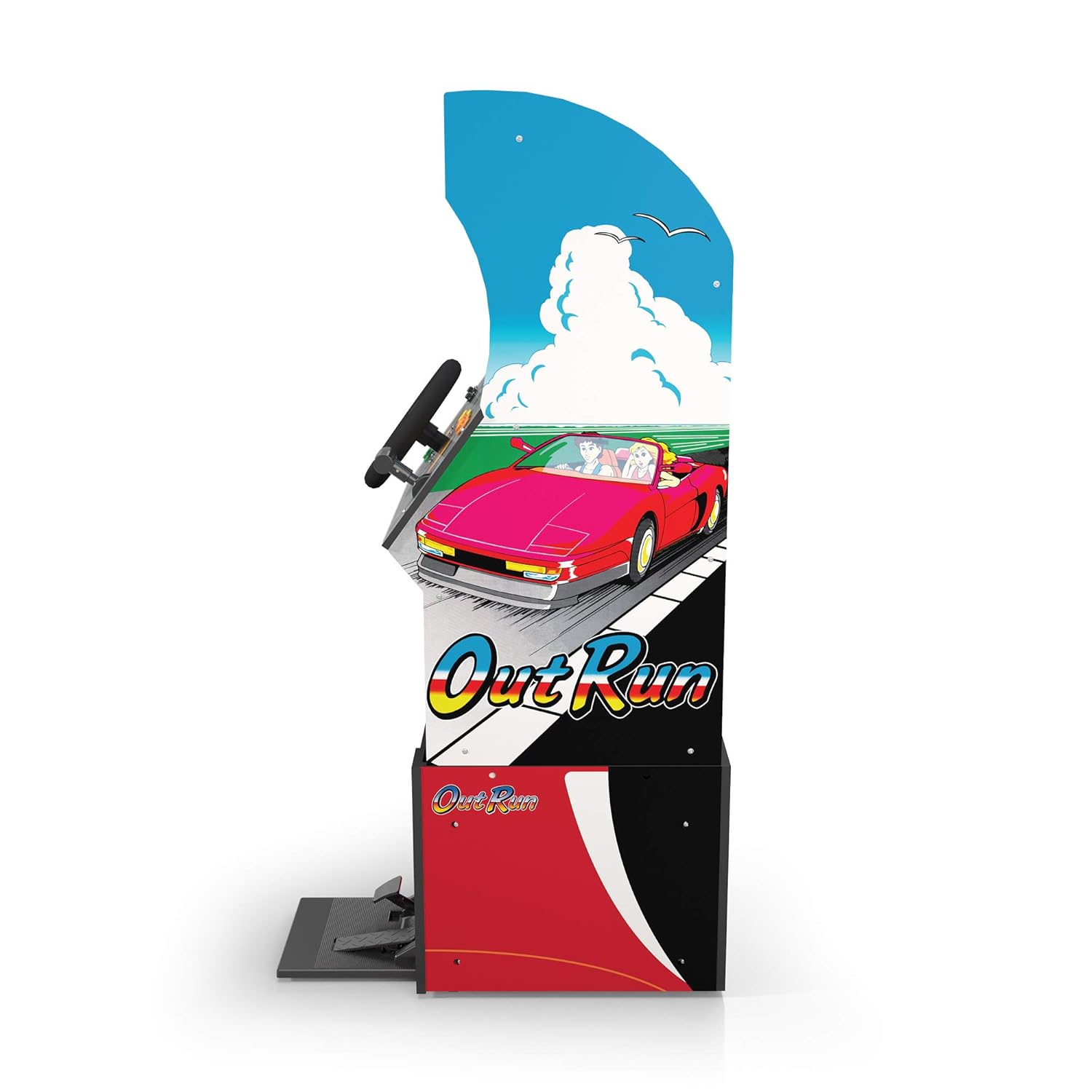
Rajah 3: Pro sampinganfile of the arcade cabinet, illustrating the driving controls.
Penyelenggaraan
Regular maintenance ensures the longevity and optimal performance of your arcade cabinet.
- Pembersihan: Gunakan kain lembut dan kering untuk mengelap permukaan kabinet. Untuk tanda degil, gunakan sedikit kainamp cloth with mild soap can be used, followed by drying. Avoid abrasive cleaners or excessive moisture.
- Penjagaan Skrin: Clean the monitor screen with a microfiber cloth specifically designed for electronics. Do not spray liquid directly onto the screen.
- Penyelenggaraan Pedal: Periodically check the gas and brake pedals for any debris or obstructions that might hinder their movement. Keep the area around the pedals clean.
- Pengurusan Kabel: Ensure all cables are neatly tucked away and not pinched or exposed, which could lead to damage.
Menyelesaikan masalah
Rujuk bahagian ini untuk isu biasa dan penyelesaiannya. Jika masalah berterusan, hubungi sokongan pelanggan.
| Masalah | Kemungkinan Punca | Penyelesaian |
|---|---|---|
| Unit tidak dihidupkan. | Power cable not connected; Power outlet issue; Power switch off. | Ensure power cable is securely plugged into the unit and a working outlet. Check power switch is 'ON'. |
| Tiada imej pada skrin. | Monitor cable loose; Monitor not powered. | Check monitor's power and video cables are securely connected. |
| Controls (steering wheel/pedals) unresponsive. | Control panel/pedal cables loose; Software glitch. | Verify all control panel and pedal cables are firmly connected to the main board. Try restarting the unit. |
| Permainan membeku atau ranap. | Isu perisian sementara. | Power off the unit, wait 10 seconds, then power back on. |
Spesifikasi
- Nombor Model: 195570000861
- Dimensi (Dipasang): 47.75 x 23.75 x 10.5 inci (Tinggi x Lebar x Dalam)
- Berat: 89.5 paun
- Permainan yang disertakan: Outrun, Turbo Outrun, Outrunners, Power Drift
- Kawalan: Steering Wheel, Gas Pedal, Brake Pedal, Game Selection Buttons
- Kuasa: AC Adapter (Input: 100-240V ~ 50/60Hz, Output: Specific to adapter, refer to label)
- Pengeluar: Arked 1Up
- Tarikh Keluaran: 7 April 2021
Waranti dan Sokongan
Arcade1Up products typically come with a limited manufacturer's warranty. For specific warranty terms and conditions, please refer to the warranty card included with your product or visit the official Arcade1Up webtapak.
For technical support, missing parts, or warranty claims, please contact Arcade1Up Customer Support:
- Webtapak: arcade1up.com/pages/contact-us
- telefon: Rujuk kepada pegawai webtapak untuk nombor hubungan serantau.
Apabila menghubungi sokongan, sila sediakan nombor model anda (195570000861) dan bukti pembelian.
Ask a question about this manual
Ask about setup, troubleshooting, compatibility, parts, safety, or missing instructions. Manuals+ will review the question and use this page’s manual context to help answer it.