
1. Pengenalan
Terima kasih kerana membeliasing the Trevi CMP 588 DAB Portable Stereo System. This manual provides essential information for the safe and correct operation of your device. Please read it thoroughly before use and retain it for future reference.
The Trevi CMP 588 DAB is a versatile portable stereo system featuring DAB/DAB+ and FM radio with RDS, a CD/MP3 player, USB input, AUX-in, Bluetooth connectivity, and a headphone jack, all designed for an enhanced audio experience.
2. Maklumat Keselamatan
- Sumber Kuasa: Gunakan hanya penyesuai kuasa atau bateri yang dinyatakan. Pastikan volumtage matches the requirements of the unit.
- Air dan Kelembapan: Do not expose the unit to rain, moisture, or immerse it in water. Avoid placing objects filled with liquids, such as vases, on the unit.
- Pengudaraan: Pastikan pengudaraan yang mencukupi. Jangan sekat bukaan pengudaraan.
- haba: Jauhkan unit daripada sumber haba seperti radiator, daftar haba, dapur, atau radas lain (termasuk amppenghidup) yang menghasilkan haba.
- Pembersihan: Cabut palam unit dari salur keluar dinding sebelum membersihkan. Gunakan kain lembut dan kering. Jangan gunakan pembersih cecair atau pembersih aerosol.
- Servis: Jangan cuba servis produk ini sendiri. Rujuk semua perkhidmatan kepada pegawai perkhidmatan yang berkelayakan.
- Pemain CD: Jangan sekali-kali melihat terus ke dalam pancaran laser.
3. Kandungan Pakej
Pastikan semua barang ada dan dalam keadaan baik:
- Trevi CMP 588 DAB Portable Stereo System
- Kabel Kuasa AC
- Alat Kawalan Jauh
- Manual Pengguna (dokumen ini)
4. Ciri-ciri Produk
- DAB/DAB+ and FM Radio with RDS
- High Readability Dot Matrix Display
- CD Player (supports CD-DA, MP3)
- USB Input for MP3 Playback
- AUX-in for external audio devices
- Kesambungan Bluetooth
- Bicu Fon Kepala
- Reka bentuk mudah alih dengan pemegang bawa
- Alat Kawalan Jauh disertakan
5. Kawalan dan Sambungan

Rajah 1: Depan view of the Trevi CMP 588 DAB, showing speakers, display, and main controls.
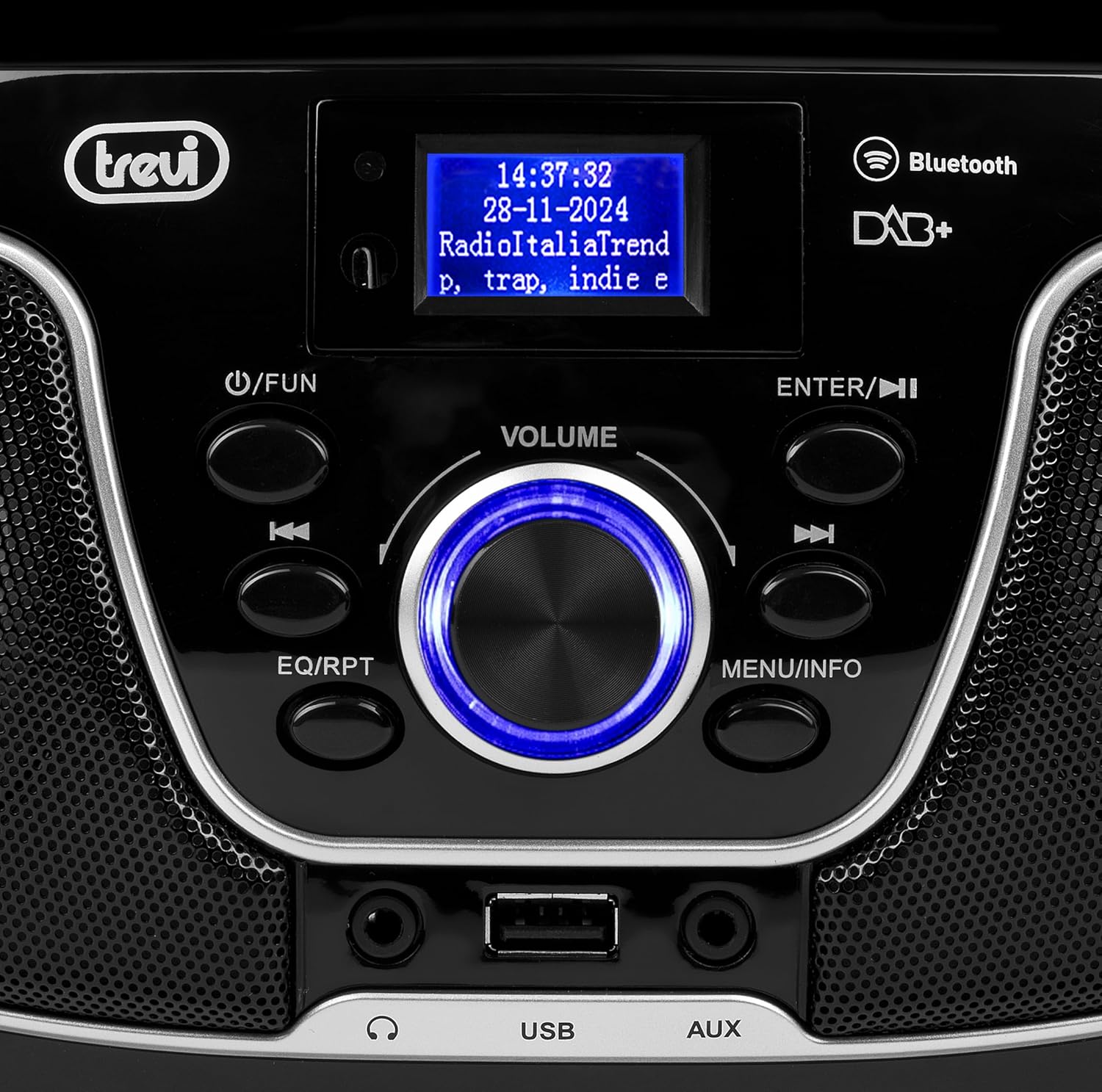
Rajah 2: Terperinci view of the control panel, including power, function, volume knob, and navigation buttons.
Kawalan Panel Depan:
- POWER / FUN button: Press to turn on/off, press to switch functions (CD/USB/DAB/FM/Bluetooth/AUX).
- Tombol VOLUME: Rotate to adjust volume. Press to confirm selections.
- ENTER / ►►I button: Confirm selection / Skip to next track/station.
- I▼▼ / EQ/RPT button: Skip to previous track/station / Equalizer settings / Repeat mode.
- MENU / INFO button: Access menu / Display information.
- Port USB: Sambungkan peranti storan USB untuk main balik MP3.
- Jack masuk AUX: Sambungkan peranti audio luaran.
- Jack fon kepala: Sambungkan fon kepala untuk mendengar secara peribadi.

Rajah 3: Belakang view of the Trevi CMP 588 DAB, showing the power input and telescopic antenna.
Sambungan Panel Belakang:
- Input Kuasa AC: Sambungkan kabel kuasa AC yang dibekalkan.
- Antena Teleskopik: Lanjutkan untuk penerimaan radio yang optimum.

Figure 4: Remote control for the Trevi CMP 588 DAB, showing various function buttons.
Fungsi Kawalan Jauh:
- STANDBY: Hidupkan / matikan.
- FUNGSI: Switch between modes (CD, USB, DAB, FM, Bluetooth, AUX).
- MATI: Redam/nyahredamkan audio.
- RPT: Ulang mod main balik.
- IMBAS: Auto scan for radio stations.
- F+/CH+, F-/CH-: Navigate folders/channels.
- EQ: Tetapan penyama.
- PLAY/PAUSE (►II): Main/jeda main balik.
- PREV/TUN- (▼▼): Previous track/tune down.
- NEXT/TUN+ (►►): Next track/tune up.
- BERHENTI (■): Hentikan main balik.
- MENU: Menu akses.
- MAKLUMAT: Paparkan maklumat.
- PROG: Program tracks/stations.
- VOL+ / VOL-: Laraskan kelantangan.
6. Persediaan
6.1 Sambungan Kuasa
- Kuasa AC: Connect the supplied AC power cable to the AC power input on the rear of the unit, then plug the other end into a wall outlet.
- Battery Operation (Optional): For portable use, insert 6 x C-size batteries (not included) into the battery compartment on the bottom of the unit. Ensure correct polarity.
6.2 Kuasa Awal Hidup
Tekan ke POWER / FUN butang pada unit atau STANDBY button on the remote control to turn on the system. The display will light up.
6.3 Setting Up the Antenna
For optimal radio reception, fully extend the telescopic antenna located at the rear of the unit. Adjust its position for the best signal.
7. Arahan Operasi
7.1 DAB/DAB+ Radio Operation
- Tekan ke POWER / FUN button repeatedly until "DAB" mode is selected.
- The unit will automatically scan for available DAB/DAB+ stations on first use. To perform a manual scan, press the MENU button, navigate to "Full Scan" and press MASUK.
- Setelah pengimbasan selesai, gunakan ▼▼ or ►► buttons to browse through the available stations. Press MASUK untuk memilih stesen.
- Tekan ke INFO button to cycle through different information displays (e.g., program type, signal strength, time).
7.2 Operasi Radio FM
- Tekan ke POWER / FUN button repeatedly until "FM" mode is selected.
- To auto-scan and store stations, press the IMBAS button on the remote. The unit will scan and save strong signals.
- To manually tune, press and hold the ▼▼ or ►► buttons to search for the next available station. Press briefly to fine-tune the frequency.
- The RDS function will display station information (if available).
7.3 Main Semula CD/MP3

Rajah 5: Atas view of the Trevi CMP 588 DAB with the CD compartment open, ready for disc insertion.
- Buka penutup petak CD.
- Place a CD (CD-DA or MP3 CD) onto the spindle with the label side facing up.
- Tutup penutup petak CD.
- Tekan ke POWER / FUN button repeatedly until "CD" mode is selected.
- The unit will read the disc. Press PLAY/PAUSE (►II) untuk memulakan main balik.
- guna ▼▼ or ►► to skip tracks. Press and hold to fast forward/rewind.
- Tekan BERHENTI (■) untuk menghentikan main balik.
7.4 Main Semula USB
- Masukkan pemacu kilat USB yang mengandungi MP3 files ke dalam port USB.
- Tekan ke POWER / FUN button repeatedly until "USB" mode is selected.
- Unit ini akan mengesan dan mula memainkan MP3 secara automatik files.
- guna ▼▼ or ►► untuk melangkau trek.
7.5 Penggandingan dan Main Semula Bluetooth
- Tekan ke POWER / FUN button repeatedly until "Bluetooth" mode is selected. The display will show "BT" or "PAIRING".
- Dayakan Bluetooth pada peranti mudah alih anda (telefon pintar, tablet, dll.).
- Cari untuk available devices and select "TREVI CMP 588 DAB" from the list.
- Once paired, you can play audio from your device through the stereo system.
- Use the controls on your mobile device or the stereo system to manage playback.
7.6 AUX-in Operation
- Connect an external audio device (e.g., MP3 player, smartphone) to the AUX-in jack using a 3.5mm audio cable (not included).
- Tekan ke POWER / FUN button repeatedly until "AUX" mode is selected.
- Play audio from your connected device. The volume can be controlled via both the stereo system and the external device.
8. Penyelenggaraan
8.1 Membersihkan Unit
Lap bahagian luar unit dengan kain lembut dan kering. Jangan gunakan pembersih, lilin atau pelarut yang melelas kerana ia boleh merosakkan kemasan. Pastikan unit dicabut plag sebelum dibersihkan.
8.2 Penjagaan Kanta CD
If the CD player experiences reading errors, the lens may be dirty. Use a commercially available CD lens cleaner to clean the lens. Do not touch the lens with your fingers.
8.3 Penyimpanan
If the unit will not be used for an extended period, remove the batteries (if applicable) and unplug the power cable. Store the unit in a cool, dry place away from direct sunlight and extreme temperatures.
9. Penyelesaian masalah
| Masalah | Kemungkinan Punca | Penyelesaian |
|---|---|---|
| Tiada kuasa | Power cable not connected; Batteries depleted or incorrectly inserted. | Check power cable connection; Replace batteries or ensure correct polarity. |
| Tiada bunyi | Kelantangan terlalu rendah; Fungsi bisu aktif; Sumber yang salah dipilih. | Increase volume; Deactivate mute; Select correct function (CD, USB, DAB, FM, BT, AUX). |
| Penerimaan radio yang lemah | Antena tidak dipanjangkan atau diletakkan dengan salah; Kawasan isyarat lemah. | Fully extend and adjust the telescopic antenna; Try moving the unit to a different location. |
| CD/USB tidak dimainkan | Cakera kotor/calar; tak betul file format on USB; USB drive not properly inserted. | Clean or replace disc; Ensure MP3 format for USB; Reinsert USB drive. |
| Penggandingan Bluetooth gagal | Device too far; Bluetooth not enabled on source device; Unit not in pairing mode. | Move devices closer; Enable Bluetooth on source device; Ensure unit is in Bluetooth mode and searching. |
10. Spesifikasi
- model: CM 588 DAB
- Sumber Kuasa: AC 230V ~ 50Hz or 6 x C-size batteries (not included)
- Penggunaan Kuasa: 15 Watt
- Jenis pembesar suara: Stereo (2 speakers)
- Ketersambungan: Bluetooth, USB, AUX-in
- Format Audio yang Disokong: CD audio (CD-DA), MP3
- Frekuensi Radio: DAB/DAB+, FM with RDS
- Dimensi (L x W x H): 50 x 50 x 28 cm (anggaran)
- Berat: 1.5 Kilogram (anggaran)
- warna: Hitam
11. Waranti dan Sokongan
This product is covered by a standard manufacturer's warranty. Please refer to the warranty card included in your package for specific terms and conditions, including the warranty period and coverage details.
For technical support, service, or warranty claims, please contact your retailer or the official Trevi customer service. Contact information can typically be found on the Trevi webtapak atau dalam pembungkusan produk.
Please retain your proof of purchase (receipt) for any warranty-related inquiries.