
Forever ForeVigo 2 SW-330
Forever Smartwatch ForeVigo 2 SW-330 User Manual
Model: ForeVigo 2 SW-330
1. Pengenalan
Welcome to your new Forever Smartwatch ForeVigo 2 SW-330. This manual provides essential information for setting up, operating, and maintaining your device. Please read it carefully to ensure proper use and to maximize the features of your smartwatch.
The ForeVigo 2 SW-330 is designed to be your daily companion, offering a range of features including sports tracking, health monitoring, and smart notifications. Its durable design and long-lasting battery make it suitable for various activities.
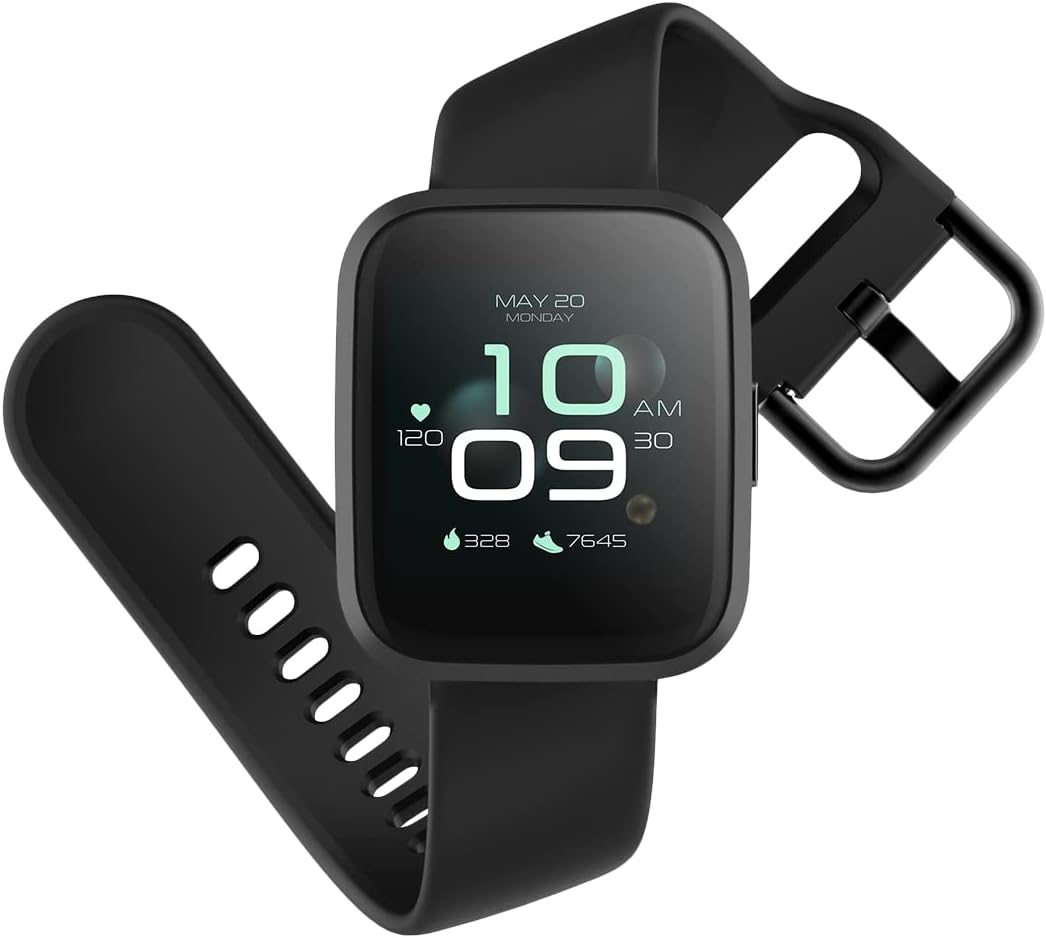
Image: The ForeVigo 2 SW-330 smartwatch with its main display showing the time, heart rate, and step count.
2. Persediaan
2.1. Mengecas Jam Pintar
Before first use, fully charge your smartwatch. The device features a 180 mAh battery, providing up to 12 days of usage on a single charge. A quick charge function is available.
- Sambungkan kabel pengecas ke port pengecasan di bahagian belakang jam tangan pintar.
- Palamkan hujung USB kabel ke dalam penyesuai kuasa USB standard (tidak disertakan) atau port USB komputer.
- The screen will display a charging indicator.
- Biarkan kira-kira 2 jam untuk cas penuh.

Image: The smartwatch screen showing a battery icon with a lightning bolt, indicating it is charging.
2.2. Menghidupkan/Mematikan
- Untuk Menghidupkan: Tekan dan tahan butang sisi sehingga skrin menyala.
- Untuk Mematikan: Navigate to the 'Settings' menu on the smartwatch, then select 'Power Off' or press and hold the side button and confirm power off.
2.3. Pemasangan Apl dan Berpasangan
To unlock the full potential of your smartwatch, download the companion application on your smartphone. The ForeVigo 2 SW-330 is compatible with both Android and iOS devices.
- Cari untuk the official 'Forever Smart' or 'ForeVigo' app in your smartphone's app store (Google Play Store for Android, Apple App Store for iOS).
- Pasang aplikasi.
- Buka apl dan ikut arahan pada skrin untuk membuat akaun atau log masuk.
- Dayakan Bluetooth pada telefon pintar anda.
- In the app, select 'Add Device' or 'Pair Smartwatch' and choose 'ForeVigo 2 SW-330' from the list of available devices.
- Sahkan permintaan berpasangan pada telefon pintar anda dan jam tangan pintar.
3. Mengendalikan Jam Pintar
3.1. Navigasi
The ForeVigo 2 SW-330 features a 1.4-inch high-quality touchscreen for intuitive navigation. Swipe left, right, up, or down to access different functions and menus. Press the side button to return to the home screen or wake the device.

Image: The smartwatch screen showing a grid of application icons, including Goals, Heart rate, Sleep, and Messages.
3.2. Sports Functions
The smartwatch supports various sports modes to track your physical activity:
- Berenang: Track your performance during water activities.
- berjalan: Pantau langkah, jarak dan kalori yang dibakar.
- Berlari: Record your runs with detailed metrics.
- Mendaki: Track outdoor adventures.
- Berbasikal: Monitor your bike rides.
Access these modes through the 'Sports' menu on your smartwatch. The device includes a calorie counter, distance tracker, stopwatch, and pedometer.

Image: The smartwatch screen displaying a list of application icons, including Goals, Heart rate, Messages, and Sports.
3.3. Pemantauan Kesihatan
- Pemantauan Tidur: The smartwatch monitors your sleep patterns, including light and deep sleep stages. View laporan terperinci dalam aplikasi pendamping.
- Pemantau Kadar Jantung: The integrated heart rate sensor continuously tracks your heart rate. Access real-time data on the watch or historical data in the app.

Image: The smartwatch screen showing sleep tracking data, including light sleep, deep sleep, and total sleep time.
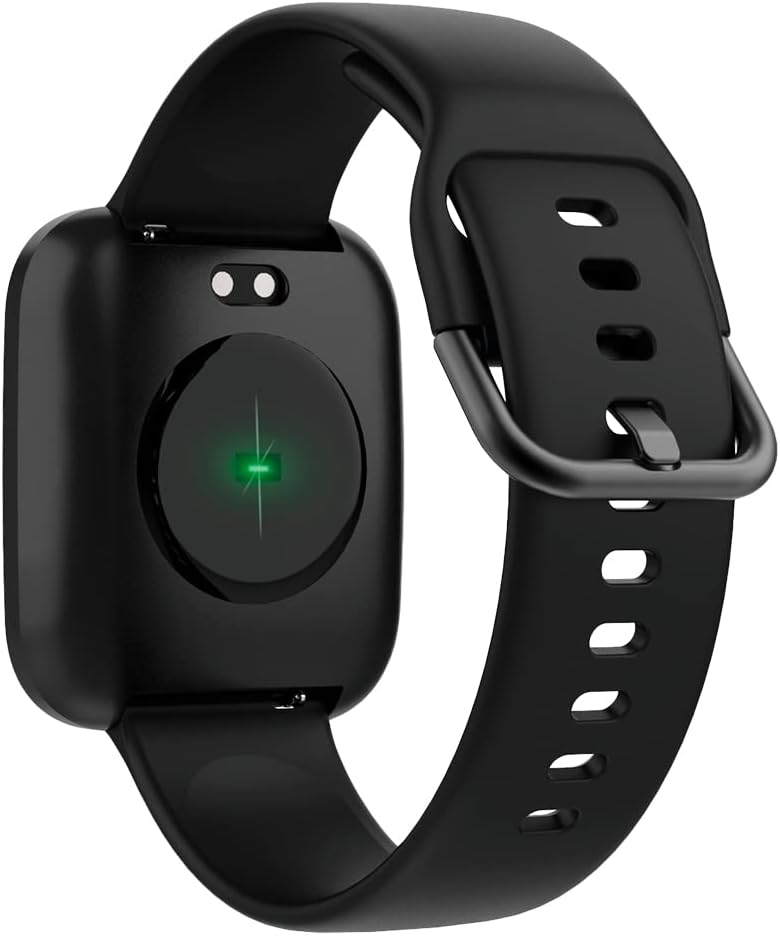
Image: The back of the smartwatch, highlighting the green light of the optical heart rate sensor.
3.4. Ciri Pintar
- Pemberitahuan Telefon: Receive alerts for calls, messages, and app notifications directly on your wrist. Configure notification settings in the companion app.
- Kawalan Muzik: Control music playback on your smartphone (play, pause, skip tracks) directly from your smartwatch.
- Jauh Kamera: Use your smartwatch as a remote shutter for your smartphone's camera.
- Daily Goals & Activity Reminders: Set daily activity goals and receive reminders to stay active throughout the day.
- Pencari Peranti: Use the app to locate your smartwatch if it's within Bluetooth range.
4. Penyelenggaraan
4.1. Tahan Air
The ForeVigo 2 SW-330 is waterproof according to the IP68 standard, meaning it can withstand total immersion in water. This allows for tracking swimming activities. However, it is not recommended for hot water activities (e.g., hot showers, saunas) as steam can damage the seals.
4.2. Pembersihan dan Penjagaan
- Bersihkan jam tangan pintar dan tali anda secara berkala dengan kain lembutamp kain.
- Elakkan menggunakan bahan kimia yang keras atau bahan yang melelas.
- Pastikan sesentuh pengecasan bersih dan kering sebelum mengecas.
4.3. Interchangeable Straps
The smartwatch features elegant and interchangeable straps made of silicone and metal. To change the strap, locate the quick-release pins on the underside of the strap and gently slide them to detach. Attach new straps by aligning the pins and sliding them into place.
5. Penyelesaian masalah
If you encounter issues with your ForeVigo 2 SW-330, try the following solutions:
- Jam tangan pintar tidak dihidupkan: Pastikan peranti dicas sepenuhnya. Sambungkannya ke pengecas selama sekurang-kurangnya 30 minit.
- Tidak boleh berpasangan dengan telefon pintar:
- Pastikan Bluetooth didayakan pada telefon pintar anda.
- Make sure the smartwatch is within range of your smartphone.
- Mulakan semula kedua-dua jam tangan pintar dan telefon pintar anda.
- Semak sama ada apl pendamping dikemas kini kepada versi terkini.
- Data kesihatan tidak tepat: Ensure the smartwatch is worn snugly on your wrist, but not too tight. Clean the heart rate sensor regularly.
- Pemberitahuan tidak muncul: Check notification settings in the companion app and your smartphone's system settings to ensure the app has necessary permissions.
- Skrin tidak bertindak balas: Try restarting the smartwatch. If the issue persists, ensure the screen is clean and dry.
For further assistance, refer to the support section of the companion app or contact customer support.
6. Spesifikasi
| Ciri | Perincian |
|---|---|
| Jenama | SELAMANYA |
| Nombor Model | SW-310 |
| warna | Hitam |
| Keserasian Sistem Pengendalian | Android, iOS |
| Saiz Skrin | 1.4 Inci |
| Ciri Khas | Lightweight, Stopwatch |
| Peranti Serasi | Telefon pintar |
| Kapasiti Bateri | 180 mAh |
| Hayat Bateri | Sehingga 12 hari |
| Komunikasi Tanpa Wayar | Bluetooth |
| GPS | GPS bersepadu |
| Tahan Air | IP68 |
| Berat badan | 34 g |
| Dimensi | 36 x 42 x 11 mm |
7. Waranti dan Sokongan
Your Forever Smartwatch ForeVigo 2 SW-330 comes with a manufacturer's warranty. Please refer to the warranty card included in your product packaging for specific terms and conditions. For technical support, product inquiries, or warranty claims, please contact your retailer or the official Forever customer service through their website or the companion application.
Simpan bukti pembelian anda untuk tujuan jaminan.
Ask a question about this manual
Ask about setup, troubleshooting, compatibility, parts, safety, or missing instructions. Manuals+ will review the question and use this page’s manual context to help answer it.