
1. Produk Lebihview
The TEKMAGIC W60-OUS-WT is a robust digital watch designed for various activities, including swimming, snorkeling, and scuba diving, with a water resistance rating of 10 ATM (up to 100 meters). It features a clear digital display and multiple functions to assist with daily timekeeping and sports activities.
Key features include precise time, date, and day display, a chronograph (stopwatch), countdown timer, dual time zone functionality, alarm clock, hourly chime, and an electro luminescent backlight for visibility in low light conditions. The watch is also shock resistant and comes with a comfortable TPU band.

Imej 1.1: Depan view of the TEKMAGIC W60-OUS-WT digital watch, showcasing its robust design and digital display with water splashes, indicating its water-resistant nature.
2. Fungsi Butang
Familiarize yourself with the watch buttons to operate its various functions:
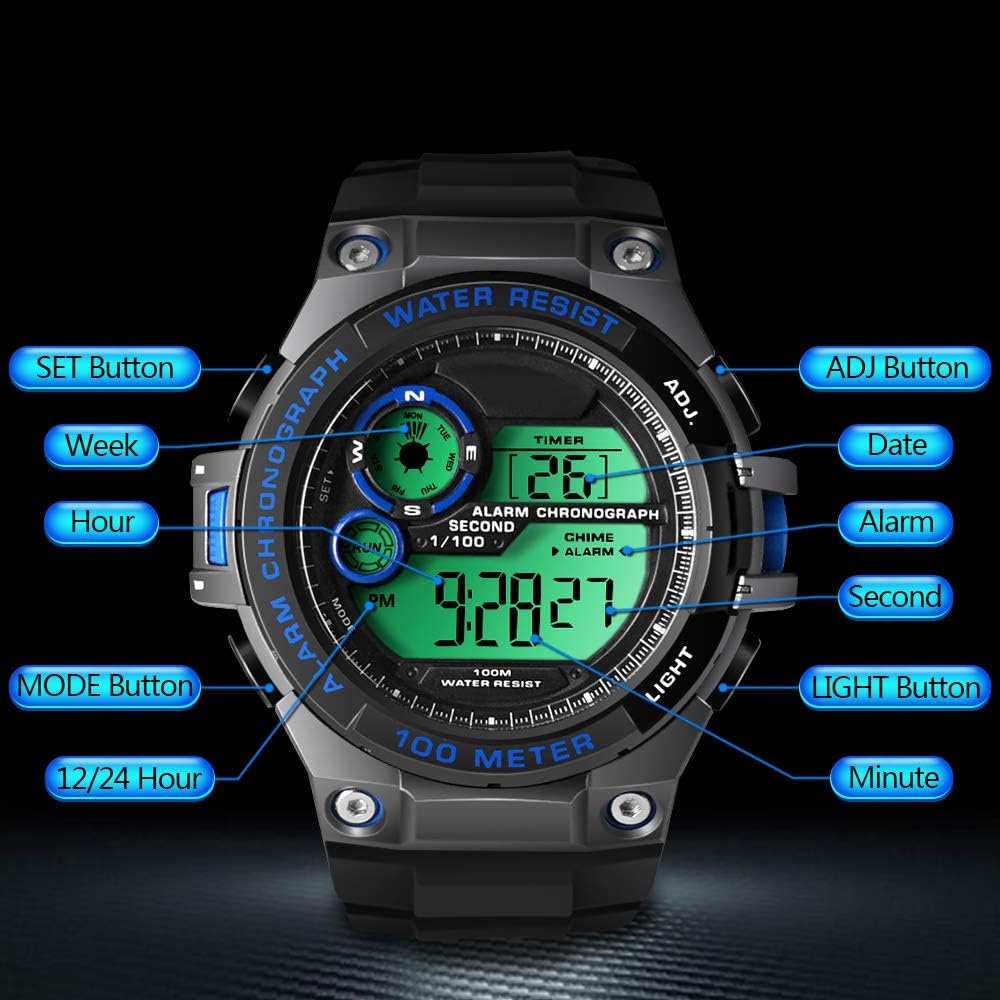
Image 2.1: Diagram illustrating the button layout and their respective functions on the TEKMAGIC W60-OUS-WT watch. Buttons include SET, MODE, 12/24 Hour, ADJ, Date, Alarm, Second, Light, and Minute.
- Butang SET: Used to enter setting modes and confirm selections.
- Butang ADJ: Used to adjust values during setting modes.
- Butang MOD: Cycles through different operational modes (Time, Chronograph, Countdown, Alarm, Dual Time).
- Butang CAHAYA: Activates the electro luminescent backlight.
- 12/24 Hour Button: Bertukar antara format masa 12 jam dan 24 jam.
3. Persediaan Awal
3.1 Menetapkan Masa dan Tarikh
- Dalam Mod Penjagaan Masa, tekan dan tahan SET butang sehingga saat mula berkelip. Ini menunjukkan anda berada dalam mod tetapan.
- Tekan ke MODE button to cycle through the setting options: Seconds → Hours → Minutes → Year → Month → Day.
- Gunakan ADJ button to increase the flashing value. For seconds, pressing ADJ akan menetapkan semula kepada 00.
- Setelah semua tetapan dilaraskan, tekan butang SET butang sekali lagi untuk keluar dari mod tetapan.
3.2 Format 12/24 Jam
Dalam Mod Penjagaan Masa, tekan butang 12/24 Jam butang untuk bertukar antara format 12 jam (dengan penunjuk AM/PM) dan 24 jam.
4. Fungsi Operasi
4.1 Mod Penjagaan Masa
Ini ialah mod lalai, memaparkan masa semasa (jam, minit, saat), tarikh dan hari dalam seminggu.
4.2 Mod Kronograf (Jam Randik)
Untuk menggunakan fungsi jam randik:
- Tekan ke MODE button repeatedly until 'CHRONO' or 'STW' appears on the display.
- Tekan ke ADJ butang untuk memulakan jam randik.
- Tekan ke ADJ butang sekali lagi untuk berhenti seketika/sambung semula.
- To reset the stopwatch, ensure it is paused, then press the SET butang.

Image 4.1: The TEKMAGIC watch displaying the stopwatch function, with a runner in the background, illustrating its use for timing sports activities.
4.3 Mod Pemasa Undur
Untuk menetapkan dan menggunakan pemasa undur:
- Tekan ke MODE button repeatedly until 'TIMER' or 'CD' appears.
- Tekan dan tahan butang SET butang sehingga jam mula berkelip.
- Gunakan MODE butang untuk memilih jam, minit atau saat, dan ADJ butang untuk melaraskan nilai.
- Tekan SET untuk mengesahkan masa undur.
- Tekan ADJ untuk memulakan atau menjeda kira detik.
- Apabila undur mencecah sifar, penggera akan berbunyi.
4.4 Alarm Clock and Hourly Berpadu
Untuk menetapkan penggera:
- Tekan ke MODE button repeatedly until 'ALARM' appears.
- Tekan dan tahan butang SET butang sehingga digit jam berkelip.
- Gunakan ADJ button to set the hour, then press MODE to select minutes and use ADJ to set them.
- Tekan SET untuk mengesahkan masa penggera.
- Tekan ke ADJ button in Alarm Mode to toggle the alarm ON/OFF. An alarm icon will appear when activated.
Untuk mengaktifkan/menyahaktifkan hourlloceng y, tekan SET button in Alarm Mode. A chime icon will appear when activated.

Image 4.2: The TEKMAGIC watch displaying its alarm and calendar functions, with visual cues for waking up and checking dates.
4.5 Zon Waktu Berganda
The watch allows you to set a second time zone:
- Tekan ke MODE button repeatedly until 'DUAL TIME' or 'DT' appears.
- Tekan dan tahan butang SET butang sehingga digit jam berkelip.
- Gunakan ADJ button to set the hour, then press MODE to select minutes and use ADJ to set them.
- Tekan SET to confirm the dual time zone setting.
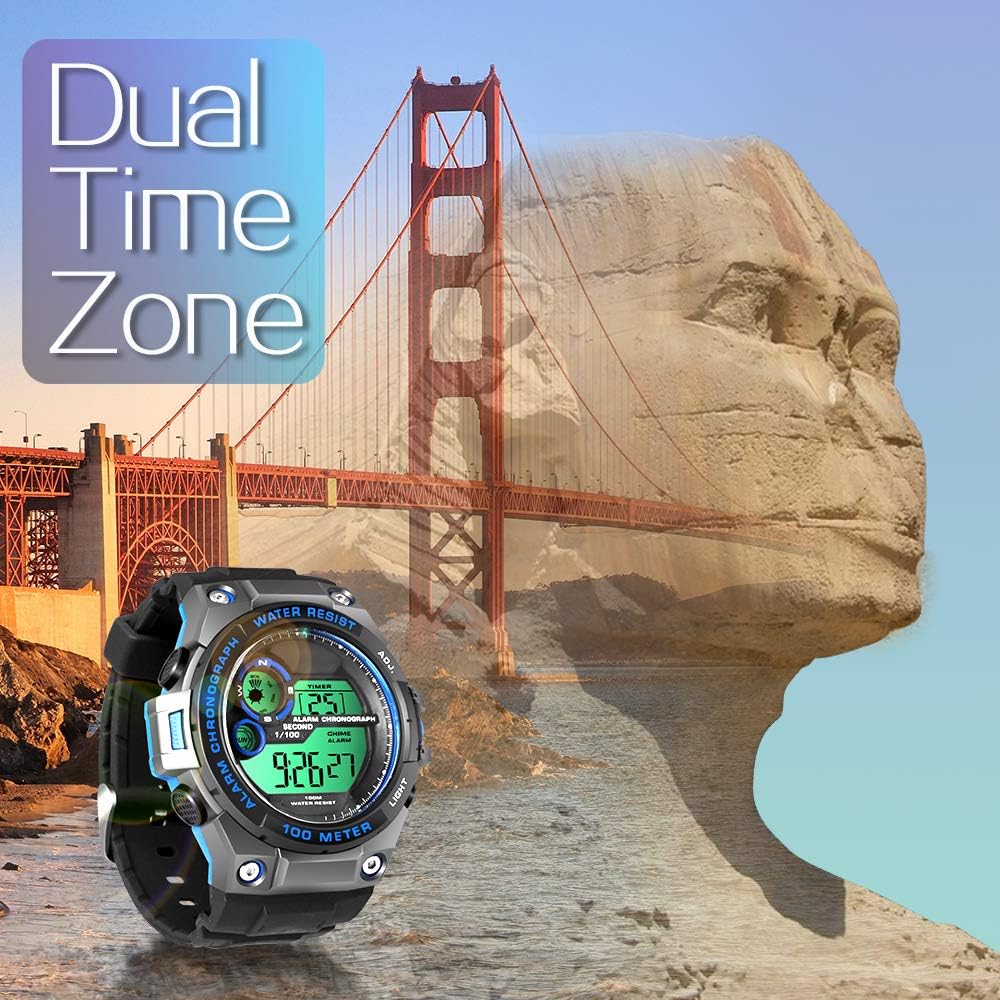
Image 4.3: The TEKMAGIC watch displaying its dual time zone feature, superimposed over an image of a bridge and a rock formation, suggesting travel and global timekeeping.
4.6 Lampu Latar
Tekan ke CAHAYA button to illuminate the display for a few seconds, enhancing visibility in dark environments.

Image 4.4: The TEKMAGIC watch with its backlight activated, shown in a dimly lit setting, highlighting its visibility feature.
4.7 Water Resistance (100m / 10 ATM)
This watch is designed to withstand water pressure up to 100 meters (10 ATM), making it suitable for swimming, snorkeling, and recreational scuba diving. It is important to note the following:
- Jangan kendalikan butang di bawah air. Operating buttons while submerged can compromise the watch's water resistance.
- Avoid exposing the watch to hot water, steam, or extreme temperature changes, as this can damage the seals.
- Rinse the watch with fresh water after exposure to saltwater to prevent corrosion.

Image 4.5: The TEKMAGIC watch displayed in an underwater scuba diving scene, emphasizing its suitability for deep-water activities.
Video 4.1: A demonstration of the TEKMAGIC watch being submerged in water, showcasing its water resistance capabilities. The watch remains functional and readable while wet.
5. Penyelenggaraan
5.1 Pembersihan
Lap jam tangan dengan kerap menggunakan kain lembutamp cloth. For stubborn dirt, use a mild soap solution and rinse thoroughly with fresh water. Ensure the watch is completely dry before storage.
5.2 Penggantian Bateri
The watch uses a CR2025 battery, which typically lasts 1.5 to 2 years. When the display becomes dim or functions become erratic, it may be time to replace the battery. Battery replacement should ideally be performed by a qualified watch technician to ensure proper sealing and maintain water resistance.
5.3 Penyimpanan
Store the watch in a cool, dry place away from direct sunlight and extreme temperatures. Avoid exposing it to strong magnetic fields.
6. Penyelesaian masalah
- Paparan kosong atau malap: Check the battery. If the battery is low, replace it.
- Butang tidak bertindak balas: Ensure the watch is not in a locked mode (if applicable, though this model does not specify one). Try a soft reset by allowing the battery to drain completely and then replacing it, or consult a technician.
- Air di dalam jam tangan: Segera bawa jam tangan tersebut kepada profesional untuk pemeriksaan dan pembaikan bagi mengelakkan kerosakan selanjutnya. Jangan cuba mengeringkannya sendiri.
- Masa/tarikh salah: Masukkan semula tetapan masa dan tarikh seperti yang diterangkan dalam Bahagian 3.1.
7. Spesifikasi

Image 7.1: Visual representation of the TEKMAGIC watch's dimensions, including case diameter (55mm), case thickness (18mm), band width (22mm), total length (258mm), and wrist circumference range (160mm-215mm).
| Ciri | Spesifikasi |
|---|---|
| Nombor Model | W60-OUS-WT |
| Kedalaman Rintangan Air | 100m (10 ATM) |
| Pergerakan | digital |
| Ketepatan Masa | ±30 saat sebulan |
| Kod Bateri | CR2025 |
| Hayat Bateri Beroperasi | 1.5 hingga 2 tahun |
| Bahan Tingkap Dail | Resin Ketelusan Tinggi |
| Bahan Sarung Jam | Plastik ABS |
| Warna Dail | Black + Gray + Blue |
| Diameter Kes | 55 mm |
| Ketebalan Kes | 18 mm |
| Bahan Jam Tangan | TPU Band |
| Warna Band | Hitam |
| Jenis Genggam | Pin Gesper |
| Lebar Jalur | 22mm |
| Maximum Wrist Circumference | 215mm |
| Minimum Wrist Circumference | 160mm |
| Berat Produk | 62g |
8. Waranti dan Sokongan
For warranty information, technical support, or service inquiries, please refer to the documentation included with your purchase or contact TEKMAGIC customer service directly. Keep your proof of purchase for warranty claims.


