
pengenalan
This manual provides detailed instructions for the setup, operation, and maintenance of your FULODE AX-666 Professional Karaoke Processor. Please read this manual thoroughly before using the device to ensure proper functionality and to maximize your audio experience.
Kandungan Pakej
Sahkan bahawa semua item yang disenaraikan di bawah disertakan dalam pakej anda:
- Audio Pre-Effector x 1
- Mikrofon x 2
- Kord Kuasa x 1
- Pemutar skru x 1
- Alat kawalan jauh x 1
- Non-Slip Ring x 2
- Manual Pengguna x 1

Image: The FULODE AX-666 unit with its dimensions and a visual list of included accessories: screwdrivers, non-slip mats, US plug, remote controls, microphones, and user manual.
Produk Selesaiview
The FULODE AX-666 is a professional digital karaoke processor designed to enhance your audio experience with advanced features and versatile connectivity.
Susun Atur Panel Depan dan Belakang
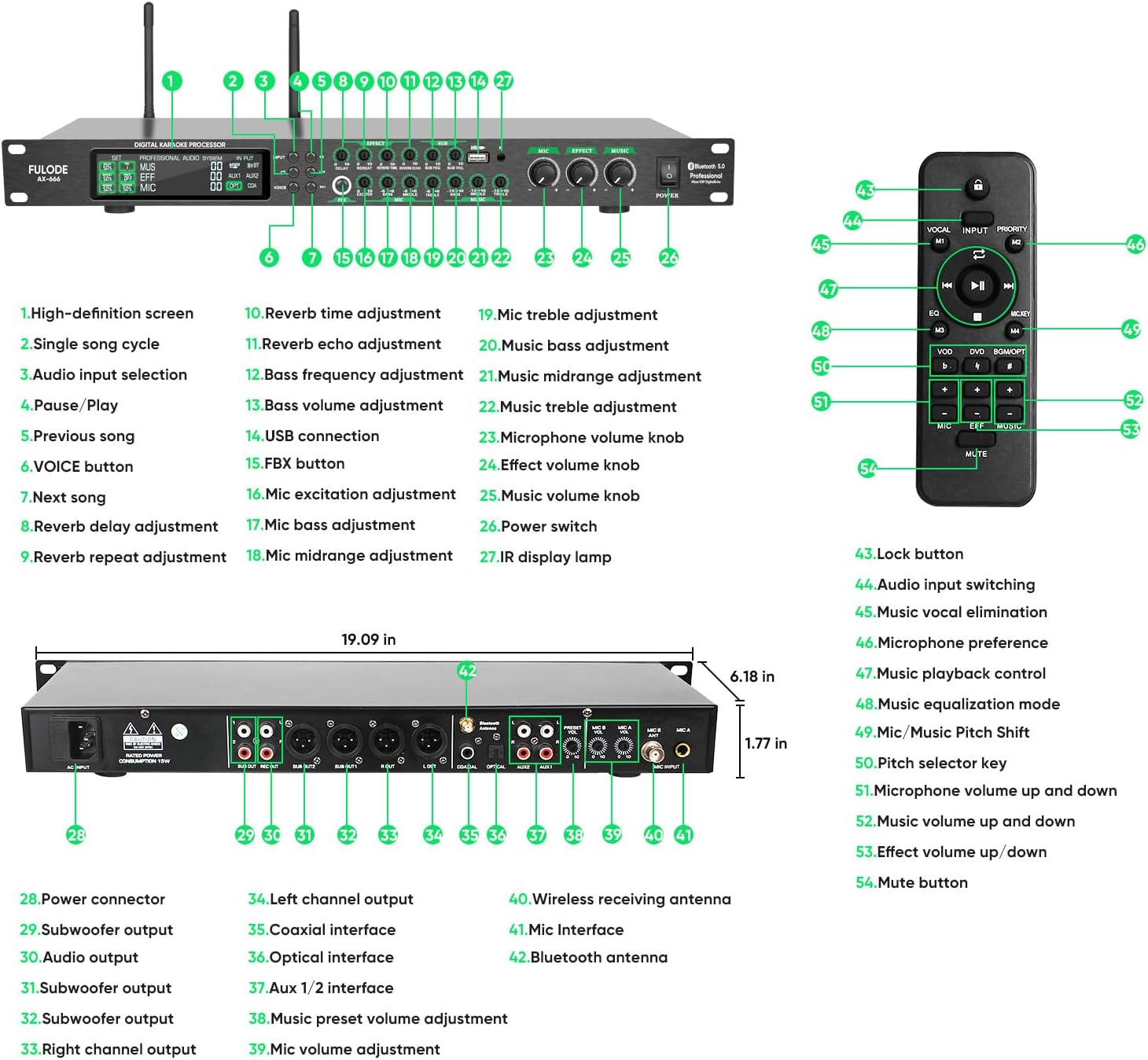
Image: Detailed diagram of the FULODE AX-666 front and rear panels, labeling all buttons, knobs, and input/output ports for easy identification.
- Skrin definisi tinggi
- Single song cycle button
- Butang pemilihan input audio
- Butang Jeda/Main
- Butang lagu sebelumnya
- VOICE button (Vocal Elimination)
- Butang lagu seterusnya
- Reverb delay adjustment knob
- Reverb repeat adjustment knob
- Reverb time adjustment knob
- Reverb echo adjustment knob
- Bass frequency adjustment knob
- Bass volume adjustment knob
- Port sambungan USB
- FBX button (Anti-Howling)
- Mic excitation adjustment knob
- Mic bass adjustment knob
- Mic midrange adjustment knob
- Mic treble adjustment knob
- Music bass adjustment knob
- Music midrange adjustment knob
- Music treble adjustment knob
- Tombol kelantangan mikrofon
- Effect volume knob
- Tombol kelantangan muzik
- Suis kuasa
- IR display lamp
- Penyambung kuasa
- Subwoofer output (Left)
- Subwoofer output (Right)
- Audio output (Left)
- Audio output (Right)
- Output saluran yang betul
- Keluaran saluran kiri
- Antara muka sepaksi
- Antara muka optik
- Aux 1/2 interface
- Music preset volume adjustment
- Pelarasan kelantangan mikrofon
- Wireless receiving antenna ports
- Mic interface (XLR)
- Antena Bluetooth
Fungsi Kawalan Jauh

Image: The infrared remote control for the FULODE AX-666, showing buttons for power, play/pause, volume, vocal elimination, and input selection.
- Butang kunci
- Audio input switching
- Music vocal elimination
- Microphone preference
- Kawalan main balik muzik
- Music equalization mode
- Mic/Music Pitch Shift
- Pitch selector key
- Microphone volume up and down
- Music volume up and down
- Effect volume up/down
- Butang bisu
Panduan Persediaan
Follow these steps to set up your FULODE AX-666 Karaoke Processor:
- Sambungan Kuasa: Connect the provided power cord to the processor's power input (28) and then to a 110V AC power outlet.
- Sambungan Antena: Attach the wireless receiving antennas to the designated ports (40) on the rear panel for optimal microphone signal reception.
- Output Audio: Connect the audio output ports (31, 32, 33) to your amplifier or sound system using appropriate cables (e.g., XLR, RCA).
- Input Audio: Choose your desired audio input source and connect it to the corresponding port on the rear panel:
- USB: Insert a USB drive into the USB port (14) on the front panel for lossless audio playback.
- Bluetooth: Ensure the Bluetooth antenna (42) is connected. Activate Bluetooth on your device and pair with "FULODE AX-666".
- Optik: Connect an optical cable from your source device (e.g., TV, media player) to the optical interface (36).
- Sepaksi: Connect a coaxial cable from your source device to the coaxial interface (35).
- Bantu: Use RCA cables to connect devices to the Aux 1/2 interfaces (37).
- Sambungan Mikrofon: The system comes with two wireless microphones. Ensure they are powered on and paired with the processor. For wired microphones, connect them to the Mic interfaces (41) on the rear panel.

Image: A visual guide to the input interfaces on the FULODE AX-666, highlighting USB, Bluetooth, Optical, Coaxial, and Auxiliary connections.
Arahan Operasi
Hidupkan/Mati Kuasa
Press the Power switch (26) on the front panel to turn the unit on or off. The high-definition screen (1) will illuminate upon power-on.
Pemilihan Sumber Input
Use the Audio input selection button (3) on the front panel or the Audio input switching button (44) on the remote control to cycle through available input sources (USB, Bluetooth, Optical, Coaxial, Aux1, Aux2).
Penggunaan Mikrofon
The system includes two wireless microphones. Ensure they are charged and powered on. The processor's extended receiving antennas provide a stable reception range of up to 164 feet.

Image: The FULODE AX-666 processor with its extended receiving antennas, illustrating the 164ft reception distance for the wireless microphones.
To adjust microphone volume, use the Microphone volume knob (23) on the front panel or the Microphone volume up and down buttons (51) on the remote.
Each microphone has 15 adjustable frequency points. To change the frequency, press the button on the microphone handle.

Image: Diagram showing how to tune microphone frequencies on the FULODE AX-666, with examples of frequency points for Mic A and Mic B.
Video: A demonstration of how to operate the microphones with the FULODE AX-666 system, including pairing and basic functions.
Anti-Howling Function (FBX)
The processor features a built-in frequency shift feedback suppression module. To activate or deactivate the anti-howling function, press the FBX button (15) on the front panel. This helps eliminate unwanted feedback during performances.
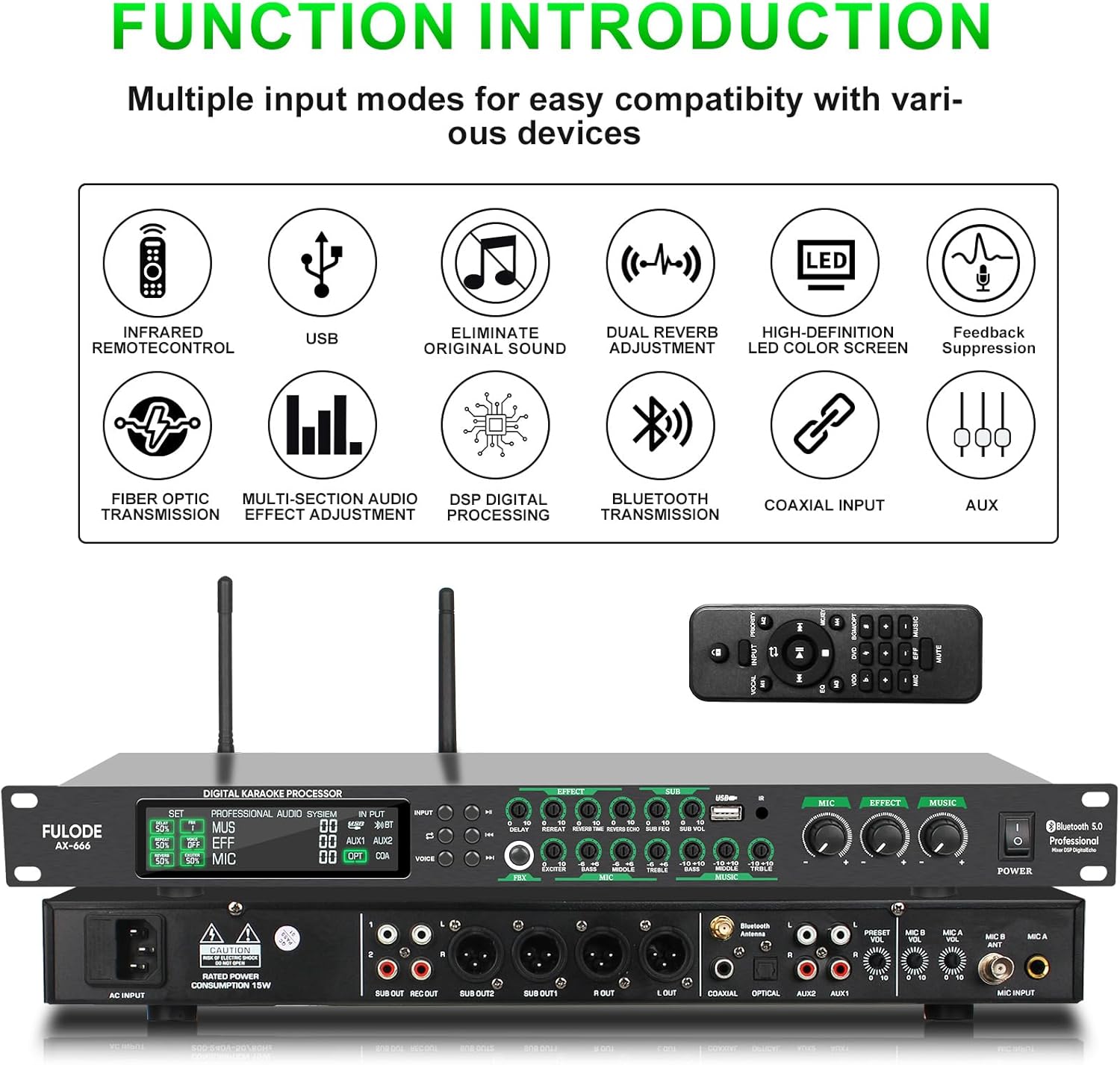
Image: Visual representation of the one-key anti-howling feature (FBX) on the FULODE AX-666, showing its activation and effect on sound waves.
Vocal Elimination (VOICE)
To remove original vocals from a track and create an accompaniment, press the VOICE button (6) on the front panel or the Music vocal elimination button (45) on the remote control.

Image: Illustration of the one-click original sound elimination feature on the FULODE AX-666, demonstrating how vocals can be removed from a song.
Pelarasan Audio
The FULODE AX-666 offers independent tuning controls for microphone, reverb, and music. Use the dedicated knobs on the front panel for precise adjustments:
- Microphone Adjustments: Mic bass (17), Mic midrange (18), Mic treble (19), Mic excitation (16), and Microphone volume (23).
- Reverb Adjustments: Reverb delay (8), Reverb repeat (9), Reverb time (10), Reverb echo (11), and Effect volume (24).
- Music Adjustments: Music bass (20), Music midrange (21), Music treble (22), and Music volume (25).
Hidden rotary knobs are available for fine-tuning specific parameters like Delay, Repeat, Bass, Mid, and Treble. Use the included screwdriver for these adjustments.

Image: The FULODE AX-666 front panel, highlighting the independent adjustment knobs for microphone, effects, and music, along with a screwdriver for fine-tuning hidden controls.
General Usage Videos
Video: A comprehensive guide demonstrating the general usage and various functions of the FULODE AX-666 Karaoke Processor.
Video: Tamatview of the FULODE AX-666 KTV Mixer, highlighting its features including dual wireless microphones, DSP, USB, MP3, Bluetooth, and Optical connectivity.
Penyelenggaraan
To ensure the longevity and optimal performance of your FULODE AX-666 Karaoke Processor, follow these maintenance guidelines:
- Pembersihan: Use a soft, dry cloth to clean the exterior of the unit. Avoid using liquid cleaners or abrasive materials, as they may damage the finish or internal components.
- Pengudaraan: Ensure the unit has adequate ventilation. Do not block any ventilation openings.
- Storan: When not in use for extended periods, store the processor in a cool, dry place away from direct sunlight and extreme temperatures.
- Penjagaan Mikrofon: Keep the wireless microphones clean and dry. Store them in a protective case when not in use to prevent damage.
Menyelesaikan masalah
If you encounter issues with your FULODE AX-666, refer to the following common problems and solutions:
| Masalah | Kemungkinan Punca | Penyelesaian |
|---|---|---|
| Tiada kuasa | Kord kuasa tidak disambungkan; Matikan kuasa; Tiada kuasa dari alur keluar. | Ensure power cord is securely connected. Turn on the power switch. Check the power outlet with another device. |
| Tiada keluaran bunyi | Incorrect input selected; Volume levels too low; Output cables not connected correctly. | Select the correct input source. Increase master volume and individual channel volumes. Verify output cables are securely connected to an ampsistem pembesar/pembesar suara. |
| Mikrofon tidak berfungsi | Microphones off; Low battery; Out of range; Frequency interference. | Ensure microphones are powered on. Replace or charge batteries. Move closer to the processor. Try changing microphone frequencies. |
| Audio feedback (howling) | Microphone too close to speakers; FBX function off; High microphone gain. | Move microphones away from speakers. Activate the FBX (Anti-Howling) function. Reduce microphone volume or gain. |
| Isu sambungan Bluetooth | Device not in pairing mode; Interference; Processor not discoverable. | Ensure your device's Bluetooth is on and in pairing mode. Restart both devices. Ensure no other devices are connected to the processor via Bluetooth. |
If the problem persists after trying these solutions, please contact FULODE customer support for further assistance.
Spesifikasi
| Ciri | Perincian |
|---|---|
| Jenama | FULODE |
| Nombor Model | AX-666 |
| Bilangan Saluran | 2 |
| Dimensi Produk (D x W x H) | 6.18"D x 19.09"W x 1.77"H |
| Berat Barang | 2.35 kg |
| Teknologi Ketersambungan | USB, XLR, Bluetooth, Auxiliary |
| Sumber Kuasa | Elektrik Bertali |
| Jenis Penyambung Output | XLR |
| Input Audio | USB, XLR, Bluetooth, Auxiliary, Optical, Coaxial |
| Voltage | 110V AC |
| Julat Mikrofon Tanpa Wayar | Sehingga 164 kaki |
| Microphone Frequencies | 15 adjustable frequency points per mic |
Waranti & Sokongan
The FULODE AX-666 Professional Karaoke Processor comes with a Waranti 360 hari dari tarikh pembelian.
For any issues, questions, or technical support, please do not hesitate to contact FULODE customer service. We are committed to providing excellent customer service and will assist you promptly.
Contact information can typically be found on the FULODE official webtapak atau melalui platform pembelian anda.