
iPower 4 Inch 195 CFM Duct Inline Ventilation
Manual Pengguna Kipas Pengudaraan Sebaris Saluran iPower 4 Inci 195 CFM
Jenama: iPower
Model: 4 Inch 195 CFM Duct Inline Ventilation
pengenalan
This manual provides essential information for the safe and efficient operation, installation, and maintenance of your iPower 4 Inch 195 CFM Duct Inline Ventilation Fan. Designed for optimal air circulation, this fan is suitable for various environments including grow tents, greenhouses, hydroponics setups, kitchens, bathrooms, basements, and garages to manage humidity, clear air, and regulate temperatures. Please read this manual thoroughly before use and retain it for future reference.
Ciri-ciri Produk
- High Effective Airflow: Transfers air quickly and quietly with a fan speed of 2500 RPM, providing an air flow of 195 CFM.
- Reka Bentuk Bunyi Rendah: Features a flow deflector that concentrates the fan stream and reduces turbulent kinetic energy, resulting in a low sound output of just 30 dB.
- Pembinaan Padat: Lightweight and compact design ensures minimal space occupation, making it ideal for installations where larger fans may not fit.
- Multifunctional Application: Perfect for use in grow tents, greenhouses, hydroponics, kitchens, bathrooms, basements, locker rooms, and garages to reduce humidity, clear the air, and lower temperatures.
- Pemasangan & Penyelenggaraan Mudah: Equipped with removable duct ends and locking tabs for straightforward removal and maintenance. Includes a 5.9 feet long power cord for convenient setup.
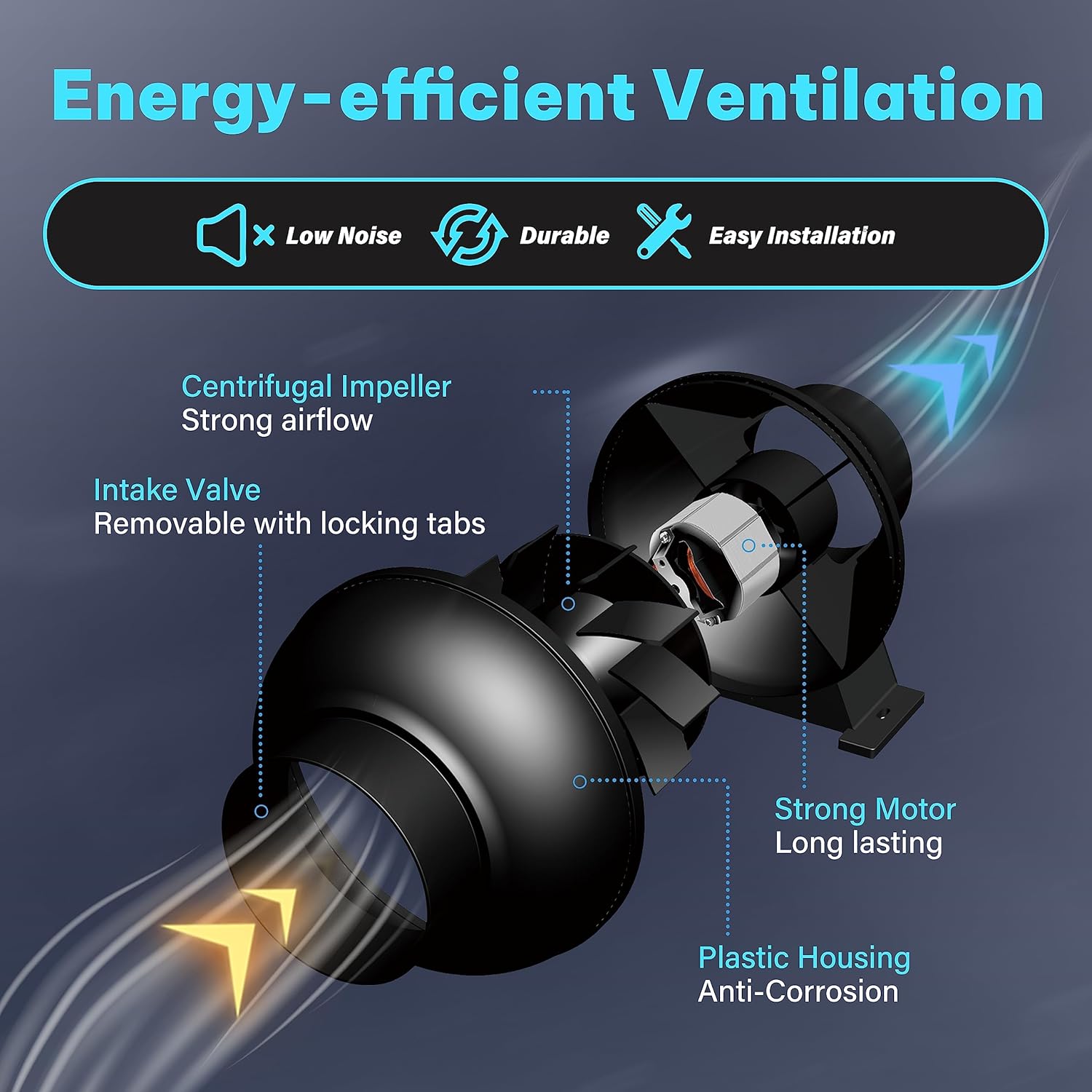
Figure 1: Energy-efficient Ventilation Features

Figure 2: High Effective Airflow

Rajah 3: Operasi Bunyi Rendah
Spesifikasi
| Spesifikasi | Nilai |
|---|---|
| Jenama | iPower |
| warna | Hitam |
| Reka bentuk kipas elektrik | Peniup |
| Sumber Kuasa | Elektrik Bertali |
| Dimensi Produk | 7.7"D x 8.1"W x 7"H |
| Tahap Kebisingan | 30 dB |
| Wattage | 28 watt |
| Kapasiti Aliran Udara | 195 Kaki Kubik Seminit (CFM) |
| Panjang Bilah | 4 Inci |
| Kelajuan | 2500 RPM |
| Voltage | 120V |
| Berat Barang | 2.72 paun (1.24 Kilogram) |
| Komponen yang Disertakan | 4 Inch 195 CFM Duct Inline Ventilation Fan |
| Penggunaan Dalaman/Luar | Dalaman |
| Kaedah Kawalan | App (Note: Product description mentions app control, but the fan itself is simple. This might refer to a kit version or general brand feature.) |
| Bahan Bilah | plastik |

Rajah 4: Spesifikasi dan Dimensi Produk
Persediaan dan Pemasangan
The iPower Inline Duct Ventilation Fan is designed for easy installation. Follow these general guidelines:
- Bongkar: Carefully remove the fan and any accessories from the packaging. Inspect for any damage.
- penempatan: Determine the optimal location for your fan. It can be installed in-line with ducting to exhaust air from a space or to bring fresh air in. Ensure the fan is placed on a stable surface or securely mounted if suspended.
- Sambungan Saluran: Connect appropriate ducting (not included) to both ends of the fan. The fan features removable duct ends with locking tabs for secure attachment. Use duct clamps to ensure airtight connections.
- Sambungan Kuasa: Plug the fan's 5.9-foot power cord into a standard 120V electrical outlet.
- Arah Aliran Udara: Ensure the fan is oriented to move air in the desired direction (intake or exhaust). The fan typically has an arrow indicating airflow direction.

Figure 5: Easy to Install Design

Gambar 6: Cthample Installation in a Grow Tent
Panduan Video Pemasangan
Video 1: iPower Inline Fan Overview and Installation. This video demonstrates the features of the iPower inline fan, including its powerful airflow, low noise operation, and ease of installation. It also shows examples of its application in various settings like offices, homes, and greenhouses for air circulation and freshness.
Arahan Operasi
Once properly installed, operating your iPower Inline Duct Ventilation Fan is straightforward:
- Hidupkan/Mati Kuasa: Simply plug the fan into a live electrical outlet to turn it on. Unplug it to turn it off.
- Operasi Berterusan: The fan is designed for continuous operation to maintain consistent air circulation and ventilation.
- Penambahbaikan Kualiti Udara: Use the fan to exhaust stale air, odors, and excess humidity, or to bring in fresh air, depending on your setup.
- Peraturan Suhu: In enclosed spaces like grow tents or basements, the fan helps regulate temperature by moving air and preventing heat buildup.
Applications in Use
The iPower Inline Fan is versatile and can be used in various environments to improve air quality and circulation:
- Persekitaran Pejabat: Helps maintain fresh air and comfortable temperatures in office spaces.
- Rumah Kediaman: Ideal for kitchens, bathrooms, and basements to reduce humidity and eliminate odors.
- Rumah Hijau & Khemah Tanaman: Essential for providing consistent air exchange, managing humidity, and regulating temperature for optimal plant growth.
Refer to Video 1 for visual examples of the fan's application in different settings.
Penyelenggaraan
Regular maintenance ensures the longevity and optimal performance of your iPower Inline Duct Ventilation Fan. The fan's design allows for easy disassembly for cleaning.
- Pemutusan Kuasa: Always unplug the fan from the power outlet before performing any maintenance or cleaning.
- Pembersihan Luaran: Lap bahagian luar kipas dengan kain lembut,amp kain. Jangan gunakan bahan kimia yang keras atau pembersih yang kasar.
- Impeller and Housing Cleaning: Periodically, disconnect the ducting and carefully separate the fan housing (using the removable duct ends and locking tabs) to access the impeller. Gently clean any dust or debris from the impeller blades and inside the housing using a soft brush or cloth. Ensure no foreign objects are lodged in the fan.
- Pemeriksaan Saluran: Inspect the connected ducting for any blockages, tears, or leaks that could impede airflow.
- Pemasangan semula: After cleaning, reassemble the fan components securely and reconnect the ducting.
Note: The fan's motor is sealed and does not require lubrication.
Menyelesaikan masalah
If you encounter issues with your iPower Inline Duct Ventilation Fan, refer to the following common troubleshooting steps:
| Masalah | Kemungkinan Punca | Penyelesaian |
|---|---|---|
| Kipas tidak dihidupkan. | Tiada kuasa ke saluran keluar. Fan is unplugged. Isu pendawaian dalaman. | Periksa pemutus litar. Ensure the fan is securely plugged in. Contact customer support if power is confirmed and fan still doesn't work. |
| Aliran udara rendah. | Ducting blockage or leaks. Dirty impeller blades. Orientasi peminat yang salah. | Inspect ducting for obstructions or loose connections. Clean the impeller blades as per maintenance section. Verify the fan is installed to push/pull air in the correct direction. |
| Bunyi atau getaran yang berlebihan. | Pemasangan longgar. Serpihan dalam pendesak. Worn bearings (unlikely for new unit). | Ensure the fan is securely mounted and ducting is not vibrating. Disconnect power and check for debris in the impeller. Jika bunyi bising berterusan, hubungi sokongan pelanggan. |
If these steps do not resolve the issue, please contact iPower customer support for further assistance.
Waranti dan Sokongan
For detailed warranty information and customer support, please refer to the official user manual PDF or visit the iPower webtapak.
Manual Pengguna Rasmi (PDF): Muat turun PDF
iPower Store: Visit iPower Store on Amazon
For any technical assistance or product inquiries, please reach out to iPower customer service through their official channels.
Ask a question about this manual
Ask about setup, troubleshooting, compatibility, parts, safety, or missing instructions. Manuals+ will review the question and use this page’s manual context to help answer it.