
1. Pengenalan
Thank you for choosing the Tornado TCM-14512ES Espresso Machine. This manual provides essential information for the safe and efficient operation, maintenance, and troubleshooting of your new appliance. Please read these instructions thoroughly before first use and retain them for future reference.
This espresso machine is designed to prepare high-quality espresso and froth milk for various coffee beverages. It features a 15-bar pump pressure system and a 1.2-liter water tank capacity.
2. Arahan Keselamatan
- Sentiasa pastikan perkakas disambungkan ke soket kuasa yang dibumikan dengan volum yang betultage (220-240V).
- Jangan rendamkan perkakas, kord kuasa, atau palamkan ke dalam air atau sebarang cecair lain.
- Keep hands and cords away from hot surfaces and steam. The steam wand and portafilter can become very hot during operation.
- Unplug the machine from the power outlet before cleaning, maintenance, or when not in use.
- Jangan kendalikan perkakas dengan kord atau palam yang rosak, atau jika ia tidak berfungsi atau telah rosak dalam apa jua cara.
- Perkakas ini adalah untuk kegunaan isi rumah sahaja. Jangan gunakan di luar rumah.
- Ensure the water tank is filled with clean, cold water before operation. Do not operate without water.
- Kanak-kanak harus diawasi untuk memastikan mereka tidak bermain dengan perkakas.
3. Produk Lebihview
Familiarize yourself with the components of your Tornado TCM-14512ES Espresso Machine:
- Tangki Air (kapasiti 1.2 Liter)
- Control Knob (Power, Espresso, Steam)
- Lampu Penunjuk Kuasa
- Lampu Petunjuk Sedia
- Pemegang Portafilter
- Filter Basket (for ground coffee)
- Tongkat Wap / Pembuih Susu
- Drip Tray and Removable Grid
- Kedai Kopi
- Tamper/Measuring Spoon (often included)

Rajah 3.1: Depan view of the Tornado TCM-14512ES Espresso Machine, showing the control knob, portafilter, steam wand, and drip tray.
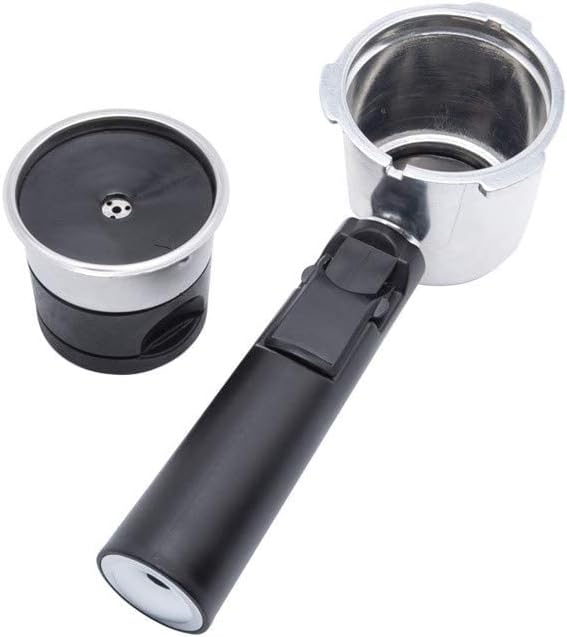
Rajah 3.2: Detached portafilter with a single filter basket, ready for coffee grounds.

Rajah 3.3: Filter basket with its lid open, illustrating the internal structure for holding coffee grounds.
4. Persediaan
4.1 Membongkar
- Keluarkan semua bahan pembungkusan dari mesin dengan berhati-hati.
- Letakkan mesin di atas permukaan yang stabil, rata dan tahan haba, jauh daripada sumber air.
- Ensure all accessories are present: portafilter, filter basket(s), measuring spoon/tampeh.
4.2 Pembersihan Awal
- Wash the water tank, portafilter, filter basket(s), and drip tray with warm, soapy water. Rinse thoroughly and dry.
- Lap bahagian luar mesin dengan iklanamp kain.
4.3 Mengisi Tangki Air
- Tanggalkan tangki air dari bahagian belakang mesin.
- Fill the tank with fresh, cold water up to the MAX level indicator.
- Letakkan tangki air kembali dengan kukuh ke kedudukannya.
4.4 Menyusun Semula Mesin (Kegunaan Pertama)
- Pastikan tangki air diisi.
- Plug the machine into a power outlet. Turn the control knob to the "Power" position (usually indicated by an 'I' or a power symbol). The power indicator light will illuminate.
- Letakkan cawan di bawah kedai kopi.
- Turn the control knob to the "Espresso" position (coffee cup symbol). Water will start to flow through the coffee outlet. Let approximately 100ml of water run through.
- Turn the control knob back to the "Power" position to stop the flow.
- Next, turn the control knob to the "Steam" position (steam symbol). Allow steam to release from the steam wand for a few seconds to clear any air. Turn the knob back to "Power".
- The machine is now primed and ready for use.
5. Arahan Operasi
5.1 Membuat Espresso
- Sediakan Mesin: Ensure the water tank is filled. Plug in the machine and turn the control knob to "Power". Wait for the "Ready" indicator light to illuminate, indicating the machine has reached the optimal brewing temperature.
- Sediakan Portafilter: Insert the desired filter basket into the portafilter. For a single shot, use the smaller basket; for a double shot, use the larger one.
- Tambah serbuk kopi: Fill the filter basket with finely ground espresso coffee. Use the measuring spoon to add the correct amount (approx. 7g for a single shot, 14g for a double shot).
- Tamp Kopi: Gunakan tamper to press the coffee grounds firmly and evenly. Wipe any excess grounds from the rim of the portafilter.
- Lampirkan Portafilter: Align the portafilter with the group head (coffee outlet) on the machine. Insert it and twist firmly to the right until it is securely locked in place.
- Piala Tempat: Position one or two espresso cups under the coffee outlet.
- Brew Espresso: Once the "Ready" light is on, turn the control knob to the "Espresso" position. Espresso will begin to flow into your cup(s).
- Hentikan Pembuatan Bir: When the desired amount of espresso is reached (typically 25-30ml per shot), turn the control knob back to the "Power" position to stop the flow.
- Buang Penapis Portabel: Carefully twist the portafilter to the left to unlock and remove it. Be cautious as it will be hot. Discard the used coffee grounds.
5.2 Susu Berbuih
- Prepare for Steam: Ensure the machine is plugged in and turned on. Turn the control knob to the "Steam" position. Wait for the "Ready" indicator light to illuminate, indicating the machine has reached steaming temperature.
- Bersihkan Tongkat Stim: Before frothing, place an empty cup under the steam wand and briefly open the steam valve (if applicable, or turn the control knob slightly to release a burst of steam) to clear any condensed water. Close the valve/knob.
- Sediakan Susu: Isikan periuk buih keluli tahan karat dengan susu sejuk (tenusu atau bukan tenusu) sehingga tepat di bawah muncung.
- Susu Buih: Immerse the tip of the steam wand just below the surface of the milk. Open the steam valve fully (or turn the control knob to the "Steam" position). Hold the pitcher at an angle, moving it slightly up and down to incorporate air and create foam.
- Panaskan Susu: Once desired foam is achieved, lower the pitcher to immerse the steam wand deeper into the milk to heat it without adding more air. Continue until the pitcher is hot to the touch (approx. 60-70°C).
- Berhenti mengukus: Close the steam valve (or turn the control knob back to "Power"). Remove the pitcher.
- Tongkat Stim Bersih: Segera lap tongkat wap dengan iklanamp cloth to prevent milk residue from drying. Briefly open the steam valve again to clear any milk from inside the wand.
6. Pembersihan dan Penyelenggaraan
Pembersihan tetap memastikan prestasi optimum dan memanjangkan jangka hayat mesin espreso anda.
6.1 Pembersihan Harian
- Portafilter dan Bakul Penapis: Selepas setiap penggunaan, tanggalkan penapis porta, buang serbuk kopi, dan bilas penapis porta serta bakul penapis di bawah air yang mengalir.
- Dulang Drip: Empty and clean the drip tray and grid daily. Wash with warm, soapy water and rinse.
- Tongkat Stim: As mentioned in the operating instructions, wipe the steam wand immediately after frothing milk and purge it to prevent blockages.
- Luaran: Lap bahagian luar mesin dengan lembut, damp kain. Jangan gunakan pembersih yang melelas atau pad penyental.
6.2 Pembersihan Tangki Air
- Clean the water tank weekly with warm, soapy water. Rinse thoroughly to remove any soap residue.
6.3 Penyahkelasan
Mineral deposits from water can build up inside the machine over time, affecting performance. Descale your machine every 2-3 months, or more frequently if you have hard water or use it often.
- Gunakan larutan penyahkerak komersial yang direka khusus untuk mesin espresso, mengikut arahan pengilang.
- Sebagai alternatif, larutan cuka putih dan air (nisbah 1:1) boleh digunakan.
- Run the descaling solution through the machine as if brewing coffee, and also through the steam wand.
- After descaling, run several cycles of clean water through the machine to rinse thoroughly and remove any descaling solution residue.
7. Penyelesaian masalah
Sebelum menghubungi sokongan pelanggan, sila rujuk isu biasa berikut dan penyelesaiannya:
| Masalah | Kemungkinan Punca | Penyelesaian |
|---|---|---|
| No water flow / Machine not pumping water. | Water tank empty, airlock in pump, clogged filter. | Fill water tank. Prime the machine (Section 4.4). Clean filter basket. |
| Espresso mengalir terlalu perlahan atau tidak mengalir langsung. | Coffee ground too fine, coffee tamped too hard, clogged filter basket. | Use coarser grind. Tamp less firmly. Clean filter basket. Descale machine. |
| Espresso flows too quickly / Weak coffee. | Coffee ground too coarse, not enough coffee, coffee tamped terlalu ringan. | Use finer grind. Increase coffee amount. Tamp dengan lebih tegas. |
| Tiada wap daripada tongkat stim. | Tongkat stim tersumbat, mesin tidak dipanaskan pada suhu stim. | Clean steam wand thoroughly. Wait for "Ready" light in steam mode. Descale machine. |
| Mesin bocor air. | Water tank not seated correctly, portafilter not locked properly, seals worn. | Ensure water tank is secure. Lock portafilter firmly. Contact support if seals are worn. |
8. Spesifikasi Teknikal
| Ciri | Spesifikasi |
|---|---|
| Jenama | Puting beliung |
| Nombor Model | TCM-14512ES |
| Voltage | 220-240 Volt |
| Kuasa / Wattage | 1050 Watt |
| Kapasiti Tangki Air | 1.2 Liter |
| Tekanan Pam | 15 Bar |
| bahan | logam |
| warna | Hitam & Perak |
| Ciri Khas | Milk Frother, Permanent Filter, Thermal, Timer, Water Filter |
| Berat Barang | 4.06 Kilogram |
| Dimensi Pakej | 36.5 x 35.5 x 23.5 cm |
9. Waranti dan Sokongan
Your Tornado TCM-14512ES Espresso Machine comes with a manufacturer's warranty. Please refer to the warranty card included with your purchase for specific terms and conditions, including the warranty period and coverage details.
For technical assistance, spare parts, or warranty claims, please contact the retailer where you purchased the product or the authorized Tornado service center in your region. Keep your proof of purchase for warranty validation.