
1. Pengenalan
The Duet 3 Mainboard 6HC is a high-performance controller board designed for a wide range of machines, including 3D printers, CNC machines, and laser cutters. It is the core component of the Duet 3 family, offering extensive flexibility and expandability. This manual provides essential information for the setup, operation, and maintenance of your Duet 3 Mainboard 6HC.

Rajah 1: Atas-bawah view of the Duet 3 Mainboard 6HC, illustrating the layout of components, connectors, and the central processor.
2. Ciri-ciri Utama
The Duet 3 Mainboard 6HC incorporates advanced features for precise and flexible machine control:
- Powerful 32-bit Processor: Equipped with an ARM Cortex M7 processor running at 300MHz for high-speed computations.
- Dedicated High-Speed Bus: Connects to a single board computer (e.g., Raspberry Pi compatible) for user interface and plugin support.
- High Current Stepper Drivers: Features 6 Trinamic 5160 stepper drivers, capable of up to 4.45A RMS (6.3A peak), with firmware control for microstepping (up to 256), StallGuard 2, and StealthChop2.
- CAN-FD Buses: Two CAN-FD buses support next-generation Duet3D expansion boards, smart tools, and custom add-ons.
- Web Interface Connectivity: Allows connection via PC, tablet, or smartphone on the same network using the onboard web antara muka.
- Berbilang Output: 10 PWM outputs with varying current capacities, supporting a high-current heated bed, 3 extruders, and 6 fans.
- I/O Serbaguna: 9 general-purpose I/O ports.
- Input Suhu: 4 Thermistor/PT1000 inputs, with support for 4 PT100/thermocouple inputs via optional daughterboards.
- Geometry Support: Supports all common 3D printer geometries.
- Z Probe Compatibility: Compatible with various Z probes, including DC42’s IR Z probe and the Duet3D Smart Effector for delta printers.
3. Panduan Persediaan
This section outlines the general steps for setting up your Duet 3 Mainboard 6HC. For detailed wiring diagrams and specific configurations, refer to the official Duet3D documentation available online.
3.1. Membongkar dan Pemeriksaan
Carefully remove the mainboard from its packaging. Inspect the board for any visible damage. Ensure all components are securely attached.

Rajah 2: Bersudut view of the Duet 3 Mainboard 6HC, showing the stepper drivers and power input terminals.
3.2. Sambungan Bekalan Kuasa
Connect a suitable DC power supply (typically 12V-24V, depending on your system requirements) to the main power input terminals. Ensure correct polarity. The board requires a 24-Pin main power connector type.
3.3. Sambungan Motor
Connect your stepper motors to the designated stepper driver outputs. The Duet 3 Mainboard 6HC features 6 high-current stepper drivers. Refer to your motor's specifications and the Duet3D wiring guide for proper connection.
3.4. Sensor and Peripheral Connections
Connect endstops, temperature sensors (thermistors, PT1000, or PT100/thermocouple with daughterboards), fans, and other peripherals to their respective I/O ports and PWM outputs. Pay close attention to pin assignments.

Rajah 3: Sisi view of the Duet 3 Mainboard 6HC, illustrating the various input/output connectors and the Ethernet port.
3.5. Sambungan Rangkaian
Connect an Ethernet cable to the board's Ethernet port for network access. This enables communication with the onboard web antara muka.
3.6. Firmware Installation/Update
Ensure the latest RepRapFirmware 3 is installed on your Duet 3 Mainboard. Instructions for firmware installation and updates are available on the official Duet3D website. This is crucial for proper functionality and access to all features.
4. Arahan Operasi
The Duet 3 Mainboard 6HC is primarily operated through its web interface, which provides a comprehensive control panel for your machine.
4.1. Mengakses ke Web Antara muka
- Ensure the Duet 3 Mainboard is powered on and connected to your local network via Ethernet.
- Buka a web browser on a PC, tablet, or smartphone connected to the same network.
- Enter the IP address of your Duet 3 Mainboard into the browser's address bar. If you don't know the IP address, you may need to use a network scanner or check your router's connected devices list.
- The Duet Web Control interface will load, allowing you to monitor and control your machine.
4.2. Operasi Asas
- Kawalan Mesin: Gunakan web interface to home axes, move motors, and execute G-code commands.
- Konfigurasi: Adjust machine parameters, calibrate sensors, and configure tool definitions.
- Pemantauan: View real-time temperature readings, motor positions, and job progress.
- File Pengurusan: Upload and manage G-code files for printing or machining operations.
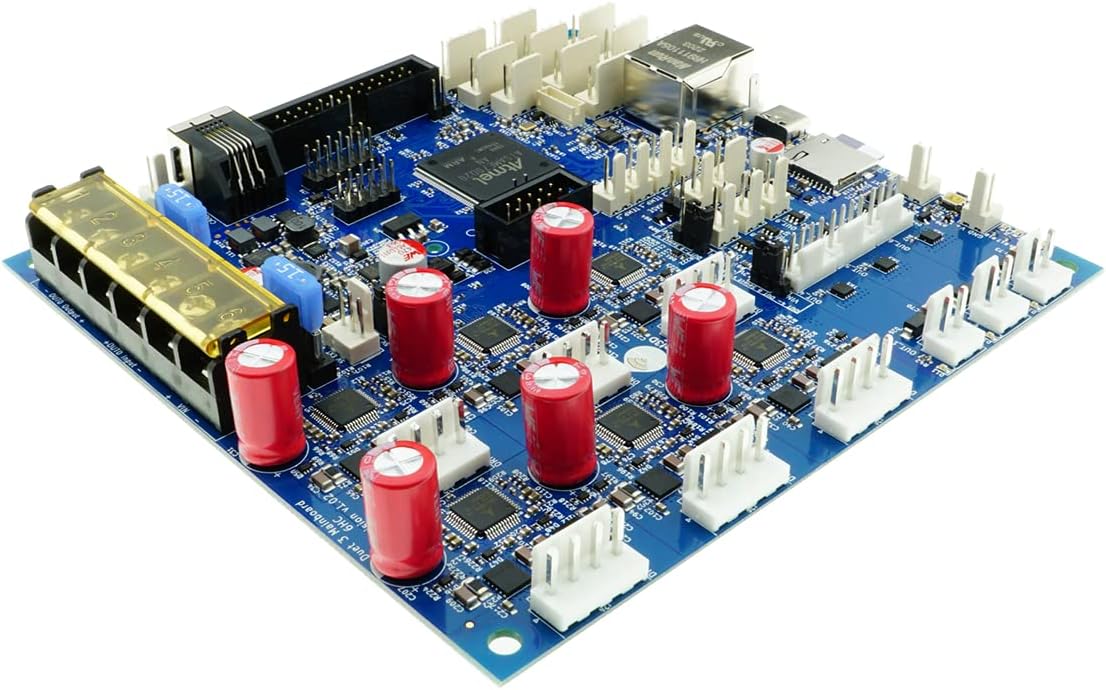
Rajah 4: Bersudut view of the Duet 3 Mainboard 6HC, highlighting the various connectors and the microSD card slot for firmware and configuration storage.
5. Penyelenggaraan
Proper maintenance ensures the longevity and reliable operation of your Duet 3 Mainboard 6HC.
- Jaga kebersihan: Regularly inspect the board for dust and debris. Use compressed air or a soft brush to gently clean the surface. Avoid using liquids.
- Kawalan Alam Sekitar: Operate the board in a clean, dry environment with stable temperatures. Avoid extreme heat, cold, or humidity.
- Kemas kini Firmware: Periodically check the Duet3D website for firmware updates. Keeping your firmware current can improve performance, add features, and fix bugs.
- Pemeriksaan Sambungan: Periodically verify that all wiring connections are secure and free from corrosion. Loose connections can lead to intermittent issues or damage.
- Power Off Before Disconnecting: Always power off the mainboard and disconnect the power supply before connecting or disconnecting any components or wiring.
6. Penyelesaian masalah
This section provides general troubleshooting steps for common issues. For more specific problems, consult the Duet3D forums or official documentation.
6.1. Board Not Powering On
- Sahkan bekalan kuasa disambungkan dengan betul dan memberikan volum yang betultage.
- Periksa sebarang litar pintas pada pendawaian.
- Ensure the power supply is capable of delivering sufficient current.
6.2. Tidak Boleh Diakses Web Antara muka
- Confirm the Ethernet cable is securely connected to both the board and your network.
- Check if the board has obtained an IP address (you may need to use a network scanning tool).
- Ensure your computer is on the same network as the Duet 3 Mainboard.
- Try restarting your router and the Duet 3 Mainboard.
6.3. Motors Not Moving
- Verify motor wiring is correct and secure.
- Check motor configuration in the firmware.
- Ensure the motor power supply is active and providing sufficient voltage / semasa.
- Check for any error messages in the web interface console.
7. Spesifikasi
Detailed technical specifications for the Duet 3 Mainboard 6HC:
| Ciri | Perincian |
|---|---|
| Pemproses | ARM Cortex M7 @ 300MHz |
| Pemacu Stepper | 6x Trinamic 5160 (up to 4.45A RMS, 6.3A peak) |
| Keluaran PWM | 10 (for heated bed, extruders, fans) |
| Pelabuhan I/O | 9 |
| Input Suhu | 4x Thermistor/PT1000, 4x PT100/Thermocouple (via daughterboards) |
| CAN-FD Buses | 2 |
| Antara Muka Rangkaian | Ethernet |
| Pemproses yang Serasi | Korteks LENGAN M7 |
| Teknologi Memori RAM | DDR4 |
| Penyambung Kuasa Utama | 24-Pin |
| Nama Model | Duet 3 Mainboard 6HC |
| ASIN | B08W295FKT |
| Pengeluar | Duet3D |
8. Waranti dan Sokongan
For warranty information, technical support, and further assistance, please refer to the official Duet3D website or contact their customer service. The Duet3D community forums are also an excellent resource for troubleshooting and sharing knowledge.
Nota: Syarat jaminan tertentu mungkin berbeza mengikut wilayah dan peruncit. Sila simpan bukti pembelian anda.