
pengenalan
Welcome to the user manual for your new DOOGEE X95 Pro 4G Smartphone. This guide provides essential information on setting up, operating, maintaining, and troubleshooting your device. The DOOGEE X95 Pro is designed to offer a seamless user experience with its 6.52-inch HD+ waterdrop display, powerful 4350mAh battery, and versatile triple camera system, all running on Android 10.

Imej: Depan dan belakang view of the DOOGEE X95 Pro Smartphone, showcasing its sleek design and triple camera setup on the rear.
Persediaan
1. Unboxing dan Pemeriksaan Awal
Keluarkan semua komponen dari pembungkusan dengan berhati-hati. Pastikan item berikut ada:
- DOOGEE X95 Pro Mobile Phone
- Charger (5V / 2A)
- Kabel USB
- Manual Pengguna (dokumen ini)
Inspect the device for any physical damage before proceeding.
2. Inserting SIM Cards and Micro SD Card
The DOOGEE X95 Pro supports dual SIM cards and an external Micro SD card for expanded storage up to 256GB.
- Cari dulang kad SIM di sisi telefon.
- Gunakan alat ejektor SIM yang disediakan untuk membuka dulang.
- Carefully place your Nano-SIM cards and/or Micro SD card into the designated slots. Ensure the gold contacts are facing down.
- Tolak dulang perlahan-lahan ke dalam telefon sehingga ia berbunyi pada tempatnya.
3. Mengecas Bateri
Before first use, it is recommended to fully charge the phone's 4350mAh battery.
- Connect the USB cable to the phone's Micro USB port.
- Sambungkan hujung kabel USB yang lain ke pengecas.
- Palamkan pengecas ke salur keluar kuasa.
- The charging indicator will appear on the screen. The phone supports 5V/2A fast charging.

Image: Diagram illustrating the internal 4350mAh battery of the DOOGEE X95 Pro, highlighting its large capacity for extended use.
4. Menghidupkan dan Persediaan Awal
Press and hold the Power button until the DOOGEE logo appears. Follow the on-screen prompts to complete the initial setup:
- Pilih bahasa anda.
- Sambung ke rangkaian Wi-Fi.
- Log masuk dengan akaun Google anda atau buat yang baharu.
- Set up screen lock (PIN, pattern, password, or facial recognition).
Operating Your DOOGEE X95 Pro
Paparan dan Navigasi
The DOOGEE X95 Pro features a 6.52-inch HD+ waterdrop display with a 90% screen-to-body ratio, providing an immersive visual experience.
- Gerak isyarat sentuh: Navigate the interface using standard Android touch gestures such as tap, swipe, pinch-to-zoom.
- Pemberitahuan: Leret ke bawah dari bahagian atas skrin untuk mengakses panel pemberitahuan dan tetapan pantas.
- Skrin Utama: Customize your home screen with widgets and app shortcuts.

Imej: Jarak dekat view of the DOOGEE X95 Pro's 6.52-inch HD+ waterdrop display, emphasizing its full-screen design and high resolution.
Ciri Kamera
Capture stunning photos and videos with the DOOGEE X95 Pro's triple rear camera system (13MP main, 2MP portrait, 2MP telephoto) and 5MP front camera.
- Kamera Belakang: The 13MP main camera is complemented by 2MP lenses for depth and telephoto, enabling features like bokeh effect and improved night mode.
- Kamera Depan: The 5MP front camera enhances your natural beauty, automatically identifying facial features and smoothing skin tones.
- Mod: Explore various camera modes such as Photo, Video, Portrait, Night, and Panorama.
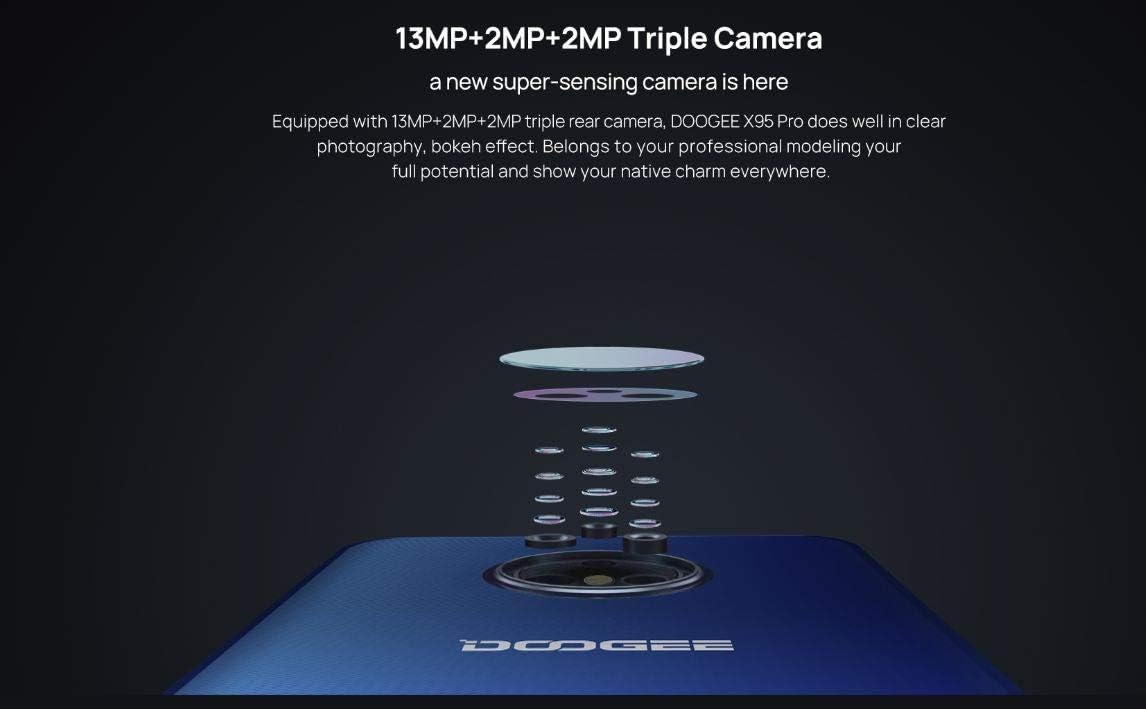
Imej: Meletup view diagram of the DOOGEE X95 Pro's triple rear camera system, illustrating its multi-lens configuration.

Image: A visual representation of the DOOGEE X95 Pro's 5MP front camera in action, demonstrating its ability to enhance facial features.
Prestasi dan Storan
The DOOGEE X95 Pro is powered by a MediaTek Helio A20 quad-core 1.8GHz processor, coupled with 4GB of RAM and 32GB of internal storage.
- Pemproses: The Helio A20 ensures smooth performance for daily tasks and light gaming, with optimized power consumption.
- Ingatan: 4GB RAM allows for efficient multitasking and lag-free operation.
- Storan: 32GB ROM provides ample space for apps and media. This can be expanded up to 256GB using a Micro SD card.

Imej: A terperinci view of the MediaTek Helio A20 processor chip, highlighting its role in the phone's performance.

Image: A user holding the DOOGEE X95 Pro, demonstrating its capability for gaming and media consumption, emphasizing its practical and powerful performance.
Pengurusan Bateri
The 4350mAh high-capacity battery is equipped with a power management chip, ensuring more than a day of usage on a single charge.
- Pengecasan Cepat: The phone supports 5V/2A fast charging, allowing for quick recharges.
- Mod jimat tenaga: Utilize the built-in power saving modes to extend battery life when needed.
- Sokongan OTG: The device supports On-The-Go (OTG) functionality, allowing you to connect USB peripherals.
Perisian dan Ciri
The DOOGEE X95 Pro runs on the latest Android 10 operating system, offering enhanced features and security.
- Android 10: Enjoy system-wide dark theme, improved privacy controls, and gesture navigation.
- Pengecaman Muka: Unlock your phone quickly and securely using facial recognition technology.
- Ketersambungan: Supports 4G network, Bluetooth 5.0, Wi-Fi, and GPS for reliable navigation.

Image: An infographic summarizing key features of the DOOGEE X95 Pro, including its display, camera, facial recognition, Android 10, RAM/ROM, and battery capacity.
Penyelenggaraan
Proper maintenance ensures the longevity and optimal performance of your DOOGEE X95 Pro.
- Pembersihan: Gunakan kain lembut dan tidak berbulu untuk membersihkan skrin dan badan. Elakkan bahan yang melelas atau bahan kimia yang keras.
- Penjagaan Bateri: Avoid extreme temperatures. Do not let the battery completely drain frequently. For long-term storage, charge the battery to about 50%.
- Kemas Kini Perisian: Regularly check for and install system updates to ensure your device has the latest features, security patches, and performance improvements. Go to Tetapan > Sistem > Kemas kini sistem.
- Pengurusan Storan: Kosongkan cache secara berkala, padamkan yang tidak perlu files, and uninstall unused apps to free up storage space and maintain performance.
Menyelesaikan masalah
If you encounter issues with your DOOGEE X95 Pro, refer to the following common solutions.
| Masalah | Penyelesaian yang Mungkin |
|---|---|
| Telefon tidak dihidupkan. | Ensure the battery is charged. Connect the charger and wait a few minutes before attempting to power on again. If unresponsive, try holding the Power button for 10-15 seconds for a forced restart. |
| Aplikasi ranap atau beku. | Kosongkan cache apl (Tetapan > Aplikasi & pemberitahuan > [Nama Aplikasi] > Storan & cache > Kosongkan cache). Restart the phone. Ensure the app is updated to its latest version. |
| Isyarat rangkaian lemah atau tiada perkhidmatan. | Check if SIM card is properly inserted. Restart the phone. Verify network settings (Tetapan > Rangkaian & internet > Rangkaian mudah alih). Contact your service provider if the issue persists. |
| Bateri cepat habis. | Reduce screen brightness. Close background apps. Turn off Wi-Fi, Bluetooth, and GPS when not in use. Enable power saving mode. Check battery usage in settings to identify power-hungry apps. |
| Telefon perlahan atau tidak responsif. | Kosongkan cache dan yang tidak perlu files. Uninstall unused apps. Restart the device. If the issue persists, consider a factory reset (Nota: Ini akan memadamkan semua data. Sandarkan maklumat penting terlebih dahulu.). |
Spesifikasi
Detailed technical specifications for the DOOGEE X95 Pro Smartphone.
| Ciri | Perincian |
|---|---|
| Jenama | DOOGEE |
| Nama Model | DOOGEE X95 Pro |
| Sistem Operasi | Android 10.0 |
| Saiz Paparan | 6.52 Inches HD+ Waterdrop (Corning Gorilla Glass) |
| Resolusi Paparan | 540 x 1200 piksel |
| Pemproses | MediaTek Helio A20 (MT6761V/WE (61D)), Quad-core 1.8GHz 12nm |
| GPU | IMG GE8300 550 MHz |
| RAM | 4 GB |
| Storan Dalaman (ROM) | 32 GB |
| Storan Luaran | Kad SD mikro sehingga 256 GB |
| Kamera Belakang | 13MP + 2MP + 2MP Triple Camera, F2.2, LED Flash |
| Kamera Depan | 5.0MP, F2.2 |
| Bateri | 4350mAh Polymer, 5V/2A Fast Charge |
| Ketersambungan | 4G (B1/3/7/8/20), 3G (WCDMA: B1/B8), 2G (GSM: 850/900/1800/1900MHz), Wi-Fi, Bluetooth 5.0, GPS, OTG, Micro USB |
| Penderia | G-sensor, Proximity Sensor, Ambient Light Sensor |
| Keselamatan | Facial Unlock |
| Dimensi | 167 * 77.4 * 8.9 mm |
| Berat badan | 189g |
| warna | Biru |
Apa yang ada dalam Kotak
The standard package for the DOOGEE X95 Pro includes:
- 1 x DOOGEE X95 Pro Mobile Phone
- 1 x Charger (5V / 2A)
- 1 x Kabel USB
- 1 x Manual Pengguna
Waranti dan Sokongan
Warranty information for your DOOGEE X95 Pro Smartphone is typically provided with your purchase documentation. Please refer to the warranty card or contact your point of purchase for specific details regarding warranty coverage and terms.
For further technical support or inquiries, please visit the official DOOGEE webtapak atau hubungi saluran perkhidmatan pelanggan mereka.

