
Produk Selesaiview
The Casio Illuminator AE1500WH Series digital watch is designed for durability and functionality, featuring a 10-year battery life and 100-meter water resistance. It offers versatile timekeeping functions including a stopwatch, countdown timer, and multiple alarms, all easily visible on its large LED-backlit display.
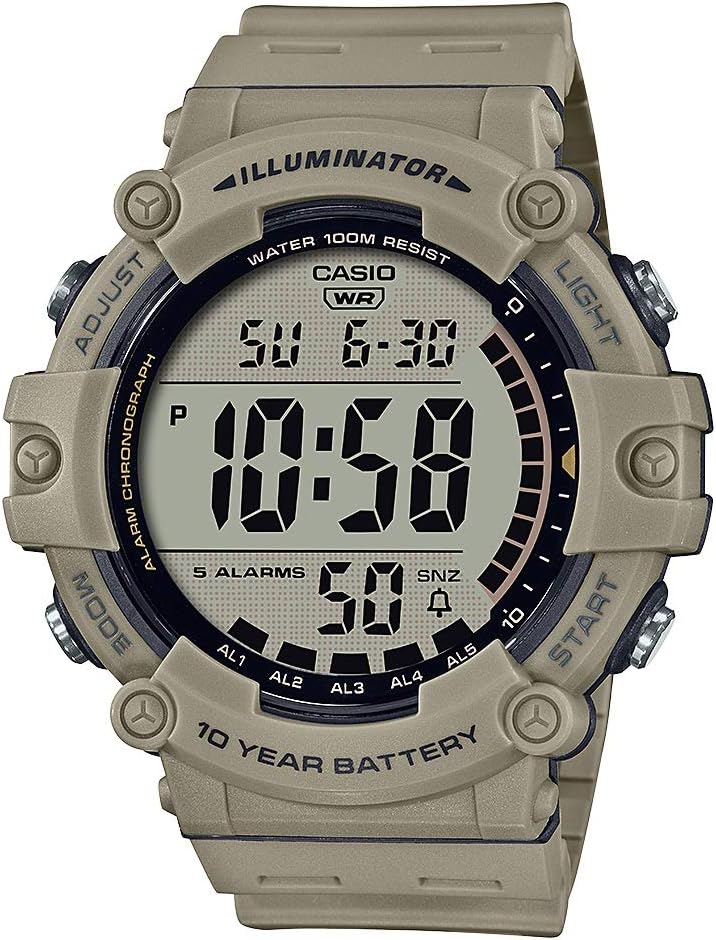
Rajah 1: Depan view daripada Jam Tangan Digital Casio Illuminator Siri AE1500WH.
Persediaan dan Operasi Asas
Menetapkan Masa dan Tarikh
To set the time and date, ensure the watch is in timekeeping mode. Press and hold the 'Adjust' button (top-left) until the display starts blinking. Use the 'Mode' button (bottom-left) to cycle through seconds, hours, minutes, year, month, and day. Use the 'Start' button (bottom-right) to change the blinking value. Once all settings are correct, press 'Adjust' again to confirm.

Figure 2: The Casio Illuminator AE1500WH watch worn on a wrist, demonstrating its size and fit.
Mod Pengendalian
Penggera
The watch features five multi-function alarms, including one with a snooze function. To access alarm settings, press the 'Mode' button until 'AL' appears. Use the 'Start' button to cycle through alarms (AL1-AL5) and the hourly time signal. To set an alarm, press and hold 'Adjust' while on the desired alarm. Use 'Mode' to select hours/minutes and 'Start' to change values. Press 'Adjust' to save. To activate/deactivate an alarm, simply press 'Adjust' while viewing it in alarm mode.
Pemasa Undur
The 24-hour countdown timer includes an auto-repeat function. To enter timer mode, press 'Mode' until 'TR' appears. To set the timer, press and hold 'Adjust'. Use 'Mode' to select hours/minutes and 'Start' to change values. Press 'Adjust' to save. To start/pause/stop the timer, use the 'Start' button. To reset, press 'Adjust' while stopped.
Jam randik
The 1/100-second stopwatch can measure elapsed time, split times, and two finishes. To enter stopwatch mode, press 'Mode' until 'ST' appears. Use 'Start' to begin/stop timing. Press 'Adjust' for split times. To reset, press 'Adjust' while stopped.
Masa Ganda
The dual time function allows you to view a second time zone. To enter dual time mode, press 'Mode' until 'DT' appears. To set the dual time, press and hold 'Adjust'. Use 'Mode' to select hours/minutes and 'Start' to change values. Press 'Adjust' to save.
Features and Accessibility
LED Backlight with Afterglow
The amber LED backlight ensures clear visibility in low-light environments. To activate the backlight, press the 'Light' button (top-right). Note that the backlight has a predefined duration and cannot be adjusted. Some users have noted that the amber light may not be sufficiently bright during the day, but it performs well in dark conditions.
Hayat Bateri 10 Tahun
The watch is powered by a reliable CR2032 battery, designed to provide a decade of uninterrupted performance. This long battery life minimizes the need for frequent battery changes.


Figure 3: Icons representing key features: 10-Year Battery Life, Water Resistance, and Stopwatch.
Rintangan Air 100 Meter
The watch is built to handle swimming, snorkeling, and other water activities with ease, ensuring durability in various conditions. It is suitable for everyday use and recreational swimming, but not for deep-sea diving.
Penyelenggaraan
To maintain your Casio watch, regularly wipe it with a soft, dry cloth. Avoid exposing it to extreme temperatures or harsh chemicals. If the watch gets wet, ensure all buttons are not pressed underwater. For battery replacement, it is recommended to consult a professional to ensure water resistance is maintained.
Menyelesaikan masalah
Ketidaktepatan Masa
Some users have reported slight time inaccuracies, losing a couple of seconds a day. If precise timekeeping is critical, regular manual adjustment may be necessary.
Backlight Visibility
While the amber LED backlight is effective in low-light conditions, it may not be sufficiently bright for daytime use. This is a design characteristic and not a defect.
Spesifikasi
| Ciri | Perincian |
|---|---|
| Nombor Model | AE-1500WH-5AVCF |
| Dimensi Pakej | 4.21 x 2.76 x 2.36 inci |
| Berat Barang | 2.93 auns |
| Bateri | 1 bateri CR5 (termasuk) |
| Tahan Air | 100-Meter |
| Pengeluar | Casio |
| Negara Asal | China |
Waranti dan Sokongan
For warranty information or product support, please refer to the documentation included in the product packaging or visit the official Casio website. Contact details for customer service are typically provided within the warranty booklet.

Figure 4: The Casio product box, where additional documentation can be found.