
1. Pengenalan
This manual provides essential information for the proper use and maintenance of your Dr Trust USA 509 Digital BMI Weight Scale. This device is designed to measure body weight and analyze various body composition metrics. Please read this manual thoroughly before first use to ensure accurate readings and safe operation.
2. Maklumat Keselamatan
- Letakkan penimbang di atas permukaan yang keras dan rata. Elakkan permaidani atau lantai yang tidak rata, kerana ini boleh menjejaskan ketepatan.
- Do not use the scale on wet or slippery surfaces. Ensure your feet and the scale surface are dry before use.
- Jangan melompat ke atas penimbang. Naik dan turunkan penimbang dengan perlahan.
- The scale is designed for household use only. It is not intended for medical diagnosis or treatment.
- Jauhkan penimbang daripada medan elektromagnet yang kuat.
- Jangan rendam penimbang di dalam air atau gunakan pembersih yang kasar.
- Individuals with pacemakers or other implanted medical devices should consult their physician before using this scale, as it uses Bioelectrical Impedance Analysis (BIA).
3. Kandungan Pakej
- Dr Trust USA 509 Digital BMI Weight Scale
- Kabel Pengecas USB
- Manual Pengguna
4. Produk Lebihview
The Dr Trust USA 509 Digital BMI Weight Scale is an advanced body composition monitor that tracks 18 essential body metrics. It features a sleek design, high-precision sensors, and Bluetooth connectivity for seamless data synchronization with a mobile application.

Image 1: Dr Trust USA 509 Digital BMI Weight Scale, displaying a weight of 52.4 kg and a 3-year warranty badge.
Ciri-ciri Utama:
- 18 Body Metrics: Measures BMI, bone mass, muscle, BFR, BMR, visceral fat, subcutaneous fat, protein rate, body age, body fat, and more.
- Boleh dicas semula: Equipped with a USB port for convenient charging.
- Penderia Ketepatan Tinggi: Four sensors ensure accurate and reliable measurements.
- Kesambungan Bluetooth: Syncs data with a mobile app for Android and iPhone devices.
- Sokongan Berbilang Pengguna: Allows tracking data for multiple users on the app.
- Step-on Technology: Automatically powers on when stepped on.
- Paparan LCD: Large, easy-to-read display for immediate weight readings.
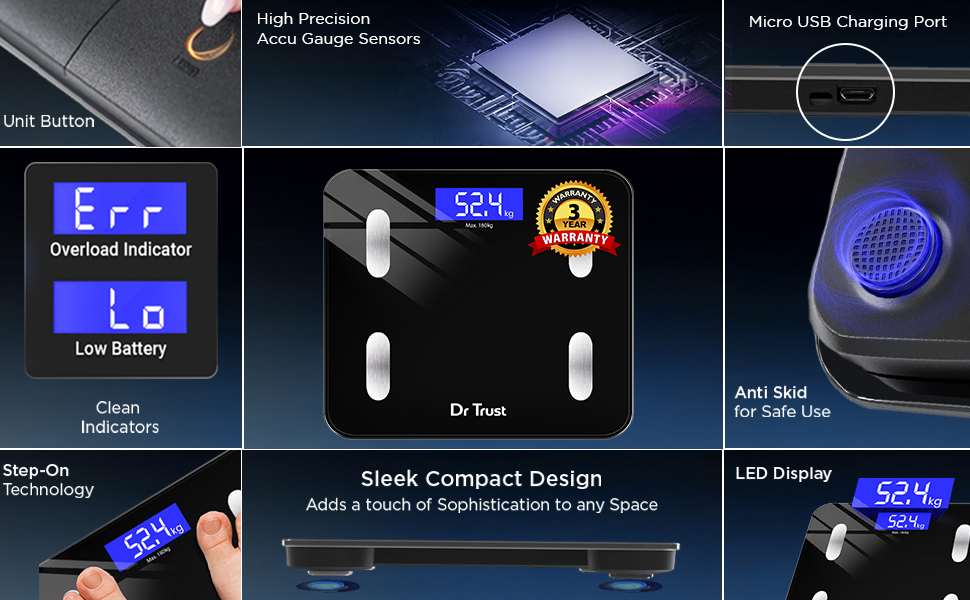
Imej 2: Terperinci view of the scale's components, including the Unit Button, Micro USB Charging Port, High Precision Accu Gauge Sensors, Clear Indicators (Err, Lo), Anti-Skid feet, Step-on Technology, Sleek Compact Design, and LED Display.
5. Persediaan
5.1 Pengecasan Awal
Before first use, ensure the scale is fully charged. Connect the provided USB charging cable to the Micro USB Charging Port on the side of the scale and to a standard USB power source. The display may show a charging indicator.

Image 3: Close-up of the Dr Trust 509 scale highlighting its rechargeable battery and USB charging port.
5.2 Pemasangan Apl dan Berpasangan Bluetooth
- Muat turun Dr Trust 360 App daripada Apple App Store atau Google Play Store.
- Dayakan Bluetooth pada telefon pintar anda.
- Open the Dr Trust 360 App and create your user profile.
- Step onto the scale to activate it. The display will show your weight.
- Within the app, follow the instructions to connect to the scale via Bluetooth. The app will automatically detect the scale.
5.3 Penempatan Skala
Place the scale on a hard, flat, and stable surface. Avoid placing it on soft surfaces like carpets, rugs, or uneven tiles, as this can lead to inaccurate readings.
6. Arahan Operasi
6.1 Mengambil Pengukuran
- Ensure the scale is on a flat surface.
- Step onto the scale barefoot. Ensure your feet are positioned on the metal electrodes for body composition analysis.
- Stand still until your weight is displayed and stabilized on the LCD screen.
- If connected via Bluetooth, the data will automatically sync to the Dr Trust 360 App.
6.2 Understanding Display Readings
The scale's LCD will primarily show your body weight. For detailed body composition metrics, refer to the Dr Trust 360 App.
6.3 Menggunakan Apl Mudah Alih
The Dr Trust 360 App provides a comprehensive overview of your health data:
- Body Metrics Tracking: View all 18 body composition metrics, including Body Weight, Protein Mass, Weight without Fat, Bone Mass, Body Mass, Metabolic Age, Visceral Fat, BMR, Muscle Rate, Body Water, Obesity Level, Subcutaneous Fat, BFR, BMI.
- Penjejakan Kemajuan: Monitor your progress over days, weeks, and months with historical data and graphs.
- Penyegerakan Data: Syncs with Google Fit and Apple Health.
- Personalized Features: Includes Calories Tracking, Water Tracking, and a Personalized Diet Plan powered by AI (available with subscription).
- Health Data Protection: Dr Trust 360 App stores your health data on Indian servers for enhanced privacy.
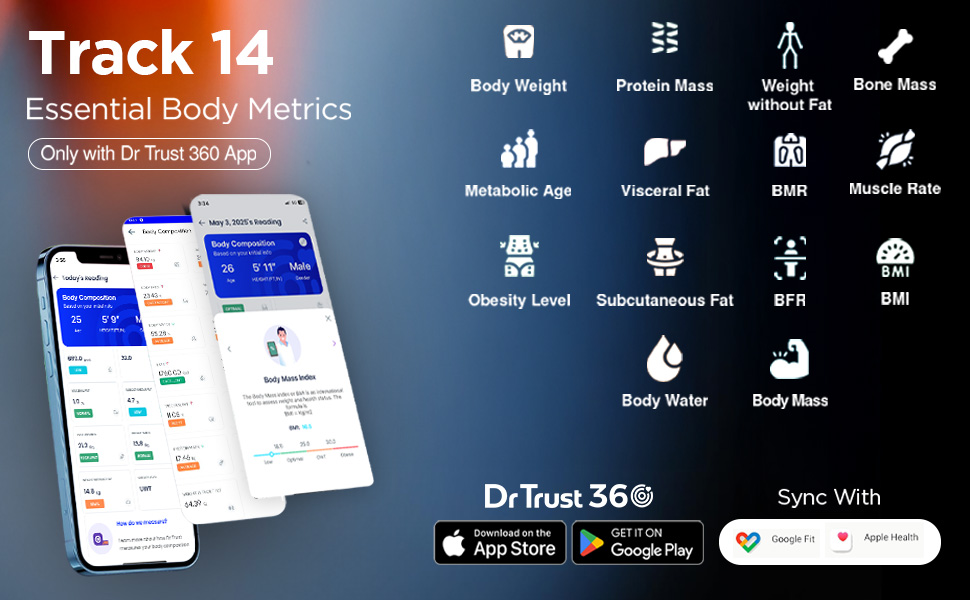
Image 4: Screenshot of the Dr Trust 360 App interface displaying various body metrics and synchronization options with Google Fit and Apple Health.
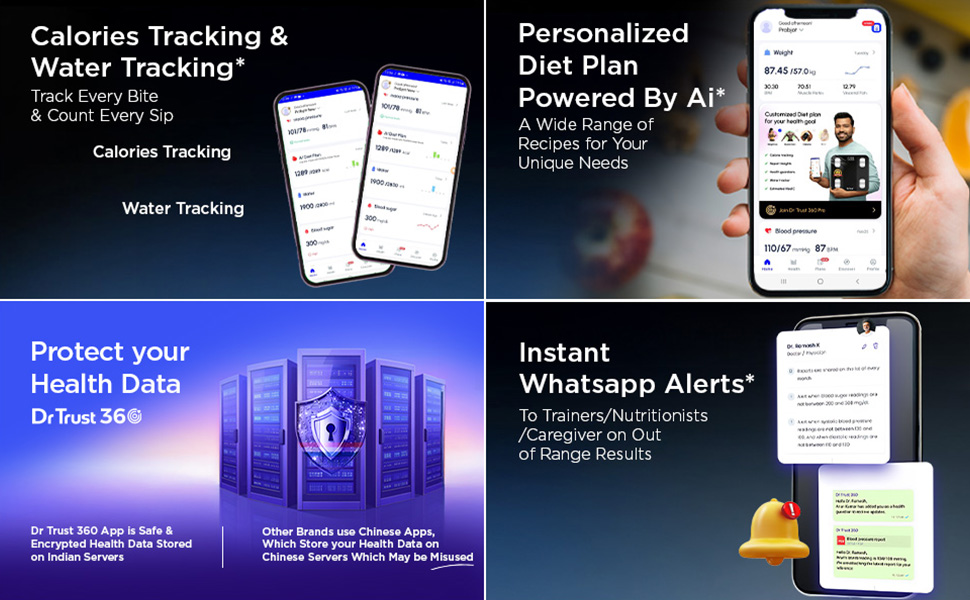
Image 5: Visual representation of the Dr Trust 360 App's capabilities, including calorie tracking, water intake tracking, and a personalized diet plan feature.
6.4 Kefungsian Berbilang Pengguna
The Dr Trust 360 App allows you to add multiple user profiles, making it suitable for family use. Each user's data is stored separately and can be tracked individually.
7. Penyelenggaraan
7.1 Pembersihan
Lap permukaan skala dengan lembut, damp cloth. Do not use chemical cleaning agents or abrasive materials, as these can damage the scale's surface or electronic components.
7.2 Mengecas
Recharge the scale when the 'Lo' indicator appears on the display. Use the provided USB cable. A single charge provides extended use.
7.3 Penyimpanan
Simpan penimbang di tempat yang sejuk dan kering. Elakkan suhu yang melampau dan cahaya matahari langsung. Jangan letakkan objek berat di atas penimbang apabila tidak digunakan.
8. Penyelesaian masalah
| Masalah | Kemungkinan Punca | Penyelesaian |
|---|---|---|
| 'Err' displayed | Overload (weight exceeds maximum capacity of 180 kg). | Kurangkan berat badan pada penimbang. |
| 'Lo' displayed | Bateri lemah. | Recharge the scale using the USB cable. |
| Bacaan tidak tepat | Scale on uneven surface, movement during measurement, or calibration issue. | Place scale on a hard, flat surface. Stand still. Step off and wait for display to clear, then step on again for recalibration. Ensure feet are dry and properly placed on electrodes. |
| Bluetooth tidak bersambung | Bluetooth off on phone, app not open, scale not active, or interference. | Ensure phone Bluetooth is on. Open Dr Trust 360 App. Step on scale to activate. Move closer to the scale. Restart phone and app if necessary. |
| Tiada paparan | Bateri habis. | Cas penimbang. |
9. Spesifikasi
| Ciri | Spesifikasi |
|---|---|
| Jenama | Dr Amanah |
| Nombor Model | IGH00220 |
| warna | Hitam |
| Jenis Paparan | LCD |
| bahan | Kaca Terbaja |
| Berat Barang | 1.56 Kilogram |
| Dimensi Produk | 32.3 x 28 x 4.5 cm |
| Sumber Kuasa | Bateri Litium Ion Boleh Dicas Semula (termasuk) |
| Ketersambungan | Bluetooth |
| Kapasiti Maks | 180 kg |
10. Maklumat Waranti
The Dr Trust USA 509 Digital BMI Weight Scale comes with a Waranti 3 tahun. Please retain your purchase receipt for warranty claims. For details on warranty terms and conditions, refer to the official Dr Trust webtapak atau hubungi sokongan pelanggan.
11. Sokongan
For any queries, technical assistance, or support, please contact Dr Trust customer service. Contact details can typically be found on the product packaging or the official Dr Trust webtapak.