1. Pengenalan dan Maklumat Keselamatan
This manual provides essential instructions for the safe assembly, operation, and maintenance of your WELCARE WC2288I Motorized Treadmill. Please read all instructions carefully before use to ensure proper function and to prevent injury.
Amaran Keselamatan Penting:
- Sentiasa berunding dengan doktor sebelum memulakan sebarang program senaman.
- Jauhkan kanak-kanak dan haiwan peliharaan dari treadmill semasa operasi.
- Place the treadmill on a solid, level surface with at least 2 meters of clear space behind it.
- Ensure the safety key is properly attached to your clothing before beginning your workout.
- Jangan kendalikan treadmill jika ia rosak atau tidak berfungsi.
- Pakai kasut sukan yang sesuai.
- Maximum user weight capacity is 100 kg. Do not exceed this limit.
2. Produk Lebihview
Familiarize yourself with the main components of your WELCARE WC2288I Treadmill.
Konsol dan Paparan
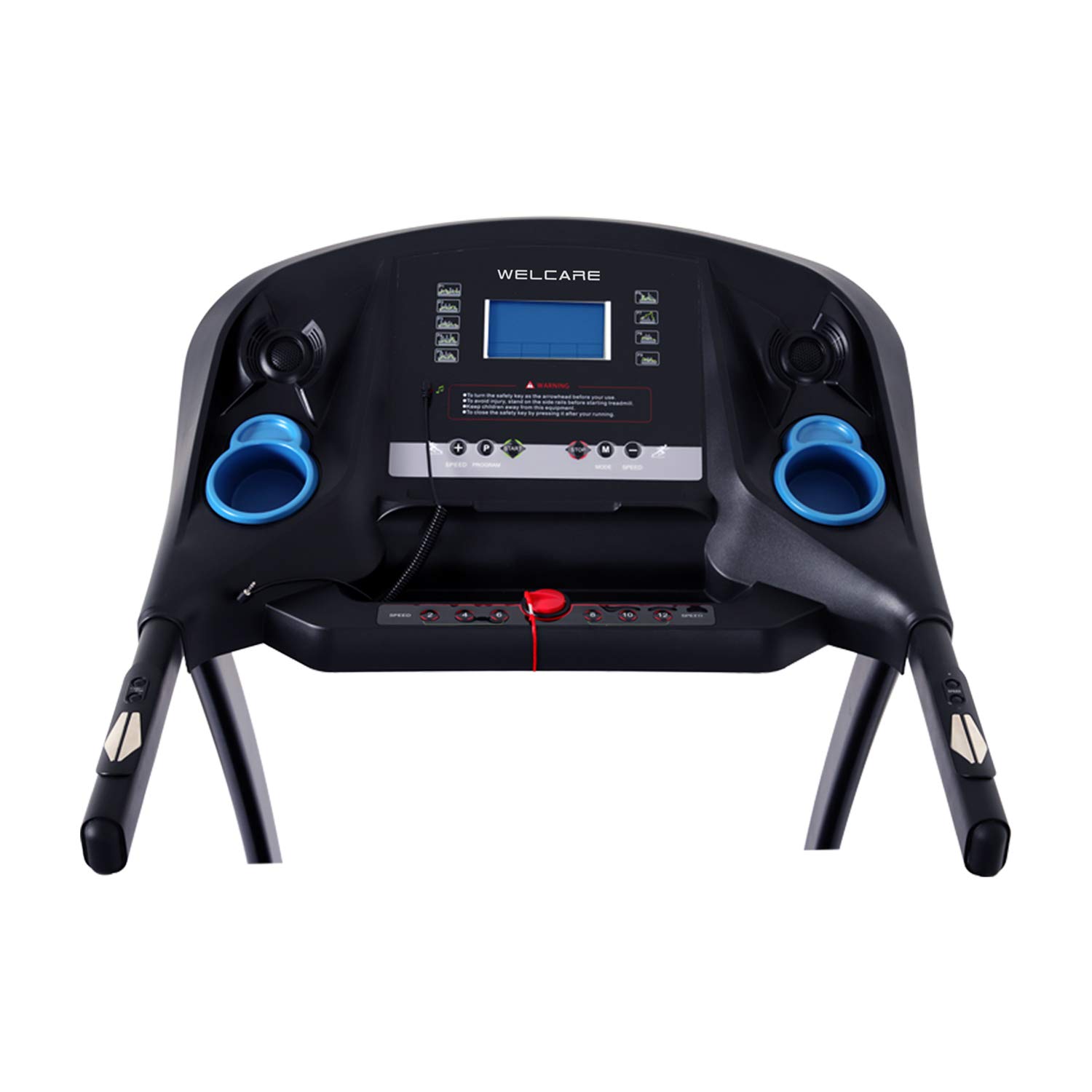
Image: The main console of the WELCARE WC2288I treadmill, featuring an LCD display, various control buttons for speed and incline, and integrated cup holders.
The central console features an LCD display that shows time, distance, speed, calories, and incline. Control buttons allow for manual adjustment of speed and incline, as well as program selection. Integrated cup holders are provided for convenience.
Kawalan Hendal

Imej: Dari dekat view of the right handlebar of the WELCARE WC2288I treadmill, showing integrated 'Start' and 'Stop' buttons, along with speed adjustment controls.
The handlebars include convenient buttons for quick start/stop and speed adjustments, allowing for easy control during your workout without reaching for the main console.
Mekanisme Lipatan

Imej: Pro sampinganfile of the WELCARE WC2288I treadmill, illustrating its foldable design for space-saving storage. The model number 'WC-2288' is visible on the side frame.
The treadmill features an easy folding mechanism and a soft drop system, allowing you to safely and easily fold and unfold the running deck for storage.
3. Arahan Persediaan
Follow these steps to assemble and prepare your treadmill for first use.
3.1 Membongkar
- Keluarkan semua komponen dari pembungkusan dengan berhati-hati.
- Check the included components against the packing list (TREADMILL, MANUAL, TOOLS).
- Simpan bahan pembungkusan untuk penyimpanan atau pengangkutan masa hadapan.
3.2 Perhimpunan
Assembly is required. Refer to the separate assembly guide included in your package for detailed, step-by-step instructions. Ensure all bolts and nuts are securely tightened before use.
3.3 Penempatan
- Letakkan treadmill di atas permukaan yang kukuh dan rata.
- Ensure adequate clearance around the treadmill, especially at the rear (minimum 2 meters).
- Avoid placing the treadmill in direct sunlight or near heat sources.
3.4 Sambungan Kuasa
- Sambungkan kord kuasa ke salur keluar elektrik yang dibumikan.
- Ensure the power switch on the treadmill is in the 'ON' position.
4. Arahan Operasi
Learn how to operate your WELCARE WC2288I Treadmill for an effective workout.
4.1 Bermula dan Berhenti
- Attach the safety key clip to your clothing and insert the safety key into its designated slot on the console.
- Press the 'START' button on the console or handlebar. The treadmill will begin at a low speed after a short countdown.
- To stop, press the 'STOP' button. For emergency stops, pull the safety key from the console.
4.2 Adjusting Speed and Incline
- Kelajuan: Use the 'SPEED +' and 'SPEED -' buttons on the console or handlebars to adjust the running speed. The speed range is 1 to 16 Kilometers per Hour.
- Condong: Use the 'INCLINE +' and 'INCLINE -' buttons on the console to adjust the incline level. The treadmill features 15 levels of auto incline.
4.3 Using FITSHOW APP and Bluetooth Connectivity
- Download the FITSHOW APP from your device's app store.
- Enable Bluetooth on your mobile device and pair it with the treadmill (look for 'WELCARE WC2288I' or similar).
- Follow the in-app instructions to connect and control your treadmill, track workouts, and access additional features.
- The treadmill also supports wireless Bluetooth music playback.
5. Penyelenggaraan
Penyelenggaraan tetap memastikan umur panjang dan prestasi optimum treadmill anda.
5.1 Pembersihan
- Lap konsol dan permukaan luaran dengan iklanamp kain selepas setiap penggunaan.
- Jangan gunakan pembersih atau pelarut yang melelas.
- Keep the area around the treadmill clean and free of dust.
5.2 Pelinciran Tali Pinggang Larian
The running belt requires periodic lubrication to reduce friction and extend its lifespan. Refer to the separate maintenance guide or contact customer support for specific lubrication instructions and recommended lubricants.
5.3 Pelarasan Tali Pinggang Larian
Over time, the running belt may become misaligned or loose. If the belt slips or moves to one side, refer to the separate maintenance guide for instructions on how to adjust the belt tension and alignment using the provided tools.
6. Penyelesaian masalah
Bahagian ini membincangkan isu biasa yang mungkin anda hadapi dengan treadmill anda.
| Masalah | Kemungkinan Punca | Penyelesaian |
|---|---|---|
| Treadmill tidak dihidupkan. | Power cord not connected, power switch off, circuit breaker tripped. | Check power cord connection, ensure power switch is ON, reset circuit breaker. |
| Tali pinggang larian berhenti atau tergelincir. | Safety key dislodged, belt too loose, motor overload. | Ensure safety key is in place. Adjust belt tension (refer to maintenance section). Reduce user weight or speed. |
| Paparan menunjukkan kod ralat. | Sensor issue, motor issue, or other internal fault. | Note the error code and consult the full manual or contact customer support. |
| Bunyi luar biasa semasa operasi. | Loose components, belt friction, motor issue. | Check for loose bolts. Lubricate running belt. If noise persists, contact support. |
7. Spesifikasi
Technical details for the WELCARE WC2288I Motorized Treadmill.
- Nama Model: WC2288I
- Jenama: SELAMAT BERJAYA
- Motor: 2 HP Continuous (4 HP Peak)
- Kelajuan Maksimum: 16 Kilometer sejam
- Kelajuan Minimum: 1 Kilometer per Hour
- Kecondongan Maksimum: 15 Levels Auto Incline
- Saran Maksimum Berat: 100 Kilogram
- Jenis Paparan: LCD
- Ketersambungan: Bluetooth, FITSHOW APP
- Sumber Kuasa: Elektrik Bertali
- Bahan Bingkai: Keluli Aloi
- Ciri Khas: Boleh dilipat
- Perhimpunan Diperlukan: ya
- Komponen yang Disertakan: Treadmill, Manual, Tools
8. Waranti dan Sokongan
For warranty information, technical support, or service inquiries, please contact the manufacturer directly.
- Pengeluar: S AND T WELCARE EQUIPMENTS P LTD
- Nombor Perhubungan: 9842993755
Please have your model number (WC2288I) and purchase date available when contacting support.