
FREETOO Portable Digital Hanging Scale
FREETOO Portable Digital Hanging Luggage Scale User Manual
Model: Portable Digital Hanging Scale
1. Pengenalan
Thank you for choosing the FREETOO Portable Digital Hanging Luggage Scale. This manual provides essential information for the safe and effective use of your new scale. Please read it thoroughly before operation and retain it for future reference.

Image 1: The FREETOO Portable Digital Hanging Luggage Scale, black in color, featuring a digital display and a strap for weighing.
2. Maklumat Keselamatan
- Do not overload the scale beyond its maximum capacity of 110 lb (50 kg).
- Jauhkan penimbang daripada air dan suhu yang melampau.
- Elakkan daripada menjatuhkan atau meletakkan skala kepada kesan yang kuat.
- This device is for weighing luggage and similar items; do not use it for weighing people or animals.
- Jauhkan bateri daripada kanak-kanak.
3. Produk Lebihview
The FREETOO Portable Digital Hanging Luggage Scale is designed for convenience and accuracy. Key features include:
- Ketepatan Tinggi: Measures up to 110 lb (50 kg) with a deviation of no more than 0.1 lb.
- Paparan Mudah Dibaca: Backlit LCD for clear visibility in various lighting conditions.
- Berbilang Unit: Switch between pounds (lb), kilograms (kg), grams (g), and ounces (oz).
- Fungsi Pintar: Tare function, weight lock, auto-off, low battery indicator, and overload indicator.
- Reka Bentuk Mudah Alih: Padat dan ringan untuk pengangkutan yang mudah.

Image 2: The FREETOO scale displaying a weight of 8.50 lb, highlighting its maximum capacity of 110 lb and accuracy of 0.1 lb.
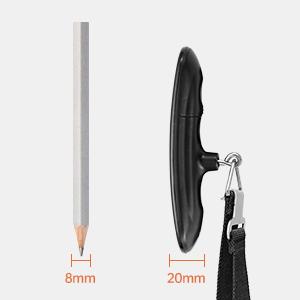
Image 3: A size comparison of the FREETOO scale next to a pencil, illustrating its compact and portable design.
4. Persediaan
4.1 Pemasangan Bateri
- Cari petak bateri di belakang penimbang.
- Buka penutup bateri.
- Insert one CR2032 lithium button cell battery, ensuring the positive (+) side faces upwards. If there is a plastic insulator tab, remove it before inserting the battery.
- Tutup penutup bateri dengan selamat.

Image 4: A hand inserting a CR2032 battery into the FREETOO scale's battery compartment.
5. Arahan Operasi
5.1 Hidupkan/Mati Kuasa
- Untuk menghidupkan: Tekan butang kuasa (U) once. The display will show '8888' and then '0.00' or '0.0' with the current unit.
- To turn off: Press and hold the power button for 3 seconds. The scale will also automatically turn off after 60 seconds of inactivity to conserve battery.
5.2 Changing Weight Units
- With the scale powered on and displaying '0.00', press the power button (U) repeatedly to cycle through the available units: lb (pounds), kg (kilograms), g (grams), and oz (ounces).
- Select your desired unit before weighing.

Image 5: The FREETOO scale's HD LCD display showing the four selectable weight units: grams (g), ounces (oz), kilograms (kg), and pounds (lb).
5.3 Weighing Luggage
- Ensure the scale is powered on and displaying '0.00' in your preferred unit.
- Attach the strap to the handle of your luggage.
- Lift the scale by its handle, holding it steady and horizontally.
- Wait for the weight reading to stabilize. The display will flash three times and then show 'HOLD' to indicate the weight has been locked.
- Lower the luggage to read the final weight. The weight will remain displayed for a few seconds before resetting or turning off automatically.

Image 6: A FREETOO scale being used to weigh a blue suitcase, demonstrating the secure hook and strap mechanism.

Image 7: A close-up of the FREETOO scale's display, showing the 'HOLD' indicator after a stable weight reading has been captured.
5.4 Fungsi Tara
- The tare function allows you to subtract the weight of a container or attachment.
- Attach the empty container or accessory to the scale.
- Tekan butang kuasa (U) once while the empty item is hanging. The display will reset to '0.00'.
- Now, add the items you wish to weigh to the container. The display will show only the net weight of the added items.

Image 8: An illustration of the FREETOO scale's key functions, including Tare, Weight Hold, Auto On/Off, Low Battery Indicator, and Overload Indicator.
6. Penyelenggaraan
- Bersihkan penimbang dengan lembut, damp kain. Jangan gunakan pembersih yang kasar atau rendam kerak di dalam air.
- Simpan skala di tempat yang sejuk dan kering apabila tidak digunakan.
- Remove the battery if the scale will not be used for an extended period to prevent leakage.
7. Penyelesaian masalah
| Masalah | Kemungkinan Punca | Penyelesaian |
|---|---|---|
| Skala tidak dihidupkan | Low or dead battery; battery incorrectly installed; plastic insulator tab not removed. | Replace battery; ensure correct polarity; remove plastic tab. |
| Bacaan tidak tepat | Scale not held steady; item touching other surfaces; scale overloaded. | Hold scale steady and horizontally; ensure item hangs freely; do not exceed 110 lb (50 kg). |
| Paparan menunjukkan 'Lo' | Bateri lemah. | Gantikan bateri CR2032. |
| Display shows 'O-Ld' | Lebihan beban. | Remove some weight from the item. Do not exceed 110 lb (50 kg). |
8. Spesifikasi
- Jenama: PERCUMA
- model: Portable Digital Hanging Scale
- kapasiti: 110 lb / 50 kg
- Ketepatan: 0.1 lb / 50 g
- Unit: lb, kg, g, oz
- paparan: LCD bercahaya belakang
- Sumber Kuasa: 1 x Bateri CR2032 (termasuk)
- Dimensi Produk: Kira-kira 5 x 2 x 1.5 inci
9. Waranti dan Sokongan
FREETOO provides the following services for this product:
- Waranti: 30 Days Replacement
- Perkhidmatan: Perkhidmatan Sepanjang Hayat
- Sokongan Pelanggan: Sokongan 24 Jam
For any inquiries or assistance, please contact FREETOO customer support through the retailer's platform or the official FREETOO webtapak.