
Teslong TD450D85L1 Articulating Borescope User Manual
Model: TD450D85L1
1. Pengenalan
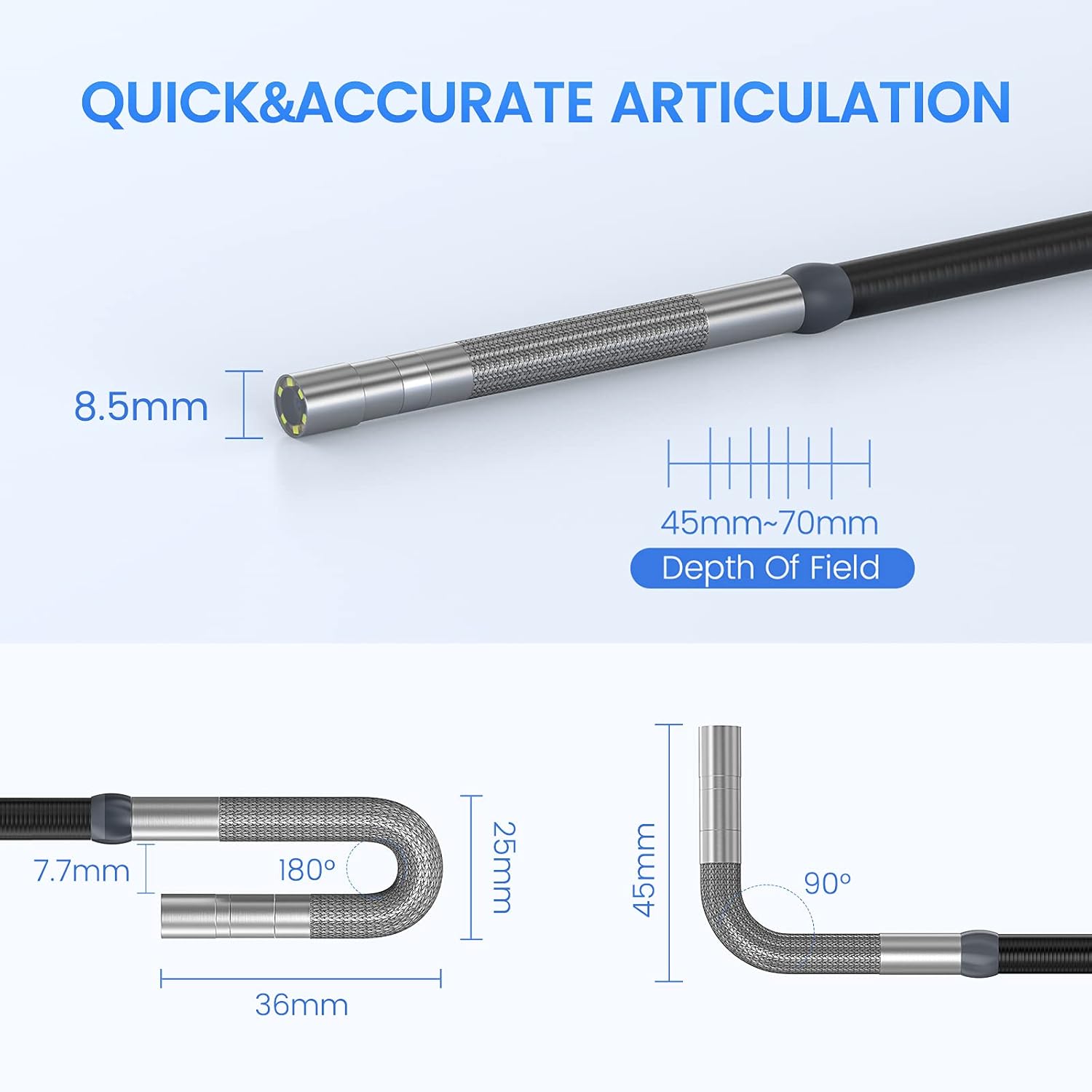
The Teslong TD450D85L1 Articulating Borescope is a professional inspection tool designed for visual examination of hard-to-reach areas. It features a two-way 180-degree articulating probe, an integrated 4.5-inch IPS LCD monitor, and high-definition imaging capabilities. This manual provides essential information for the safe and effective use of your borescope.
2. Maklumat Keselamatan
- Non-Waterproof Probe: The inspection probe of this borescope is BUKAN KALIS AIR. Do not submerge the probe or any part of the device in water or other liquids. Doing so will cause damage and void the warranty.
- Avoid using the device in environments with extreme temperatures or high humidity.
- Jauhkan peranti daripada medan magnet yang kuat.
- Jangan cuba membuka atau mengubah suai peranti. Pembaikan hendaklah hanya dilakukan oleh kakitangan yang diberi kuasa.
- Ensure the device is fully charged before use to prevent unexpected power loss during inspections.

3. Kandungan Pakej
Sahkan bahawa semua item yang disenaraikan di bawah disertakan dalam pakej anda:
- TD450D85L1 Articulating Borescope Unit (with integrated 4.5-inch IPS monitor)
- Kabel Pengecasan USB Jenis-C
- Kad MicroSD 8GB (dipasang sebelumnya)
- Membawa Sarung
- Manual Pengguna

4. Produk Lebihview dan Ciri
The Teslong TD450D85L1 is an advanced inspection camera designed for detailed visual inspections. It features a flexible gooseneck probe with an 8.5mm diameter and a 2.0MP CMOS sensor, providing 1080P HD image and video capture. The integrated 4.5-inch IPS LCD monitor offers a clear view without the need for external devices or Wi-Fi connections.
Ciri-ciri Utama:
- Two-Way 180° Articulation: Allows precise control of the probe tip for navigating complex spaces and maintaining optimal viewsudut-sudut.
- Integrated 4.5-inch IPS LCD Monitor: Provides a clear, real-time display of the inspection area. No smartphone, Wi-Fi, or app required.
- Pengimejan Definisi Tinggi: 1080P HD resolution with a 2.0MP CMOS sensor for capturing detailed images and videos.
- Adjustable LED Illumination: Built-in highlighting LEDs ensure clear visibility in dark conditions.
- Rakaman Foto dan Video: Supports JPG image and AVI video recording directly to the included 8GB MicroSD card. Includes a microphone and speaker for audio recording.
- Hayat Bateri yang Panjang: Equipped with a built-in 5000mAh rechargeable battery for extended operation.


5. Persediaan
5.1 Pengecasan Awal
- Connect the USB Type-C charging cable to the borescope's charging port.
- Palamkan hujung kabel USB yang satu lagi ke dalam penyesuai kuasa USB standard (tidak disertakan) atau port USB komputer.
- Allow the device to charge fully before first use. The charging indicator light will change when charging is complete.
5.2 Pemasangan Kad MicroSD
The 8GB MicroSD card is typically pre-installed. If it needs to be inserted or replaced:
- Locate the MicroSD card slot on the side of the monitor unit.
- Gently insert the MicroSD card with the gold contacts facing down until it clicks into place.
- Untuk mengeluarkan, tolak kad masuk sedikit sehingga ia keluar.

6. Arahan Operasi
6.1 Menghidupkan/Mematikan
- Untuk menghidupkan, tekan dan tahan butang Kuasa sehingga skrin menyala.
- To power off, press and hold the Power button until the screen shuts down.
6.2 Controlling Articulation
The borescope probe features two-way 180-degree articulation. Use the control knob on the handle to adjust the direction of the probe tip:
- Rotate the knob clockwise or counter-clockwise to bend the probe tip left or right.
- The articulation can be locked in position for stable viewing.

6.3 Melaraskan Pencahayaan LED
The probe tip is equipped with adjustable LED lights to illuminate the inspection area. Use the dedicated button on the monitor unit to cycle through different brightness levels or turn the lights off.
6.4 Mengambil Foto dan Merakam Video
- Untuk mengambil gambar: Semasa dalam live view, press the Photo button (usually indicated by a camera icon) to capture a still image.
- Untuk merakam video: Press the Video button (usually indicated by a video camera icon) to start recording. Press it again to stop recording. The device will record audio through its built-in microphone.
- All captured media is saved to the installed MicroSD card.
6.5 Semulaviewdalam Media
Access the playback mode from the main menu to view captured photos and videos. Use the navigation buttons to browse through your media files.
7. Penyelenggaraan
- Pembersihan: Gently wipe the monitor screen and the probe with a soft, dry cloth. For stubborn dirt on the probe, use a slightly damp cloth and ensure it is completely dry before storage. Do not use abrasive cleaners or solvents.
- Storan: Store the borescope in its carrying case in a cool, dry place, away from direct sunlight and extreme temperatures.
- Penjagaan Bateri: For optimal battery life, charge the device regularly and avoid fully discharging it for extended periods. If storing for a long time, charge it to about 50% every few months.
- Kemas Kini Perisian: Semak pengeluar website periodically for any available firmware updates.
8. Penyelesaian masalah
| Masalah | Kemungkinan Punca | Penyelesaian |
|---|---|---|
| Peranti tidak dihidupkan. | Bateri lemah. | Cas peranti sepenuhnya. |
| Tiada imej pada skrin. | Probe cable not securely connected. | Ensure the probe cable is firmly connected to the monitor unit. |
| Imej adalah kabur atau gelap. | Insufficient lighting; dirty camera lens; incorrect focus. | Adjust LED brightness. Clean the camera lens. Ensure the object is within the 45-70mm depth of field. |
| Tidak boleh merakam foto/video. | Kad MicroSD penuh atau tidak dimasukkan dengan betul; ralat kad. | Check MicroSD card insertion. Delete unnecessary files or replace the card. Format the card if necessary (this will erase all data). |
| Articulation is stiff or unresponsive. | Mechanical obstruction; debris in articulation mechanism. | Carefully inspect the probe tip for any obstructions. Do not force articulation. Contact customer support if the issue persists. |
9. Spesifikasi
| Ciri | Spesifikasi |
|---|---|
| Nama Model | Articulating Endoscope Inspection Camera (TD450D85L1) |
| Saiz Skrin | 4.5 Inches IPS LCD |
| Resolusi Pegun Berkesan | 2 MP |
| Resolusi Tangkapan Video | 1080p |
| Diameter Probe | 8.5mm |
| Artikulasi | Two-Way 180 Degrees |
| Macro Focus Range (Depth of Field) | 45-70mm |
| Sudut Sebenar daripada View | 60 Darjah |
| Jenis Sensor | CMOS |
| Jenis Media | Kad Mikro SD (termasuk 8GB) |
| File Format | JPG (imej), AVI (video) |
| Rakaman Audio | Yes (with internal microphone) |
| Teknologi Ketersambungan | USB |
| Kapasiti Bateri | 5000mAh (boleh dicas semula) |
| Tahap Ketahanan Air | Not Waterproof (probe) |
10. Waranti dan Sokongan
Your Teslong TD450D85L1 Articulating Borescope comes with a Waranti 12 bulan from the date of purchase. This warranty covers manufacturing defects and ensures reliable performance under normal use.
For technical assistance, troubleshooting, or warranty claims, please contact Teslong customer service. Refer to the contact information provided on the official Teslong website or in your product packaging for the most up-to-date support channels.
Please have your model number (TD450D85L1) and purchase details ready when contacting support.