
pengenalan
This manual provides detailed instructions for the safe and effective use of your HealthSmart Digital Touchless Infrared Thermometer. Designed for both adults and children, this device offers clinically accurate temperature readings without physical contact, making it ideal for quick and hygienic measurements. It can measure forehead, object, and ambient (air) temperatures.

Figure 1: HealthSmart Digital Touchless Infrared Thermometer, front view.
Maklumat Keselamatan Penting
- Read all instructions carefully before using the thermometer.
- This thermometer is intended for household use only. It is not a substitute for professional medical advice.
- Jauhkan peranti daripada kanak-kanak dan haiwan peliharaan.
- Jangan rendam termometer dalam air atau cecair lain.
- Elakkan daripada menjatuhkan peranti atau terkena impak yang kuat.
- Do not attempt to disassemble or repair the thermometer yourself.
- Kenyataan mengenai suplemen makanan belum dinilai oleh FDA dan tidak bertujuan untuk mendiagnosis, merawat, menyembuhkan atau mencegah sebarang penyakit atau keadaan kesihatan.
Produk Selesaiview
Familiarize yourself with the components and display indicators of your thermometer.
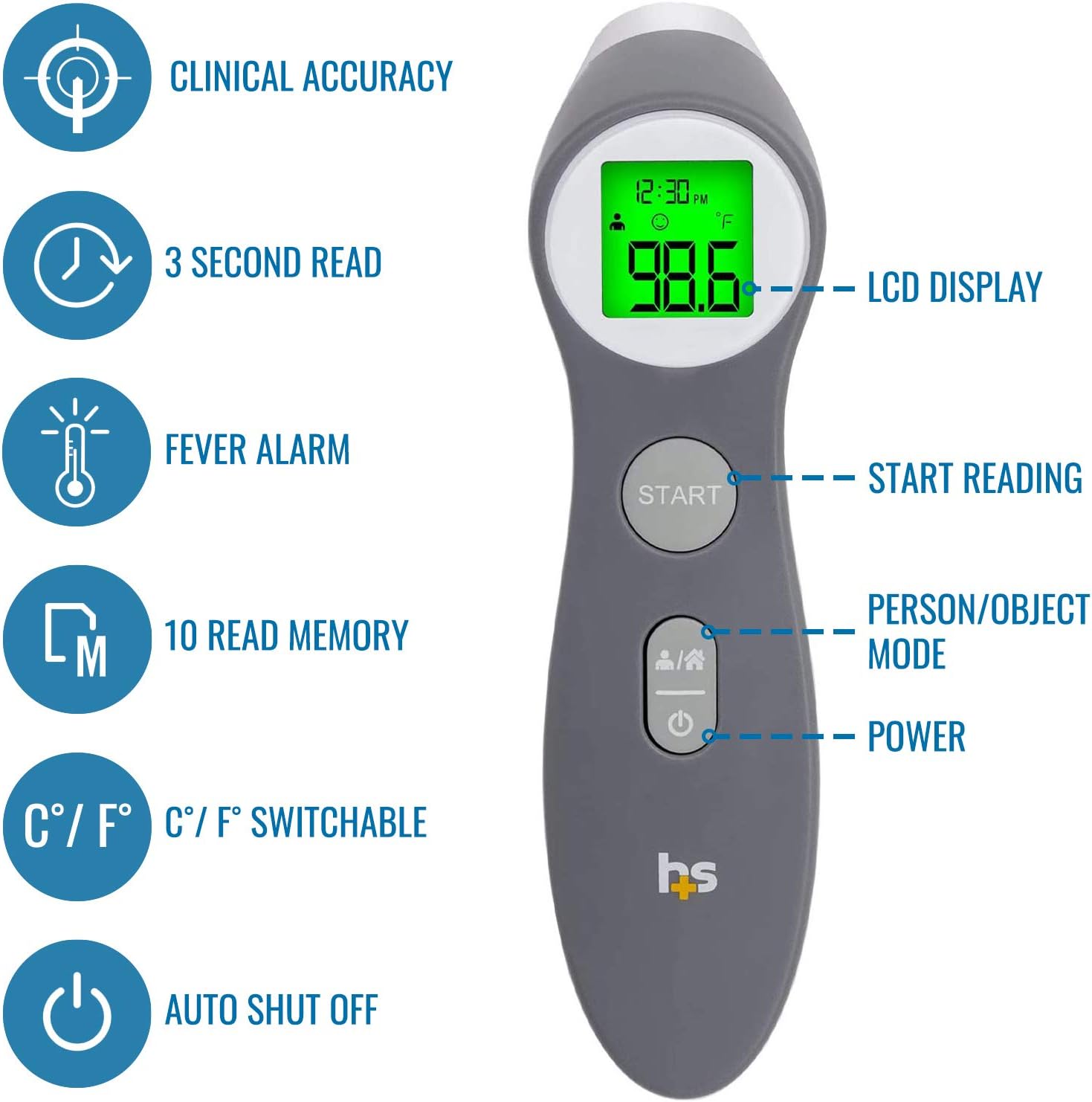
Figure 2: Key features of the thermometer, including LCD display, start button, person/object mode button, and power button.

Rajah 3: Terperinci view of the informative LCD display, showing mode, date/time, battery level, memory, Celsius/Fahrenheit indicator, and temperature reading.
Persediaan
1. Pemasangan Bateri
The thermometer requires two AAA batteries (included). Open the battery compartment cover located at the back of the handle, insert the batteries according to the polarity indicators, and close the cover securely.
2. Initial Settings (Time, Date, Year)
Upon first use or after battery replacement, the thermometer may prompt you to set the time, date, and year. Follow the on-screen instructions to adjust these settings. This feature helps in tracking temperature readings over time.
3. Fahrenheit/Celsius Selection
The thermometer allows you to switch between Fahrenheit (°F) and Celsius (°C) units. Refer to the device's specific button or menu option (often a dedicated button or a combination of buttons) to toggle between these units as per your preference.
Arahan Operasi
1. Measuring Body Temperature (Forehead)
- Ensure the thermometer is in body measurement mode (indicated by a person icon on the display). If not, press the "Person/Object Mode" button to switch.
- Position the thermometer approximately 1 to 3 inches (2.5 to 7.5 cm) from the center of the forehead.
- Tekan ke MULAKAN butang.
- Hold steady until you hear a beep, indicating the measurement is complete. The temperature will be displayed on the screen.
- The screen backlight will change color to indicate temperature status:
- hijau: Normal temperature (under 99.1°F / 37.3°C)
- Jingga: Low fever (under 100°F / 37.8°C)
- merah: High fever (above 100°F / 37.8°C)

Figure 4: Proper technique for measuring forehead temperature on a child.

Figure 5: Visual representation of the three-color indicator for temperature readings: Green (Normal), Orange (Low Fever), and Red (High Fever).
2. Measuring Object or Air Temperature
- Press the "Person/Object Mode" button to switch to object measurement mode (indicated by a house icon on the display).
- Point the thermometer at the object or air space you wish to measure.
- Tekan ke MULAKAN butang.
- The temperature will be displayed. This mode is useful for checking the temperature of baby bottles or bathwater.
3. Ingatan Ingatan
The thermometer stores up to 10 previous readings. To access these, press the memory button (if available, or refer to specific instructions for your model) to cycle through stored temperatures, including the date and time of measurement. This helps monitor temperature trends.
Penyelenggaraan
1. Pembersihan
To ensure accurate readings and hygiene, clean the thermometer regularly. The manufacturer recommends Cuci Tangan Sahaja for the device. Use a soft cloth lightly dampened with alcohol or a mild disinfectant to wipe the probe and the body of the thermometer. Do not use abrasive cleaners or immerse the device in water.
2. Penyimpanan
Store the thermometer in a cool, dry place, away from direct sunlight and extreme temperatures. Keep it in its original packaging or a protective case when not in use to prevent damage.
Menyelesaikan masalah
- Tiada Masalah Kuasa/Paparan: Check battery installation and ensure batteries are not depleted. Replace with new AAA batteries if necessary.
- Bacaan Tidak Tepat:
- Ensure the thermometer is held at the correct distance (1-3 inches) from the forehead.
- Verify the correct measurement mode (body/object) is selected.
- Clean the sensor lens gently with a cotton swab moistened with alcohol.
- Allow the thermometer to acclimate to room temperature for at least 30 minutes if it has been in a significantly different environment.
- Mesej Ralat: If an error code appears, refer to the specific error code section in the full instruction manual (if provided with the product) or contact customer support.
Spesifikasi
| Ciri | Perincian |
|---|---|
| Dimensi Produk | 1.73 x 1.61 x 6.02 inci; 4.66 auns |
| Nombor Model Item | 18-555-000 |
| Bateri | 2 bateri AAA diperlukan (termasuk) |
| Pengeluar | HealthSmart |
| Ciri Khas | Ketepatan Tinggi |
| Julat Umur (Perihalan) | Dewasa |
| Komponen yang Disertakan | Termometer |
| Bahan Luar | plastik |
| Jenis Paparan | digital |
| Teknologi Ketersambungan | Inframerah |
| Arahan Penjagaan Produk | Cuci Tangan Sahaja |

Rajah 6: Dimensi fizikal termometer.
Waranti dan Sokongan
The HealthSmart Digital Touchless Infrared Thermometer includes a Waranti terhad 1 tahun. For warranty claims, technical support, or further assistance, please refer to the contact information provided in the product packaging or visit the official HealthSmart webtapak.