
CJ TECH T16S
CHJ_Tech T16S HD Penuh 1080P WebManual Pengguna cam
Model: T16S | Brand: CJ TECH
pengenalan
This manual provides detailed instructions for the setup, operation, maintenance, and troubleshooting of your CHJ_Tech T16S Full HD 1080P Webkamera. Sila baca manual ini dengan teliti sebelum menggunakan produk ini untuk memastikan prestasi dan jangka hayat yang optimum.
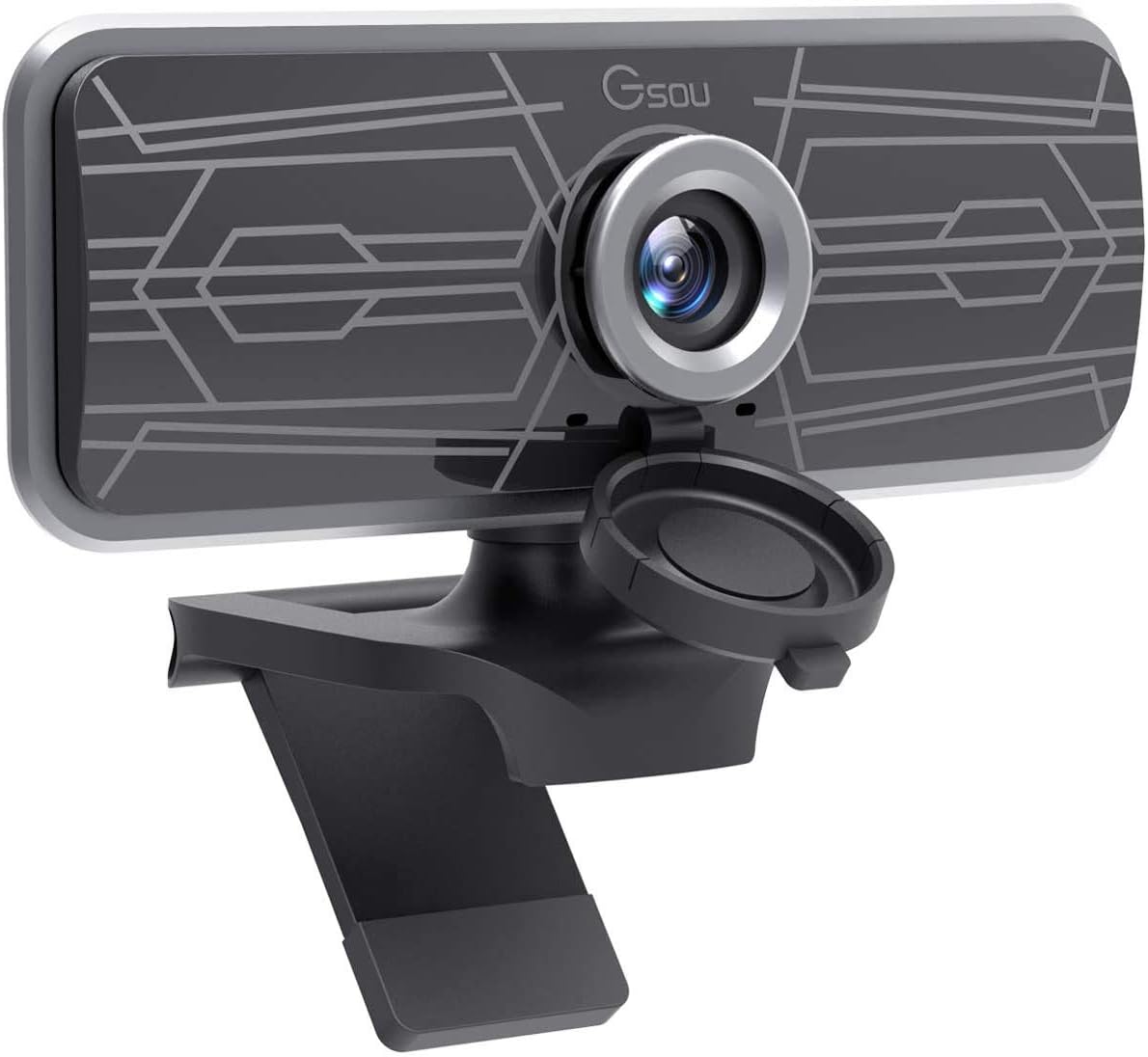
Image: The CHJ_Tech T16S Full HD 1080P Webcam, featuring a sleek black design with a silver lens ring and an integrated privacy cover, mounted on its adjustable stand.
1. Persediaan dan Pemasangan
The CHJ_Tech T16S Webcam is designed for easy plug-and-play installation, requiring no additional drivers or software for most operating systems.
1.1 Menyambungkan Webcam
- Buka bungkusan Webcam: Buang dengan berhati-hati webkamera daripada pembungkusannya.
- Kedudukan yang Webcam: Letakkan webcam on top of your monitor, laptop screen, or a flat surface. The adjustable clip allows for secure mounting.
- Sambung ke Port USB: Plug the USB 2.0 cable from the webcam into an available USB port on your computer (PC, Mac, or Laptop). The webcam will light up upon successful connection.

Image: A hand plugging the webcam's USB cable into a laptop, illustrating the simple plug-and-play setup process without the need for drivers.
1.2 Keserasian Sistem
The T16S webcam is widely compatible with various operating systems and communication platforms:
- Sistem Operasi: Windows XP (SP3), Windows 7, Windows 8, Windows 10, macOS, Android, Linux.
- Platform yang Disokong: Skype, Facetime, OBS, XBOX, Hangouts, Facebook, Twitter, YouTube, Twitch, WhatsApp, and more.
2. Mengendalikan Webcam
Once connected, your T16S webcam sedia untuk digunakan dengan aplikasi persidangan video atau penstriman pilihan anda.
2.1 Ciri-ciri Video dan Audio
- Video HD Penuh 1080P: The webcam captures clear, high-definition video at 1080p resolution and 30 frames per second (FPS), ideal for video calls, conferencing, and live streaming.

Image: A comparison showing the superior clarity of 1080P Full HD video compared to 720P, highlighting the webcam's high-resolution capability.
- Sudut Lebar View: Enjoy a 77-degree wide viewing angle, allowing more participants or a broader background to be included in your video feed.

Image: An illustration demonstrating the 77-degree wide viewsudut ing webcam, suitable for group meetings or capturing a wider scene.
- Mikrofon terbina dalam: The integrated digital microphone features noise reduction and echo-cancellation technology, ensuring clear audio capture within 3 meters, even in noisy environments.
- Fixed-Focus Lens: The fixed-focus lens keeps subjects in clear focus without manual adjustment, providing consistent image clarity.
2.2 Adjustable Design
- Putaran 360°: The webcam features a 360-degree horizontal rotation, allowing you to easily adjust the camera's direction without moving your device.
- Pelarasan Menegak: The flexible shaft allows for 30-degree up and down vertical adjustment, helping you find the perfect angle.
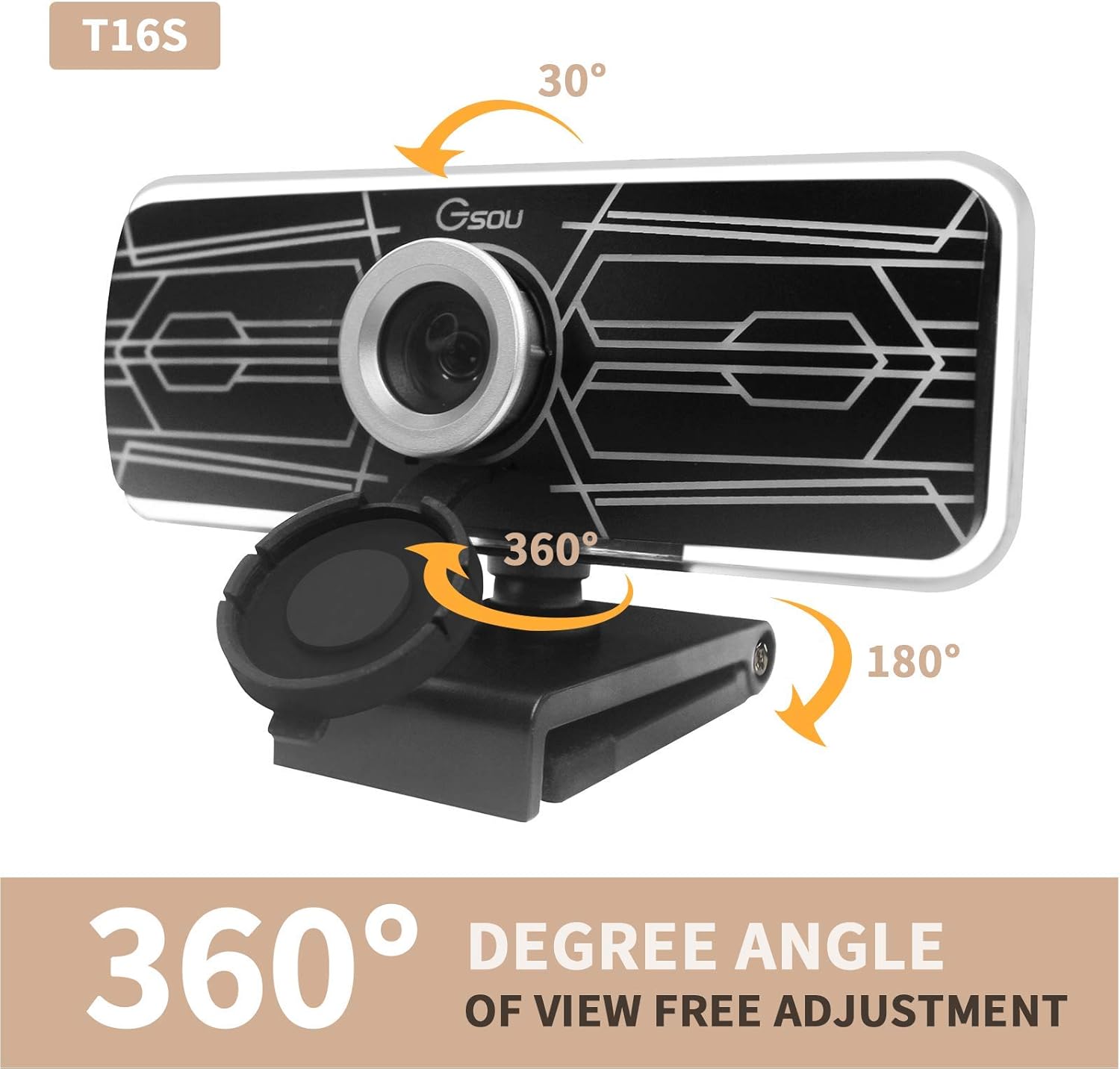
Image: Diagrams illustrating the webcam's 360-degree horizontal rotation and 30-degree vertical tilt capabilities for flexible positioning.
2.3 Perlindungan Privasi
The webcam includes a fully anti-peeping cover to protect your privacy and security when the camera is not in use. Simply slide the cover over the lens to block the view.

Image: A visual representation of the built-in noise reduction microphone and the privacy cover, showing both open and closed states for enhanced security.
2.4 Senario Penggunaan
The T16S webcam is versatile and suitable for a variety of applications:
- Online Learning & Teaching: Facilitate clear communication for virtual classrooms.
- Video Calling & Conferencing: Conduct professional meetings or personal calls with high-quality video and audio.
- Penstriman Langsung: Provide crisp video for your streaming content.
- Permainan: Enhance your gaming experience with clear video communication.

Image: A collage of images demonstrating various uses for the T16S webcam, including online teaching, video conferencing, personal video calls, and game streaming.
3. Penyelenggaraan dan Penjagaan
Penjagaan yang betul akan memastikan umur panjang dan prestasi optimum anda webcam.
- Membersihkan Lensa: Gunakan kain lembut dan tidak berbulu yang direka khas untuk optik untuk mengelap kanta dengan lembut. Elakkan bahan yang kasar atau bahan kimia yang keras.
- Membersihkan Badan: Lapkan webcam body with a soft, damp cloth. Do not use liquid cleaners directly on the device.
- Storan: Apabila tidak digunakan, simpan webkamera di tempat yang sejuk dan kering, jauh daripada cahaya matahari langsung dan suhu yang melampau.
- Elakkan Titisan: Mengendalikan webcam dengan berhati-hati untuk mengelakkan kerosakan akibat terjatuh atau hentaman secara tidak sengaja.
4. Penyelesaian masalah
Jika anda menghadapi masalah dengan anda webcam, sila rujuk kepada penyelesaian biasa berikut:
| Masalah | Kemungkinan Punca | Penyelesaian |
|---|---|---|
| No image/video output. |
|
|
| Tiada audio daripada mikrofon. |
|
|
| Imej adalah kabur atau gelap. |
|
|
5. Spesifikasi Produk
| Ciri | Perincian |
|---|---|
| Model | T16S |
| Jenama | CJ TECH |
| Resolusi Tangkapan Video | 1080p HD Penuh |
| Kadar Bingkai | 30 FPS |
| Viewsudut | 77 Darjah Sudut Lebar |
| Mikrofon | Built-in Digital Microphone with Noise Reduction and Echo-Cancellation |
| Jenis Fokus | Fokus Tetap |
| Ketersambungan | USB 2.0 (Pasang & Main) |
| Putaran | 360° Horizontal, 30° Vertical Adjustment |
| Berat Barang | 3.2 auns (lebih kurang 90.7 gram) |
| Dimensi Produk | 4.17 x 1.85 x 2.3 inci (lebih kurang 10.6 x 4.7 x 5.8 cm) |
| Keserasian | Windows XP (SP3), 7, 8, 10; macOS; Android; Linux |
6. Maklumat Waranti
Sila rujuk pembungkusan produk atau maklumat peruncit website for specific warranty details. Typically, electronic products come with a limited manufacturer's warranty covering defects in materials and workmanship for a specified period from the date of purchase.
Simpan resit pembelian anda sebagai bukti pembelian untuk sebarang tuntutan waranti.
7. Sokongan Pelanggan
For technical assistance, troubleshooting beyond this manual, or warranty inquiries, please contact CJ TECH customer support through the contact information provided on the product packaging or their official webtapak.
When contacting support, please have your product model (T16S) and purchase details ready.
Ask a question about this manual
Ask about setup, troubleshooting, compatibility, parts, safety, or missing instructions. Manuals+ will review the question and use this page’s manual context to help answer it.