
1. Pengenalan
This manual provides detailed instructions for the installation, operation, and maintenance of your Cestovet 10.1 Inch Android 13 Car Stereo Radio. Designed for Jeep Compass (2010-2016) and Jeep Patriot (2009-2016), this unit features Wireless CarPlay, Android Auto, Bluetooth, WiFi, Steering Wheel Control (SWC), Mirror Link, and GPS navigation. Please read this manual thoroughly before installation and use to ensure optimal performance and safety.
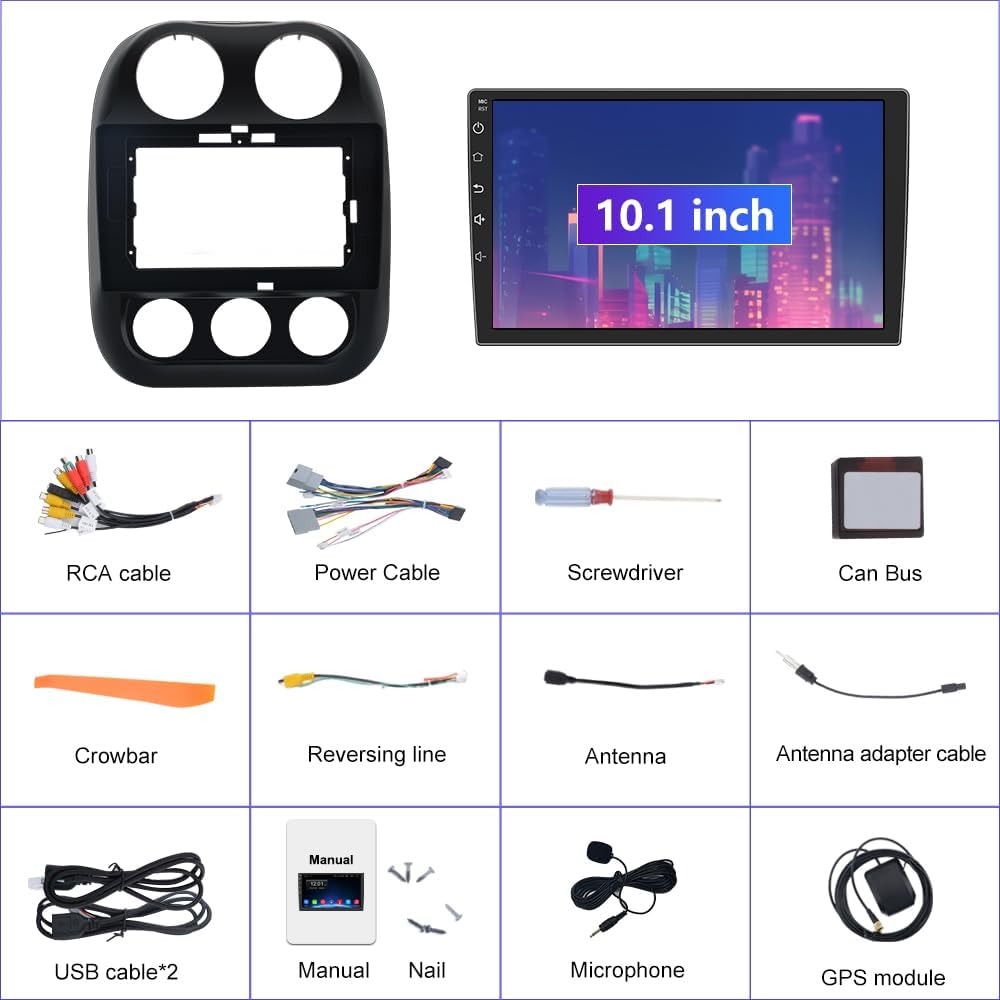
2. Apa yang ada di dalam Kotak
Carefully unpack all items and ensure everything listed below is present:
- 10.1-inch Android 13 Car Stereo Main Unit
- Dash Installation Mount Trim Kit
- Power Cable with CANBUS Module
- Antena Radio
- Antena GPS
- Kabel USB (x2)
- RCA Cable & Backup Microphone Interface
- Backup Microphone
- HD Reversing Camera
- Reversing Camera Extension Cable
- Installation Tool (Crowbar, Screwdriver)
- Manual Pengguna
3. Persediaan & Pemasangan
3.1 Semakan Pra-Pemasangan
- Ensure your vehicle is a Jeep Compass (2010-2016) or Jeep Patriot (2009-2016) for compatibility.
- Turn off the vehicle's engine and disconnect the negative terminal of the car battery to prevent electrical shorts.
- Gather all necessary tools, including the provided installation tool.
3.2 Wiring & Connections
Refer to the wiring diagram and videos for detailed connection instructions. Proper wiring is crucial for functionality.

Penting: If you experience no sound after installation, ensure the white 4-pin or 8-pin connector (depending on your car's amplifier system) is correctly plugged into the main wiring harness. The CANBUS module is essential for power and integrating steering wheel controls.
Video 3.1: Detailed guide on how to install the car stereo unit and its wiring.
3.3 Langkah Pemasangan Umum
- Using the provided crowbar, carefully pry open and remove the original radio and dash panel.
- Connect the main power harness, ensuring the CANBUS module is correctly integrated.
- Connect the Radio Antenna, GPS Antenna, and USB cables to their respective ports on the new unit.
- If installing a rear camera, connect the reversing video input wire and power the camera from the reverse lamp litar.
- Mount the 10.1-inch Android 13 Car Stereo into the dash trim kit.
- Carefully re-install the new unit into the dashboard, ensuring all clips and screws are secure.
- Reconnect the car battery and test all functions before fully reassembling the dashboard.

4. Arahan Operasi
4.1 Power On/Off & Touchscreen Interface
Press the power button on the unit to turn it on or off. The 10.1-inch touchscreen provides intuitive control over all functions. Swipe and tap to navigate through apps and settings.
4.2 Sambungan Wi-Fi
To access online features and download apps, connect the unit to a Wi-Fi network:
- Swipe down from the top of the screen to access the quick settings panel.
- Tap the Wi-Fi icon to turn it on.
- Pergi ke Tetapan > Rangkaian & Internet > Wi-Fi.
- Pilih rangkaian yang anda inginkan dan masukkan kata laluan jika digesa.
Video 4.1: Demonstrates Wi-Fi and Hotspot connection steps (0:06-0:25).
4.3 Kesambungan Bluetooth
Pair your smartphone via Bluetooth for hands-free calling and audio streaming:
- On the car stereo, open the 'Phone' app or go to Settings > Connected devices > Bluetooth.
- Pastikan Bluetooth didayakan pada kedua-dua stereo dan telefon pintar anda.
- Cari untuk available devices on your smartphone and select the stereo's device name (e.g., "BCB-Android845").
- Sahkan kod gandingan pada kedua-dua peranti.
Video 4.2: Shows Bluetooth pairing for calls and music streaming (0:44-0:55).
4.4 CarPlay Wayarles & Android Auto
Connect your iPhone or Android phone wirelessly for a seamless in-car experience:
- Ensure Bluetooth and Wi-Fi are enabled on your smartphone and the car stereo.
- On the car stereo, open the 'ZLINK5' app (or similar CarPlay/Android Auto app).
- Follow the on-screen prompts to connect your device. For iPhones, ensure CarPlay is enabled in your phone's settings.
Video 4.3: Demonstrates Wireless CarPlay connection and usage (0:56-1:10).
4.5 Navigasi GPS
The unit supports both online and offline GPS navigation. Pre-installed maps for North America are available. To use navigation:
- Open the 'Navigation' or 'Maps' app from the home screen.
- Enter your destination using the search function.
- Follow the voice prompts and on-screen directions.
Video 4.4: Shows GPS navigation features and map interaction (1:01-1:09).
4.6 Radio FM
Access the FM radio tuner for local broadcasts:
- Tap the 'Radio' app icon.
- Use the arrow buttons to manually tune frequencies or the search function to scan for stations.
- Save your favorite stations as presets for quick access.
Video 4.5: Demonstrates FM Radio tuning and features (1:45-2:00).
4.7 EQ Settings (Equalizer)
Customize your audio experience with the built-in equalizer:
- Open the 'EQ' app from the app drawer.
- Adjust the frequency bands to fine-tune the sound output.
- Select from various preset sound modes (e.g., Standard, Pop, Rock, Jazz) or create custom settings.
- Adjust the 'Sound Field' to optimize audio for different seating positions in the vehicle.
Video 4.6: Shows how to access and adjust the EQ settings and sound field (1:33-1:44).
4.8 Kawalan Roda Stereng (SWC)
The unit supports your vehicle's original steering wheel controls for safe and convenient operation. Access the 'SW Learning' app to program or customize button functions.
4.9 Reversing Assistance
When a rear camera is connected, the display automatically switches to the camera view when the vehicle is put into reverse, providing visual assistance for parking and maneuvering.

5. Penyelenggaraan
- Pembersihan Skrin: Gunakan kain lembut dan tidak berbulu sedikit dampdiisi dengan air atau pembersih skrin. Elakkan bahan kimia yang keras atau bahan yang melelas.
- Kemas Kini Perisian: Periksa kemas kini perisian secara berkala melalui tetapan unit atau tetapan pengilang webtapak untuk memastikan prestasi optimum dan akses kepada ciri baharu.
- Pemeriksaan Sambungan: Periksa dengan kerap semua sambungan pendawaian untuk memastikan ia selamat dan bebas daripada kakisan.
- Suhu: Elakkan daripada mendedahkan unit kepada suhu yang melampau untuk tempoh yang lama.
6. Penyelesaian masalah
| Masalah | Kemungkinan Punca | Penyelesaian |
|---|---|---|
| Unit tidak dihidupkan | Incorrect power wiring; Blown fuse; Loose battery connection. | Check power cable connections (refer to Section 3.2); Inspect vehicle's fuse box; Ensure battery terminals are secure. |
| Tiada keluaran bunyi | Incorrect speaker wiring; CANBUS module issue; Volume too low. | Verify speaker connections; Ensure white connector on harness is properly seated (refer to Figure 3.1); Increase volume. |
| Bluetooth/CarPlay/Android Auto not connecting | Bluetooth/Wi-Fi off; Device not paired; Interference. | Ensure Bluetooth/Wi-Fi is active on both devices; Re-pair the device; Move away from sources of interference. |
| Kehilangan atau ketidaktepatan isyarat GPS | GPS antenna not properly installed/connected; Obstruction. | Ensure GPS antenna is securely connected and placed in an unobstructed location (e.g., dashboard); Update map data. |
| Kawalan Stereng tidak berfungsi | CANBUS module issue; SWC not programmed. | Verify CANBUS connection; Use the 'SW Learning' app to program the controls. |
7. Spesifikasi
- Nama Model: 2GRAM
- Saiz Paparan: 10 Inci
- Resolusi: 1024 x 600
- Sistem pengendalian: Android 13
- Ingatan: RAM 2GB, ROM 32GB
- Ketersambungan: Bluetooth, Selular, Wi-Fi
- Ciri Khas: Wireless CarPlay, Android Auto, Touchscreen, Voice Command (via Microphone), Steering Wheel Control, Mirror Link, Reversing Assistance, GPS Navigation (North America maps)
- Jenis Perkhidmatan Kenderaan: Car (Jeep Patriot/Compass 2010-2016)
- Berat Barang: 5.17 paun
- Dimensi Produk: 14.96 x 12.99 x 7.09 inci
- Jenis Pemasangan: Pemasangan Panel
- Komponen yang Disertakan: Mikrofon
8. Waranti
This Cestovet Car Stereo Radio comes with a 1-year warranty from the date of purchase. Please retain your proof of purchase for any warranty claims. The warranty covers manufacturing defects and malfunctions under normal use. It does not cover damage caused by improper installation, misuse, accidents, or unauthorized modifications.
9. Sokongan
For technical assistance, troubleshooting beyond this manual, or warranty claims, please contact Cestovet customer support. Refer to the product packaging or the official Cestovet website for contact information. You may also find additional resources and FAQs on the Cestovet brand store page on Amazon.