
1. Pengenalan
This manual provides instructions for the proper setup, operation, and maintenance of your Decdeal J900 USB Wired Gaming Mouse. Please read this manual thoroughly before using the product to ensure optimal performance and longevity.
2. Ciri-ciri Produk
- DPI boleh laras: Supports 800/1600/2400/3200/4800/6400 DPI settings for precise control.
- Lampu Belakang RGB: Features 7 programmable RGB backlight modes for customizable visual effects.
- Reka bentuk ergonomik: Engineered for comfortable hand feel, reducing fatigue during extended use.
- Honeycomb Hollow Design: Promotes ventilation and cooling, preventing hot hands and palms.
- Pasang dan Main: USB powered, no additional drivers required for operation.
- Suis Tahan Lama: Equipped with switches rated for 20 million clicks.

Rajah 2.1: Pro sampinganfile of the Decdeal J900 mouse, detailing its ergonomic design, maximum 6400 DPI, customizable RGB lighting, 5G laser sensor, and 1000Hz polling rate for responsive performance.
3. Persediaan
- Unpack the Decdeal J900 USB Wired Gaming Mouse from its packaging.
- Cari port USB yang tersedia pada komputer anda (desktop atau komputer riba).
- Masukkan penyambung USB tetikus ke dalam port USB.
- The mouse is plug-and-play; no additional software or drivers are required for basic functionality. The operating system will automatically detect and install the necessary components.
4. Arahan Operasi
4.1. Pelarasan DPI
The Decdeal J900 mouse features six adjustable DPI levels to suit various tasks and preferences. The DPI can be cycled through using the dedicated DPI button located on the top of the mouse, behind the scroll wheel.
- Press the DPI button to cycle through the available settings: 800, 1600, 2400, 3200, 4800, and 6400 DPI.
- Each DPI level may correspond to a specific LED color indicator (refer to Figure 4.1 for details).

Figure 4.1: This diagram shows the six adjustable DPI levels (800, 1600, 2400, 3200, 4800, 6400) of the Decdeal J900 mouse, indicating how to cycle through them.
4.2. RGB Backlight Modes
The mouse offers 7 programmable RGB backlight modes. These modes can be changed using the RGB light mode switch located on the underside of the mouse.
- Flip the mouse over to locate the RGB light mode switch.
- Press the switch to cycle through different lighting effects, including Rainbow, DPI Color Breath, Keep Light On, Close, Random Leisure, Random Sleep, and Random Sport modes.
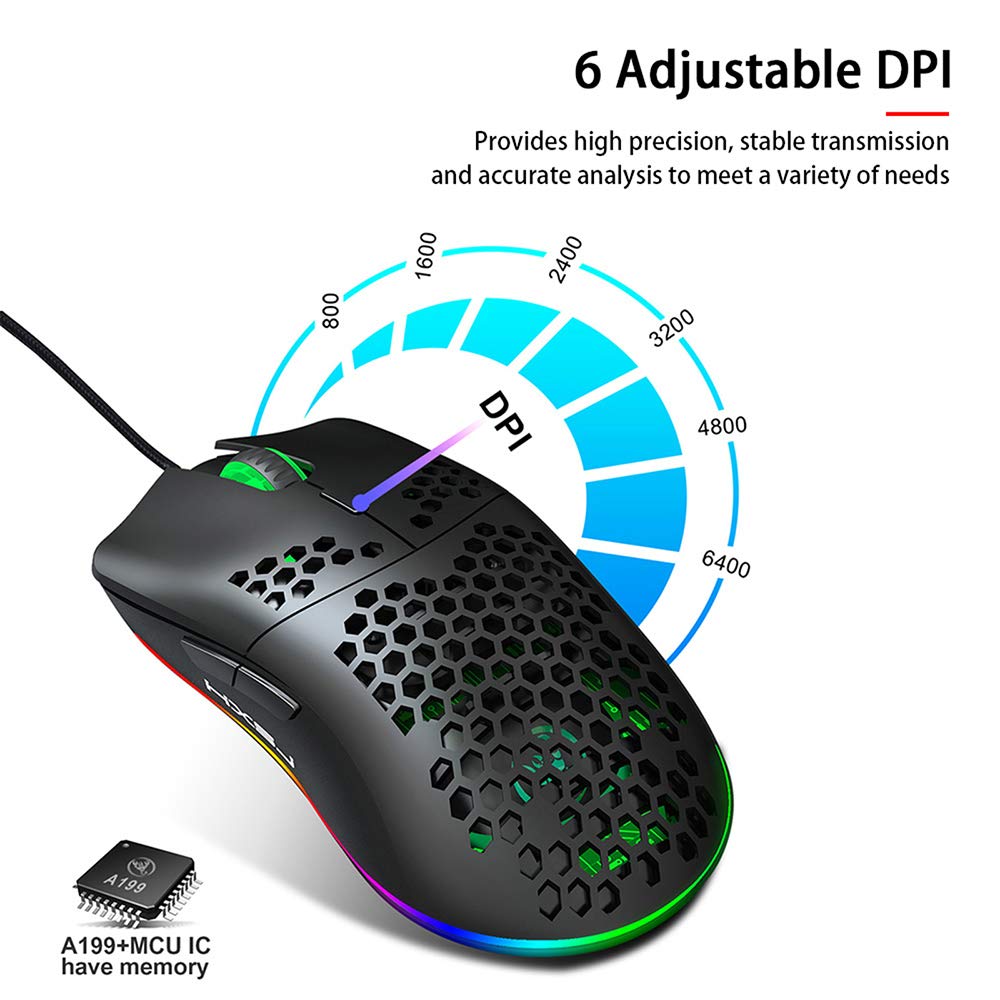
Figure 4.2: A hand is shown pressing the dedicated RGB light mode switch located on the underside of the Decdeal J900 mouse, demonstrating how to change lighting effects.

Figure 4.3: This image illustrates the adjustable DPI settings and various LED light modes available on the Decdeal J900 mouse.
5. Penyelenggaraan
To ensure the longevity and optimal performance of your Decdeal J900 mouse, follow these maintenance guidelines:
- Pembersihan: Gunakan kain lembut dan kering untuk mengelap permukaan tetikus. Untuk kotoran degil, gunakan sedikit kainamp Kain boleh digunakan, memastikan tiada kelembapan memasuki komponen dalaman. Elakkan bahan kimia yang keras atau pembersih yang kasar.
- Penjagaan Kabel: Avoid bending or twisting the USB cable excessively. Do not pull the cable to disconnect the mouse; always grasp the USB connector.
- Storan: Apabila tidak digunakan, simpan tetikus di persekitaran yang bersih dan kering, jauh daripada suhu ekstrem dan cahaya matahari langsung.
6. Penyelesaian masalah
If you encounter issues with your Decdeal J900 mouse, refer to the following common solutions:
- Tetikus Tidak Menjawab:
- Ensure the USB cable is securely connected to your computer's USB port.
- Cuba sambungkan tetikus ke port USB lain.
- Mulakan semula komputer anda.
- Test the mouse on another computer to determine if the issue is with the mouse or the computer.
- DPI Tidak Berubah:
- Pastikan anda menekan butang pelarasan DPI yang betul.
- Check if the mouse is properly connected and powered.
- RGB Lights Not Working/Changing:
- Verify the RGB light mode switch on the underside of the mouse is being pressed correctly.
- Ensure the mouse is receiving power via the USB connection.
7. Spesifikasi
| Jenama | Deal |
| Model | J900 |
| Teknologi Ketersambungan | Berwayar USB |
| Teknologi Pengesanan Pergerakan | Optik |
| DPI boleh laras | 800/1600/2400/3200/4800/6400 |
| Lampu latar | RGB (7 modes) |
| Orientasi Tangan | Tangan Kanan |
| Dimensi Produk | 15 x 10 x 5 cm |
| Berat Barang | 150 g |
| Sistem Operasi yang Serasi | Linux, Windows 7, Windows XP (and newer versions) |

Figure 7.1: An exploded diagram of the Decdeal J900 mouse, revealing its internal components such as the left button, Gundam 6400DPI sensor, transparent roller, ten-million-life microswitch, PCB circuit board, tail logo, RGB marquee glow ring, hollow base, and UPE foot sticker.
8. Waranti dan Sokongan
The Decdeal J900 USB Wired Gaming Mouse comes with a standard manufacturer's warranty. For specific warranty terms, duration, and support inquiries, please refer to the warranty card included with your product or contact Decdeal customer service directly. Keep your purchase receipt as proof of purchase for warranty claims.