
1. Produk Lebihview
The KUIDAMOS DSO FNIRSI PRO is a portable digital oscilloscope designed for various measurement tasks. It features a 2.4-inch LCD display, a real-time sampling rate of up to 20MS/s, and an analog bandwidth of 5MHz. This device is equipped with a built-in 1200mAh rechargeable lithium battery, offering approximately 3 hours of continuous operation. It supports waveform storage and management, making it suitable for both maintenance and research and development applications.
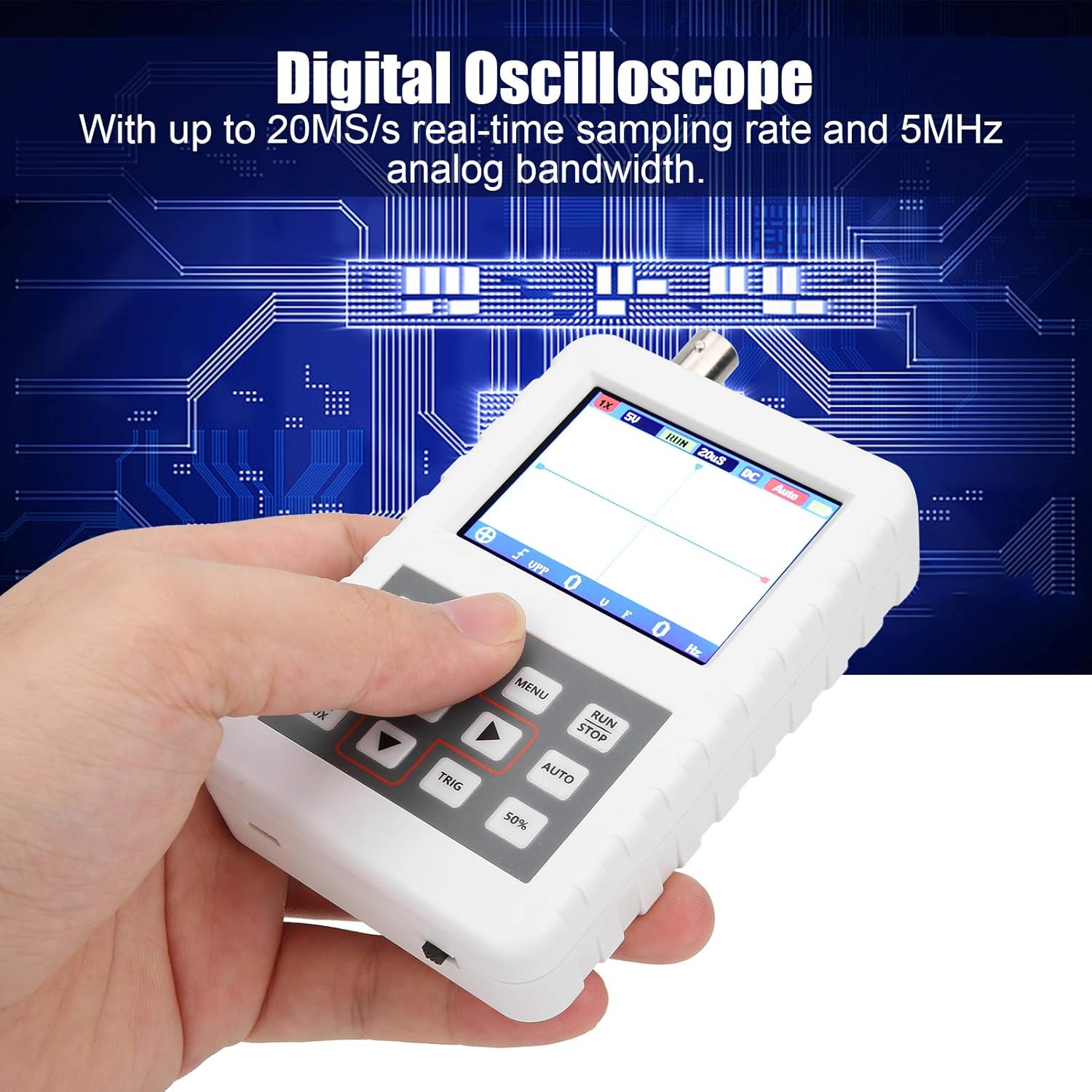
Image 1.1: The DSO FNIRSI PRO Digital Oscilloscope, highlighting its 20MS/s sampling rate and 5MHz analog bandwidth.

Image 1.2: The oscilloscope's 2.4-inch HD LCD screen with 320 x 240 resolution for clear waveform display.

Imej 1.3: Depan dan belakang views of the DSO FNIRSI PRO, illustrating its physical layout.
2. Kandungan Pakej
Sahkan bahawa semua item yang disenaraikan di bawah disertakan dalam pakej anda:
- 1 x DSO FNIRSI PRO Digital Oscilloscope
- 1 x Matching Probe
- 1 x USB Data Line
- 1 x Manual Pengguna (dokumen ini)
3. Persediaan Awal
3.1 Mengecas Peranti
Before first use, fully charge the oscilloscope. Connect the provided USB data line to the device's charging port and to a 5V/1A, 2A, 3A, or 4A USB power adapter. The built-in 1200mAh lithium battery can be charged continuously for approximately 3 hours.
3.2 Menyambung Probe
Connect the matching probe to the BNC connector on the top of the oscilloscope. Ensure a secure connection by twisting the probe connector clockwise until it locks into place.
3.3 Menghidupkan/Mematikan
To power on the device, press and hold the power button (usually located on the side or bottom) for a few seconds until the screen illuminates. To power off, press and hold the power button again until the device shuts down.
4. Arahan Operasi
4.1 Controls and Interface
The oscilloscope features a user-friendly interface with several buttons for navigation and function control.

Image 4.1: Operating the DSO FNIRSI PRO, showing the placement of control buttons.
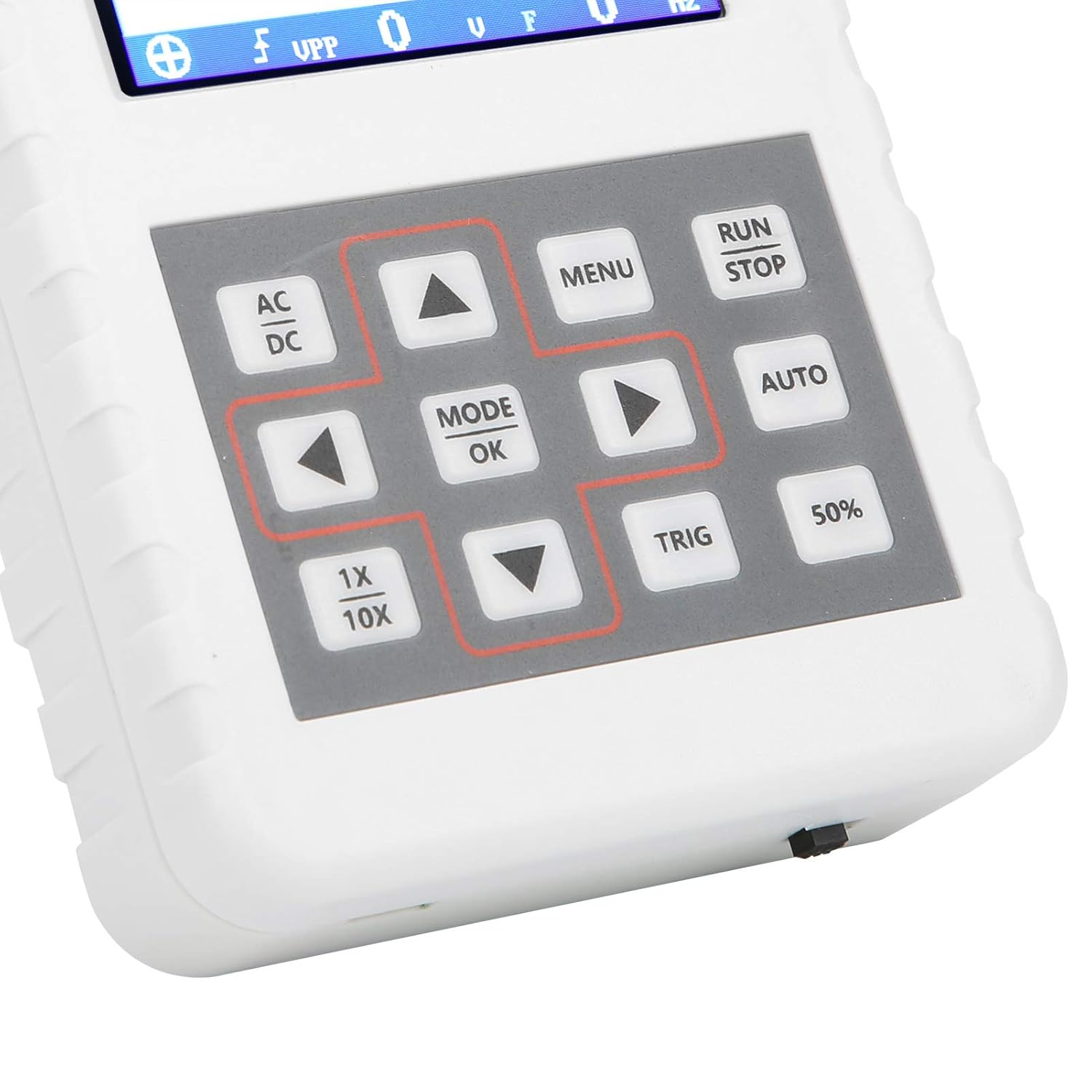
Imej 4.2: Terperinci view of the oscilloscope's control panel.
- MENU: Accesses the main menu for settings and functions.
- LARI/BERHENTI: Starts or pauses waveform acquisition.
- AUTO: Melaraskan tetapan secara automatik untuk paparan bentuk gelombang yang optimum.
- TRIG: Adjusts trigger level.
- 50%: Sets the trigger level to 50% of the waveform amplilitan.
- AC DC: Toggles between AC and DC coupling modes.
- 1X/10X: Sets the oscilloscope's input attenuation to match the probe's setting.
- MODE/OK: Confirms selections or changes modes.
- Butang Anak Panah (Atas, Bawah, Kiri, Kanan): Navigate menus and adjust parameters.
4.2 Probe Attenuation Settings
It is critical to match the probe's attenuation setting with the oscilloscope's input setting to ensure accurate measurements.
- Untuk 1X measurement (0-40V): Set both the physical switch on the probe and the 1X/10X button on the oscilloscope to the 1X kedudukan.
- Untuk 10X measurement (40-800V): Set both the physical switch on the probe and the 1X/10X button on the oscilloscope to the 10X kedudukan.
4.3 Measurement Modes and Triggering
The oscilloscope supports various trigger modes to stabilize waveform display:
- Bujang: Captures a single waveform event and then stops.
- Biasa: Captures a waveform only when a trigger condition is met.
- Auto: Continuously acquires waveforms, even without a trigger, but will trigger if a signal is present.
Gunakan TRIG button and arrow keys to adjust the trigger level, which determines the voltage point at which the oscilloscope begins to acquire data.
4.4 Waveform Storage and Management
The device includes 16MB of built-in storage, capable of storing up to 500 waveform images. Use the file manager function to browse, view, and manage saved waveforms. This includes viewing detailed information, flipping through images, and deleting unwanted files.

Imej 4.3: Cthamples of sine wave measurements at various frequencies.

Imej 4.4: Cthamples of square, triangular, and sawtooth wave measurements.
5. Penjagaan dan Penyelenggaraan
5.1 Pembersihan
Lap peranti dengan kain lembut dan kering. Jangan gunakan pembersih atau pelarut yang kasar, kerana ia boleh merosakkannya.asing atau skrin. Pastikan peranti dimatikan dan diputuskan sambungan daripada sebarang sumber kuasa sebelum membersihkan.
5.2 Penjagaan Bateri
Untuk memanjangkan hayat bateri, elakkan daripada kerap mencas sepenuhnya bateri. Jika menyimpan peranti untuk tempoh yang lama, cas sehingga kira-kira 50% dan cas semula setiap beberapa bulan.
5.3 Penyimpanan
Store the oscilloscope in a cool, dry place, away from direct sunlight, extreme temperatures, and high humidity. Keep it protected from dust and physical impact.
6. Penyelesaian masalah
- Issue: Abnormal measured data.
Penyelesaian: Check the probe's attenuation switch (1X or 10X) and ensure it matches the setting on the oscilloscope (using the 1X/10X button). If the probe is set to 10X and the oscilloscope is set to 1X, the device will not be damaged, but the data displayed will be incorrect. - Issue: Device does not power on.
Penyelesaian: Ensure the battery is sufficiently charged. Connect the device to a power source using the USB data line and allow it to charge for at least 30 minutes before attempting to power it on again. - Issue: Screen is blank or frozen.
Penyelesaian: Try performing a soft reset by pressing and holding the power button for an extended period (e.g., 10-15 seconds) until the device powers off, then power it back on. If the issue persists, ensure the battery is charged.
7. Spesifikasi Teknikal
| Ciri | Spesifikasi |
|---|---|
| Model Produk | DSO FNIRSI PRO |
| Bahan Produk | ABS |
| Bilangan Saluran | 1 |
| Saiz Skrin | lebih kurang 6.1cm / 2.4in |
| Resolusi Skrin | 320 x 240 |
| Jenis Paparan | Skrin LCD |
| Lebar Jalur Analog | 5MHz |
| S maksimumampKadar ling | 20MSps |
| Mod Pencetus | Single/Normal/Auto |
| Waveform Storage | 16MB (up to 500 waveform pictures) |
| Bateri Terbina dalam | Bateri litium 1200mAh |
| Masa Tunggu Sedia | 3 jam |
| Input Pengecasan | 5V/1A/2A/3A/4A |
| Pengeluar | KUIDAMOS |
| Negara Asal | USA |
| Nombor Bahagian Item | KUIDAMOStgaix9hwck |
8. Waranti dan Sokongan Pelanggan
For warranty information, technical support, or service inquiries, please refer to the documentation provided with your purchase or contact the seller directly. Keep your purchase receipt as proof of purchase for any warranty claims.