
1. Pengenalan
The Tycon TPSC2440NMPPT is an advanced Maximum Power Point Tracking (MPPT) solar charge controller designed for efficient battery charging from solar panels. It automatically adjusts to 12V or 24V battery systems and supports various battery types including Flooded, AGM, GEL, and Lithium, with a customizable USER setting. This controller features an integral LCD display for monitoring key system parameters.
2. Arahan Keselamatan
Please read and understand all instructions before installation and operation. Failure to follow these instructions may result in electric shock, fire, or severe injury.
- Ensure all wiring is correctly polarized and securely connected.
- Do not disassemble or attempt to repair the controller. Refer to qualified service personnel.
- Install the controller in a well-ventilated area, away from flammable materials and corrosive gases.
- Always disconnect the battery and solar panel before installing or moving the controller.
- Pakai peralatan pelindung diri (PPE) yang sesuai semasa pemasangan.
- The controller is designed for indoor use or protected outdoor environments (IP32 rating). Avoid direct exposure to water.
3. Produk Lebihview
The TPSC2440NMPPT controller is equipped with several features to optimize solar charging and battery management:
- Teknologi MPPT: Maximizes power harvest from solar panels.
- Auto-Ranging Voltage: Compatible with 12V or 24V battery arrays.
- Multimode Load Operation: Offers 5 selectable modes for load control.
- Soft Start Load Output: Powers high capacitive loads safely.
- Automatic Battery Equalization: Performs 30-day equalization for optimal battery health.
- Conformal Coated Electronics: Provides environmental protection.
- TVS Lightning Protection: Enhances durability against electrical surges.
- Integral LCD Display: Menunjukkan Vol Bateritage, Capacity, Charging Capacity, Temperature, Load Current, and Solar Current.
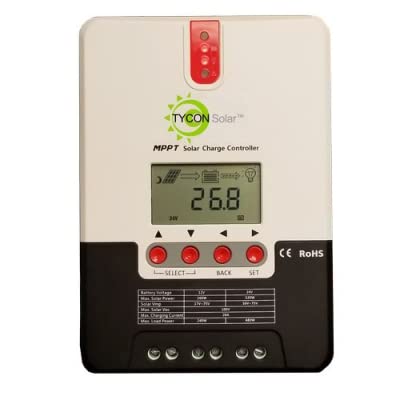
Rajah 1: Depan view of the Tycon TPSC2440NMPPT Solar MPPT Battery Charging Controller, showing the LCD display and connection terminals.
4. Persediaan dan Pemasangan
Ikuti langkah ini untuk pemasangan yang betul:
- Pemasangan: Choose a suitable location for mounting the controller. Ensure good ventilation and protection from direct sunlight and moisture.
- Sambungan Bateri: Connect the battery to the controller's battery terminals first. Ensure correct polarity (+ to + and - to -). The controller will automatically detect the battery voltage (12V atau 24V).
- Sambungan Panel Suria: Connect the solar panel array to the controller's solar input terminals. Observe correct polarity. Ensure the open-circuit voltage of the solar array does not exceed the controller's maximum input voltage (110V at 25°C).
- Sambungan Beban (Pilihan): If using the load output, connect your DC loads to the controller's load terminals. Do not exceed the rated load current (20A Max).
- Penderia Suhu: Connect the included battery temperature probe cable to the designated port on the controller. Place the sensor near the battery for accurate temperature compensation.
- Hidupkan kuasa: Once all connections are secure, the controller will power on and begin operation.
5. Arahan Operasi
The integral LCD display provides real-time information about your solar charging system. Use the buttons (if present, assuming standard UP/DOWN/SET) to navigate through the display menus and adjust settings.
5.1 Maklumat Paparan LCD
- Bateri Voltage: vol semasatage bateri yang disambungkan.
- Kapasiti Bateri: Estimated state of charge.
- Kapasiti Mengecas: Current power being delivered to the battery.
- Suhu Bateri: Temperature measured by the external probe.
- Beban Semasa: Current being drawn by connected DC loads.
- Solar Current: Current being generated by the solar panels.
5.2 Battery Type Settings
The controller supports Flooded, AGM, GEL, and Lithium battery types. A USER setting allows for custom charge parameters. Refer to the on-screen menu for selecting and configuring the battery type.
5.3 Load Operation Modes
The controller offers 5 selectable load operation modes. Consult the device's menu for details on each mode and how to select them, typically involving timed operation or dusk-to-dawn control.
6. Penyelenggaraan
Penyelenggaraan berkala memastikan prestasi optimum dan jangka hayat pengawal cas solar anda.
- Periksa Sambungan: Periksa semua sambungan pendawaian secara berkala untuk kesesakan dan kakisan.
- Pengawal Bersih: Keep the controller clean and free of dust. Use a dry cloth for cleaning. Do not use liquids.
- Kesihatan Bateri: Pantau bateri voltage and capacity on the LCD. Ensure batteries are properly maintained according to their manufacturer's guidelines.
- Pengudaraan: Pastikan kawasan pemasangan mempunyai pengudaraan yang baik untuk mengelakkan pemanasan melampau.
7. Penyelesaian masalah
| Masalah | Kemungkinan Punca | Penyelesaian |
|---|---|---|
| Tiada paparan/Tiada kuasa | Loose battery connection; Battery voltage too low; Blown fuse (external, if applicable). | Check battery connections and polarity. Charge battery if voltage is below operating threshold. Check and replace any external fuses. |
| Tiada pengecasan solar | Solar panel not connected; Incorrect polarity; Insufficient sunlight; Damaged solar panel/wiring. | Verify solar panel connections and polarity. Ensure panels are receiving adequate sunlight. Inspect panels and wiring for damage. |
| Beban tidak berfungsi | Load disconnected; Overload; Short circuit; Battery voltage terlalu rendah. | Check load connections. Reduce load if exceeding 20A. Check for short circuits. Ensure battery is sufficiently charged. |
| Bacaan tidak tepat | Loose connections; Faulty sensor. | Check all wiring connections. Ensure temperature sensor is properly connected and placed. |
8. Spesifikasi
- model: TPSC2440NMPPT
- Auto Voltage: 12V/24V (System)
- Ampsebelum: 40A
- Muatan Ternilai Semasa: 20A Maks
- Beban Kapasitif Maksimum: 10,000uF
- Input Suria Maks Voltage: 110V (25°C), 90V (25°C)
- Max Power Point Range: 2VDC to 75VDC (Battery Volts)
- Kecekapan Penukaran: 96% Jenis.
- Kecekapan Penjejakan MPPT: 99%
- Penggunaan Sendiri: 1W
- Pampasan Suhu: -3.0mV/°C/Sel
- Saiz Wayar Maks: 8 AWG
- Voltage and Current Accuracy: +/-2%
- Pembumian: Tanah Negatif
- Perlindungan Alam Sekitar: IP32
- Dimensi Produk: 12 x 9 x 6 inci
- Berat Barang: 5.16 paun
- Jenis Paparan: LCD