
1. Produk Lebihview
The CUBOT Note 7 is a 4G unlocked smartphone running Android 10. It features a 5.5-inch Dewdrop screen, 2GB RAM, 16GB internal storage (expandable up to 128GB via TF card), a 13MP rear camera, and an 8MP front camera. The device supports dual Nano SIM cards and includes a 3100mAh battery.

Figure 1: CUBOT Note 7 Smartphone (Green)
Ciri-ciri Utama:
- 5.5-inch Waterdrop Incell Fullview Skrin
- Android 10 GO Operating System
- 2GB RAM + 16GB ROM (expandable up to 128GB with TF card)
- 13MP Rear Main Camera + 2 sub cameras with 1A LED flashlight
- Kamera Depan 8MP
- Bateri 3100mAh
- Dual Nano SIM Card Slots
- Face ID Unlock
- 2.4G Wi-Fi Support, Bluetooth 4.2
- Micro USB port, 3.5mm Headphone Jack
2. Panduan Persediaan
2.1 Unpacking and Initial Checks
Upon opening the box, ensure all components are present. The package typically includes the CUBOT Note 7 smartphone, a USB cable, and a power adapter. Before first use, verify that the insulating film on the battery has been removed. This film is present for transportation safety and must be removed for the phone to power on.
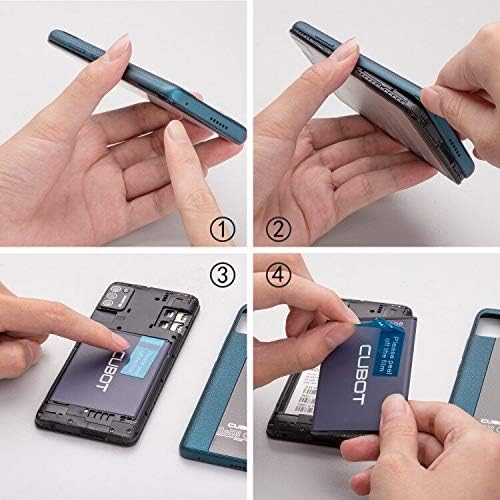
Figure 2: Battery Insulating Film Removal
Detailed description: This image illustrates the process of removing the insulating film from the CUBOT Note 7 battery. Step 1 shows the phone with its back cover. Step 2 shows the back cover being gently pried open. Step 3 reveals the battery compartment. Step 4 shows a hand peeling off a blue insulating film from the battery, which is labeled 'CUBOT'.
2.2 Pemasangan Kad SIM dan Kad TF
The CUBOT Note 7 supports two Nano SIM cards and one TF (MicroSD) card for expandable storage. To install them:
- Tanggalkan penutup belakang telefon dengan lembut.
- Locate the battery compartment and the SIM/TF card slots.
- Insert your Nano SIM cards into the designated SIM slots.
- Insert the TF card (up to 128GB) into its dedicated slot.
- Ensure the battery is correctly seated and replace the back cover.

Figure 3: SIM and TF Card Slots
Detailed description: This image displays the rear of the CUBOT Note 7, highlighting the slots for two Nano SIM cards and one Micro-SD (TF) card. The 3100mAh detachable battery is also visible, indicating its position relative to the card slots.
2.3 Menghidupkan
Press and hold the Power button located on the side of the device until the CUBOT logo appears on the screen. Follow the on-screen prompts to complete the initial setup, including language selection, Wi-Fi connection, and Google account setup.
3. Arahan Operasi
3.1 Navigating Android 10 GO
The CUBOT Note 7 runs on Android 10 GO, a streamlined version of Android optimized for entry-level devices. The interface is designed for simplicity and efficiency. Swipe up from the bottom of the screen to access the app drawer. Swipe down from the top to access quick settings and notifications.

Figure 4: Android 10 GO Interface
Detailed description: This image shows the CUBOT Note 7 displaying various screens of the Stock Android 10 interface, including the home screen, settings menu, a cleaner app, and battery optimization options. This illustrates the simpler and smarter operation experience provided by the system.
3.2 Face ID Unlock
The device supports Face ID for convenient unlocking. To set up Face ID:
- Pergi ke tetapan > Keselamatan > Buka Kunci Muka.
- Ikut arahan pada skrin untuk mendaftarkan wajah anda.
- Ensure you are in a well-lit environment during registration for optimal performance.
3.3 Penggunaan Kamera
The CUBOT Note 7 is equipped with a 13MP rear camera and an 8MP front camera. Open the Camera app to capture photos and videos. Tap the screen to focus, and press the shutter button to take a picture. Switch between front and rear cameras using the camera toggle icon.

Rajah 5: Kamera Depan dan Belakang
Detailed description: This image highlights the camera capabilities of the CUBOT Note 7, showing a sample photo taken with the 8MP front camera (a person smiling on a beach) and a sample photo taken with the 13MP AI rear camera (a scenic beach with umbrellas and a distant tower).
4. Penyelenggaraan dan Penjagaan
4.1 Penjagaan Bateri
To prolong battery life, avoid exposing the phone to extreme temperatures. Charge the device using the provided charger and cable. If the phone does not turn on, ensure the battery's insulating film has been removed and the battery is properly seated.
4.2 Kemas Kini Perisian
Semak kemas kini perisian secara berkala untuk memastikan prestasi dan keselamatan yang optimum. Pergi ke tetapan > Sistem > Kemas kini sistem. If an update fails, try turning off Wi-Fi and mobile data, then attempt the update again. If issues persist, skip the update and proceed with normal phone usage.
4.3 Pembersihan
Use a soft, lint-free cloth to clean the screen and body of the phone. Avoid using harsh chemicals or abrasive materials that could damage the device.
5. Penyelesaian masalah
5.1 Phone Does Not Turn On
- Ensure the battery's insulating film has been removed.
- Verify the battery is correctly installed and charged.
- Connect the phone to its charger and wait a few minutes before attempting to power on again.
5.2 Isu Ketersambungan Rangkaian
The CUBOT Note 7 is compatible with GSM carriers such as AT&T, T-Mobile, Metro PCS, and Cricket Wireless. It is NOT compatible with CDMA carriers like Verizon, Sprint, Boost Mobile, Straight Talk, or U.S. Cellular. If you experience network issues:
- Check if your carrier is supported.
- Pastikan kad SIM anda dimasukkan dengan betul.
- Mulakan semula telefon.
- Check network settings under tetapan > Rangkaian & internet.

Figure 6: Supported Network Bands
Detailed description: This image shows the CUBOT Note 7 with an overlay detailing its network compatibility: 4G FDD (B2/4/5/7/12/17/28A+B), 3G (B2/4/5), and 2G (B2/3/5/8). This visual aid helps users understand the specific bands supported by the device.
5.3 Performance Lag
As an entry-level smartphone, performance may vary with demanding applications. To optimize performance:
- Tutup aplikasi yang tidak digunakan yang berjalan di latar belakang.
- Kosongkan cache untuk aplikasi yang kerap digunakan.
- Avoid running multiple heavy applications simultaneously.
6. Spesifikasi
| Ciri | Spesifikasi |
|---|---|
| Nombor Model | 867 |
| Sistem Operasi | Android 10 GO |
| Paparan | 5.5-inch Waterdrop Incell Fullview Skrin |
| Resolusi | 1280 x 720 |
| RAM | 2 GB |
| Storan Dalaman (ROM) | 16 GB |
| Storan Boleh Dikembangkan | Sehingga 128GB melalui Kad TF |
| Kamera Belakang | 13MP Main + 2 Sub Cameras |
| Kamera Depan | 8MP |
| Kapasiti Bateri | 3100 mAh Litium Ion |
| Sokongan Kad SIM | Dual Nano SIM |
| Keserasian Rangkaian | 4G FDD (B2/4/5/7/12/17/28A+B), 3G (B2/4/5), 2G GSM |
| Wi-Fi | Wi-Fi 2.4G |
| Bluetooth | 4.2 |
| Ketersambungan | Micro USB, 3.5mm Headphone Jack |
| Dimensi | 5.31 x 2.48 x 0.43 inci |
| Berat badan | 5.3 auns (150 gram) |

Figure 7: CUBOT Note 7 Dimensions
Detailed description: This image provides a visual representation of the CUBOT Note 7's dimensions, showing its length (5.31 inches), width (2.48 inches), and thickness (0.43 inches). It also indicates the weight as 5.07 oz (which is approximately 144 grams, aligning with the 150 grams from specifications).
7. Waranti dan Sokongan
7.1 Maklumat Waranti
Please refer to the warranty card included in your product packaging for detailed warranty terms and conditions. Keep your proof of purchase for warranty claims.
7.2 Sokongan Pelanggan
For technical assistance, troubleshooting, or other inquiries, please contact CUBOT customer support through their official webtapak atau maklumat hubungan yang diberikan dalam dokumentasi produk anda.