
1. Pengenalan dan Lebihview
The LiTime 10 Amp Lithium Battery Charger is designed for 12V (12.8V) LiFePO4 batteries, delivering stable charging through CC/CV modes. It supports 0V activation to revive batteries under BMS protection. This charger is equipped with a built-in cooling fan for efficient operation in various temperature conditions (-4°F to 104°F) and features multiple safety protections. It is suitable for RVs, trucks, cars, and solar systems.

Figure 1: LiTime 10 Amp Lithium Battery Charger.

Figure 2: Multi-level protection features of the charger.
Video 1: Selesaiview of LiTime Automotive Grade LiFePO4 Lithium Battery and Charger capabilities.
Video 2: Demonstrating the use of LiTime products in a camper van power system.
Video 3: Selesaiview of LiTime battery accessories, including chargers.
2. Persediaan dan Sambungan
Before connecting, ensure the battery voltage matches the charger's output voltage (14.6V for 12V LiFePO4 batteries). The charger comes with an AC input cable and a DC output cable with an Anderson connector. An M8 terminal adapter is also included for direct battery post connection.
Langkah Sambungan:
- Pastikan suis kuasa pengecas berada dalam kedudukan MATI.
- Connect the DC output cable (with Anderson connector or M8 terminals) to your LiFePO4 battery. Ensure connections are firm to prevent overheating.
- Connect the AC input cable to a standard 100V-240V AC power outlet.
- Turn the charger's power switch to the ON position. The charger will begin charging, indicated by the LED status.
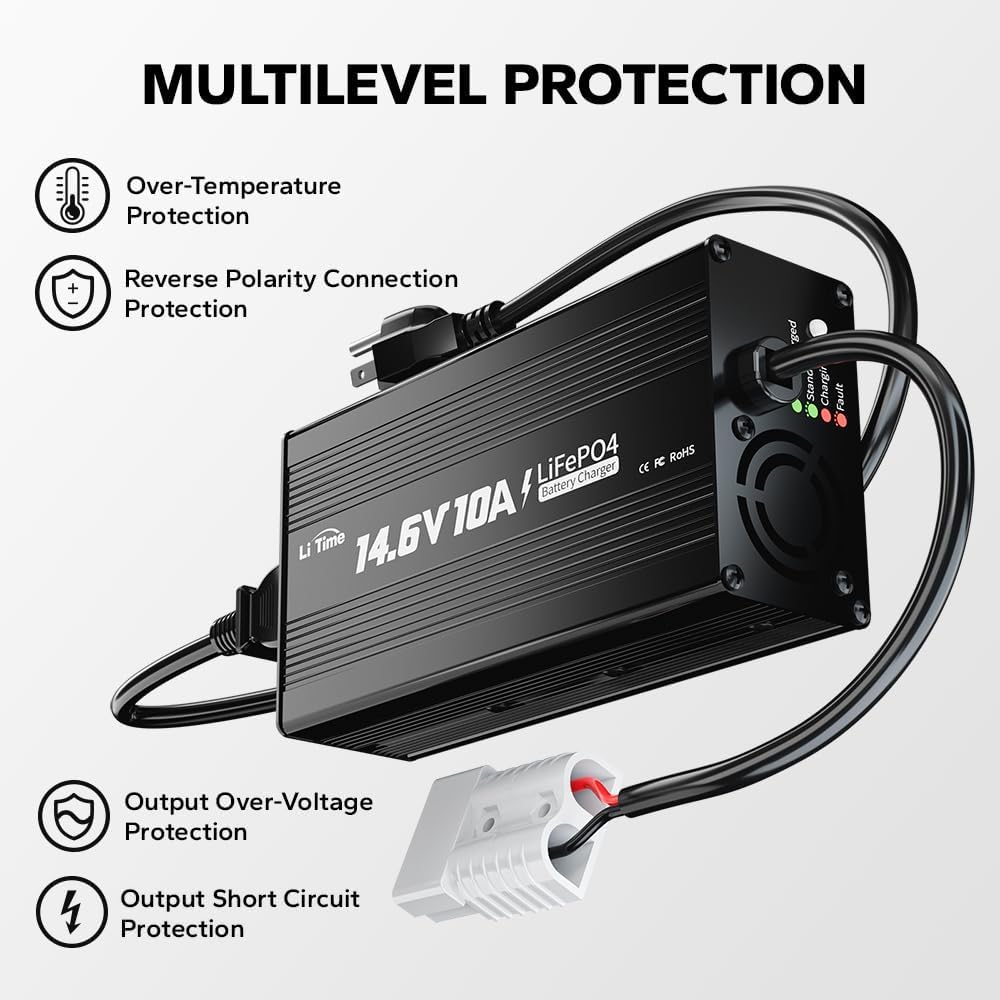
Figure 3: Charger connections including Anderson connector and M8 terminals.

Figure 4: Visual guide for connecting the charger to the battery and power source.

Figure 5: Contents of the product package, including charger, cables, and manual.
3. Arahan Operasi
Status Penunjuk LED:
- LED Always on Red: Bateri sedang dicas.
- LED Always on Green: Bateri dicas penuh.
- LED Flashes Green: Charger is on standby.
- LED Flashes Red: Charger fault or under protection (e.g., over-temperature, reverse polarity, output short-circuit, output over-voltagdan).

Figure 6: Explanation of LED indicator lights for charging status.
3-Stage Charging Mode:
Pengecas menggunakan 3-stage charging process for optimal battery health and efficiency:
- Pre-Charge Stage (T1 - Activating): Jika bateri voltage is low, the charger will apply a limited current to activate it. This stage also supports 0V activation to revive batteries under BMS protection.
- Pengecasan Arus Malar Stage (T2 - 10A Current Charging): When the battery is in the main charging time, the charger will charge the battery with a 10A current. The battery voltage rises above the set value, and the charger automatically switches to the next stage.
- Pemalar Voltage Mengecas Stage (T3 - Current Reducing & Charging Completed): Pengecas bertukar kepada vol malartage charging. The charging current gradually decreases. When the charging voltage atau arus mencapai nilai yang ditetapkan, pengecas secara automatik mematikan vol keluarantage dan pengecasan bateri selesai.

Rajah 7: Gambar rajah yang menggambarkan 3-stage proses pengecasan.

Figure 8: The charger's ability to activate 0V batteries after BMS protection.
Sistem Penyejukan yang Cekap:
The charger is equipped with a built-in cooling fan to maintain stable charging efficiency and prevent overheating, extending the life of the charger and battery.

Figure 9: Internal cooling fan for temperature regulation during charging.
Video 4: Detailed explanation of the internal workings of a LiFePO4 charger from 0% to 100% charge.
4. Langkah-langkah Keselamatan
Always prioritize safety when operating the charger. This charger is designed with multilevel protections to prevent over-temperature, reverse polarity connection, output short-circuit, and output over-voltage.
- Check the battery specifications carefully before charging to ensure that the LiFePO4 battery matches the charger's technical data.
- Make sure the charger is properly connected to the battery. Avoid a short circuit.
- Cabut palam kabel input/output pengecas serta-merta sebaik sahaja pengecas atau bateri didapati tidak normal atau rosak semasa mengecas.
- Do not use other input cables or extend the output connection cable personally, or please contact LiTime customer service.
- Jangan buka, bongkar atau ubah suai pengecas.
- Jangan sekali-kali menggunakannya semasa ribut petir.
- Sila jauhkan pengecas dan bateri daripada air, sumber haba, percikan api, api, gas mudah terbakar dan bahan kimia berbahaya.
- Do not place rods or other metal objects in vents or other openings.
- Place the charger in a well-ventilated area with sufficient heat dissipation to prevent overheating and damage.
- Do not puncture, drop, crush, burn, penetrate, shake, strike, or throw it with force.
- This 12 volt 10 amp lithium battery charger is not waterproof - not suitable for Marine environments such as boats, ships, yachts, trolling motors, etc.

Figure 10: Visual guide for important safety precautions.
5. Penyelesaian masalah
Isu dan Penyelesaian Biasa:
| Masalah | Kemungkinan Punca | Penyelesaian |
|---|---|---|
| Charging indicator flashes red when charging. | Di bawah Perlindungan Suhu Lebih | Cool down the charger to normal temperature. |
| Charging indicator flashes red after connected. | Under Reverse Polarity Connection / Output Short Circuit Protection / Output Over-Voltage Perlindungan | Connect the charger to the battery correctly. |
| Pengecas tidak dicas dan LED dimatikan selepas disambungkan kepada kuasa grid. | Poor connection / Charger Internal Damage | Make sure all connections are correct and tight. Contact us at service@litime.com for further solutions. |

Figure 11: Troubleshooting table for common charger issues.
Charger Won't Start?
If your inverter is plugged in, it may be blocking the charger's initial "wake-up" pulse. Follow these steps:
- Unplug the inverter from the battery.
- Let the charger activate the battery.
- Reconnect the inverter after charging is complete.

Figure 12: Steps to resolve charger not starting due to inverter interference.
Video 5: Guide on what to do if the battery is not working or charging.
6. Spesifikasi Produk
| Spesifikasi | Nilai |
|---|---|
| Input Voltage | 100V to 240V AC, 50Hz to 60Hz |
| Keluaran Voltage | 14.6 Volt (DC) |
| Arus Keluaran | 10 Amps |
| Suhu Operasi | -4°F hingga 104°F (-20°C hingga 40°C) |
| Suhu Penyimpanan | -40°F hingga 158°F (-40°C hingga 70°C) |
| Dimensi Produk | 10.43 x 2.17 x 3.15 inci (7.09"D x 3.58"W x 2.03"H) |
| Berat Barang | 2.07 paun |
| Nombor Model | L12V10A |
| Pensijilan | FCC, CE, RoHS, PSE |
7. Waranti & Sokongan
LiTime Battery Charger comes with a 2-year quality warranty. For technical support and customer service, you can reach out via phone or online services. Quick feedback is typically provided within 24 hours.
Contact: service@litime.com