
pengenalan
Thank you for choosing the BONTEC GDM01 Single Monitor Arm. This manual provides essential information for the safe and correct installation, operation, and maintenance of your monitor arm. Please read these instructions carefully before assembly and keep them for future reference.
The BONTEC GDM01 is designed to support LCD LED screens ranging from 13 to 27 inches, with a maximum weight capacity of 6.5 kg (14.3 lbs). It features a gas spring for smooth height adjustment and offers full motion flexibility, including tilt, swivel, and rotation, to achieve an ergonomic viewkedudukan.
Maklumat Keselamatan
- Pastikan semua komponen ada dan tidak rosak sebelum pemasangan. Jangan gunakan bahagian yang rosak.
- Jangan melebihi kapasiti berat maksimum 6.5 kg (14.3 lbs).
- Ensure the mounting surface (desk) is strong enough to support the combined weight of the monitor arm and your monitor.
- Tighten all screws firmly but do not overtighten. Overtightening can damage the product.
- Always use two people for heavy lifting or when attaching the monitor to the arm.
- Keep children away from small parts that could be swallowed.
- If you have any questions or encounter difficulties, contact customer support.
Kandungan Pakej
Sila sahkan bahawa semua bahagian disertakan dalam pakej anda:
- Perhimpunan Lengan Monitor
- Meja Clamp Komponen
- Grommet Mount Component
- Plat VESA
- Kit Perkakasan (skru, pencuci, kunci Allen)
- Manual Arahan
Persediaan dan Pemasangan
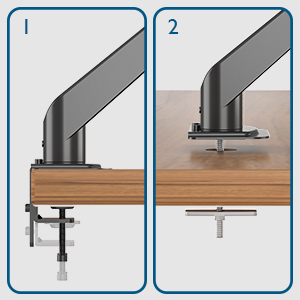
The BONTEC GDM01 monitor arm offers two installation methods: desk clamp dan pelekap grommet.
Method 1: Desk Clamp Pemasangan
- Lampirkan Clamp Pangkalan: Selamatkan C-clamp to the edge of your desk. Ensure the desk thickness is between 10mm and 83mm. Tighten the clamp screw until the base is firmly attached to the desk.
- Pasang Lengan: Slide the monitor arm assembly onto the pole of the clamp base. Secure it with the provided screws or locking mechanism.
- Lampirkan Plat VESA ke Monitor: Align the VESA plate with the mounting holes on the back of your monitor (75x75mm or 100x100mm). Use the appropriate screws from the hardware kit to secure the plate to the monitor.
- Pasangkan Monitor ke Lengan: Carefully slide the monitor (with VESA plate attached) onto the arm's mounting head. The open top slots on the VESA plate make this process easier. Ensure it clicks into place or is secured with the locking screw.


Method 2: Grommet Mount Installation
- Prepare Grommet Hole: Ensure your desk has a grommet hole. If not, you may need to drill one (consult a professional if unsure).
- Insert Grommet Base: Place the grommet base through the hole. Secure it from underneath the desk with the provided plate and nut.
- Pasang Lengan: Slide the monitor arm assembly onto the pole of the grommet base. Secure it with the provided screws or locking mechanism.
- Lampirkan Plat VESA ke Monitor: Align the VESA plate with the mounting holes on the back of your monitor (75x75mm or 100x100mm). Use the appropriate screws from the hardware kit to secure the plate to the monitor.
- Pasangkan Monitor ke Lengan: Carefully slide the monitor (with VESA plate attached) onto the arm's mounting head. Ensure it clicks into place or is secured with the locking screw.
Operating and Adjusting the Monitor Arm
The BONTEC GDM01 monitor arm offers extensive adjustability for optimal viewdalam keselesaan dan ergonomik.
Tension Adjustment (Gas Spring)
The built-in gas spring allows for smooth and effortless height adjustment. The tension needs to be adjusted according to the weight of your monitor.
- If the monitor arm sags or cannot hold the monitor's weight, turn the bolt clockwise to increase gas spring tension.
- If the monitor arm is too stiff or difficult to move downwards, turn the bolt counter-clockwise to decrease tension.

Pelarasan Ketinggian
Once the gas spring tension is correctly set, you can easily raise or lower your monitor to the desired height. The arm allows for a height adjustment range from 155mm to 400mm.

Condong, Pusing dan Putaran
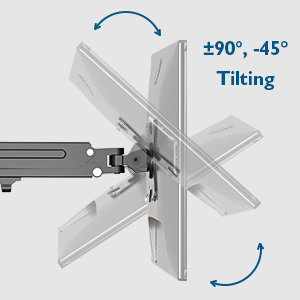
- Condong: Adjust the monitor tilt from -45° to +90° to reduce glare and find your preferred viewsudut ing.
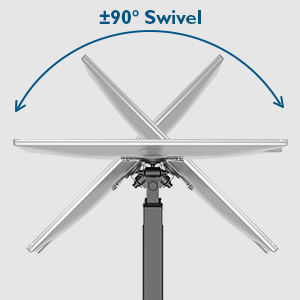
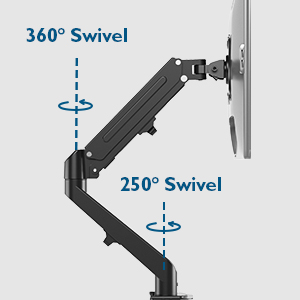
- Pusing: The arm allows for 180° swivel at the base and 250° swivel at the joint, enabling you to share your screen or change viewarah dalam.
- Putaran: Rotate your monitor 360° for landscape or portrait orientation.
Pengurusan Kabel
The integrated cable management system helps keep your workspace tidy. Route your monitor cables along the arm and through the designated clips or channels to conceal them.

Penyelenggaraan
- Periksa semua skru dan sambungan secara berkala untuk memastikan ia kekal ketat.
- Bersihkan lengan monitor dengan kain lembut,amp kain. Elakkan pembersih atau pelarut yang melelas.
- Do not attempt to disassemble the gas spring mechanism.
Menyelesaikan masalah
| Masalah | Kemungkinan Punca | Penyelesaian |
|---|---|---|
| Lengan monitor kendur atau tidak mahu terus bangun. | Gas spring tension is too low for the monitor's weight. | Increase gas spring tension by turning the adjustment bolt clockwise with the provided Allen key. |
| Lengan monitor terlalu kaku untuk digerakkan. | Gas spring tension is too high. | Decrease gas spring tension by turning the adjustment bolt counter-clockwise with the provided Allen key. |
| Monitor wobbles on the arm. | VESA plate screws or arm connection screws are loose. | Ensure all VESA plate screws and arm connection screws are securely tightened. |
| Meja klamp tidak stabil. | Clamp not tightened sufficiently or desk surface is uneven. | Retighten the desk clamp. Ensure the desk surface is flat and stable. Consider using the grommet mount if the clamp adalah tidak sesuai. |
Spesifikasi
- model: GDM01
- Bahan: Keluli Aloi
- Keserasian Saiz Skrin: 13 - 27 inci
- Kapasiti Berat: 6.5 kg (14.3 lbs)
- Keserasian VESA: 75x75mm, 100x100mm
- Julat Pelarasan Tinggi: 155mm - 400mm
- Arm Extension: Sehingga 525mm
- Julat Miring: -45° hingga +90°
- Julat Pusing: 180° (base), 250° (joint)
- Putaran: 360°
- Meja Clamp Ketebalan: 10mm - 83mm
Waranti dan Sokongan
BONTEC products are designed for durability and performance. For warranty information or technical support, please refer to the contact details provided with your purchase or visit the official BONTEC website. Please have your model number (GDM01) and purchase details ready when contacting support.
Pengeluar: BONTEC