
LAUNCH CRP MOT IV (LE-MOT4-301190864)
LAUNCH CRP MOT IV OBD2 Diagnostic Tool User Manual
Model: CRP MOT IV (LE-MOT4-301190864)
1. Pengenalan
The LAUNCH CRP MOT IV is an advanced diagnostic tool, building upon the MOT 3. It features comprehensive vehicle coverage, powerful functions, and precise test results. This device is designed to assist automotive professionals and enthusiasts in diagnosing and maintaining vehicle systems efficiently.
Utilizing wireless or wired communication between the Vehicle Communication Interface (VCI) and the display tablet, it performs full system diagnostics including Diagnostic Trouble Code (DTC) reading, DTC clearing, data stream reading, actuation tests, and special functions. Additional features include service functions, a toolbox, software updates, diagnostic history, diagnostic feedback, and a maintenance database search.
2. Persediaan dan Penggunaan Awal
2.1 Membongkar dan Komponen
Carefully unpack all components from the packaging. Ensure the following items are present:
- LAUNCH CRP MOT IV Display Tablet
- Antara Muka Komunikasi Kenderaan (VCI)
- Kabel Diagnostik OBD-II
- Penyesuai Kuasa
- Kabel USB
- Manual Pengguna (dokumen ini)

Figure 2.1: The LAUNCH CRP MOT IV diagnostic tool, showing its main display and robust casing.
2.2 Mengecas Peranti
Before first use, fully charge the CRP MOT IV tablet using the provided power adapter. Connect the power adapter to the tablet's charging port and plug it into a standard electrical outlet. The charging indicator will illuminate.
2.3 Connecting the VCI to the Vehicle
Locate the vehicle's OBD-II port, typically found under the dashboard on the driver's side. Connect the OBD-II diagnostic cable to the VCI, then plug the other end of the cable into the vehicle's OBD-II port. Ensure a secure connection.

Figure 2.2: The LAUNCH CRP MOT IV tablet connected wirelessly to the Vehicle Communication Interface (VCI).
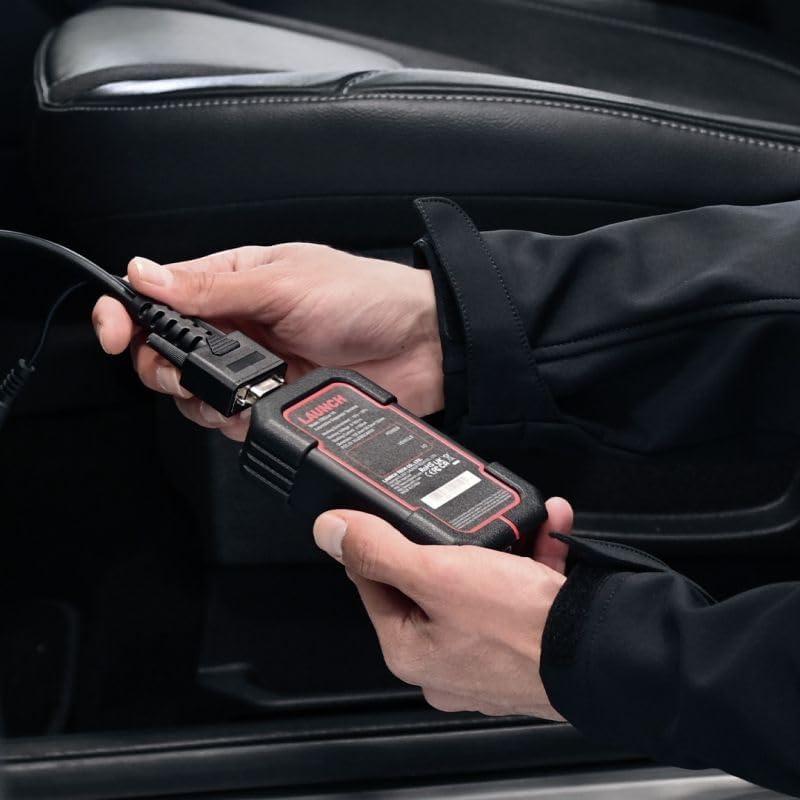
Figure 2.3: Demonstrates connecting the VCI to the vehicle's OBD-II port.
2.4 Menghidupkan dan Persediaan Awal
Press and hold the power button on the tablet to turn it on. Follow the on-screen prompts to complete the initial setup, including language selection (English is supported), Wi-Fi connection, and time zone settings. Ensure the VCI is powered on and connected to the vehicle for communication.
3. Arahan Operasi
3.1 Fungsi Diagnostik Asas
The CRP MOT IV provides comprehensive diagnostic capabilities for various vehicle systems. Navigate to the "Diagnose" section on the main menu to access these functions:
- Baca DTC: Retrieves Diagnostic Trouble Codes from the vehicle's Electronic Control Units (ECUs).
- Kosongkan DTC: Erases stored DTCs from the ECUs. Ensure the underlying issue is resolved before clearing codes.
- Baca Strim Data: Displays real-time data parameters from various sensors and components, providing insights into vehicle performance.
- Ujian Aktuasi: Allows bidirectional control to test specific components, such as turning on/off relays, injectors, or solenoids, to verify their functionality.
- Pegunkan Data Bingkai: Captures a snapshot of critical parameter values at the moment a DTC is set, aiding in diagnosis.

Figure 3.1: A user operating the LAUNCH CRP MOT IV to perform vehicle diagnostics.
3.2 Fungsi Perkhidmatan
The CRP MOT IV supports over 31 special service functions for various maintenance and reset procedures. Access these functions from the "Service Function" menu. Some key functions include:
- Anti-theft Matching
- Pengekodan Penyuntik
- Penjanaan Semula DPF
- Pemadanan Kotak Gear
- Tire Reset (TPMS)
- Tetapan Semula Penderia NOx
- Tetapan Semula AdBlue
- Vol Tinggitage Battery Detection
- Set Semula Minyak
- Set Semula Brek
- Steering Angle Sensor Calibration
- Penyesuaian Pendikit
- Penentukuran Suspensi
- Inisialisasi Bumbung Matahari
- Penentukuran Tempat Duduk
- Pemadanan Lampu Depan
- Adaptasi EGR
- Crankshaft Position Sensor Learning
- Dan banyak lagi...

Figure 3.2: A visual representation of the extensive list of 31+ service functions supported by the CRP MOT IV.
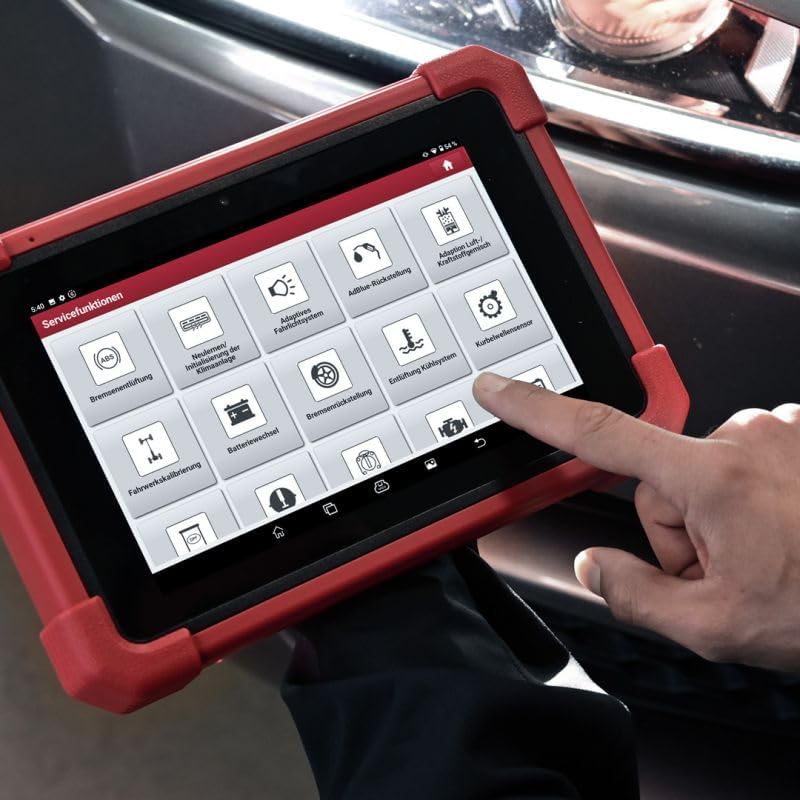
Rajah 3.3: Jarak dekat view of the service functions menu on the CRP MOT IV tablet.
3.3 Vehicle Coverage and Protocol Support
To determine if the device supports a specific function for a particular vehicle make and model, use the "Vehicle Coverage" feature. This online tool allows you to query supported brands, models, systems, and functions at any time.
The CRP MOT IV supports a wide range of communication protocols, including:
- CAN FD / CAN / SCAN / FCAN
- DoIP (requires additional DoIP cable, sold separately)
- KWP / L-line
- J1850 PWM
- VPW
- Chrysler CCD
- Dan banyak lagi.

Figure 3.4: The VCI unit being connected to the vehicle's diagnostic port.
4. Penyelenggaraan
4.1 Kemas Kini Perisian
Regular software updates are crucial for maintaining optimal performance and expanding vehicle coverage and functions. Connect the CRP MOT IV to a stable Wi-Fi network and navigate to the "Software Update" section on the main menu to check for and install available updates.
4.2 Penjagaan Peranti
- Keep the device clean using a soft, dry cloth. Avoid abrasive cleaners or solvents.
- Simpan peranti di tempat yang sejuk dan kering jauh dari cahaya matahari langsung dan suhu yang melampau.
- Protect the screen from scratches using a screen protector if desired.
- Ensure all cables and connectors are free from damage before use.
5. Penyelesaian masalah
5.1 Isu dan Penyelesaian Biasa
- Peranti tidak dihidupkan: Pastikan bateri telah dicas. Sambungkan penyesuai kuasa dan cuba lagi. Jika masalah berterusan, hubungi sokongan.
- Tiada komunikasi dengan kenderaan:
- Verify the VCI is securely connected to the vehicle's OBD-II port.
- Check if the vehicle's ignition is in the ON position.
- Ensure the VCI is properly paired with the tablet (for wireless connection).
- Confirm the vehicle's make, model, and year are correctly selected in the software.
- Slow software performance:
- Pastikan peranti mempunyai ruang storan kosong yang mencukupi.
- Tutup sebarang aplikasi latar belakang yang tidak diperlukan.
- Perform a software update to ensure you have the latest optimizations.
5.2 Diagnostic History and Feedback
The "Diagnostic History" function allows users to access detailed records of previously tested vehicles. This enables users to resume operations without starting from scratch.
If you encounter anomalies with models or functions while using the diagnostic software, utilize the "Diag Feedback" function. This allows you to submit detailed reports to LAUNCH for analysis and troubleshooting, helping to improve future software versions.
6. Spesifikasi Teknikal
| Ciri | Spesifikasi |
|---|---|
| Pengeluar | PELANCARAN |
| Jenama | PELANCARAN |
| Model | Mot IV |
| Nombor Model | LE-MOT4-301190864 |
| Berat Barang | 1 g |
| Dimensi Produk (L x W x H) | 27.4 x 19.05 x 4.05 cm |
| Bateri | 1 Litium-ion (termasuk) |
| Ciri Khas | Touchscreen support |
| Sistem Operasi | Android 10.0 |
| Saiz Skrin | 8 Inci |
| Bahasa | Inggeris |
| Sumber Kuasa | Dikuasakan Bateri |
7. Waranti dan Sokongan
7.1 Official Product and Service
Service and warranty support are exclusively available for original LAUNCH Europe products purchased from our official shop or authorized dealers. Authorized dealers can be identified by their seller number.
7.2 Sokongan Teknikal
LAUNCH Europe provides technical support for its products. For assistance, please contact our support team via phone or email. Support is available to help with product operation, troubleshooting, and general inquiries.
For the most up-to-date contact information, please refer to the official LAUNCH Europe webtapak atau dokumentasi pembelian anda.
Ask a question about this manual
Ask about setup, troubleshooting, compatibility, parts, safety, or missing instructions. Manuals+ will review the question and use this page’s manual context to help answer it.