
pengenalan
This universal remote control is designed for seamless compatibility with all Samsung TV models, including LCD, Smart, 3D LED, and HDTVs. It serves as a perfect replacement for damaged or old remote controls, covering all functions of the original. Its user-friendly design and backlit buttons enhance convenience, especially in low-light conditions.
Persediaan
Pemasangan Bateri
The remote requires two AAA batteries (not supplied). To install, locate the battery compartment on the back of the remote. Slide the battery cover downwards to open. Insert the batteries, ensuring correct polarity (+ and - ends match the indicators inside the compartment). Close the cover by sliding it back into place until it clicks securely.

Imej: Belakang view of the remote control with the battery cover removed, illustrating the battery insertion process.
Sambungan Awal
No programming or complex setup is required. Once the batteries are correctly installed, the remote control is ready to use with your Samsung TV immediately.
Arahan Operasi
Remote Layout and Key Functions
Familiarize yourself with the buttons on your remote control. Key functions include:
- Butang Kuasa: Located at the top left, turns the TV on or off.
- Butang Sumber: Bertukar antara sumber input yang berbeza (HDMI, AV, dsb.).
- Pad Nombor (0-9): Untuk pemilihan saluran langsung.
- Volume (+/-) and Mute: Melaraskan kelantangan dan membisukan bunyi.
- Saluran (CH +/-): Menukar saluran TV.
- Navigation Arrows (Up, Down, Left, Right) and Enter: Digunakan untuk navigasi menu dan pemilihan.
- Butang Hab Pintar: Accesses your Samsung Smart Hub for apps and streaming services.
- Netflix/Amazon Buttons: Direct access to popular streaming platforms.
- Kembali/Keluar: Navigates back or exits menus/apps.
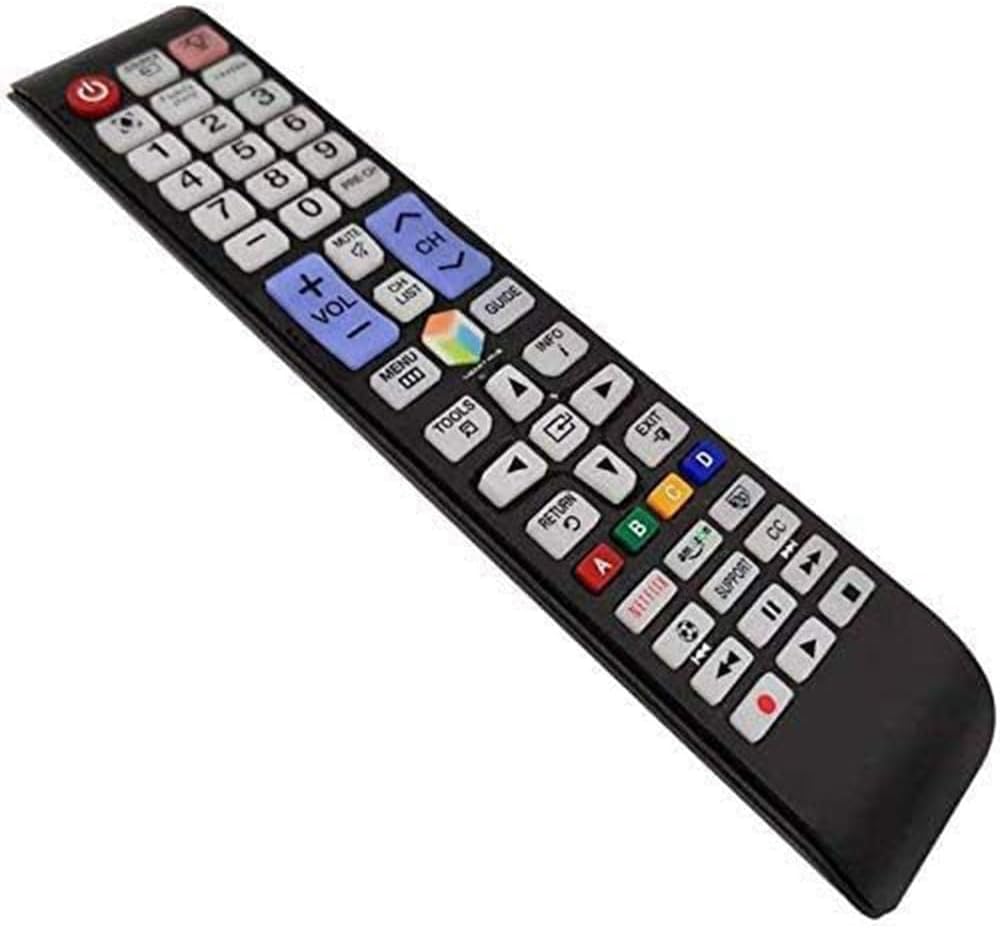
Imej: Terperinci view of the remote control's button layout.
Ciri Lampu Latar
The remote features a backlight function for improved visibility in dark environments. Press the light bulb button (located near the top right) to illuminate the buttons. The backlight will automatically turn off after a short period of inactivity to conserve battery life.

Image: The remote control demonstrating its backlit button feature.
Smart TV and App Navigation
For Samsung Smart TVs, use the navigation arrows and the central 'Enter' button to browse through menus, select applications, and control playback within streaming services. The dedicated Netflix and Amazon buttons provide quick access to these platforms.

Image: The remote control being used to navigate a Samsung Smart TV interface.
Penyelenggaraan
Pembersihan
To clean the remote control, wipe it gently with a soft, dry cloth. Do not use liquid cleaners or abrasive materials, as they may damage the surface or internal components.
Penggantian Bateri
Replace batteries when the remote's response becomes sluggish or the backlight dims significantly. Always replace both batteries at the same time with new AAA batteries to ensure optimal performance.
Menyelesaikan masalah
| Isu | Kemungkinan Punca | Penyelesaian |
|---|---|---|
| Jauh tidak bertindak balas | Bateri mati atau salah dimasukkan | Gantikan bateri, pastikan polariti yang betul. |
| Butang tidak berfungsi | Obstruction between remote and TV sensor | Ensure a clear line of sight to the TV's IR sensor. |
| Lampu latar tidak berfungsi | Kuasa bateri rendah | Gantikan bateri. |
Spesifikasi
| Ciri | Perincian |
|---|---|
| Dimensi Produk | 1.97 x 1.18 x 1.57 inci |
| Berat Barang | 1.06 auns |
| Bateri Diperlukan | 2 bateri AAA |
| Ciri Khas | Butang lampu belakang |
| warna | Biru |
| Peranti Serasi | All Samsung TV / LCD / Smart TV / 3D LED / HDTVs |
Waranti dan Sokongan
If you encounter any quality problems or require assistance with your SMATAR Universal Remote Control, please feel free to contact us. We are committed to providing a satisfactory solution and ensuring your complete satisfaction with our product.