
HOLACA B08PV1X97P
HOLACA Wall Mount with 64GB USB Flash Drive for Blink Sync Module 2
Manual Arahan Pengguna
1. Pengenalan
This manual provides detailed instructions for the installation, operation, and maintenance of your HOLACA Wall Mount with 64GB USB Flash Drive, designed specifically for the Blink Sync Module 2. This product offers an integrated solution for local video storage and a clean, cable-managed setup for your Blink security system.

Image: The HOLACA Wall Mount with the 64GB USB Flash Drive, designed for the Blink Sync Module 2, shown with its components.
2. Kandungan Pakej
Before proceeding with installation, please ensure all components are present:
- 1 x HOLACA Power Outlet Wall Mount
- 1 x 64GB USB Flash Drive
- 1 x Short USB Charging Cable
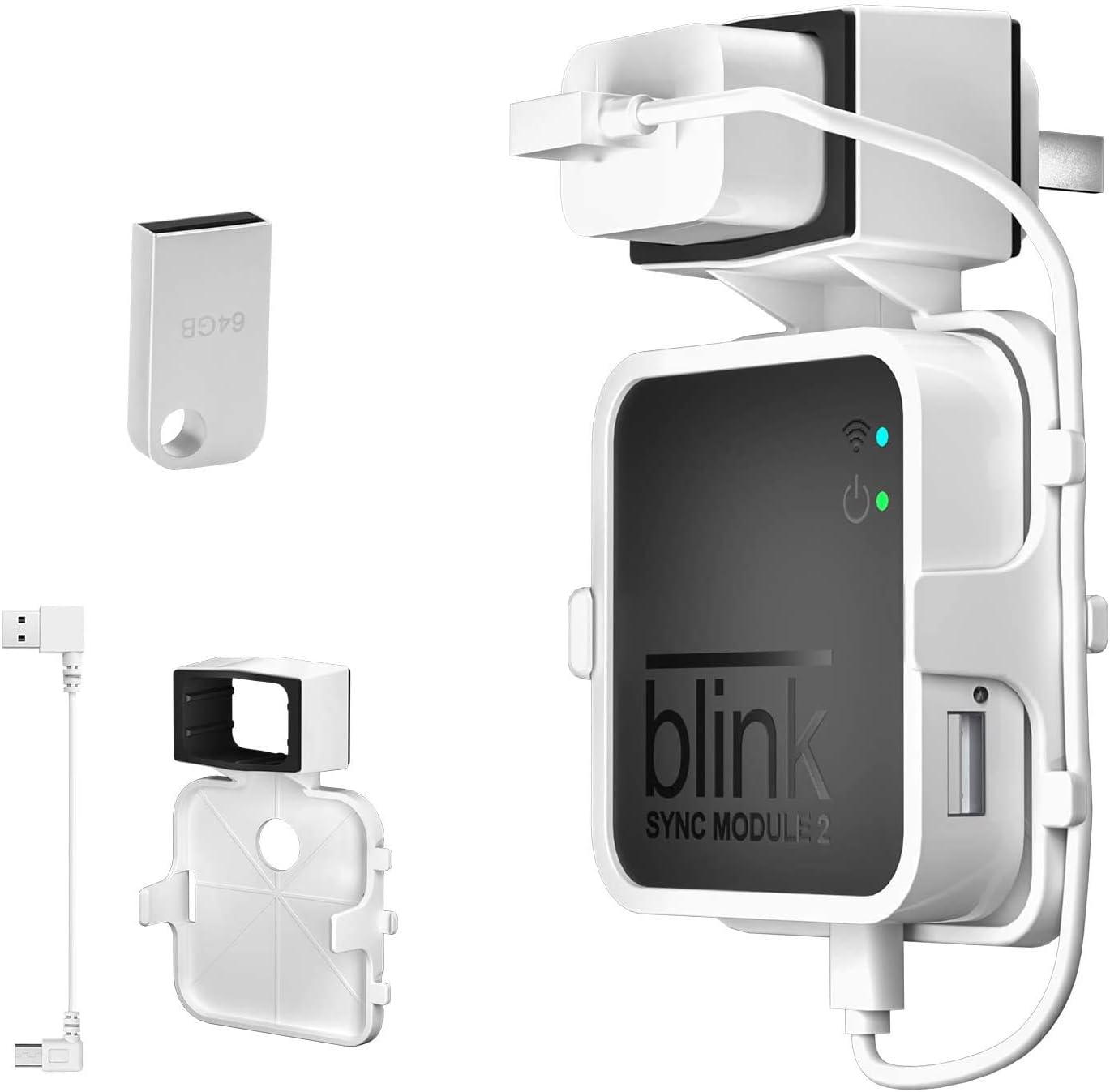
Image: All items included in the HOLACA Wall Mount package: the mount, 64GB USB drive, and short USB cable.
3. Persediaan dan Pemasangan
The HOLACA Wall Mount is designed for easy, tool-free installation, ensuring no damage to your walls and a tidy setup.
- Prepare the Blink Sync Module 2: Ensure your Blink Sync Module 2 is ready for installation.
- Insert the Sync Module: Carefully slide your Blink Sync Module 2 into the wall mount. The precise fit ensures it is held firmly in place.
- Connect the Short USB Cable: Use the provided short USB charging cable to connect the Sync Module to its original charging block. This customized cable helps eliminate unsightly long cords.
- Insert 64GB USB Flash Drive: Insert the included 64GB USB flash drive into the designated USB port on the Sync Module. This enables local video storage.
- Palamkan ke Wall Outlet: Plug the assembled unit directly into any standard wall outlet. The design ensures it does not block other plug holes. No drilling or tools are required for this step.
- Keserasian Pengecas: The mount is compatible with various charger sizes. For slightly smaller chargers (e.g., American Version), a silicone pad can be used to achieve a perfect fit. European Version original chargers typically do not require the silicone pad.

Image: Illustration of the simple buckle design, showing how the Blink Sync Module 2 slides into the mount.

Image: The HOLACA Wall Mount being plugged into a wall outlet, demonstrating no wall damage and no obstruction of other outlets.

Image: Comparison showing how the mount accommodates different charger sizes, with or without a silicone pad for optimal fit.
The integrated design helps save space and reduces cable clutter, making your home clean and tidy while preventing children and pets from pulling on cords.

Image: A visual representation of how the HOLACA Wall Mount saves space and reduces cable clutter compared to a traditional setup.
4. Operating the 64GB USB Flash Drive
The included 64GB USB flash drive is ready for immediate use with your Blink Sync Module 2 for local video storage. Once inserted, the Sync Module will automatically begin managing recordings to the drive.
WARNING: When the 64GB USB drive is full, you must manually delete old files to allow new recordings. The system does not automatically overwrite old data.
5. Penyelenggaraan
To ensure the longevity and optimal performance of your HOLACA Wall Mount and USB flash drive, follow these simple maintenance guidelines:
- Pembersihan: Use a soft, dry cloth to wipe down the mount and USB drive. Avoid abrasive cleaners or solvents.
- Persekitaran: Ensure the product is used in a dry environment, away from excessive heat or moisture.
- Pengurusan Kabel: Periodically check the short USB cable for any signs of wear or damage.
6. Penyelesaian masalah
If you encounter any issues with your HOLACA Wall Mount or 64GB USB Flash Drive, please refer to the following common solutions:
- USB Drive Full: If new recordings are not being saved, check if the 64GB USB drive is full. Manually delete old files untuk mengosongkan ruang.
- Sambungan longgar: Ensure the Blink Sync Module 2 is securely seated in the mount and that the short USB cable and power adapter are firmly plugged in.
- Charger Fit Issues: If your charger feels loose, ensure you are using the appropriate silicone pad if your charger is a slightly smaller (e.g., American Version) type.
Untuk isu berterusan yang tidak diliputi di sini, sila hubungi khidmat pelanggan.
7. Spesifikasi
| Ciri | Perincian |
|---|---|
| Jenama | HOLACA |
| Peranti Serasi | Blink Sync Module 2 |
| Kapasiti Penyimpanan Memori | 64 GB |
| Jenis Memori Denyar | USB |
| Antara Muka Perkakasan | USB |
| warna | putih |
8. Waranti dan Sokongan
HOLACA is committed to customer satisfaction. We offer professional support and stand by the quality of our products.
- Jaminan Kualiti: We promise customers a 6-month replacement service or a full refund for any quality issues.
- Sokongan Pelanggan: If you have any questions or require assistance, please do not hesitate to contact us. We are dedicated to resolving your issues patiently within 24 hours.
Ask a question about this manual
Ask about setup, troubleshooting, compatibility, parts, safety, or missing instructions. Manuals+ will review the question and use this page’s manual context to help answer it.