
1. Pengenalan
The Blink Mini is a compact indoor plug-in smart security camera designed for monitoring your home. It offers 1080p HD video, infrared night vision, motion detection, and two-way audio capabilities, allowing you to stay connected to your indoor environment from anywhere via the Blink Home Monitor app.
2. Produk Lebihview
2.1 Ciri-ciri Utama
- Video HD 1080p: Rekod dan view clear video during the day and with infrared HD night vision after dark.
- Audio Dua hala: Communicate with people and pets in your home directly from your smartphone.
- Pengesanan Pergerakan: Receive alerts on your smartphone when motion is detected. Customizable motion detection zones are available.
- Indoor Chime Functionality: Use the Mini as an indoor plug-in chime for a Blink Video Doorbell, providing real-time alerts when the doorbell is pressed.
- Pilihan Storan Fleksibel: Save and share clips with a Blink Subscription Plan (30-day free trial included) or locally with a Sync Module 2 (sold separately).
- Integrasi Alexa: Compatible with Alexa-enabled devices for voice control of live view, arming, and disarming.
2.2 Apa yang ada di dalam Kotak
- Blink Mini camera (quantity dependent on package)
- 1 stand (attached per camera)
- 2 skru pemasangan (setiap kamera)
- 1 USB cable (per camera)
- 1 power adapter (per camera)
2.3 Komponen Produk

Rajah 1: Blink Mini camera highlighting its core features.

Rajah 2: Blink Mini camera demonstrating two-way audio functionality with a smart display.
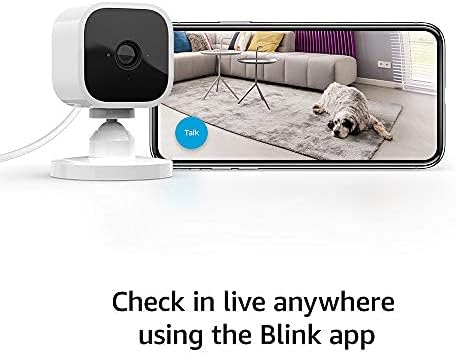
Rajah 3: Monitoring live view from the Blink Mini camera using the Blink app on a smartphone.
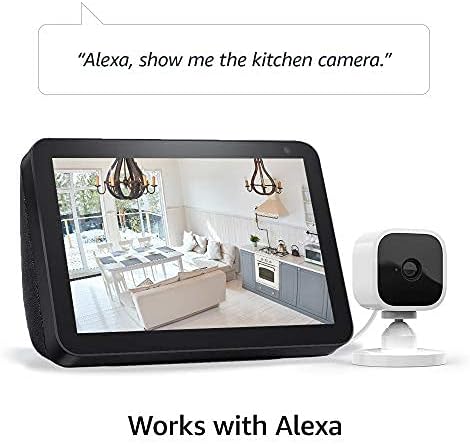
Rajah 4: Blink Mini camera integration with Alexa for voice control and live viewpada peranti yang serasi.
3. Persediaan
Setting up your Blink Mini camera is a straightforward process. Ensure you have a stable 2.4 GHz Wi-Fi connection available.
3.1 Langkah Persediaan Awal
- Download the Blink Home Monitor App: Cari untuk "Blink Home Monitor" in your smartphone's app store (iOS 17, Android 10, or Fire OS 8 or newer required) and install it.
- Buat Akaun: Open the app and follow the on-screen instructions to create a new Blink account or log in to an existing one.
- Tambah Peranti: In the app, tap the "+" icon to add a new device and select "Blink Mini Camera."
- Imbas Kod QR: Use your phone's camera to scan the QR code located on the back of your Blink Mini camera.
- Plug In the Camera: Connect the provided USB cable to the camera and the power adapter, then plug the adapter into a standard electrical outlet. The camera's blue LED will begin to flash.
- Sambung ke Wi-Fi: Follow the app's instructions to connect your Blink Mini to your 2.4 GHz Wi-Fi network. Ensure your Wi-Fi has a minimum 2 Mbps upload speed.
- Letakkan Kamera: Place the camera in your desired indoor location. The attached stand allows for flexible positioning on flat surfaces or mounting to a wall using the included screws.
4. Arahan Operasi
Once set up, your Blink Mini camera provides various monitoring and interaction features through the Blink Home Monitor app.
4.1 Langsung View dan Audio Dua Hala
- To access live video, open the Blink Home Monitor app and tap the camera icon next to your Mini camera.
- Semasa live view, tap the microphone icon to enable two-way audio. Speak into your phone to communicate through the camera's speaker.
4.2 Pengesanan Pergerakan
- Enable motion detection in the camera settings within the Blink app to receive alerts when movement is detected.
- Customize motion detection zones to focus on specific areas and reduce unwanted notifications. Adjust sensitivity settings as needed.
4.3 Rakaman dan Penyimpanan Video
- Video clips triggered by motion or initiated by live view boleh diselamatkan.
- A Blink Subscription Plan provides cloud storage for video clips. A 30-day free trial is typically included with new devices.
- Alternatively, you can save clips locally to a USB drive when connected to a Blink Sync Module 2 (sold separately).
4.4 Integrasi Alexa
- Enable the Blink skill in the Alexa app.
- Link your Blink account to your Alexa account.
- Use voice commands such as "Alexa, show me [camera name]" to view live feeds on compatible Echo Show devices, or "Alexa, arm [system name]" to activate motion detection.
5. Penyelenggaraan
Regular maintenance ensures optimal performance and longevity of your Blink Mini camera.
5.1 Pembersihan
- Lap kanta dan badan kamera dengan lembut menggunakan kain lembut, kering dan tidak berbulu.
- Avoid using liquid cleaners, aerosols, or abrasive solvents, as these can damage the camera.
5.2 Kemas Kini Perisian
- Blink regularly releases software updates to improve performance, add features, and enhance security.
- Ensure your camera is connected to Wi-Fi and powered on to receive automatic updates.
- Refer to the Blink support page for information specific to your device's software security updates.
6. Penyelesaian masalah
If you encounter issues with your Blink Mini, try the following troubleshooting steps:
- Kamera Luar Talian: Check the power connection and ensure your Wi-Fi network is active and stable. Restart your Wi-Fi router if necessary.
- Kualiti Video Lemah: Ensure the camera lens is clean. Check your Wi-Fi signal strength in the app; a weak signal can affect video quality.
- Pengesanan Pergerakan Tidak Berfungsi: Verify that motion detection is enabled in the app settings. Adjust sensitivity and ensure motion zones are correctly configured.
- Isu Audio Dua Hala: Check your smartphone's microphone and speaker settings. Ensure the camera's speaker is not obstructed.
- Apl Tidak Menjawab: Close and reopen the Blink Home Monitor app. If the issue persists, restart your smartphone.
- Menetapkan semula Kamera: If problems persist, you may need to reset the camera. Refer to the Blink support page for specific instructions on how to perform a factory reset.
7. Spesifikasi
| Ciri | Perincian |
|---|---|
| Bidang view | 110° pepenjuru |
| Resolusi kamera | 1080p HD video (day), infrared HD night vision (dark) |
| Camera frame rate | Sehingga 30 bingkai sesaat |
| Saiz | 2 inci x 1.9 inci x 1.4 inci (50 mm x 49 mm x 36 mm) |
| Berat badan | 1.7 auns (48 gram) |
| CPU | Immedia Proprietary – AC1002B, 4 cores / 200 MHz |
| kuasa | 2 meter micro USB and power adapter, electrical rating: 100-240V 50/60 HZ 0.15A |
| Sambungan Wi-Fi | Supports 2.4 Ghz 802.11g/n; requires minimum 2 Mbps upload speed. Does not support ad-hoc or paywall networks. |
| Warna yang ada | Putih, Hitam |
| Minimum smartphone requirements | iOS 17, Android 10, Fire OS 8 only |
| Aplikasi Blink | Monitor Rumah Blink |
| Audio | Speaker output and 2-way audio recording |
| LED | One blue LED to indicate activity (optional) |
| Generasi | 1st generation – 2020 release |
8. Waranti dan Sokongan
8.1 Maklumat Waranti
The Blink Mini camera includes a Jaminan dan perkhidmatan terhad 1 tahun. Use of Blink cameras is subject to the terms found on the official Blink webtapak.
8.2 Sokongan Pelanggan
For additional information, detailed guides, or technical assistance, please visit the official Blink Mini support page. You can typically find a link to the support page within the Blink Home Monitor app or on the Blink webtapak.