
1. Pengenalan
Thank you for choosing the Tbest CCD HD IP68 Reversing Camera. This manual provides detailed instructions for the installation, operation, and maintenance of your new reversing camera system. Please read this manual thoroughly before installation and use to ensure proper function and safety. This camera is designed to enhance your vehicle's safety by providing a clear view of the area behind your car when reversing.
2. Produk Lebihview
2.1 Ciri-ciri Utama
- High-Definition CCD Sensor: Provides clear and sharp images.
- Penilaian Kalis Air IP68: Ensures durability and reliable performance in various weather conditions.
- Kanta Sudut Lebar 170 Darjah: Offers an expansive field of view untuk meminimumkan titik buta.
- Keupayaan Penglihatan Malam: Operates effectively in low-light conditions.
- Integrated License Plate Light Design: Replaces the original license plate light for a seamless, factory-like installation.
- Garis Panduan Tempat Letak Kereta: Assists with precise parking maneuvers.
- Universal RCA Connector: Compatible with most aftermarket car displays and head units.
2.2 Kandungan Pakej
- 1 x Tbest CCD HD Reversing Camera
- 1 x Video Cable (approx. 6 meters / 19.7 feet)
- 1 x Kabel Kuasa
- 1 x Manual Pengguna (dokumen ini)

This image displays the complete set of cables provided with the camera, including the video cable (approximately 6 meters long) and the power cable.
3. Maklumat Keselamatan
Sila patuhi langkah berjaga-jaga keselamatan berikut:
- Sentiasa putuskan sambungan bateri kenderaan sebelum melakukan sebarang kerja elektrik.
- Pastikan semua pendawaian ditebat dan dipasang dengan betul untuk mengelakkan litar pintas atau kerosakan.
- Jangan halang pemandu view atau mengganggu kawalan kenderaan semasa pemasangan.
- This camera is an aid for reversing and parking; it does not replace the driver's responsibility to check surroundings manually.
- Rujuk profesional jika anda tidak pasti tentang mana-mana bahagian proses pemasangan.
4. Persediaan dan Pemasangan
The Tbest Reversing Camera is designed for specific vehicle models, integrating into the license plate light housing. Compatible vehicles include Renault Fluence (2019-2014), Renault Duster (2009-2014), Dacia Duster (2010-2014), Renault Megane 3 (2008-2016), and Nissan Terrano (2010-2014).
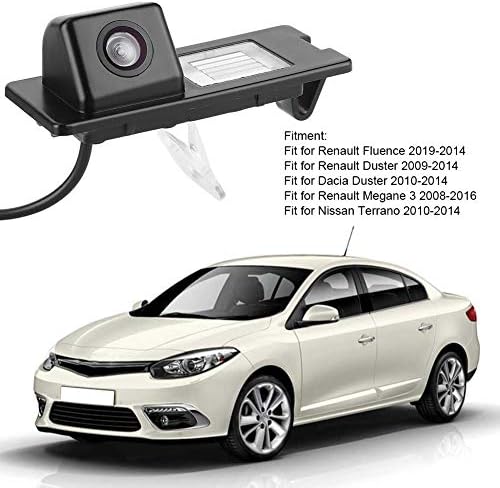
The camera unit is shown next to a list detailing compatible vehicle models, including Renault Fluence, Duster, and Megane, and Nissan Terrano.
4.1 Langkah Pemasangan
- Sediakan Kenderaan: Ensure the vehicle is turned off and the parking brake is engaged. Disconnect the negative terminal of the car battery to prevent electrical shorts.
- Remove Original License Plate Light: Carefully remove the existing license plate light housing from your vehicle's rear. This usually involves unfastening screws or clips.
- Install the Camera Unit: Insert the Tbest reversing camera unit into the vacant license plate light slot. Ensure it fits securely and the camera lens is facing outwards and downwards for optimal viewsudut ing.
- Sambungkan Kuasa: Connect the camera's power cable (red and black wires) to the vehicle's reverse light power supply. The red wire connects to the positive (+) lead of the reverse light, and the black wire connects to a ground (-) point. This ensures the camera activates automatically when reverse gear is engaged.
- Route Video Cable: Run the video cable (RCA connector) from the camera unit through the vehicle's interior to the location of your car's display screen (e.g., infotainment system, rearview mirror monitor). Ensure the cable is routed safely, away from moving parts or heat sources, and secured to prevent damage.
- Sambung ke Paparan: Plug the RCA video cable into the video input port of your car's display unit.
- Uji Sistem: Reconnect the car battery. Turn on the vehicle and engage reverse gear. The camera image should appear on your display screen. Adjust the camera's position slightly if needed to optimize the view.
- Pendawaian Selamat: Once tested and confirmed working, secure all wiring with cable ties or electrical tape to prevent rattling or damage.

The camera is shown integrated into a vehicle's rear license plate light housing, with the corresponding view on the car's display screen, complete with dynamic parking guidelines.
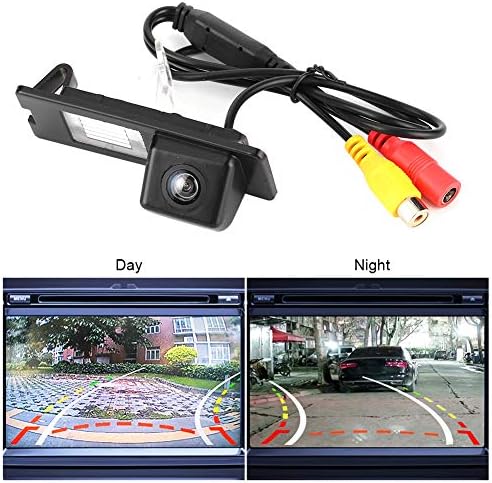
The camera unit is pictured with its RCA video and power cables. Below, two screens demonstrate the camera's performance in both bright daylight and low-light night conditions.
5. Arahan Operasi
Once properly installed, the Tbest Reversing Camera operates automatically:
- Pengaktifan Automatik: When you shift your vehicle into reverse gear, the camera will automatically power on and transmit its video feed to your connected display screen.
- Garis Panduan Tempat Letak Kereta: The display will show dynamic parking guidelines overlaid on the camera's view, assisting you in judging distances and positioning your vehicle.
- Sudut Lebar View: Utilize the 170-degree wide-angle view to observe obstacles and surroundings that may not be visible in your rearview cermin.
- Penglihatan Malam: The camera's low-light capability ensures a clear view even in dark conditions.
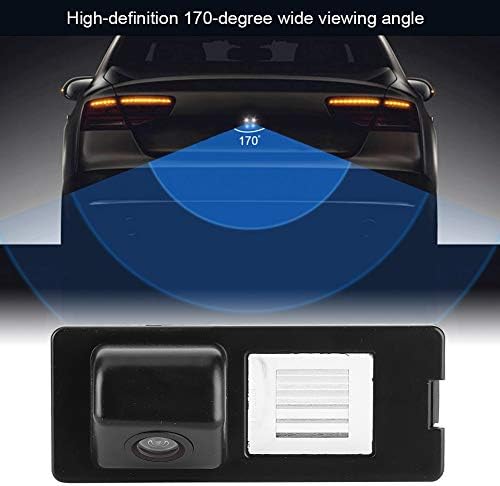
This diagram visually represents the camera's 170-degree wide viewing angle, highlighting the broad area it covers behind the vehicle for enhanced safety.
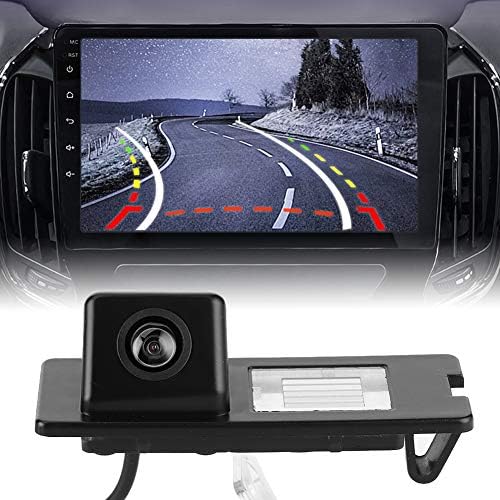
This image displays the Tbest reversing camera unit alongside a car's infotainment screen, illustrating the camera's output with parking guidelines.
6. Penyelenggaraan
To ensure the longevity and optimal performance of your Tbest Reversing Camera, follow these maintenance guidelines:
- Pembersihan tetap: Bersihkan kanta kamera secara berkala dengan kain lembutamp kain untuk menanggalkan kotoran, habuk atau tompokan air yang boleh menghalang view. Elakkan pembersih yang kasar.
- Periksa Pendawaian: Occasionally check the wiring for any signs of wear, fraying, or loose connections. Secure any loose wires.
- Elakkan Bahan Kimia Keras: Do not use strong chemical cleaners or solvents on the camera unit, as they may damage the housing or lens.
- Suhu melampau: While designed for automotive use, prolonged exposure to extreme temperatures (hot or cold) can affect electronic components.

A detailed close-up of the camera unit, showing its compact design and lens.
7. Penyelesaian masalah
If you encounter issues with your reversing camera, refer to the following troubleshooting guide:
- Tiada Imej pada Paparan:
- Check if the vehicle is in reverse gear.
- Verify all power and video cable connections are secure and correctly plugged in.
- Ensure the display unit is set to the correct video input channel.
- Check the camera's power supply by testing the reverse light circuit with a multimeter.
- Imej Berkelip atau Herot:
- Inspect video cables for damage or loose connections.
- Ensure proper grounding for the camera's power supply.
- Check for electromagnetic interference from other vehicle electronics.
- Poor Image Quality (Blurry/Dark):
- Bersihkan lensa kamera dengan teliti.
- Ensure there is sufficient ambient light for optimal night vision performance.
- Verify the camera is securely mounted and not vibrating.
- Parking Lines Incorrect:
- Parking lines are typically fixed and cannot be adjusted. Ensure the camera is mounted straight.
If the problem persists after following these steps, please contact Tbest customer support.
8. Spesifikasi
| Ciri | Spesifikasi |
|---|---|
| Jenama | Tbest |
| Peranti Serasi | Renault Fluence, Duster, Megane |
| Jenis Pemasangan | Surface Mount (License Plate Light Housing) |
| Voltage | 12 Volt |
| Teknologi Penderia Optik | CCD |
| Jenis Kanta | Sudut Lebar |
| Nyata View sudut | 170 Darjah |
| Jenis Penyambung | RCA |
| Saiz Penderia Optik | 1/3 inci |
| Bidang View | 170 Darjah |
| Pencahayaan (Lux) | 0.2 |
| Screen Capture Resolution | 720p |
| Effective Capture Resolution | 720 Piksel |
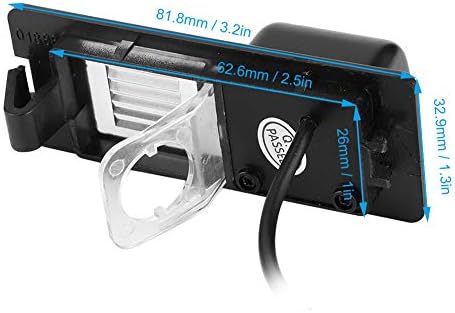
This image provides precise measurements of the camera unit, including its length, width, and height, in both millimeters and inches.
9. Waranti dan Sokongan
Tbest products are manufactured to high-quality standards. This product comes with a standard manufacturer's warranty. Please refer to the warranty card included with your purchase or visit the official Tbest webtapak untuk terma dan syarat jaminan terperinci.
For technical support, troubleshooting assistance, or warranty claims, please contact Tbest customer service through the retailer where you purchased the product or via the contact information provided on the official Tbest webtapak.