
LAUNCH CRP123X Elite
LAUNCH CRP123X Elite OBD2 Scanner User Manual
model: CRP123X Elite | Jenama: PELANCARAN
1. Pengenalan
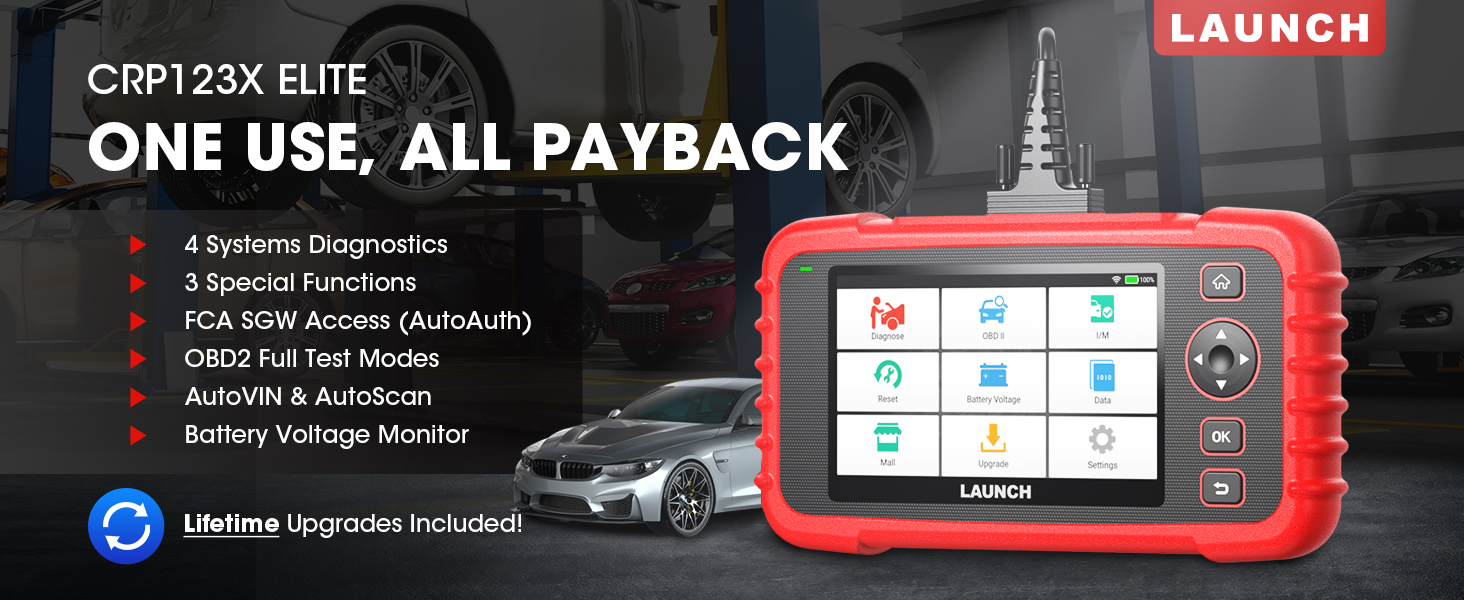
The LAUNCH CRP123X Elite is an advanced OBD2 diagnostic scan tool designed for comprehensive vehicle system analysis. It offers a wide range of functions including 4-system diagnostics (Engine, Transmission, ABS, SRS), 3 special reset services (Oil Reset, Electronic Throttle Relearn, Steering Angle Sensor Calibration), full OBD2 functions, AutoVIN technology, and lifetime free software updates via Wi-Fi. This manual provides detailed instructions for setting up, operating, and maintaining your CRP123X Elite scanner.
2. Ciri-ciri Utama
- Kemas Kini Perisian Percuma Sepanjang Hayat: Ensures compatibility with future vehicles and systems, updated wirelessly via Wi-Fi.
- 3 Hottest Special Functions: Includes Oil Reset, Electronic Throttle Relearn (ETC Reset), and Steering Angle Sensor Calibration (SAS Reset).
- 4-System Diagnostics: Comprehensive diagnostics for Engine, Anti-lock Braking System (ABS), Supplemental Restraint System (SRS), and Transmission Control Module (TCM). Read and clear DTCs, view live data, and read ECU information.
- Liputan Kenderaan yang Luas: Supports over 72 car brands across US, EU, and Asia, including 2018+ FCA SGW (AutoAuth required).
- AutoVIN & AutoScan: Automatically identifies vehicle information and quickly scans all modules in all systems for 2006+ vehicles.
- All 10 OBD2 Test Modes: Supports all standard OBD2 functions for basic car issue diagnosis, including reading/clearing codes, live data, freeze frame, I/M readiness, O2 sensor test, EVAP system test, on-board monitor test, component test, and vehicle information retrieval.
- Vol. Masa Nyatatage Pantau: Displays dynamic graphic representation of the car's battery voltage.
- 4-in-1 Graphic Live Data: Allows merging up to 4 PIDs data on one screen for easier analysis.
- Diagnostic Report Sharing: Save and share diagnostic reports for further analysis or record-keeping.
- Reka Bentuk Mesra Pengguna: Features a 5-inch HD touchscreen, Android 7.0 OS, 16GB memory, and anti-slip, shock-resistant casing.
3. Kandungan Pakej
Sahkan bahawa semua item terdapat dalam pakej anda:
- LAUNCH CRP123X Elite Scanner (Red unit with 5-inch touchscreen)
- DC 5V Charging Cable (USB cable)
- OBD2 Cable (DB-15 diagnostic connector)
- Carrying Bag (Black zippered case)
- User Manual (Printed document)

4. Panduan Persediaan
4.1 Penghidupan dan Pengecasan Awal
Before first use, ensure the device is fully charged. Connect the provided DC 5V Charging Cable to the scanner's charging port and a suitable USB power adapter (not included) or computer USB port. The device will power on automatically or can be powered on by pressing the power button.

4.2 Sambungan Wi-Fi
- From the main menu, tap on "Settings".
- Pilih "Wi-Fi" dan hidupkannya.
- Pilih rangkaian Wi-Fi yang anda inginkan daripada senarai dan masukkan kata laluan jika digesa.
- Sebaik sahaja disambungkan, ikon Wi-Fi akan muncul di bar status.
4.3 Kemas Kini Perisian Awal
It is recommended to perform a software update after connecting to Wi-Fi to ensure you have the latest vehicle coverage and functions.
- From the main menu, tap on "Upgrade".
- The system will check for available updates. Select all necessary updates and tap "Download".
- Allow the updates to complete. The device may restart during this process.

5. Arahan Operasi
5.1 Menyambung ke Kenderaan
Locate the vehicle's OBD2 port, usually under the dashboard on the driver's side. Connect the provided OBD2 cable to the scanner and then to the vehicle's OBD2 port. Turn the vehicle's ignition to the "ON" position (engine off or running, depending on the test).

5.2 System Diagnostics (Engine, ABS, SRS, Transmission)
The CRP123X Elite can diagnose four core vehicle systems:
- Sistem Enjin: Baca dan kosongkan kod kerosakan enjin, view live data streams, and check engine light status.
- Sistem Brek Anti-kunci (ABS): Diagnose ABS issues, read and clear ABS fault codes, and view ABS sensor data.
- Sistem Kekangan Tambahan (SRS/Beg Udara): Read and clear airbag fault codes. Note: Crash data cannot be cleared from memory even with a new airbag.
- Modul Kawalan Penghantaran (TCM): Diagnose transmission problems, read and clear transmission fault codes, and view transmission live data.
To perform a system diagnostic:
- From the main menu, tap "Diagnose".
- Select the vehicle make and model. The AutoVIN feature (for 2006+ vehicles) can automatically detect this.
- Choose the system you wish to diagnose (e.g., "Engine", "ABS").
- Pilih "Baca Kod" untuk view Diagnostic Trouble Codes (DTCs) or "Clear Codes" to erase them.
- Pilih "View Data Stream" to monitor real-time sensor data.

5.3 Reset Functions (Oil, ETC, SAS)
The scanner supports three common reset services:
- Set Semula Minyak: Resets the oil life reminder after an oil change or maintenance service.
- Electronic Throttle Relearn (ETC Reset): Relearns the electronic throttle body for optimal engine performance and smooth idle.
- Steering Angle Sensor Calibration (SAS Reset): Calibrates the steering angle sensor after alignment or component replacement.
Untuk melaksanakan fungsi penetapan semula:
- From the main menu, tap "Reset".
- Select the desired reset function (e.g., "Oil Reset").
- Follow the on-screen instructions to complete the procedure.

5.4 All 10 OBD2 Test Modes
The CRP123X Elite supports all 10 modes of OBD2 testing, providing comprehensive diagnostic capabilities for emissions-related issues and general vehicle health:
- Baca Kod: Memaparkan Kod Masalah Diagnostik (DTC) semasa, belum selesai dan kekal.
- Padamkan Kod: Membersihkan DTC daripada komputer kenderaan dan mematikan Penunjuk Kerosakan Lamp (MIL).
- Strim Data Langsung: Memaparkan data masa nyata daripada sensor kenderaan dalam format teks atau graf.
- Pegunkan Data Bingkai: Menunjukkan gambaran ringkas keadaan operasi pada masa kerosakan berkaitan pelepasan berlaku.
- Kesediaan Saya / M: Memeriksa kesediaan sistem pemantauan pelepasan.
- Ujian Sensor O2: Retrieves and displays O2 sensor monitoring test results.
- Ujian Monitor On-Board: Mendapatkan semula keputusan ujian untuk komponen powertrain berkaitan pelepasan dan sistem yang tidak dipantau secara berterusan.
- Ujian Sistem EVAP: Memulakan ujian Sistem Kawalan Pelepasan Sejatan.
- Ujian Komponen: Membenarkan permulaan ujian kebocoran untuk sistem EVAP kenderaan.
- Maklumat Kenderaan: Retrieves Vehicle Identification Number (VIN), Calibration ID (CID), and Calibration Verification Number (CVN).

5.5 Live Data Stream & Recording
The scanner can display live sensor data in various formats. You can select up to four data parameters to view simultaneously in a graphical format for easier comparison and analysis.
- From the main menu, tap "Data".
- Select "Live Data" and choose the parameters you wish to monitor.
- Tap the "Record" icon to begin recording the data for later review.

5.6 Laporan Diagnostik
After completing a diagnostic session, you can generate and save a diagnostic report. This report can be printed via PC or emailed for record-keeping or sharing with a mechanic.
- After a scan, navigate to "Data" and then "Diagnostic Report".
- awak boleh view, playback, or share the report via email (requires Wi-Fi connection).

5.7 Vol. Masa Nyatatage Pantau
The scanner includes a feature to monitor the vehicle's battery voltage in real-time, displayed graphically.
- From the main menu, tap "Battery Voltage".
- Observe the real-time voltage readings and dynamic graphic.
6. Penyelenggaraan
- Pembersihan: Gunakan yang lembut, damp cloth to clean the scanner's exterior. Do not use abrasive cleaners or solvents.
- Storan: Store the device in its carrying bag in a dry, cool place away from direct sunlight and extreme temperatures.
- Kemas Kini Perisian: Regularly connect the device to Wi-Fi and perform software updates to ensure optimal performance and access to the latest vehicle data and features.
- Penjagaan Bateri: Charge the device regularly, even if not in frequent use, to maintain battery health. Avoid fully discharging the battery for extended periods.
7. Penyelesaian masalah
| Masalah | Kemungkinan Punca | Penyelesaian |
|---|---|---|
| Peranti tidak dihidupkan. | Low battery; faulty connection. | Charge the device fully. Ensure OBD2 cable is securely connected to vehicle and scanner. |
| Ralat komunikasi dengan kenderaan. | Loose connection; vehicle not OBD2 compliant; ignition off; blown fuse in vehicle. | Check all connections. Verify vehicle is OBD2 compliant (1996 and newer for US). Turn ignition ON. Check vehicle's fuse for the OBD2 port. |
| Skrin membeku atau peranti tidak bertindak balas. | Gangguan perisian; ralat sistem sementara. | Press and hold the power button to force a restart. If issue persists, perform a factory reset (data will be lost). |
| Tidak dapat menyambung ke Wi-Fi. | Kata laluan salah; di luar julat; isu rangkaian. | Verify Wi-Fi password. Move closer to the Wi-Fi router. Restart the router. |
For further assistance, please contact LAUNCH customer support.
8. Spesifikasi
| Ciri | Perincian |
|---|---|
| Nombor Model | launch crp123x |
| Sistem Operasi | Android 7.0 |
| Paparan | 5-inch HD Touch Screen (LCD touch screen) |
| Ingatan | 16GB ROM, 2GB RAM |
| CPU | 1.5GHz |
| Ketersambungan | Wi-Fi |
| Dimensi Produk | 10.24 x 3.15 x 7.48 inci (7.48"L x 3.15"W x 10.24"H) |
| Berat badan | 2.36 paun |
| Bahasa | English (and 9 other languages) |
| Tarikh Tersedia Pertama | 16 November 2020 |


9. Waranti & Sokongan
LAUNCH stands behind the quality of the CRP123X Elite scanner with an extended 5-year product quality backup. Enjoy free lifetime software updates to ensure compatibility with future vehicles and systems.
For technical assistance or any inquiries, please contact LAUNCH Support:
- Nombor Bebas Tol: 1-888-756-2936
- Waktu Operasi: Monday - Friday, 9:00 AM - 6:00 PM EST
- e-mel: Tech_Launchoriginal@outlook.com
LAUNCH also offers a 30-day money-back policy.

Ask a question about this manual
Ask about setup, troubleshooting, compatibility, parts, safety, or missing instructions. Manuals+ will review the question and use this page’s manual context to help answer it.