
ASTRO A9916-PPHB
Manual Pengguna Jam Tangan Digital Lelaki Astro
Model: A9916-PPHB | Brand: ASTRO
pengenalan
Welcome to the user manual for your new Astro Men's Digital Watch, model A9916-PPHB. This guide provides comprehensive instructions on how to set up, operate, and maintain your watch to ensure optimal performance and longevity. Please read this manual carefully before using your watch.
Produk Selesaiview dan Fungsi Butang
Your Astro digital watch features a clear display and intuitive button controls for various functions.
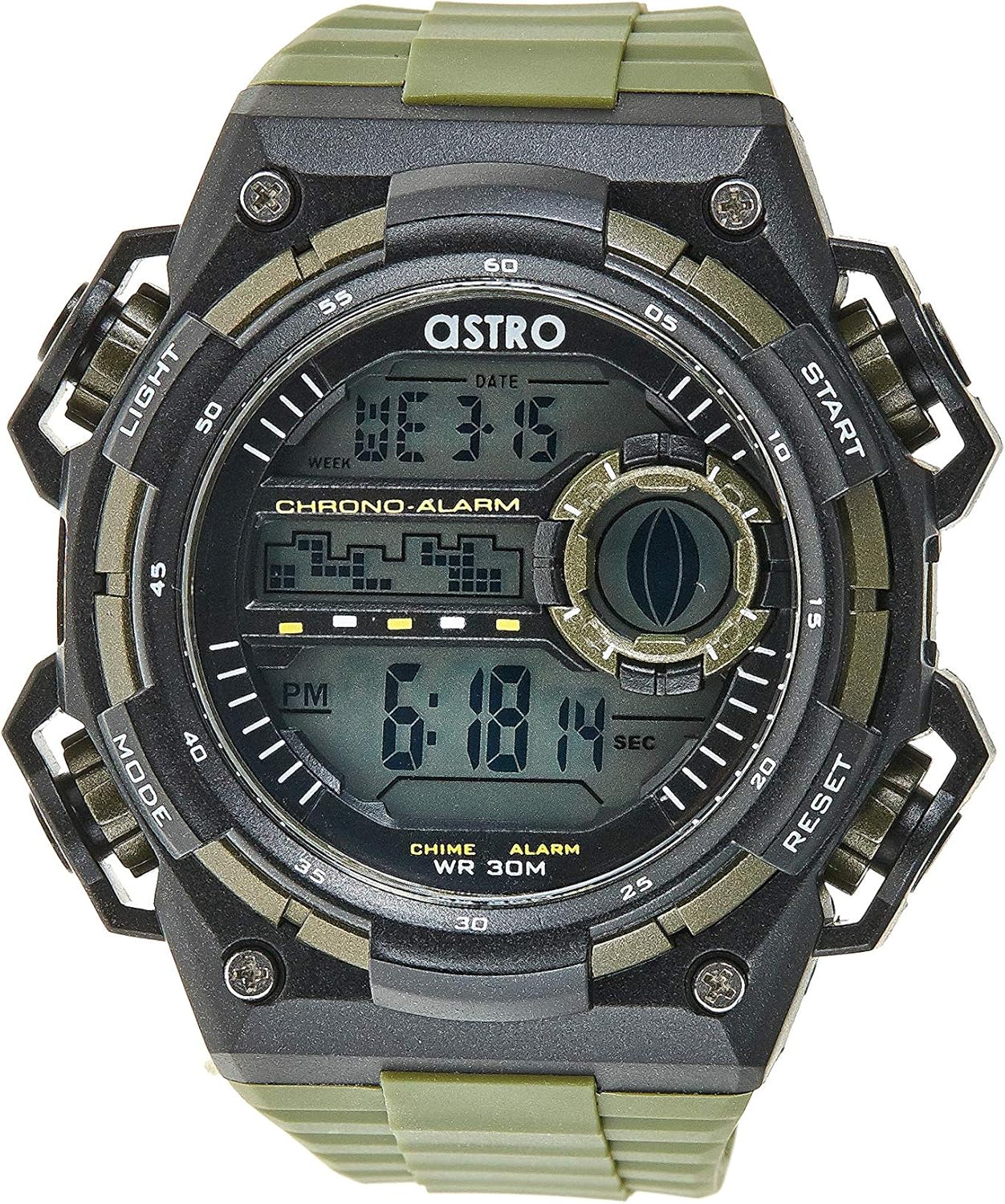
Rajah 1: Depan View of the Watch. This image displays the watch face, highlighting the digital display and the four primary control buttons: LIGHT (top left), MODE (bottom left), START (top right), and RESET (bottom right). The display shows the time, day of the week, and date, along with indicators for chronograph and alarm functions.

Rajah 2: Sisi View of the Watch. Imej ini menyediakan profile view of the watch, clearly showing the placement and design of the "LIGHT" and "MODE" buttons on the left side of the watch case. These buttons are essential for navigating through the watch's functions and activating the backlight.

Rajah 3: Belakang View of the Watch. This image shows the reverse side of the watch, featuring the stainless steel case back secured by four screws. The durable olive green plastic strap, with its buckle closure, is also visible, indicating the watch's robust construction.
Fungsi Butang:
- Butang LIGHT (Kiri Atas): Activates the backlight for viewing the display in low-light conditions.
- Butang MOD (Kiri Bawah): Cycles through different modes: Time Display, Alarm Setting, Chronograph (Stopwatch), and Date Setting.
- Butang MULA (Kanan Atas): Used to start/stop the chronograph, adjust values during setting, or activate the alarm.
- Butang TETAP SEMULA (Bahagian Kanan Bawah): Used to reset the chronograph, confirm settings, or switch between 12/24-hour format.
Persediaan dan Konfigurasi Awal
1. Membuka kotak dan Pemeriksaan
Upon receiving your watch, carefully unbox it and inspect for any visible damage. Ensure all components, including the watch and any accompanying documentation (like the guarantee card), are present.

Figure 4: Watch Packaging and Guarantee Card. This image shows the watch's protective tin packaging and the included guarantee card, which is important for warranty claims.
2. Menetapkan Masa dan Tarikh
- Daripada mod paparan masa biasa, tekan butang MODE butang tiga kali untuk memasuki mod tetapan masa. Digit saat akan mula berkelip.
- Tekan ke TETAP SEMULA button to cycle through the settings: Seconds → Hour → Minute → Month → Date → Day of the Week.
- Semasa satu digit berkelip, tekan MULAKAN butang untuk meningkatkan nilai. Tekan butang MULAKAN butang untuk memajukan digit dengan pantas.
- Setelah semua tetapan dilaraskan, tekan butang MODE butang untuk keluar dari mod tetapan dan kembali ke paparan masa biasa.
3. 12/24-Hour Format Selection
Dalam mod paparan masa biasa, tekan butang TETAP SEMULA butang untuk bertukar antara format 12 jam (dengan penunjuk 'AM'/'PM') dan 24 jam.
Arahan Operasi
1. Fungsi Penggera
- Daripada paparan masa biasa, tekan butang MODE butang sekali untuk memasuki mod Penggera. Masa penggera akan dipaparkan.
- Tekan ke TETAP SEMULA button to select the hour or minute to set. The selected digit will flash.
- Tekan ke MULAKAN butang untuk melaraskan digit yang berkelip.
- Untuk mengaktifkan/menyahaktifkan penggera, tekan butang MULAKAN button while in Alarm mode (without any digits flashing). An alarm icon will appear/disappear on the display.
- Tekan ke MODE butang untuk kembali ke paparan masa biasa.
2. Hourly Berpadu
Untuk mengaktifkan atau menyahaktifkan hourly chime (which beeps at the top of every hour):
- Dalam mod Penggera, tekan butang TETAP SEMULA butang untuk menogol hourly chime on/off. A chime icon will appear/disappear on the display.
3. Chronograph (Jam randik)
- Daripada paparan masa biasa, tekan butang MODE button twice to enter the Chronograph mode. The display will show "00:00:00".
- Tekan ke MULAKAN butang untuk memulakan pemasaan.
- Tekan ke MULAKAN butang sekali lagi untuk menjeda masa.
- Tekan ke TETAP SEMULA button while paused to reset the chronograph to "00:00:00".
- Tekan ke MODE butang untuk kembali ke paparan masa biasa.
4. Fungsi Lampu Belakang
Tekan ke CAHAYA button (top left) at any time to illuminate the display for a few seconds, making it visible in dark environments.
Penyelenggaraan dan Penjagaan
1. Membersihkan Jam Tangan Anda
Untuk memastikan jam tangan anda kelihatan terbaik, lap dengan kerap menggunakan kain lembut dan kering. Untuk kotoran degil, lap dengan sedikitamp kain boleh digunakan, diikuti dengan pengeringan segera. Elakkan penggunaan bahan kimia yang keras atau bahan yang kasar.
2. Water Resistance (WR 30M)
Your Astro watch is water resistant up to 30 meters (3 ATM). This means it is suitable for daily use and can withstand splashes or brief immersion in water, such as during hand washing or light rain. It is NOT suitable for showering, swimming, diving, or any water sports. Do not operate buttons when the watch is wet.
3. Penggantian Bateri
When the display becomes dim or functions become erratic, it may be time to replace the battery. Battery replacement should ideally be performed by a qualified watch technician to ensure proper sealing and water resistance integrity.
Menyelesaikan masalah
| Masalah | Kemungkinan Punca | Penyelesaian |
|---|---|---|
| Paparan kosong atau malap. | Bateri lemah. | Gantikan bateri. |
| Masa tidak betul. | Masa tidak ditetapkan dengan betul atau menekan butang secara tidak sengaja. | Refer to "Setting the Time and Date" section to reset the time. |
| Butang tidak bertindak balas. | Watch may be in a frozen state or battery is extremely low. | Cuba tekan semua butang serentak selama beberapa saat untuk menetapkan semula. Jika masalah berterusan, gantikan bateri. |
| Penggera tidak berbunyi. | Alarm is not activated. | Ensure the alarm icon is displayed on the screen. Refer to "Alarm Function" section. |
Spesifikasi
- Nombor Model: A9916-PPHB
- Jenis Paparan: digital
- Bahan Tali: plastik
- Bahan kes: Plastic / Stainless Steel Back
- Tahan Air: 30 Meter (3 ATM)
- Fungsi: Time (12/24-hour), Date, Day, Alarm, Hourly Chime, Chronograph, Backlight
- Pengeluar: Astro
Waranti dan Sokongan
Your Astro A9916-PPHB watch comes with a manufacturer's guarantee. Please refer to the included guarantee card (Figure 4) for specific terms and conditions of your warranty. Keep your purchase receipt and guarantee card in a safe place as proof of purchase.
For technical support, warranty claims, or any inquiries not covered in this manual, please contact your retailer or the official Astro customer service channel as indicated on your guarantee card or product packaging.
Ask a question about this manual
Ask about setup, troubleshooting, compatibility, parts, safety, or missing instructions. Manuals+ will review the question and use this page’s manual context to help answer it.