
1. Pengenalan
The OttLite Entertain LED Speaker Lamp (Model S83WGW) is a versatile lighting and audio solution designed for various indoor environments. This device integrates an LED lamp with adjustable brightness and color modes, a Bluetooth speaker for wireless audio streaming, and a detachable emergency light feature. This manual provides detailed instructions for the proper setup, operation, and maintenance of your lamp.

Image 1.1: The OttLite Entertain LED Speaker Lamp, tunjukkancasing reka bentuk bersepadunya.
2. Kandungan Pakej
Sahkan bahawa semua item terdapat dalam pakej:
- OttLite Entertain LED Speaker Lamp (S83WGW)
- Kabel Kuasa
3. Persediaan
- Membongkar: Keluarkan semua komponen dari pembungkusan dengan berhati-hati.
- penempatan: Letakkan lamp pada permukaan yang stabil dan rata.
- Sambungan Kuasa: Sambungkan kabel kuasa yang disediakan ke lamp's power input port and then plug it into a standard 120V AC wall outlet. The lamp's internal battery will begin charging automatically.
4. Arahan Operasi
4.1. Fungsi Cahaya
Lamp features touch-activated controls located on the top of the shade for easy adjustment of light settings.
- Hidupkan/Mati Kuasa: Lightly touch the metallic button on the top center of the lamp shade to turn the light on or off.
- Laraskan Kecerahan: With the light on, repeatedly touch the metallic button to cycle through three brightness levels.
- Tukar Mod Warna: Press and hold the metallic button for approximately 2 seconds to switch between the three color temperature modes: warm white, bright white, and natural daylight. Release the button when the desired mode is active.
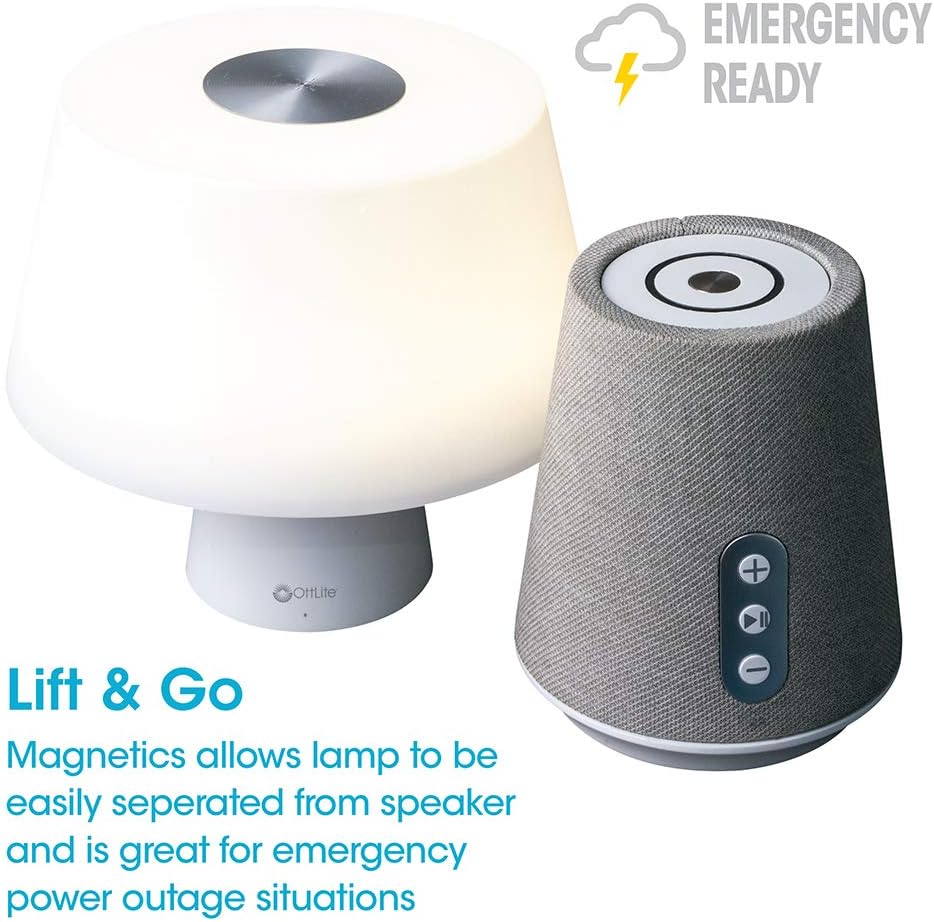
Image 4.1: Activating the lamp's light functions via the touch control on top of the shade.

Imej 4.2: Lamp offers three distinct color temperature modes for varied lighting needs.
4.2. Pembesar Suara Bluetooth
The integrated Bluetooth speaker allows for wireless audio playback from compatible devices.
- Hidupkan Pembesar Suara: Press the Play/Pause button on the front of the speaker base to turn the speaker on. A tone will indicate it is ready for pairing.
- Berpasangan: On your audio device (e.g., smartphone, tablet), enable Bluetooth and search for available devices. Select "OttLite Entertain" from the list. A confirmation tone will sound upon successful pairing.
- Kawalan Audio:
- Tekan ke + butang untuk meningkatkan kelantangan.
- Tekan ke - butang untuk mengurangkan kelantangan.
- Tekan ke Main/Jeda butang untuk memainkan atau menjeda audio.
- Power Off Speaker: Press and hold the Play/Pause button for approximately 3 seconds to turn the speaker off.

Image 4.3: The speaker base with clearly labeled controls for volume and playback.

Image 4.4: The speaker base highlights its Bluetooth connectivity feature.
4.3. Emergency Light Feature (Lift & Go)
Lamp portion can be detached from the speaker base to function as a portable emergency light.
- Detaching the Light: Angkat l dengan perlahanamp shade portion straight up from the speaker base. It is held in place by magnets.
- Using the Emergency Light: The detached light will operate on its internal rechargeable battery. Use the touch control on top of the shade to turn it on/off and adjust brightness as described in Section 4.1. The light can provide illumination for 5 to 30+ hours depending on the brightness setting.
- Mengecas semula: To recharge the emergency light, simply place it back onto the speaker base. Ensure it is properly seated for charging to commence.

Image 4.5: The 'Lift & Go' feature allows the lamp to be used as a portable emergency light.
5. Penyelenggaraan
To ensure the longevity and optimal performance of your OttLite Entertain LED Speaker Lamp, ikut garis panduan penyelenggaraan ini:
- Pembersihan: Putuskan sambungan lamp from the power source before cleaning. Use a soft, dry cloth to wipe down the exterior surfaces. Do not use abrasive cleaners, solvents, or harsh chemicals, as these may damage the finish.
- Storan: Apabila tidak digunakan untuk tempoh yang lama, simpan lamp di tempat yang sejuk dan kering jauh dari cahaya matahari langsung dan suhu yang melampau.
- Penjagaan Bateri: For the internal rechargeable battery, avoid fully discharging it frequently. Recharge the lamp regularly, even if not in constant use, to maintain battery health.
6. Penyelesaian masalah
Jika anda menghadapi masalah dengan l andaamp, rujuk langkah penyelesaian masalah berikut:
| Masalah | Kemungkinan Punca | Penyelesaian |
|---|---|---|
| Lamp lampu tidak menyala. | Tidak dipasang; kuasa outage; internal battery depleted; faulty connection. | Ensure power cable is securely plugged in. Check power outlet. Recharge the lamp by placing it on the base. |
| Bluetooth speaker does not connect. | Speaker not in pairing mode; device Bluetooth off; already connected to another device. | Ensure speaker is on and in pairing mode. Turn Bluetooth on your device. Disconnect from other devices. |
| Emergency light does not work when detached. | Bateri dalaman kehabisan kuasa. | Place the light back on the speaker base to recharge its internal battery. |
| Poor audio quality from speaker. | Peranti terlalu jauh dari pembesar suara; gangguan; bateri lemah. | Move device closer to speaker. Avoid obstacles. Ensure speaker is charged. |
7. Spesifikasi
| Ciri | Perincian |
|---|---|
| Nombor Model | S83WGW |
| Jenama | OttLite |
| Dimensi Produk | 3.12"D x 3.12"W x 10.87"H |
| Berat Barang | 2.6 paun |
| Jenis Sumber Cahaya | LED |
| Wattage | 3 watt |
| Kecerahan | 337 Lumen |
| Suhu Warna | 5000 Kelvin (Siang) |
| Kaedah Kawalan | Sentuh |
| Sumber Kuasa | Corded Electric (with rechargeable battery for emergency light) |
| Bateri | 1 bateri Lithium Ion (termasuk) |
| bahan | plastik |
| UPC | 761712019116 |
8. Waranti dan Sokongan
For warranty information or technical support, please refer to the official OttLite webtapak atau hubungi bahagian perkhidmatan pelanggan mereka. Simpan resit pembelian anda sebagai bukti pembelian untuk sebarang tuntutan waranti.
Maklumat Hubungan: Sila layari OttLite's official store page for current support options and contact details.