
1. Pengenalan
This manual provides comprehensive instructions for the safe and efficient operation of your Caso Design Hot Brew 10-Cup Coffee Maker, Model 11858. Please read all instructions carefully before first use and retain this manual for future reference.
The Caso Design Hot Brew coffee maker is designed to brew up to 10 cups of hot coffee. Key features include a programmable timer for scheduled brewing, a permanent removable filter for convenience, and a warming plate to keep coffee warm for up to 35 minutes. The filter lid features 17 holes for even water distribution, optimizing coffee extraction.
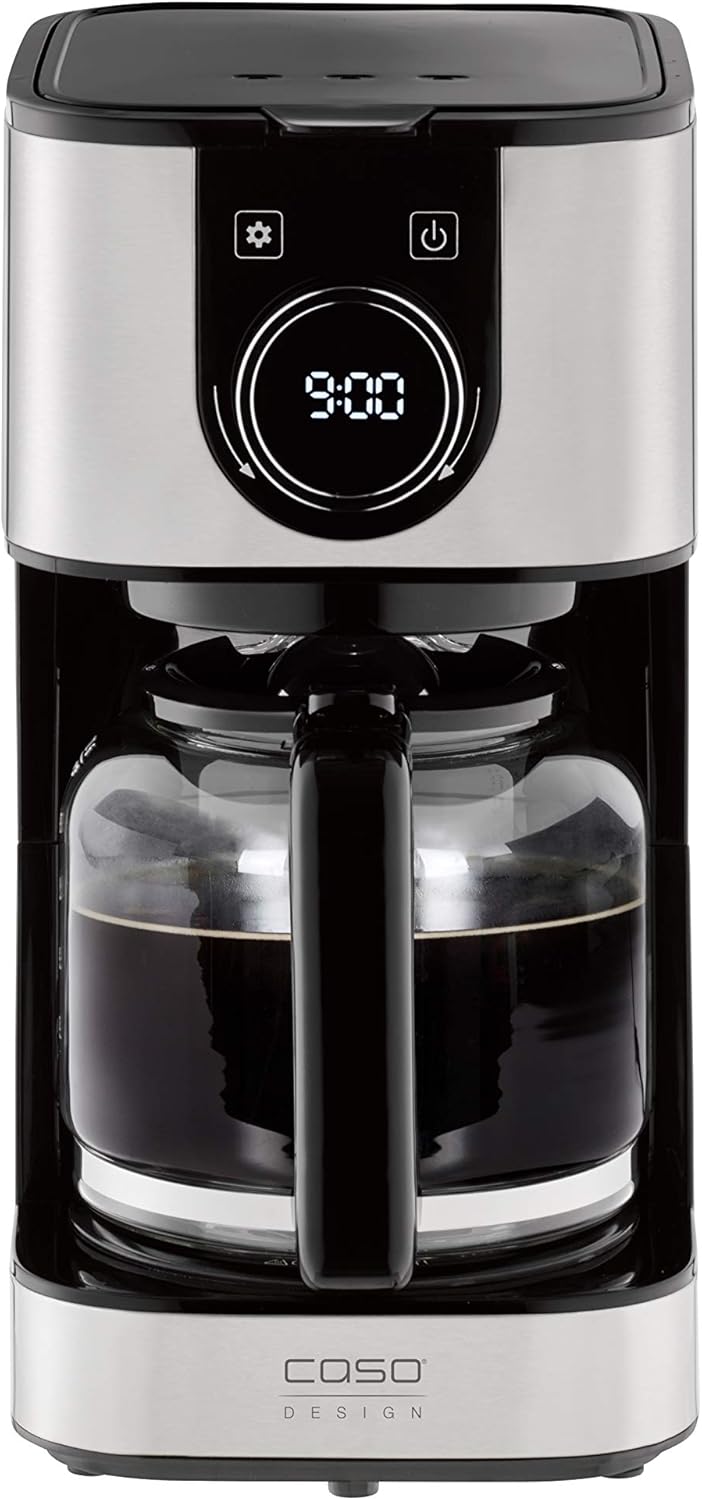
Imej 1.1: Depan view of the Caso Design Hot Brew 10-Cup Coffee Maker.
2. Arahan Keselamatan
To prevent personal injury or damage to your appliance, always follow these basic safety precautions:
- Read all instructions before operating the coffee maker.
- Jangan sentuh permukaan panas. Gunakan pemegang atau tombol.
- Untuk melindungi daripada kebakaran, renjatan elektrik dan kecederaan kepada orang lain, jangan rendamkan kord, palam, atau perkakas dalam air atau cecair lain.
- Pengawasan rapi diperlukan apabila sebarang perkakas digunakan oleh atau berhampiran kanak-kanak.
- Cabut plag dari soket apabila tidak digunakan dan sebelum membersihkan. Biarkan sejuk sebelum memakai atau menanggalkan bahagian, dan sebelum membersihkan perkakas.
- Jangan kendalikan sebarang perkakas dengan kord atau palam yang rosak, atau selepas perkakas tidak berfungsi atau rosak dalam apa jua cara.
- Penggunaan lampiran aksesori yang tidak disyorkan oleh pengilang perkakas boleh mengakibatkan kebakaran, renjatan elektrik atau kecederaan kepada orang.
- Jangan gunakan di luar rumah.
- Jangan biarkan kord tergantung di tepi meja atau kaunter, atau menyentuh permukaan panas.
- Jangan letakkan pada atau berhampiran gas panas atau penunu elektrik, atau dalam ketuhar yang dipanaskan.
- Sentiasa pasangkan plag pada perkakas dahulu, kemudian palamkan kord ke dalam salur keluar dinding. Untuk memutuskan sambungan, matikan mana-mana kawalan kepada "mati", kemudian tanggalkan palam dari alur keluar dinding.
- Jangan gunakan perkakas untuk kegunaan selain daripada yang dimaksudkan.
3. Komponen Produk
Familiarize yourself with the parts of your Caso Design Hot Brew Coffee Maker:
- Main Coffeemaker Unit
- Carafe Kaca
- Permanent Removable Filter
- Skop Kopi
- Takungan Air dengan Petunjuk Tahap
- Control Panel with Display and Rotary Knob
- Pinggan Pemanasan

Imej 3.1: Selesaiview of coffee maker features, including water tank, timer, and permanent filter.
4. Persediaan
- Membongkar: Keluarkan semua bahan pembungkusan dengan berhati-hati dan periksa pembuat kopi untuk sebarang kerosakan.
- Pembersihan Awal: Before first use, wash the glass carafe and permanent filter in warm, soapy water. Rinse thoroughly and dry. Wipe the exterior of the coffee maker with a damp kain.
- penempatan: Place the coffee maker on a flat, stable, heat-resistant surface, away from the edge of the counter. Ensure adequate ventilation around the appliance.
- Kitaran Brew Pertama (Pembersihan): Fill the water reservoir to the MAX (10-cup) level with cold water. Do not add coffee grounds. Run a full brew cycle to clean the internal components. Discard the water from the carafe. Repeat this process once more.

Image 4.1: Water level indicator showing up to 10 cups capacity.
5. Arahan Operasi
5.1. Membancuh Kopi
- Isi takungan air: Open the top lid and fill the water reservoir with cold, fresh water up to the desired number of cups, indicated by the water level markings. The maximum capacity is 10 cups.
- Tambah serbuk kopi: Place the permanent filter into the filter basket. Add the desired amount of ground coffee using the provided scoop. A general guideline is one scoop per cup, but adjust to your taste. Close the top lid securely.
- Tempat Carafe: Pastikan karafe kaca diletakkan dengan betul di atas plat pemanasan.
- Mulakan Pembuatan Bir: Tekan butang kuasa (U) on the control panel. The coffee maker will begin brewing. The brewing temperature is approximately 200°F.
- Drip Stop Feature: The drip stop feature allows you to temporarily remove the carafe during brewing to pour a cup of coffee. Replace the carafe within 20 seconds to prevent overflow.
- Fungsi Kekal Panas: After brewing, the warming plate will automatically activate and keep the coffee warm for 35 minutes. The display will show the remaining time in keep warm mode. After 35 minutes, the coffee maker will automatically shut off.

Image 5.1: Adding coffee grounds to the permanent filter.

Image 5.2: Display indicating the 'Keep Warm' function is active.
5.2. Setting the Programmable Timer
The programmable timer allows you to set a specific time for the coffee maker to start brewing automatically.
- Tetapkan Masa Semasa: Tekan butang tetapan (⚙️). The clock icon will appear. Rotate the knob to set the current hour and press the knob to confirm. Rotate the knob again to set the minutes and press to confirm.
- Set Programmed Time: Tekan butang tetapan (⚙️) again until the timer icon appears. Rotate the knob to set the desired brewing start time (hour) and press to confirm. Rotate the knob again to set the minutes and press to confirm.
- Aktifkan Pemasa: After setting the programmed time, ensure the coffee maker is prepared with water and coffee grounds. Press the power button (U) once. The display will show the current time, and a small timer icon will illuminate, indicating the timer is active. The coffee maker will start brewing at the set time.

Image 5.3: Setting the programmable timer for automatic brewing.
5.3. Aroma Plus Function
The Aroma Plus function allows you to adjust the coffee intensity. Refer to the display and rotary knob for selecting your preferred intensity level. This function ensures optimal taste by adjusting the brewing process.
6. Penyelenggaraan dan Pembersihan
Pembersihan tetap memastikan prestasi optimum dan memanjangkan hayat pembuat kopi anda.
- Sentiasa Cabut plag: Before cleaning, always unplug the coffee maker from the power outlet and allow it to cool completely.
- Karafe dan Penapis: The glass carafe and permanent filter can be washed in warm, soapy water. Rinse thoroughly and dry. These parts are also dishwasher safe (top rack recommended).
- Luaran: Lap permukaan luar pembuat kopi dengan lembut, damp kain. Jangan gunakan pembersih yang melelas atau pad penyental.
- Plat Pemanasan: Wipe the warming plate with a clean, damp cloth. Do not use abrasive materials that could scratch the surface.
- Mengurangkan: Over time, mineral deposits (limescale) can build up in your coffee maker, affecting performance. Descale your coffee maker regularly (e.g., every 2-3 months, or more often in hard water areas) using a commercial descaling solution or a mixture of white vinegar and water (1:2 ratio). Follow the descaling product's instructions or run a brew cycle with the vinegar solution, then two cycles with fresh water to rinse.
7. Penyelesaian masalah
Jika anda menghadapi masalah dengan pembuat kopi anda, rujuk masalah dan penyelesaian biasa berikut:
| Masalah | Kemungkinan Punca | Penyelesaian |
|---|---|---|
| Pembuat kopi tidak dihidupkan. | Tidak dipasang; kuasa outage; outlet rosak. | Pastikan kord kuasa dipasang dengan selamat ke soket yang berfungsi. Periksa pemutus litar anda. |
| Kopi tidak dibancuh. | Timer not set correctly; insufficient water; filter basket not properly seated. | Check if the programmable timer is active. Ensure enough water is in the reservoir. Verify the filter basket is correctly in place. |
| Kopi terlalu lemah atau terlalu kuat. | Incorrect coffee-to-water ratio; Aroma Plus setting. | Adjust the amount of coffee grounds. Experiment with the Aroma Plus function for desired strength. |
| Air melimpah dari bakul penapis. | Terlalu banyak serbuk kopi; penapis tersumbat; botol tidak diletakkan dengan betul. | Reduce coffee grounds. Clean the permanent filter. Ensure carafe is centered on the warming plate. |
| Kopi tidak cukup panas. | Mineral buildup; warming plate issue. | Perform a descaling cycle. Ensure the warming plate is clean and functioning. |
8. Spesifikasi
| Ciri | Perincian |
|---|---|
| Jenama | Reka Bentuk Caso |
| Nama Model | Hot Brew 10 cup Coffee Maker |
| Nombor Model Item | 11858 |
| warna | tahan karat |
| Kapasiti | 10 Cawan |
| Dimensi Produk | 12.95"D x 9.65"W x 6.61"H |
| Berat Barang | 4.43 paun |
| Jenis Pembancuh Kopi | Mesin Kopi Titis |
| Mod Operasi | Automatik Sepenuhnya |
| Ciri Khas | Programmable Timer, Permanent Filter, Warming Plate, Drip Stop |
| Komponen yang Disertakan | Coffeemaker, Carafe, Manual, Warranty |

Image 8.1: Product dimensions for the Caso Design Hot Brew Coffee Maker.
9. Video Ciri-ciri Produk
Video 9.1: Official product features video demonstrating the Caso Design Hot Brew 10-cup Coffee Maker.
10. Waranti dan Sokongan
Your Caso Design Hot Brew 10-Cup Coffee Maker comes with a manufacturer's warranty. Please refer to the warranty card included in your product packaging for specific terms and conditions. For technical support, service, or warranty claims, please contact Caso Design customer service through their official webtapak atau maklumat hubungan yang diberikan dalam dokumentasi produk anda.