
1. Maklumat Keselamatan
Read all safety instructions carefully before installing and operating the PNI SP2000W Voltage Inverter. Failure to follow these instructions may result in electric shock, fire, or serious injury.
- Keselamatan Elektrik: Peranti ini beroperasi dengan vol tinggitage. Do not open the inverter casing. All servicing must be performed by qualified personnel.
- Pengudaraan: Ensure adequate ventilation around the inverter. Do not block the cooling fans or place the inverter in an enclosed space. Overheating can cause damage or fire.
- Persekitaran: Do not expose the inverter to water, rain, snow, spray, or dust. Operate in a dry, cool, and well-ventilated area.
- Sambungan Bateri: Connect the inverter directly to a 12V car battery. Do not connect to other voltage sources or attempt to use with solar panels, as special inverters are required for solar systems.
- Keserasian Muatan: This inverter is designed for resistive loads such as TVs, lighting lamps, radios, fans, and mini-refrigerators. Avoid connecting inductive loads with high starting currents unless within the inverter's surge capacity.
- Perlindungan Lebihan: The inverter includes overload protection. Do not exceed the continuous output power of 2000W.
2. Produk Lebihview
The PNI SP2000W is a pure sinusoid voltage inverter designed to convert 12V DC power from a car battery into 230V AC power, suitable for powering various electrical appliances. It features a continuous output of 2000W and active cooling for efficient operation.
2.1. Ciri-ciri Utama
- Kuasa Output: 2000W continuous, 4000W peak.
- Input Voltage: 12V DC.
- Keluaran Voltage: 220V / 230V AC.
- Bentuk Gelombang Keluaran: Pure Sinusoid.
- Kekerapan: 50 Hz.
- penyejukan: Active cooling with two built-in fans and aluminum housing.
- Perlindungan: Overload, thermal, short circuit.
2.2. Kandungan Pakej
- PNI SP2000W Voltage Penyongsang
- Power connection cables (red for positive, black for negative)
- Wrench for terminal connections
- Manual pengguna
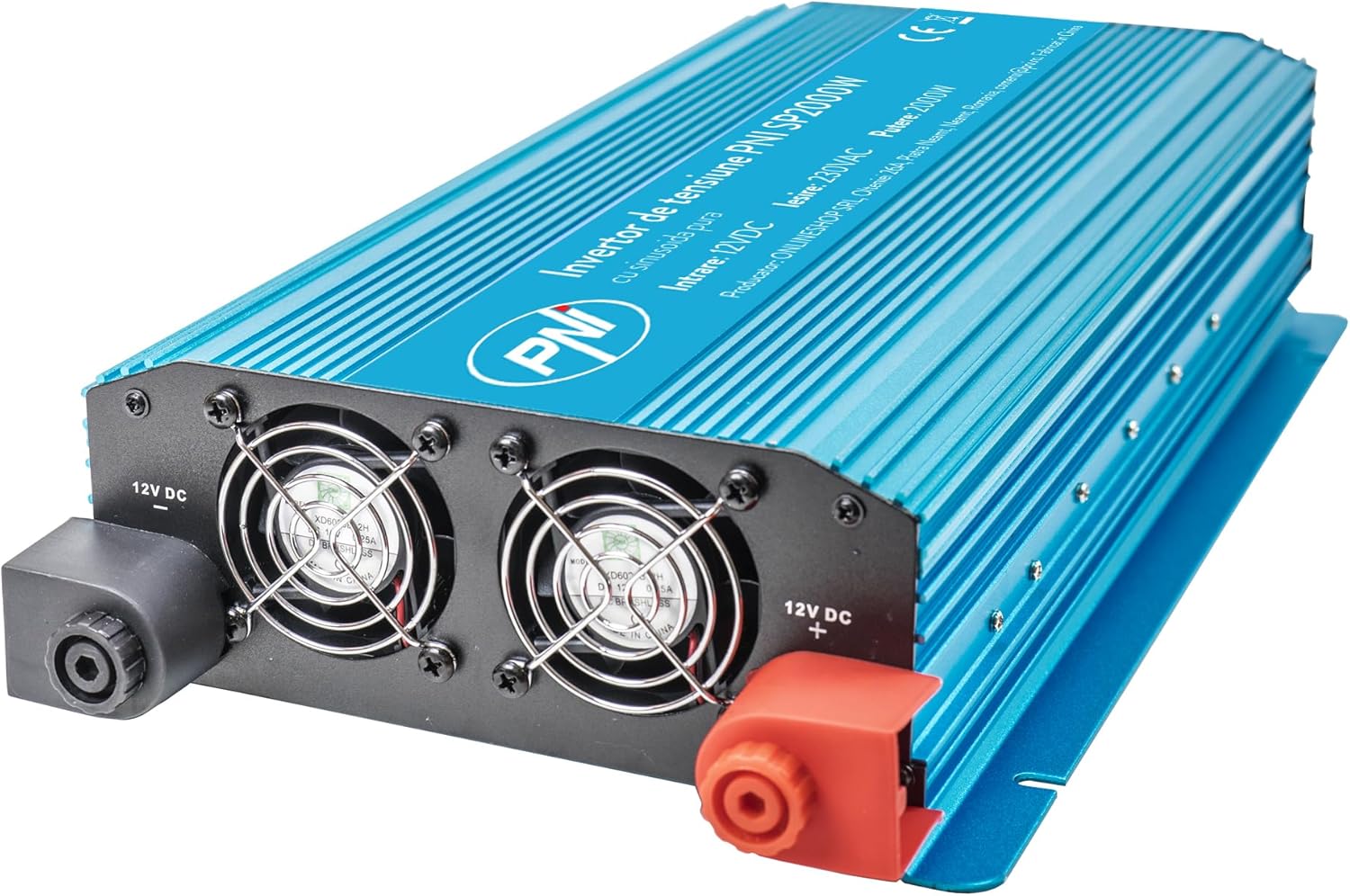
Rajah 1: Depan view of the PNI SP2000W Voltage Inverter, showing the blue casing and the PNI logo.

Rajah 2: Atas view of the PNI SP2000W Voltage Inverter, displaying the product label with model information and specifications.

Figure 3: The PNI SP2000W Voltage Inverter shown with its included accessories: power connection cables (red and black) and a wrench for securing terminals.
3. Persediaan
Persediaan yang betul adalah penting untuk operasi inverter anda yang selamat dan cekap.
3.1. penempatan
- Place the inverter on a flat, stable surface.
- Ensure there is at least 15 cm (6 inches) of clear space around the inverter for proper ventilation.
- Elakkan cahaya matahari langsung, sumber haba dan kawasan yang mempunyai kelembapan atau habuk yang tinggi.
3.2. Connecting to a 12V Battery
The inverter must be connected directly to a 12V DC battery. Use the provided cables for connection.
- Pastikan suis kuasa inverter berada dalam kedudukan "OFF".
- Connect the red cable to the positive (+) terminal of the inverter and then to the positive (+) terminal of the 12V battery.
- Connect the black cable to the negative (-) terminal of the inverter and then to the negative (-) terminal of the 12V battery.
- Tighten all connections securely using the provided wrench to prevent loose connections, which can cause overheating and damage.
- Verify that all connections are correct and secure before proceeding.

Figure 4: Input side of the inverter, showing the 12V DC positive (+) and negative (-) terminals for battery connection, along with the cooling fans.

Figure 5: Output side of the inverter, featuring two 230V AC sockets, the main power switch, and indicator lights for power and fault status.
4. Arahan Operasi
Follow these steps to operate your PNI SP2000W Voltage Inverter safely.
- Hidupkan kuasa: After ensuring all connections are secure and correct, switch the inverter's power button to the "ON" position. The green "POWER" indicator light should illuminate.
- Sambungkan Perkakas: Plug your 230V AC appliances into the inverter's output sockets. Ensure the total wattage daripada semua peralatan yang disambungkan tidak melebihi 2000W.
- Pantau: Observe the inverter's indicator lights. If the red "FAULT" light illuminates, refer to the Troubleshooting section.
- Matikan: When you are finished using the inverter, first turn off and unplug all connected appliances. Then, switch the inverter's power button to the "OFF" position.
5. Penyelenggaraan
Regular maintenance helps ensure the longevity and reliable performance of your inverter.
- Pembersihan: Periodically clean the exterior of the inverter with a soft, dry cloth. Do not use liquid cleaners or solvents. Ensure the cooling vents are free from dust and debris.
- Pengudaraan: Regularly check that the cooling fans are not obstructed and are operating correctly. Good airflow is essential to prevent overheating.
- Sambungan Kabel: Periodically inspect the battery connection cables for any signs of wear, damage, or corrosion. Ensure connections remain tight.
- Storan: If storing the inverter for an extended period, disconnect it from the battery and store it in a cool, dry place away from direct sunlight.
6. Penyelesaian masalah
If you encounter issues with your PNI SP2000W Inverter, refer to the following common problems and solutions.
| Masalah | Kemungkinan Punca | Penyelesaian |
|---|---|---|
| No power output / Inverter does not turn on | Sambungan bateri longgar Bateri rendah voltage Suis penyongsang MATI | Check and tighten battery cables Isi semula atau ganti bateri Ensure inverter switch is ON |
| Red "FAULT" light is on | Lebihan beban Terlalu panas Litar pintas Input rendah/Tinggi voltage | Kurangkan beban yang disambungkan Allow inverter to cool, ensure ventilation Check for short circuits in connected appliances/cables Semak bateri voltage |
| Peralatan tidak berfungsi dengan betul | Peralatan elektriktage terlalu tinggi Appliance type incompatible (e.g., high inductive load) | Ensure total load is within 2000W continuous Consult appliance manual for compatibility with pure sine wave inverters |
| Peminat sentiasa berlari dengan kuat | High internal temperature due to heavy load or poor ventilation | Reduce load or improve ventilation around the inverter |
Jika masalah berterusan selepas mencuba penyelesaian ini, hubungi khidmat pelanggan.
7. Spesifikasi
| Ciri | Spesifikasi |
|---|---|
| Model | PNI-SP2000W |
| Kuasa Keluaran Berterusan | 2000 W |
| Maximum Output Power (Peak) | 4000 W |
| Input Voltage | 12 V DC |
| Keluaran Voltage | 220 V / 230 V AC |
| Kekerapan Bekerja | 50 Hz |
| Bentuk Gelombang Output | Pure Sinusoid |
| Kecekapan | > 88% |
| Consumption in Stand-by | 10-15 W |
| Penyejukan Aktif | Dengan kipas |
| Dimensi (L x W x H) | 440 x 220 x 100 mm |
| Berat badan | 4.27 Kg |
| Panjang Kabel | 44 sm |
| Suhu Operasi | -10 °C ~ +40 °C |
| Suhu Penyimpanan | -20 °C ~ +55 °C |
| Kelembapan | 90% (tidak pemeluwapan) |
| Kapasiti Lebihan | > 120% |
| Perlindungan | Overload, Thermal, Short Circuit, Over-voltage, Bawah voltage |
| Soket Keluaran | 2 x 230 V AC sockets |
8. Waranti dan Sokongan
PNI products are manufactured to high-quality standards. This product is covered by a manufacturer's warranty against defects in materials and workmanship. Please retain your proof of purchase for warranty claims.
For technical support or warranty inquiries, please refer to the contact information provided with your purchase documentation or visit the official PNI webtapak.