
1. Pengenalan
Terima kasih kerana membeliasing the SHARP XL-B512 Stereo Sound System. This micro sound system offers a rich 45-watt sound experience with versatile connectivity options including Bluetooth, CD player, USB, and FM radio. Its elegant design with a wooden speaker housing and LED display complements any living space. This manual provides essential information for setting up, operating, and maintaining your device to ensure optimal performance and longevity.
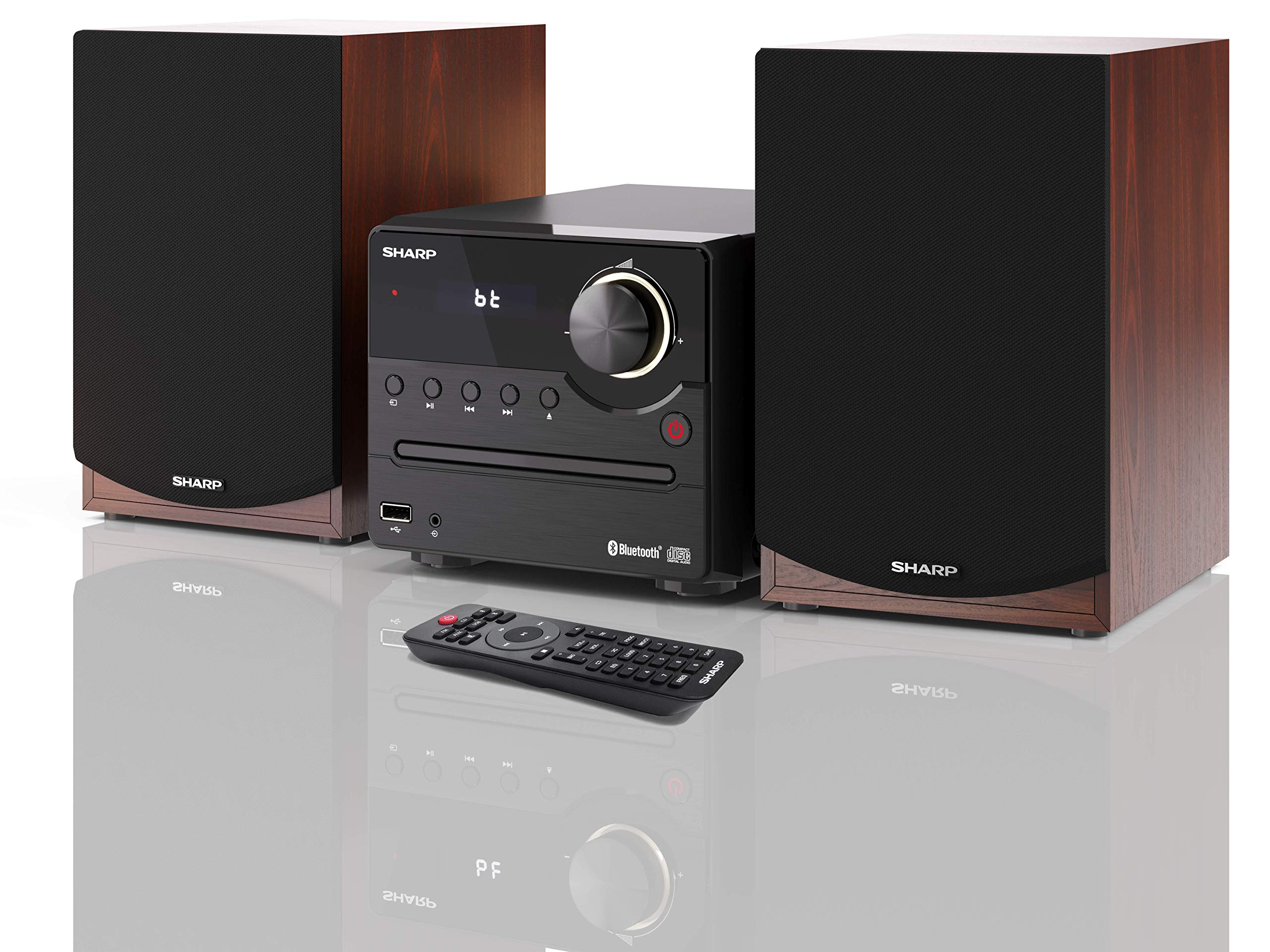
Rajah 1: SHARP XL-B512 Stereo Sound System. This image shows the central unit flanked by two wooden-cased speakers, reflecting on a polished surface.
2. Maklumat Keselamatan
Sila baca semua arahan keselamatan dengan teliti sebelum menggunakan produk. Simpan manual ini untuk rujukan masa hadapan.
- Sumber Kuasa: Use only the specified power supply. Ensure the voltage sepadan dengan bekalan kuasa tempatan anda.
- Pengudaraan: Jangan sekat sebarang bukaan pengudaraan. Benarkan ruang yang mencukupi di sekeliling unit untuk aliran udara yang betul.
- Air dan Kelembapan: Jangan dedahkan unit kepada hujan, lembapan atau cecair menitis/percikan. Jangan letakkan objek yang diisi dengan cecair, seperti pasu, pada radas.
- haba: Jauhkan unit daripada sumber haba seperti radiator, daftar haba, dapur, atau radas lain (termasuk amppenghidup) yang menghasilkan haba.
- Pembersihan: Cabut plag unit daripada soket dinding sebelum membersihkan. Gunakan kain kering sahaja.
- Servis: Jangan cuba servis produk ini sendiri. Rujuk semua perkhidmatan kepada pegawai perkhidmatan yang berkelayakan.
3. Kandungan Pakej
Sahkan bahawa semua item yang disenaraikan di bawah disertakan dalam pakej anda:
- SHARP XL-B512 Micro Sound System (Main Unit)
- Two Speakers (with wooden housing)
- Kabel Kuasa
- Alat Kawalan Jauh (dengan bateri)
- Manual Arahan (dokumen ini)
- Panduan Mula Pantas
4. Persediaan
4.1 Sambungan Pembesar suara
Connect the two speakers to the main unit using the provided speaker cables. Ensure correct polarity (positive to positive, negative to negative) for optimal sound quality.
4.2 Sambungan Kuasa
Connect the power cable to the AC IN port on the rear of the main unit, then plug it into a wall outlet.

Rajah 2: Rear panel connections. This image displays the back of the central unit with ports for speaker wires and the AC power input, alongside the rear of the two speakers.
4.3 Kuasa Awal Hidup
Press the Power button on the main unit or the remote control to turn on the system. The LCD display will illuminate.
5. Arahan Operasi
5.1 Kawalan Panel Hadapan

Rajah 3: Front panel controls. This close-up shows the central unit's display, volume knob, and various control buttons for playback and source selection.
- Butang Kuasa: Menghidupkan atau mematikan unit.
- Butang Sumber: Cycles through available input sources (CD, FM, Bluetooth, USB, AUX).
- Tombol Kelantangan: Melaraskan tahap kelantangan induk.
- Kawalan Main Semula: Play/Pause, Stop, Skip Forward/Backward for CD and USB modes.
- Port USB: Untuk menyambungkan peranti storan USB untuk main balik muzik.
- Input AUX: Bicu 3.5mm untuk menyambungkan peranti audio luaran.
5.2 Main Semula CD
- Tekan ke Sumber button to select 'CD' mode.
- Open the CD tray by pressing the Eject button.
- Place a CD (CD/CD-R/CD-RW/MP3 format) with the label side up into the tray.
- Close the CD tray. The system will read the disc and begin playback automatically or display track information.
- Use the playback controls (Play/Pause, Stop, Skip) to manage your music.
5.3 Radio FM
- Tekan ke Sumber button to select 'FM' mode.
- The system will automatically search for available stations or you can manually tune.
- To save a station as a preset, tune to the desired station, then press and hold the Pratetap button (if available on remote) or follow on-screen instructions. The system supports 40 preset memories.
- Gunakan Pratetap Atas/Bawah butang untuk menavigasi stesen yang disimpan.
5.4 Berpasangan Bluetooth
- Tekan ke Sumber button to select 'Bluetooth' mode. The display will show 'bt' and flash, indicating it's in pairing mode.
- Pada peranti mudah alih anda, dayakan Bluetooth dan cari peranti yang tersedia.
- Select 'SHARP XL-B512' from the list of devices.
- Once paired, the 'bt' indicator on the system's display will stop flashing. You can now stream audio from your device.
5.5 Main Semula USB
- Insert a USB storage device into the USB port on the front panel.
- Tekan ke Sumber button to select 'USB' mode.
- Sistem akan mengesan dan memainkan audio yang serasi secara automatik files (MP3).
- Gunakan kawalan main balik untuk menavigasi trek.
5.6 Input AUX
- Connect an external audio device (e.g., smartphone, MP3 player) to the AUX IN jack on the front panel using a 3.5mm audio cable (not supplied).
- Tekan ke Sumber button to select 'AUX' mode.
- Play audio from your connected device. The sound will be output through the SHARP XL-B512 system.
5.7 Tetapan Penyama
The system features 6 preset equalizers with independent treble and depth control. Use the EQ button on the remote control or main unit to cycle through the presets and adjust sound to your preference.
6. Penyelenggaraan
6.1 Membersihkan Unit
Wipe the unit with a soft, dry cloth. Do not use abrasive cleaners, waxes, or solvents as they may damage the finish. Ensure the unit is unplugged before cleaning.
6.2 Penjagaan CD
Handle CDs by their edges. Keep them clean and free of scratches. Store CDs in their cases when not in use.
6.3 Speaker Care
The wooden speaker housing can be cleaned with a soft, dry cloth. Avoid placing heavy objects on the speakers or exposing them to direct sunlight or extreme temperatures.
7. Penyelesaian masalah
If you encounter any issues with your SHARP XL-B512 system, refer to the following table for common problems and solutions.
| Masalah | Kemungkinan Punca | Penyelesaian |
|---|---|---|
| Tiada kuasa | Power cable not connected securely; Power outlet not active. | Periksa sambungan kabel kuasa; Cuba salur kuasa yang lain. |
| Tiada bunyi | Volume too low; Incorrect source selected; Speaker cables disconnected. | Increase volume; Select correct input source; Check speaker cable connections. |
| Bluetooth tidak berpasangan | System not in pairing mode; Device too far; Bluetooth disabled on device. | Ensure system is in Bluetooth pairing mode; Move device closer; Enable Bluetooth on your device. |
| CD tidak dimainkan | CD inserted incorrectly; CD is dirty or scratched; Incorrect format. | Reinsert CD correctly; Clean CD; Ensure CD is a supported format (CD/CD-R/CD-RW/MP3). |
| Alat kawalan jauh tidak berfungsi | Bateri mati atau tidak dimasukkan dengan betul; Halangan antara alat kawalan jauh dan unit. | Replace batteries; Ensure correct battery polarity; Remove any obstructions. |
Jika masalah berterusan selepas mencuba penyelesaian ini, sila hubungi sokongan pelanggan.
8. Spesifikasi
Below are the technical specifications for the SHARP XL-B512 Stereo Sound System:
- model: XL-B512
- Jumlah Kuasa Output: 45 Watt
- Mod Output Audio: Stereo
- Speaker Output Channel Quantity: 2
- Format Audio yang Disokong: MP3, CD, CD-R, CD-RW
- Teknologi Penala: FM PLL Tuner
- Julat Frekuensi FM: 87.5 hingga 108 MHz
- FM Preset Memory: 40 stesen
- Ketersambungan: Bluetooth, USB, Auxiliary (3.5mm)
- Ciri Khas: 6 Preset Equalizers, LCD Display with white backlight
- Sound System Dimensions (W x H x D): 17 x 22 x 15 cm
- Speaker Dimensions (W x H x D): 14.5 x 17.7 x 22.3 cm (each)
- Berat Barang: 4 kg
- Sumber Kuasa: Elektrik Bertali
- Kawalan Jauh: Ya (termasuk bateri)
9. Waranti dan Sokongan
Your SHARP XL-B512 Stereo Sound System comes with a standard manufacturer's warranty. Please refer to the warranty card included in your package for specific terms and conditions, including the warranty period and coverage details.
For technical support, service inquiries, or further assistance, please contact your local SHARP customer service center. Contact information can typically be found on the manufacturer's webtapak atau dalam dokumentasi jaminan.